Solved Remove Unknown User From Network

boweasel

New member
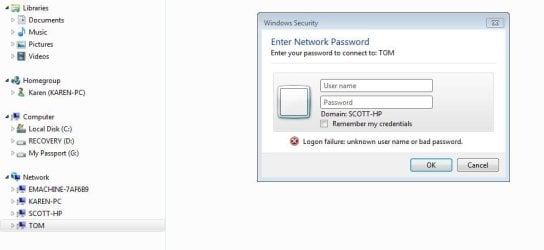
I just noticed that when I use Windows Explorer, there is an unfamiliar name on my network. When I click on that name I'm presented with a Windows Security screen prompting me for a User Name and Password.

I have no idea what that screen wants, who the user is, or how to remove it.

Anybody have ideas?
 

Attachments
  • Capture11.JPG
    Capture11.JPG
    49 KB · Views: 1

My Computer

Computer type
Laptop
OS
Windows 7 home premium 64 bit
CPU
AMD K10
Motherboard
Hewlett-Packard 1444 (Socket S1G4)
Memory
3.00GB Dual-Channel DDR3 @ 532MHz
Graphics Card(s)
ATI AMD M880G with ATI Mobility Radeon HD 4250 (HP)
Sound Card
Realtek
Screen Resolution
1366 x 768
Hard Drives
465GB Western Digital
Antivirus
MSE
Hi Scott,
As you dont recognise the user dowload and run Malwarebytes free, uncheck 30 day trial.
Then in the settings option tick scan for rootkits.

If you Right click on Tom, it should give you the option to delete it.
If not Rght click on your signal bars select Network/sharing then on next screen manage my networks,
right click on Tom and the dropdown will give you the remove option


Roy
 

My Computer

Computer type
PC/Desktop
Computer Manufacturer/Model Number
medionl/Aspire 6930G/acer x55a
OS
W7 home premium 32bit/W7HP 64bit/w10 tp insider ring
CPU
E5300 dual core
Motherboard
medion MS7366
Memory
3gb
Graphics Card(s)
Nvidia Geforce 7100 Nforce 630i
Monitor(s) Displays
avixc
Internet Speed
n (isp resticted to 72)
Antivirus
mse/pands
Browser
palemoon
Other Info
Belkin Fd7050 n USB using Railink RT2870 drivers, more upto date
Hi Scott,
As you dont recognise the user dowload and run Malwarebytes free, uncheck 30 day trial.
Then in the settings option tick scan for rootkits.

If you Right click on Tom, it should give you the option to delete it.
If not Rght click on your signal bars select Network/sharing then on next screen manage my networks,
right click on Tom and the dropdown will give you the remove option

Roy
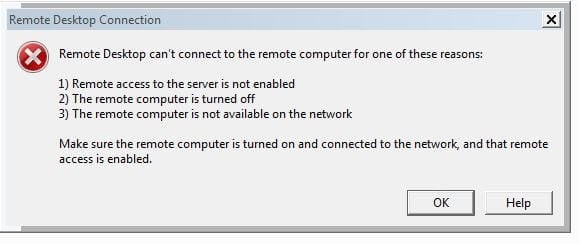
Already run Malwarebytes and scan for rootkits was checked. Right-clicking on Tom only gives the options to Expand (which brings up the Enter Network Password box again), Connect with Remote Desktop Connection (see below) or Open in New Window (ENP box again). No delete option.

Clicking on Manage Wireless Networks from the Network and Sharing Center fails to display any network called Tom. But then again it doesn't show EMACHINES-7AF6B9, Scott-HP or Karen-PC either. Those computers are all part of my Homegroup.
 

Attachments

  • Capture12.JPG
    Capture12.JPG
    31.9 KB · Views: 35

My Computer

Computer type
Laptop
OS
Windows 7 home premium 64 bit
CPU
AMD K10
Motherboard
Hewlett-Packard 1444 (Socket S1G4)
Memory
3.00GB Dual-Channel DDR3 @ 532MHz
Graphics Card(s)
ATI AMD M880G with ATI Mobility Radeon HD 4250 (HP)
Sound Card
Realtek
Screen Resolution
1366 x 768
Hard Drives
465GB Western Digital
Antivirus
MSE
What do you get when you expand Homegroup Karen.

Roy
 

My Computer

Computer type
PC/Desktop
Computer Manufacturer/Model Number
medionl/Aspire 6930G/acer x55a
OS
W7 home premium 32bit/W7HP 64bit/w10 tp insider ring
CPU
E5300 dual core
Motherboard
medion MS7366
Memory
3gb
Graphics Card(s)
Nvidia Geforce 7100 Nforce 630i
Monitor(s) Displays
avixc
Internet Speed
n (isp resticted to 72)
Antivirus
mse/pands
Browser
palemoon
Other Info
Belkin Fd7050 n USB using Railink RT2870 drivers, more upto date
What do you get when you expand Homegroup Karen.

Roy
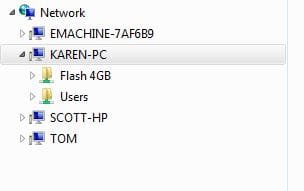
I see the 2 folders that are part of the Homegroup on the Karen-PC. The Emachines computer is a desktop that is directly connected to my router. I set up the Homegroup on the Karen-PC and added the Scott-HP to it. The Emachines desktop was never added to the Homegroup. When I click on the Emachines I get the exact same message box that I do when clicking Tom.
 

Attachments

  • Capture13.JPG
    Capture13.JPG
    14.9 KB · Views: 35

My Computer

Computer type
Laptop
OS
Windows 7 home premium 64 bit
CPU
AMD K10
Motherboard
Hewlett-Packard 1444 (Socket S1G4)
Memory
3.00GB Dual-Channel DDR3 @ 532MHz
Graphics Card(s)
ATI AMD M880G with ATI Mobility Radeon HD 4250 (HP)
Sound Card
Realtek
Screen Resolution
1366 x 768
Hard Drives
465GB Western Digital
Antivirus
MSE
You might learn more about the device from your router's interface.

If you can find a MAC address for the device named TOM, then you might be able to tie it to a particular vendor via this list:

http://standards-oui.ieee.org/oui.txt
It takes a while to render that page.
 

My Computer

Computer type
Laptop
Computer Manufacturer/Model Number
Employer provided Dell Latitude
OS
W7 Pro SP1 64bit
CPU
i7
Memory
8GB
Graphics Card(s)
Intel HD Graphics
Hard Drives
crappy SSD
Antivirus
Employer mandated Symantec Endpoint Protection
Browser
Pale Moon 64bit, IE11 64bit & Chrome 64bit
>>>Homegroup Karen<<<
Not network, was hoping might be able to delete it from there.

Roy
 

My Computer

Computer type
PC/Desktop
Computer Manufacturer/Model Number
medionl/Aspire 6930G/acer x55a
OS
W7 home premium 32bit/W7HP 64bit/w10 tp insider ring
CPU
E5300 dual core
Motherboard
medion MS7366
Memory
3gb
Graphics Card(s)
Nvidia Geforce 7100 Nforce 630i
Monitor(s) Displays
avixc
Internet Speed
n (isp resticted to 72)
Antivirus
mse/pands
Browser
palemoon
Other Info
Belkin Fd7050 n USB using Railink RT2870 drivers, more upto date
If you have an unprotected wireless connection set at your router a neighbor may have "accidentally" connected to it.
Try in cmd:
ping tom

You would also see other PCs in your network if you have network-enabled virtual machines running on one of your PCs.
 

My Computer

Computer type
PC/Desktop
Computer Manufacturer/Model Number
Custom Build
OS
Windows 7 Ultimate x64 SP1
CPU
AMD Phenom 2 1090T
Motherboard
Gigabyte GA-890FXA-UD5
Memory
2x8GB Kingston HyperX Fury Black 1600Mhz Unganged
Graphics Card(s)
MSI GTX 970 Gaming 4G
Sound Card
Realtek On-Board HD 7.1 Audio / Logitech G35
Monitor(s) Displays
3xAcer GD245HQ
Screen Resolution
1920x1080
Hard Drives
Samsung 850 Pro 512GB SSD - OS /
WD Caviar Black SATA 3 - 1 TBx2 - Dynamic RAID 0 /
WD Caviar Green SATA 2 - 640GBx2 - Dynamic RAID 0 /
WD Caviar Green SATA 2 - 640GB - Internal Backup /
Seagate Barracude SATA 3 - 3TB - External Backup/ Sync
PSU
HighPower 1000W
Case
Cooler Master HAF 932
Cooling
Noctua NH-D14
Keyboard
Logitech G19
Mouse
Logitech G500
Internet Speed
100/4 Mbit Cable (100GB quota)
Antivirus
ZoneAlarm Extreme Security / MBAM Pro / MBAE Free / SAS Free
Browser
IE 11 - Firefox - Chrome
Other Info
Logitech F710/ G27/ G940/ Z5500 // TrackIR 5 // Nvidia 3D Surround Vision
If you have an unprotected wireless connection set at your router a neighbor may have "accidentally" connected to it.
Try in cmd:
ping tom
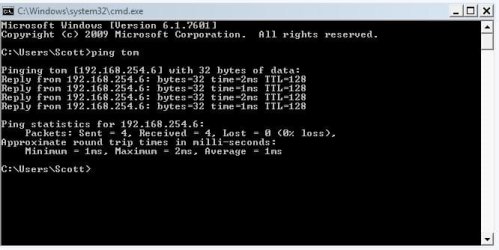
Yes, I can ping Tom. However I have only the one wireless network using WPA2-PSK security. I'm running 2 laptops, 1 tablet and 1 desktop off that connection. I also have an old non-wireless HP printer that I set up as a network printer so we could use it on any of our laptops without having to be directly connected.
You would also see other PCs in your network if you have network-enabled virtual machines running on one of your PCs.
Frankly I don't know what that means. Sorry.
 

Attachments

  • Capture14.JPG
    Capture14.JPG
    47.7 KB · Views: 27

My Computer

Computer type
Laptop
OS
Windows 7 home premium 64 bit
CPU
AMD K10
Motherboard
Hewlett-Packard 1444 (Socket S1G4)
Memory
3.00GB Dual-Channel DDR3 @ 532MHz
Graphics Card(s)
ATI AMD M880G with ATI Mobility Radeon HD 4250 (HP)
Sound Card
Realtek
Screen Resolution
1366 x 768
Hard Drives
465GB Western Digital
Antivirus
MSE
You might learn more about the device from your router's interface.

If you can find a MAC address for the device named TOM, then you might be able to tie it to a particular vendor via this list:

http://standards-oui.ieee.org/oui.txt
It takes a while to render that page.
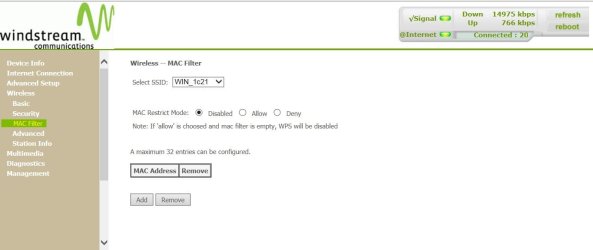
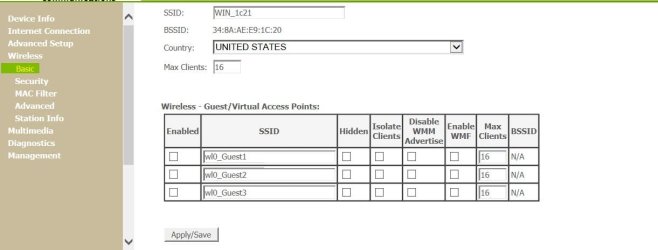
This is a combination modem/router from my ISP. Accessing it gives me this page about MAC filtering
 

Attachments

  • Capture15.JPG
    Capture15.JPG
    61.8 KB · Views: 0

My Computer

Computer type
Laptop
OS
Windows 7 home premium 64 bit
CPU
AMD K10
Motherboard
Hewlett-Packard 1444 (Socket S1G4)
Memory
3.00GB Dual-Channel DDR3 @ 532MHz
Graphics Card(s)
ATI AMD M880G with ATI Mobility Radeon HD 4250 (HP)
Sound Card
Realtek
Screen Resolution
1366 x 768
Hard Drives
465GB Western Digital
Antivirus
MSE
Within the router's web based interface, try clicking on each item in the left pane (and if need be, making selections in the right pane) to see if you can find a list of devices that are connected to the router. It might have wording like DHCP table.

If you find something like that, then hopefully it will list device name, IP address and MAC address. You don't need to post the MAC address, just look it up using the link that I posted. Doing that might let you know the manufacturer of the device... or at least the manufacturer of the network interface adapter.

If we cannot locate this device name TOM, then you might want to use the router's MAC filtering (shown in your screenshot) to allow only your known devices.
 

My Computer

Computer type
Laptop
Computer Manufacturer/Model Number
Employer provided Dell Latitude
OS
W7 Pro SP1 64bit
CPU
i7
Memory
8GB
Graphics Card(s)
Intel HD Graphics
Hard Drives
crappy SSD
Antivirus
Employer mandated Symantec Endpoint Protection
Browser
Pale Moon 64bit, IE11 64bit & Chrome 64bit
Virtual machine wiki - https://en.wikipedia.org/wiki/Virtual_machine, you would know it if you had it, so don't worry about that one.

Having WPA2 security does not necessarily mean it is protected. Do you know if you have to enter a password while connecting to your wireless? Try forgetting the wireless connection with your phone and re-connect, see if it asks a password.

UsernameIssues' recommendation about the DHCP client table can work, some routers are just bad and fail to list every device (don't know why). Also check the DHCP scope (IP range) to see if it is static or dynamic.

Alternative and easier ;) You should be able to get MAC of TOM by, first ping tom, and make sure of IP address, then also in cmd:
Code:
[FONT=Courier New]arp -a | find "xxx.xxx.xxx.xxx"[/FONT]
replace xxx.xxx.xxx.xxx with the IP address of TOM

In my network (W7Pro64 is a virtual machine)
Code:
C:\Users\Gokhan>ping w7pro64
Pinging W7Pro64 [192.168.0.100] with 32 bytes of data:
Reply from 192.168.0.100: bytes=32 time<1ms TTL=128
Ping statistics for 192.168.0.100:
    Packets: Sent = 4, Received = 4, Lost = 0 (0% loss),
Approximate round trip times in milli-seconds:
    Minimum = 0ms, Maximum = 0ms, Average = 0ms
 
C:\Users\Gokhan>arp -a | find "192.168.0.100"
  [B]192.168.0.100         08-00-27-3d-7c-f1     dynamic[/B]
 

My Computer

Computer type
PC/Desktop
Computer Manufacturer/Model Number
Custom Build
OS
Windows 7 Ultimate x64 SP1
CPU
AMD Phenom 2 1090T
Motherboard
Gigabyte GA-890FXA-UD5
Memory
2x8GB Kingston HyperX Fury Black 1600Mhz Unganged
Graphics Card(s)
MSI GTX 970 Gaming 4G
Sound Card
Realtek On-Board HD 7.1 Audio / Logitech G35
Monitor(s) Displays
3xAcer GD245HQ
Screen Resolution
1920x1080
Hard Drives
Samsung 850 Pro 512GB SSD - OS /
WD Caviar Black SATA 3 - 1 TBx2 - Dynamic RAID 0 /
WD Caviar Green SATA 2 - 640GBx2 - Dynamic RAID 0 /
WD Caviar Green SATA 2 - 640GB - Internal Backup /
Seagate Barracude SATA 3 - 3TB - External Backup/ Sync
PSU
HighPower 1000W
Case
Cooler Master HAF 932
Cooling
Noctua NH-D14
Keyboard
Logitech G19
Mouse
Logitech G500
Internet Speed
100/4 Mbit Cable (100GB quota)
Antivirus
ZoneAlarm Extreme Security / MBAM Pro / MBAE Free / SAS Free
Browser
IE 11 - Firefox - Chrome
Other Info
Logitech F710/ G27/ G940/ Z5500 // TrackIR 5 // Nvidia 3D Surround Vision
If they are running WPA2, then a password is mandatory.

Try the instruction in screenpost, rogue name change to Tom

Roy
 

Attachments

  • wlan kill.PNG
    wlan kill.PNG
    8.1 KB · Views: 17
Last edited:

My Computer

Computer type
PC/Desktop
Computer Manufacturer/Model Number
medionl/Aspire 6930G/acer x55a
OS
W7 home premium 32bit/W7HP 64bit/w10 tp insider ring
CPU
E5300 dual core
Motherboard
medion MS7366
Memory
3gb
Graphics Card(s)
Nvidia Geforce 7100 Nforce 630i
Monitor(s) Displays
avixc
Internet Speed
n (isp resticted to 72)
Antivirus
mse/pands
Browser
palemoon
Other Info
Belkin Fd7050 n USB using Railink RT2870 drivers, more upto date
Hmm, alright, thanks for the clarification.
 

My Computer

Computer type
PC/Desktop
Computer Manufacturer/Model Number
Custom Build
OS
Windows 7 Ultimate x64 SP1
CPU
AMD Phenom 2 1090T
Motherboard
Gigabyte GA-890FXA-UD5
Memory
2x8GB Kingston HyperX Fury Black 1600Mhz Unganged
Graphics Card(s)
MSI GTX 970 Gaming 4G
Sound Card
Realtek On-Board HD 7.1 Audio / Logitech G35
Monitor(s) Displays
3xAcer GD245HQ
Screen Resolution
1920x1080
Hard Drives
Samsung 850 Pro 512GB SSD - OS /
WD Caviar Black SATA 3 - 1 TBx2 - Dynamic RAID 0 /
WD Caviar Green SATA 2 - 640GBx2 - Dynamic RAID 0 /
WD Caviar Green SATA 2 - 640GB - Internal Backup /
Seagate Barracude SATA 3 - 3TB - External Backup/ Sync
PSU
HighPower 1000W
Case
Cooler Master HAF 932
Cooling
Noctua NH-D14
Keyboard
Logitech G19
Mouse
Logitech G500
Internet Speed
100/4 Mbit Cable (100GB quota)
Antivirus
ZoneAlarm Extreme Security / MBAM Pro / MBAE Free / SAS Free
Browser
IE 11 - Firefox - Chrome
Other Info
Logitech F710/ G27/ G940/ Z5500 // TrackIR 5 // Nvidia 3D Surround Vision
Within the router's web based interface, try clicking on each item in the left pane (and if need be, making selections in the right pane) to see if you can find a list of devices that are connected to the router. It might have wording like DHCP table.

If you find something like that, then hopefully it will list device name, IP address and MAC address. You don't need to post the MAC address, just look it up using the link that I posted. Doing that might let you know the manufacturer of the device... or at least the manufacturer of the network interface adapter.

If we cannot locate this device name TOM, then you might want to use the router's MAC filtering (shown in your screenshot) to allow only your known devices.
I've gotten the MAC address, thanks to GokAy, but tying that address to a vendor using the link you provided is impossible. Not only did the page take FOREVER to load (easily 5 minutes), but once it did load I could only view the first page. Trying to page beyond that always gives me 1eee.org is not responding with a suggestion to recover the webpage.
 

My Computer

Computer type
Laptop
OS
Windows 7 home premium 64 bit
CPU
AMD K10
Motherboard
Hewlett-Packard 1444 (Socket S1G4)
Memory
3.00GB Dual-Channel DDR3 @ 532MHz
Graphics Card(s)
ATI AMD M880G with ATI Mobility Radeon HD 4250 (HP)
Sound Card
Realtek
Screen Resolution
1366 x 768
Hard Drives
465GB Western Digital
Antivirus
MSE
Your router should have an access control list for the wireless. Enter TOM's MAC address there and deny access. Then check your wireless devices for connectivity in case :) Restart the router afterwards as well.
 

My Computer

Computer type
PC/Desktop
Computer Manufacturer/Model Number
Custom Build
OS
Windows 7 Ultimate x64 SP1
CPU
AMD Phenom 2 1090T
Motherboard
Gigabyte GA-890FXA-UD5
Memory
2x8GB Kingston HyperX Fury Black 1600Mhz Unganged
Graphics Card(s)
MSI GTX 970 Gaming 4G
Sound Card
Realtek On-Board HD 7.1 Audio / Logitech G35
Monitor(s) Displays
3xAcer GD245HQ
Screen Resolution
1920x1080
Hard Drives
Samsung 850 Pro 512GB SSD - OS /
WD Caviar Black SATA 3 - 1 TBx2 - Dynamic RAID 0 /
WD Caviar Green SATA 2 - 640GBx2 - Dynamic RAID 0 /
WD Caviar Green SATA 2 - 640GB - Internal Backup /
Seagate Barracude SATA 3 - 3TB - External Backup/ Sync
PSU
HighPower 1000W
Case
Cooler Master HAF 932
Cooling
Noctua NH-D14
Keyboard
Logitech G19
Mouse
Logitech G500
Internet Speed
100/4 Mbit Cable (100GB quota)
Antivirus
ZoneAlarm Extreme Security / MBAM Pro / MBAE Free / SAS Free
Browser
IE 11 - Firefox - Chrome
Other Info
Logitech F710/ G27/ G940/ Z5500 // TrackIR 5 // Nvidia 3D Surround Vision
Your router should have an access control list for the wireless. Enter TOM's MAC address there and deny access. Then check your wireless devices for connectivity in case :) Restart the router afterwards as well.
I see nothing beyond what is shown below.
 

Attachments

  • Capture17.JPG
    Capture17.JPG
    60.8 KB · Views: 0

My Computer

Computer type
Laptop
OS
Windows 7 home premium 64 bit
CPU
AMD K10
Motherboard
Hewlett-Packard 1444 (Socket S1G4)
Memory
3.00GB Dual-Channel DDR3 @ 532MHz
Graphics Card(s)
ATI AMD M880G with ATI Mobility Radeon HD 4250 (HP)
Sound Card
Realtek
Screen Resolution
1366 x 768
Hard Drives
465GB Western Digital
Antivirus
MSE
Yeah there is, MAC filter (in your screenshot you are at Basic, 2 lines below)
 

My Computer

Computer type
PC/Desktop
Computer Manufacturer/Model Number
Custom Build
OS
Windows 7 Ultimate x64 SP1
CPU
AMD Phenom 2 1090T
Motherboard
Gigabyte GA-890FXA-UD5
Memory
2x8GB Kingston HyperX Fury Black 1600Mhz Unganged
Graphics Card(s)
MSI GTX 970 Gaming 4G
Sound Card
Realtek On-Board HD 7.1 Audio / Logitech G35
Monitor(s) Displays
3xAcer GD245HQ
Screen Resolution
1920x1080
Hard Drives
Samsung 850 Pro 512GB SSD - OS /
WD Caviar Black SATA 3 - 1 TBx2 - Dynamic RAID 0 /
WD Caviar Green SATA 2 - 640GBx2 - Dynamic RAID 0 /
WD Caviar Green SATA 2 - 640GB - Internal Backup /
Seagate Barracude SATA 3 - 3TB - External Backup/ Sync
PSU
HighPower 1000W
Case
Cooler Master HAF 932
Cooling
Noctua NH-D14
Keyboard
Logitech G19
Mouse
Logitech G500
Internet Speed
100/4 Mbit Cable (100GB quota)
Antivirus
ZoneAlarm Extreme Security / MBAM Pro / MBAE Free / SAS Free
Browser
IE 11 - Firefox - Chrome
Other Info
Logitech F710/ G27/ G940/ Z5500 // TrackIR 5 // Nvidia 3D Surround Vision
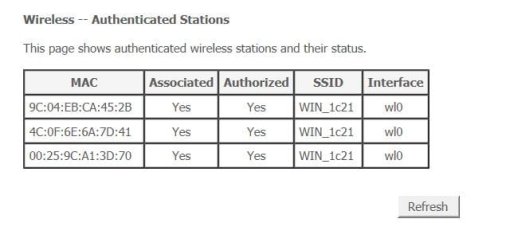
None of the MAC addresses displayed her are the same as the one listed for TOM.
 

Attachments

  • Capture18.JPG
    Capture18.JPG
    34.8 KB · Views: 16

My Computer

Computer type
Laptop
OS
Windows 7 home premium 64 bit
CPU
AMD K10
Motherboard
Hewlett-Packard 1444 (Socket S1G4)
Memory
3.00GB Dual-Channel DDR3 @ 532MHz
Graphics Card(s)
ATI AMD M880G with ATI Mobility Radeon HD 4250 (HP)
Sound Card
Realtek
Screen Resolution
1366 x 768
Hard Drives
465GB Western Digital
Antivirus
MSE
~~~
I've gotten the MAC address, thanks to GokAy, but tying that address to a vendor using the link you provided is impossible. Not only did the page take FOREVER to load (easily 5 minutes), but once it did load I could only view the first page. Trying to page beyond that always gives me 1eee.org is not responding with a suggestion to recover the webpage.
That website does test one's browser :-)
Please post the first 6 characters of the MAC address for TOM.
 
Last edited:

My Computer

Computer type
Laptop
Computer Manufacturer/Model Number
Employer provided Dell Latitude
OS
W7 Pro SP1 64bit
CPU
i7
Memory
8GB
Graphics Card(s)
Intel HD Graphics
Hard Drives
crappy SSD
Antivirus
Employer mandated Symantec Endpoint Protection
Browser
Pale Moon 64bit, IE11 64bit & Chrome 64bit
Back
Top