
Solved Remove XP dual boot

thecolin

New member
Local time
6:30 PM
Messages
3
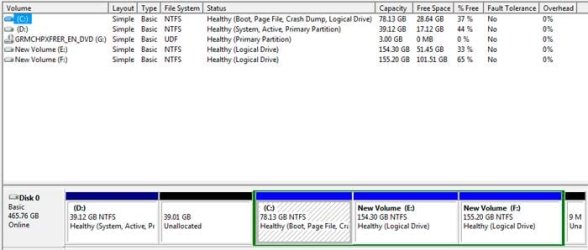
I'm trying to remove a dual boot of XP (the D drive on the screenshot) on a single HD and expand the space for my windows 7 installation. It doesn't seem to be possible to do it directly through disk management.

I have a copy of EasyBCD installed and a copy of the partition wizard bootable CD burned, but I'm not sure how to proceed and it doesn't seem like the kind of thing to mess around with casually.

Alternatively, if that isn't possible, if someone could provide some advice on joining the unallocated space into the C drive, that would be an workable alternative.
 

Attachments
  • Untitled.jpg
    Untitled.jpg
    27 KB · Views: 30

My Computer My Computer

At a glance

Windows 7 home 64
OS
Windows 7 home 64
It won`t let you delete it because it is marked active and contains the system files, if you delete it, Windows 7 won`t boot.

If you don`t have a Windows 7 Installation DVD, make a system repair disc before you go any further, you will need it to get 7 booting again.

start>control panel>backup and restore>create system repair disc.

Who installed W7 on a logical drive ? It should be made Primary. ( in my opinion )

Ideally, you want D, the unallocated space and C to be 1 entire Primary partition.

You are wasting speed by having C in the middle of the drive like that.
 

My Computer My Computer

At a glance

Windows 10 Pro x64Intel Core i7 6700KGSkill TridentZ RGB 16GB 3600 16-16-16-36EVGA GTX 980 Ti SC x2
Computer type
PC/Desktop
Computer Manufacturer/Model Number
Skylake Special #666
OS
Windows 10 Pro x64
CPU
Intel Core i7 6700K
Motherboard
Asus Sabertooth Z170 Mark 1
Memory
GSkill TridentZ RGB 16GB 3600 16-16-16-36
Graphics Card(s)
EVGA GTX 980 Ti SC x2
Sound Card
Realtek High Definition
Monitor(s) Displays
AOC G2460PG
Screen Resolution
1920 x 1080 144Hz
Hard Drives
Samsung 860 Pro 256GB, Seagate Barracuda 4TB x2
PSU
EVGA 1000 P2, EVGA White Custom Braided Cables
Case
Corsair Vengeance C70 Gunmetal Black
Cooling
Corsair H100i v2, Corsair ML120 x2, Thermal Grizzly Kryonaut
Keyboard
Logitech G910 Orion Spectrum
Mouse
Logitech G700s
Internet Speed
Verizon Fios Quantum Gateway 75/75
Antivirus
Windows Defender, Malwarebytes Free 3.8.3
Browser
Chrome
Other Info
Corsair SP120 x4, LG Blu-ray Drive, Durabrand HT-395 100 Watt Dolby Digital Amp, Corsair H2100 Wireless 7.1 Headset
Everything I've read say's you must format that partition that has the dual boot up OS on it.
 

My Computer My Computer

At a glance

Windows 7 Ultimate 64 bitAMD Phenom II X4 965 Black EditionGSkill 4 X 2 GB PC 8500XFX Radeon HD 6790 D
Computer Manufacturer/Model Number
Custom built
OS
Windows 7 Ultimate 64 bit
CPU
AMD Phenom II X4 965 Black Edition
Motherboard
Gigabyte GA-MA790X-DS4
Memory
GSkill 4 X 2 GB PC 8500
Graphics Card(s)
XFX Radeon HD 6790 D
Sound Card
On board RealTek HD
Monitor(s) Displays
Dual monitors:Samsung SyncMaster S20B300
Screen Resolution
1600 X 900
Hard Drives
Seagate Barracuda 1TB (primary)
Seagate Barracuda 2 X 320 GB
PSU
Ultra X4 750 watt fully modular
Case
Thermaltake Overseer RX 1 full tower
Cooling
Core-Contact 92 mm CPU Cooler
Keyboard
Logitech G510
Mouse
Razor DeathAdder
Internet Speed
50/5 Mbps UL/DL
Other Info
Optical: Super Muliti DVD burner w/lightscribe, Hauppauge WinTV HVR-1800
It won`t let you delete it because it is marked active and contains the system files, if you delete it, Windows 7 won`t boot.

If you don`t have a Windows 7 Installation DVD, make a system repair disc before you go any further, you will need it to get 7 booting again.

So I should force windows to delete the partition then recover from the system disc?

Ideally, you want D, the unallocated space and C to be 1 entire Primary partition.

That's what I'm attempting to achieve, the people I bought the system from set it up like this. :p
 

My Computer My Computer

At a glance

Windows 7 home 64
OS
Windows 7 home 64

My Computer My Computer

At a glance

Windows 10 Pro x64Intel Core i7 6700KGSkill TridentZ RGB 16GB 3600 16-16-16-36EVGA GTX 980 Ti SC x2
Computer type
PC/Desktop
Computer Manufacturer/Model Number
Skylake Special #666
OS
Windows 10 Pro x64
CPU
Intel Core i7 6700K
Motherboard
Asus Sabertooth Z170 Mark 1
Memory
GSkill TridentZ RGB 16GB 3600 16-16-16-36
Graphics Card(s)
EVGA GTX 980 Ti SC x2
Sound Card
Realtek High Definition
Monitor(s) Displays
AOC G2460PG
Screen Resolution
1920 x 1080 144Hz
Hard Drives
Samsung 860 Pro 256GB, Seagate Barracuda 4TB x2
PSU
EVGA 1000 P2, EVGA White Custom Braided Cables
Case
Corsair Vengeance C70 Gunmetal Black
Cooling
Corsair H100i v2, Corsair ML120 x2, Thermal Grizzly Kryonaut
Keyboard
Logitech G910 Orion Spectrum
Mouse
Logitech G700s
Internet Speed
Verizon Fios Quantum Gateway 75/75
Antivirus
Windows Defender, Malwarebytes Free 3.8.3
Browser
Chrome
Other Info
Corsair SP120 x4, LG Blu-ray Drive, Durabrand HT-395 100 Watt Dolby Digital Amp, Corsair H2100 Wireless 7.1 Headset
As your boot files are on D, you must move them to C so that Win7 can boot itself after correctly removing XP by deleting D. But C is Logical which cannot be marked Active to accept the boot files, so you must first convert it to Primary. Here's how:

Boot free Partition Wizard bootable CD, rightclick C to Modify>Set to Primary, click OK.

Rightclick C again to Modify>Set to Active, click OK.

Now click on the HD # to highlight it, from Disk tab select Rebuild MBR, OK, Apply all steps.

Reboot, if Win7 doesn't start then boot into Win7 installer or System Repair Disk to run Startup Repair - Run up to 3 Separate Times until Win7 starts and C wears the System Active Boot flags.

Now you can back up D files, boot into PW CD, rightclick D to Delete, OK, then rightlclick C again to Resize, drag left border all the way to left to take up the deleted D space, OK, Apply. Partition Wizard Resize Partition Video Help. Be prepared to run repairs again after resizing on the boot sector (in about 5% cases).

If there are any other changes you'd now like to make, post back another Disk Mgmt screenshot and tell us which. You can also adjust the size of any partition using the cool new PW Extend function which can take/give from any other partition.
 
Back
Top