Solved Remove XP from dual boot with Windows 7

CyS

New member
Local time
2:02 AM
Messages
12
Hi,
I have the following setup in my PC.
I have three physical disks installed: Disk 0, Disk 1 and Disk 2
On Disk 1 I have three partitions:
1. Windows XP,
2. Windows 7
3. Data

It was originally XP only and now it's in dual boot with Windows 7.

I'd like to remove the XP partition completely and keep only Windows 7, extending it's size with the space freed up from the XP Partition.
I was listening to the video tutorial on TechRepublic. Is there an easier way?

Can someone explain is plain English? :)

Thanks very much!

CyS
 

My Computer

OS
Windows 7 x32
CyS please ignore (do nothing) this post, I'm writing it to theog
He could copy all his files over Disk 0, and then use EasyBCD to rewrite his boot files appointing to the new location of win 7.
how about that? :)
 

My Computer

Computer type
PC/Desktop
Computer Manufacturer/Model Number
Custom Built PC
OS
Windows 7 Ultimate 64 bit SP1
CPU
Intel(R) Core(TM) i5-2500K
Motherboard
Gigabyte Technology Co., Ltd. Z68X-UD3-B3
Memory
12GB Kingston Hyperx 1600MHz
Graphics Card(s)
Asus GTS 450
PSU
500W Coolink
Other Info
Genius G-Pen F610 (PenPad)
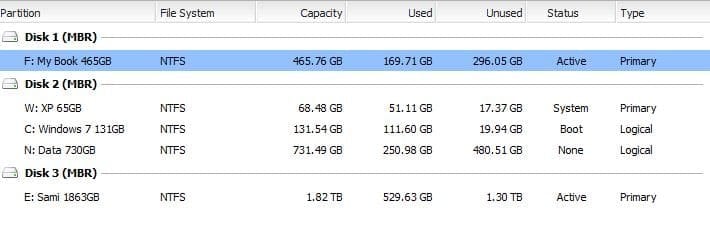
I uploaded the screenshot of my Disks and partitions.

Curious of your conclusions.

CyS
 

Attachments

  • Partitions Capture.JPG
    Partitions Capture.JPG
    27.8 KB · Views: 39

My Computer

OS
Windows 7 x32
Speaking conditionally, do nothing yet :P, you could reach your goal:
1. format W:\
2. EASEUS Partition Master, extend C:\ by moving it backwards on the disk and adding the following 50gigs of space

i dunno if the free version can do that action. i do not recommend paragon softwares. I'm sure that windows partition manager cant do that, i've tried it several times.
nice setup by the way :)
 

My Computer

Computer type
PC/Desktop
Computer Manufacturer/Model Number
Custom Built PC
OS
Windows 7 Ultimate 64 bit SP1
CPU
Intel(R) Core(TM) i5-2500K
Motherboard
Gigabyte Technology Co., Ltd. Z68X-UD3-B3
Memory
12GB Kingston Hyperx 1600MHz
Graphics Card(s)
Asus GTS 450
PSU
500W Coolink
Other Info
Genius G-Pen F610 (PenPad)
Still speaking conditionally... :)
When you say format w: I assume you mean doing it from Windows 7 (i.e. the one booted from the Windows 7 partition). Correct?

Then, should not I still need to delete the w: partition and release the space? And if I do so, can my PC still boot?

Hypothetically speaking only... :)
 

My Computer

OS
Windows 7 x32
If you delete W: your PC will not boot, & must likely will a reinstall.
 

My Computer

OS
ME/XP/Vista/Win7
Right. Obviously I do not want that. So what can I do?
 

My Computer

OS
Windows 7 x32
Yeah, you would have to delete W: any way, (using win7) so formatting it wouldn't make much sense :)
 

My Computer

Computer type
PC/Desktop
Computer Manufacturer/Model Number
Custom Built PC
OS
Windows 7 Ultimate 64 bit SP1
CPU
Intel(R) Core(TM) i5-2500K
Motherboard
Gigabyte Technology Co., Ltd. Z68X-UD3-B3
Memory
12GB Kingston Hyperx 1600MHz
Graphics Card(s)
Asus GTS 450
PSU
500W Coolink
Other Info
Genius G-Pen F610 (PenPad)
If you delete W: your PC will not boot, & must likely will a reinstall.
Is MBR stored on the primary partition? I havent thought of it yet :P
 

My Computer

Computer type
PC/Desktop
Computer Manufacturer/Model Number
Custom Built PC
OS
Windows 7 Ultimate 64 bit SP1
CPU
Intel(R) Core(TM) i5-2500K
Motherboard
Gigabyte Technology Co., Ltd. Z68X-UD3-B3
Memory
12GB Kingston Hyperx 1600MHz
Graphics Card(s)
Asus GTS 450
PSU
500W Coolink
Other Info
Genius G-Pen F610 (PenPad)
What makes a Hard disk "Disk1", "Disk2" or any other? Is it the SATA slot its cable plugged to the motherboard? change the plugging and then Disk 2 would become Disk 1?

I know there must be something wrong with this logic, sounds too easy. :)
 

My Computer

OS
Windows 7 x32
The HD plugged to the first sata port is disk0.
 

My Computer

OS
ME/XP/Vista/Win7
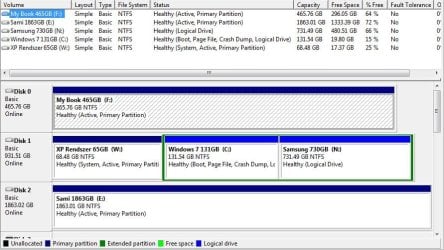
Here it is.
 

Attachments

  • Partition Capture 2.JPG
    Partition Capture 2.JPG
    87.5 KB · Views: 34

My Computer

OS
Windows 7 x32
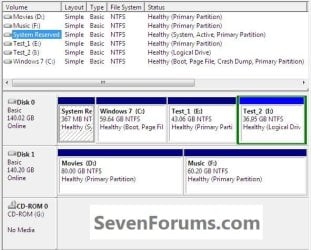
The C: can't be "System Active" as it's on an Extended partition / Logical drive.

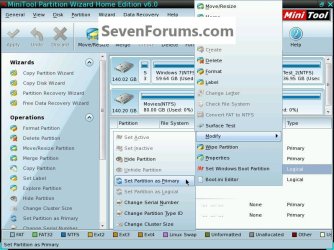
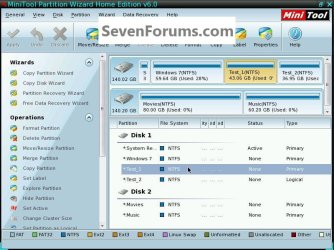
The OP can use Option Four of this tutorial at the link below to safely convert C: to a Primary partition so the "System" boot files can be stored on the Windows 7 C: partition; be sure to use the boot CD and not the installed version of Partition Wizard for this.
First download the Partition Wizard Bootable Disk (PWBD) ISO file to the desktop, be sure to get the PWBD and not the installed version; scroll down to see the download link for the Bootable CD ISO file at this link below.
Then use ImgBurn to burn the ISO to a CD, at no greater than 4x speed with a verify; it was designed for use and works best from a CD rather than a DVD; then boot the created CD to make the changes, it doesn't take any input from the user to setup, just relax and let it load.
After C: is a Primary partition we can help get the "System" boot files created to that partition.
 

My Computer

Computer Manufacturer/Model Number
* BFK Customs *
OS
W 7 64-bit Ultimate
CPU
Intel Q9550 Yorkfield
Motherboard
ASUS P5Q Pro
Memory
8GB Dominator 8500C5D
Graphics Card(s)
ATI : XFX 5870
Sound Card
Realtek HD Audio 7-1
Monitor(s) Displays
1x 47" LCD HDMI & 3x 26" LCD HDMI
Screen Resolution
1920x1080P & 1920x1200
Hard Drives
1x 80GB Intel X25-M G2 SSD : 1x 500GB & 1x 640GB WD Caviar Black(s)
PSU
Corsair 620HX
Case
Cooler Master RC-690
Cooling
Tuniq Tower 120, 2x 140mm and 3x 120mm case fans
Keyboard
Microsoft 500
Mouse
Razer Diamondback 3G
Internet Speed
14 Mb/s
Other Info
1x Koutech 3Gb/s SATA HDD Hot Swap Rack
click any image to enlarge
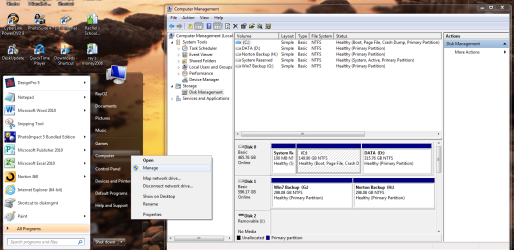
11.jpg12.jpg
13.jpg14.jpg
 
Last edited:

My Computer

Computer Manufacturer/Model Number
* BFK Customs *
OS
W 7 64-bit Ultimate
CPU
Intel Q9550 Yorkfield
Motherboard
ASUS P5Q Pro
Memory
8GB Dominator 8500C5D
Graphics Card(s)
ATI : XFX 5870
Sound Card
Realtek HD Audio 7-1
Monitor(s) Displays
1x 47" LCD HDMI & 3x 26" LCD HDMI
Screen Resolution
1920x1080P & 1920x1200
Hard Drives
1x 80GB Intel X25-M G2 SSD : 1x 500GB & 1x 640GB WD Caviar Black(s)
PSU
Corsair 620HX
Case
Cooler Master RC-690
Cooling
Tuniq Tower 120, 2x 140mm and 3x 120mm case fans
Keyboard
Microsoft 500
Mouse
Razer Diamondback 3G
Internet Speed
14 Mb/s
Other Info
1x Koutech 3Gb/s SATA HDD Hot Swap Rack
I have never gotten Partition Wizard to convert Logical to Primary with more than one Logical sub-partition.
 
It would best OP to unplug the two other HD's, when doing any repairs.
 

My Computer

OS
ME/XP/Vista/Win7

My Computer

Computer Manufacturer/Model Number
* BFK Customs *
OS
W 7 64-bit Ultimate
CPU
Intel Q9550 Yorkfield
Motherboard
ASUS P5Q Pro
Memory
8GB Dominator 8500C5D
Graphics Card(s)
ATI : XFX 5870
Sound Card
Realtek HD Audio 7-1
Monitor(s) Displays
1x 47" LCD HDMI & 3x 26" LCD HDMI
Screen Resolution
1920x1080P & 1920x1200
Hard Drives
1x 80GB Intel X25-M G2 SSD : 1x 500GB & 1x 640GB WD Caviar Black(s)
PSU
Corsair 620HX
Case
Cooler Master RC-690
Cooling
Tuniq Tower 120, 2x 140mm and 3x 120mm case fans
Keyboard
Microsoft 500
Mouse
Razer Diamondback 3G
Internet Speed
14 Mb/s
Other Info
1x Koutech 3Gb/s SATA HDD Hot Swap Rack
Back
Top