Removing Default Icons From Start Menu And Taskbar

MongooseMan

New member
Local time
5:10 PM
Messages
11
Whenever a new user logs on to a computer, Microsoft puts certain default icons on the Start Menu and the Task bar, whether you want them there or not. I need to remove these icons, and put our own on the start menu. I can put our own icons on the start menu, but I don't have a way to remove the default icons. I need to remove the clutter from the start menu.

Does anyone have a script or other method to remove those icons?
 

My Computer

OS
Windows 7 Pro 32-bit
See if this tutorial will help you out http://www.sevenforums.com/tutorials/180081-connect-change-default-icon-start-menu.html if so also look at the bottom of it there is a list of related tutorials that will help with the rest of them.

If that is not what you wanted change please post a screenshot of what you are trying to change.
Use these tutorials for posting screenshots.
http://www.sevenforums.com/tutorials/9717-screenshot-paint.html
How to Use the Snipping Tool in Vista - Vista Forums
http://www.sevenforums.com/tutorials/9733-screenshots-files-upload-post-seven-forums.html

Jerry
 

My Computer

Computer type
Laptop
Computer Manufacturer/Model Number
Sager NP9170
OS
Win 7 Pro x64 / Win 10 Pro
CPU
Intel(R) Core(TM) i7-3630QM CPU @ 2.40GHz
Motherboard
CLEVO P170EM
Memory
12 GB
Graphics Card(s)
(1) Intel(R) HD Graphics 4000 (2) NVIDIA GeForce GTX 675M
Sound Card
(1) Realtek High Definition Audio (2) Intel(R) Display Aud
Monitor(s) Displays
17.3
Screen Resolution
1920x1080
Hard Drives
(1) Samsung 860 EVO 500GB(OS) (1) Samsung 860 EVO 500GB(Data)
Keyboard
Backlite
Antivirus
MSE, Malwarebytes Pro
Browser
Firefox
Other Info
DESKTOP: Custom-built.
OS: Win 10 Pro x64.
CASE: Rosewill R5.
CPU: Intel I5 4670K CPU @ 3.40GHz.
CPU COOLER: Cool Master Hyper 212 EVO.
MOTHERBOARD: Asus Z87-A.
MEMORY: Kingston HyperX 2x4 GB.
GPU: Nvidia Geforce 650 TI.
PSU: Corsair TX750.
DRIVES: (1) Samsung 840 120 GB SSD (2) Western Digital blue 500 GB 7200 RPM.
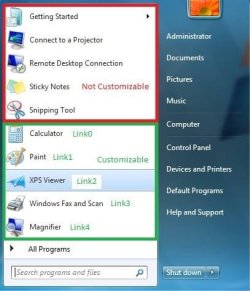
I borrowed this screenshot from How To: Customize the Windows 7 Start Menu and Taskbar Using unattend.xml - Ask the Core Team - Site Home - TechNet Blogs

StartMenuIcons.jpg

Whenever a user logs in for the first time, the icons in the section marked "Not Customizable" are added to the start menu. I am managing the computers in a school computer lab. In our environment, every time someone logs on to a computer, that person is a new user, as far as that computer is concerned. I need to customize the start menu so that the students have quick access to the programs they will be using all the time. These five icons are just clutter, and they need to be gone.

I have seen a number of scripts which could be customized to remove unwanted icons, and insert the ones you want. Does anyone have a script which will just remove these five icons? I am looking for something that could be run as part of the log on script.
 

My Computer

OS
Windows 7 Pro 32-bit

My Computer

Computer type
Laptop
Computer Manufacturer/Model Number
Sager NP9170
OS
Win 7 Pro x64 / Win 10 Pro
CPU
Intel(R) Core(TM) i7-3630QM CPU @ 2.40GHz
Motherboard
CLEVO P170EM
Memory
12 GB
Graphics Card(s)
(1) Intel(R) HD Graphics 4000 (2) NVIDIA GeForce GTX 675M
Sound Card
(1) Realtek High Definition Audio (2) Intel(R) Display Aud
Monitor(s) Displays
17.3
Screen Resolution
1920x1080
Hard Drives
(1) Samsung 860 EVO 500GB(OS) (1) Samsung 860 EVO 500GB(Data)
Keyboard
Backlite
Antivirus
MSE, Malwarebytes Pro
Browser
Firefox
Other Info
DESKTOP: Custom-built.
OS: Win 10 Pro x64.
CASE: Rosewill R5.
CPU: Intel I5 4670K CPU @ 3.40GHz.
CPU COOLER: Cool Master Hyper 212 EVO.
MOTHERBOARD: Asus Z87-A.
MEMORY: Kingston HyperX 2x4 GB.
GPU: Nvidia Geforce 650 TI.
PSU: Corsair TX750.
DRIVES: (1) Samsung 840 120 GB SSD (2) Western Digital blue 500 GB 7200 RPM.
That is not what I need. I need to set the computer so that a new user logging in for the first times does not see those icons at all. I need an end user to see the programs he needs, and not all the extra clutter that Microsoft put in there.
 

My Computer

OS
Windows 7 Pro 32-bit
You should be able to do that with Group Policy. I have Home Premium, so can't tell you exact settings, but look under User configuration> Administrative Templates> Start Menu and Taskbar

Group Policy Settings for Start Menu and Taskbar

A Guy
 

My Computer

Computer type
PC/Desktop
OS
Windows 10 Home x64
CPU
INTEL Core i5-750 Quad-Core 3.37GHz
Motherboard
ASUS P7P55D
Memory
HyperX Fury Black Series 8GB (2 x 4GB) 1866Mhz
Graphics Card(s)
EVGA GeForce GTX 750 Superclocked 1GB 128-Bit GDDR5
Monitor(s) Displays
LG 32MA68HY 32" IPS
Screen Resolution
1920 x 1080
Hard Drives
Samsung 840 Evo 120GB, SEAGATE 500GB Barracuda® 7200.12, SATA 3 Gb/s, 7200 RPM, 16MB cache
PSU
ANTEC TruePower New TP-550, 80 PLUS, 550W
Case
ANTEC Three Hundred Illusion
Cooling
COOLER MASTER Hyper 212 Plus, 4 x 120mm 1 x 140mm Noctua's
Internet Speed
85 + Mbps
Antivirus
Avast
Browser
Vivaldi
Back
Top