
thegoodguy
New member
- Local time
- 3:58 AM
- Messages
- 2
Hi,
I have a problem where I'm unable to remove some system inon from an explorer folder-view window.
I like seldom-used icons hidden away. I can find them on the odd occasion that I might need them. I have removed all the "unnecessary" icons from my desktop (Computer, Network etc.), but I cannot make them disappear from the explorer folder-view window ... if I use a shortcut to the Desktop folder. If I navigate to the folder through the folder tree, the icons are suitably invisible. The odd thing is that this has only just started happening. Everything was as I wanted it until a few days ago.
I have attached a couple of screenshots that should help explain what I mean.
I hope someone can help. Thanks
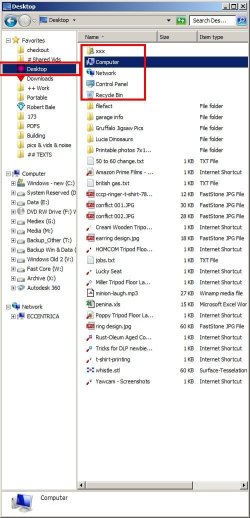
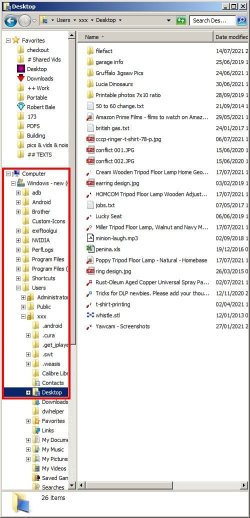
I have a problem where I'm unable to remove some system inon from an explorer folder-view window.
I like seldom-used icons hidden away. I can find them on the odd occasion that I might need them. I have removed all the "unnecessary" icons from my desktop (Computer, Network etc.), but I cannot make them disappear from the explorer folder-view window ... if I use a shortcut to the Desktop folder. If I navigate to the folder through the folder tree, the icons are suitably invisible. The odd thing is that this has only just started happening. Everything was as I wanted it until a few days ago.
I have attached a couple of screenshots that should help explain what I mean.
I hope someone can help. Thanks
My Computers
System One System Two
-
- Computer type
- PC/Desktop
- Computer Manufacturer/Model Number
- dell
- OS
- Windows 7 Pro SP1
- CPU
- i7
- Memory
- 12gb
- Graphics Card(s)
- nvidia geforce gtx 1050 ti
- Hard Drives
- 250gb SSD (os)
1tb
1tb
-
- Computer type
- PC/Desktop

