Removing items from Context Menu

BAZ

New member
Member
Local time
11:40 AM
Messages
78
Is there any way we can remove some unneeded items from the context menu?
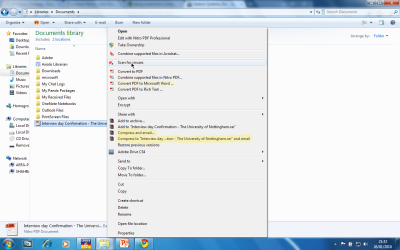
Screenshot.png
I especially want to get rid of ones like 'compress and email' etc.
 

My Computer

Computer Manufacturer/Model Number
TOSHIBA EQUIUM A200 (X86-based PC AT/AT COMPATIBLE)
OS
Windows 7 Ultimate x86
CPU
Intel(R) Pentium(R) Dual CPU T2310 @ 1.46GHz
Motherboard
Intel Corporation SANTA ROSA CRB
Memory
2GB
Graphics Card(s)
Mobile Intel(R) 965 Express Chipset Family
Screen Resolution
1280 * 800 Pixels
Hard Drives
ST9120822AS ATA Device (IDE)
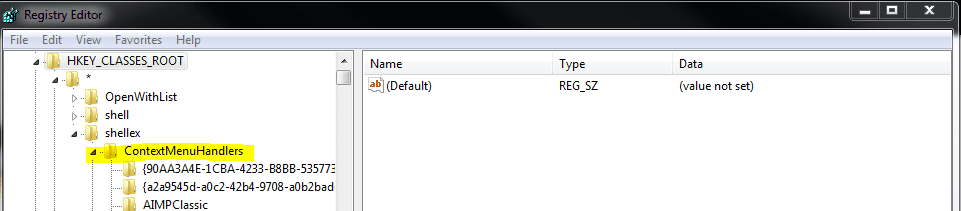
Open Registry Editor (regedit), go to HKEY_CLASSES_ROOT\*\shellex\ContextMenuHandlers and delete the unwanted entries. This is for the Folder Context Menu.

For File Context Menu, go to HKEY_CLASSES_ROOT\Directory\shellex\ContextMenuHandlers and do the same.

Kari
 

My Computer

Computer type
Laptop
Computer Manufacturer/Model Number
HP ENVY 17-1150eg
OS
Windows 10 Pro x64 EN-GB
CPU
1.6 GHz Intel Core i7-720QM Processor
Memory
6 GB
Graphics Card(s)
ATI Mobility Radeon HD 5850 Graphics
Sound Card
Beats sound system with integrated subwoofer
Monitor(s) Displays
17" laptop display, 22" LED and 32" Full HD TV through HDMI
Screen Resolution
1600*900 (1), 1920*1080 (2&3)
Hard Drives
Internal: 2 x 500 GB SATA Hard Disk Drive 7200 rpm
External: 2TB for backups, 3TB USB3 network drive for media
Cooling
As Envy runs a bit warm, I have it on a Cooler Master pad
Keyboard
Logitech diNovo Media Desktop Laser (bluetooth)
Mouse
Logitech Performance Mouse MX
Internet Speed
50/10 Mbps VDSL
Antivirus
Windows Defender 4.3.9431.0
Browser
Maxthon 3.5.2., IE11
Thank you, Kari!
 

My Computer

Computer Manufacturer/Model Number
TOSHIBA EQUIUM A200 (X86-based PC AT/AT COMPATIBLE)
OS
Windows 7 Ultimate x86
CPU
Intel(R) Pentium(R) Dual CPU T2310 @ 1.46GHz
Motherboard
Intel Corporation SANTA ROSA CRB
Memory
2GB
Graphics Card(s)
Mobile Intel(R) 965 Express Chipset Family
Screen Resolution
1280 * 800 Pixels
Hard Drives
ST9120822AS ATA Device (IDE)
Uh.... why don't I have these entries?

I have HKEY_CLASSES_ROOT\*\shellex with a (Default) string in it (no value). It's the very first folder in HKEY_CLASSES_ROOT.

And in HKEY_CLASSES_ROOT\Directory\shellex\ContextMenuHandlers I also have a single (Default) string with no value set.

Am I missing something?

TIA

mac
 

My Computer

OS
windows 7
Why should a user need to modify the registry to change context menu items?

It seems like after a decade or more that we should have a better solution available to us than digging into the registry.
 

My Computer

Computer Manufacturer/Model Number
N/A
OS
Windows 7 Professional x64
CPU
Intel Core i7 860 @ 2.80GHz
Motherboard
Gigabyte P55-UD6
Memory
4.0GB OCZ Dual-Channel DDR3
Graphics Card(s)
GeForce GTS 250
Sound Card
HT Omega Striker 7.1
Monitor(s) Displays
Samsung Syncmaster P2570
Screen Resolution
1920x1080
Hard Drives
1000GB Western Digital
Keyboard
Saitek Eclipse (Red)
Uh.... why don't I have these entries?

I have HKEY_CLASSES_ROOT\*\shellex with a (Default) string in it (no value). It's the very first folder in HKEY_CLASSES_ROOT.

And in HKEY_CLASSES_ROOT\Directory\shellex\ContextMenuHandlers I also have a single (Default) string with no value set.

Am I missing something?

TIA

mac
You don't see this:

ShellEx1.PNG

Kari
 

My Computer

Computer type
Laptop
Computer Manufacturer/Model Number
HP ENVY 17-1150eg
OS
Windows 10 Pro x64 EN-GB
CPU
1.6 GHz Intel Core i7-720QM Processor
Memory
6 GB
Graphics Card(s)
ATI Mobility Radeon HD 5850 Graphics
Sound Card
Beats sound system with integrated subwoofer
Monitor(s) Displays
17" laptop display, 22" LED and 32" Full HD TV through HDMI
Screen Resolution
1600*900 (1), 1920*1080 (2&3)
Hard Drives
Internal: 2 x 500 GB SATA Hard Disk Drive 7200 rpm
External: 2TB for backups, 3TB USB3 network drive for media
Cooling
As Envy runs a bit warm, I have it on a Cooler Master pad
Keyboard
Logitech diNovo Media Desktop Laser (bluetooth)
Mouse
Logitech Performance Mouse MX
Internet Speed
50/10 Mbps VDSL
Antivirus
Windows Defender 4.3.9431.0
Browser
Maxthon 3.5.2., IE11
Oh, geez!! I'm soooo dumb!

Ok. The folders are there. My excuse is that I'm still not used to the arrow to expand, instead of a plus sign.

That's my excuse and I'm sticking to it. LOL.

Thanks, Kari!

mac
 

My Computer

OS
windows 7
;)
Happens to all of us time to time.

Kari
 

My Computer

Computer type
Laptop
Computer Manufacturer/Model Number
HP ENVY 17-1150eg
OS
Windows 10 Pro x64 EN-GB
CPU
1.6 GHz Intel Core i7-720QM Processor
Memory
6 GB
Graphics Card(s)
ATI Mobility Radeon HD 5850 Graphics
Sound Card
Beats sound system with integrated subwoofer
Monitor(s) Displays
17" laptop display, 22" LED and 32" Full HD TV through HDMI
Screen Resolution
1600*900 (1), 1920*1080 (2&3)
Hard Drives
Internal: 2 x 500 GB SATA Hard Disk Drive 7200 rpm
External: 2TB for backups, 3TB USB3 network drive for media
Cooling
As Envy runs a bit warm, I have it on a Cooler Master pad
Keyboard
Logitech diNovo Media Desktop Laser (bluetooth)
Mouse
Logitech Performance Mouse MX
Internet Speed
50/10 Mbps VDSL
Antivirus
Windows Defender 4.3.9431.0
Browser
Maxthon 3.5.2., IE11

My Computer

Computer Manufacturer/Model Number
HP, Dell, Gateway, Toshiba - 4 laptops and 2 desktops
OS
Vista, Windows7, Mint Mate, Zorin, Windows 8
CPU
from 1.6GHz Duo to i7
Monitor(s) Displays
2x HP w2207
Hard Drives
5x HDD, 7x SSD, 12x Externals
Keyboard
with trackball - no mices
Mouse
Trackball mice
Internet Speed
DSL 6000
  • Like
Reactions: BAZ

My Computer

Computer Manufacturer/Model Number
TOSHIBA EQUIUM A200 (X86-based PC AT/AT COMPATIBLE)
OS
Windows 7 Ultimate x86
CPU
Intel(R) Pentium(R) Dual CPU T2310 @ 1.46GHz
Motherboard
Intel Corporation SANTA ROSA CRB
Memory
2GB
Graphics Card(s)
Mobile Intel(R) 965 Express Chipset Family
Screen Resolution
1280 * 800 Pixels
Hard Drives
ST9120822AS ATA Device (IDE)
Back
Top