Removing Live mail Message warning

john510

New member
Local time
7:40 PM
Messages
8
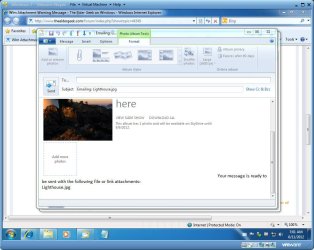
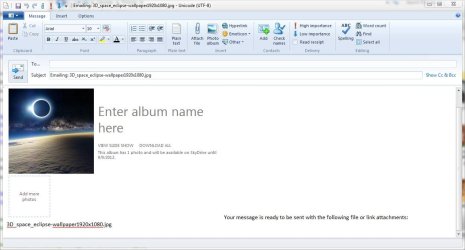
Windows 7 and windows live mail, how do you remove the attachment warning such as: Note: To protect against computer viruses, e-mail programs may prevent sending or receiving certain types of file attachments. Check your e-mail security settings to determine how attachments are handled.
 

My Computer

OS
64
Welcome to SF john510

1.Select Tools
2.Safety options(Windows Live Mail) from the menu.
3.Go to the Security tab.
4.Unselect "Do not allow attachments to be saved or opened that could potentially be a virus is not checked."
5.Click OK.

Restart WLM or Close and open the message again.
Let us know if it works.
 

My Computer

Computer type
PC/Desktop
Computer Manufacturer/Model Number
Self assembled
OS
Windows 10 Home 64Bit
CPU
Intel Core i5 10400 @ 2.90GHz
Motherboard
Intel Corporation DG41WV (PROCESSOR)
Memory
8.00GB Single-Channel Unknown @ 1329MHz (16-20-20-38)
Sound Card
Realtek High Definition Audio
Monitor(s) Displays
DELL E170S
Screen Resolution
1280x1024 pixels
Hard Drives
931GB TOSHIBA DT01ACA100 (SATA)
238GB TEAM TM8PS7256G (SATA SSD)
Case
Nothing Fancy
Cooling
Fans
Keyboard
A4 Tech Co LTD
Mouse
A4 Tech Co Ltd/Logitech
Internet Speed
25 Mbps
That is already unchecked .. that does NOT stop the message from being placed into the mail message..

any one else?
 

My Computer

OS
64
I'm not familiar with WLM, but do have any AV software on there that may be providing that functionality?
 

My Computer

OS
Windows 7 Ultimate x64
I'm not familiar with WLM, but do have any AV software on there that may be providing that functionality?

Im running advast but it does not enter this info inthe message, I had the same message before I installed the AV program..Its seems to be from windows live mail program
 

My Computer

OS
64
Oh, okay.

Just to let you know, koolkat77 has noted your thread to others who may be able to help, so don't give up, come back occasionally to check for new posts.
 

My Computer

OS
Windows 7 Ultimate x64
Oh, okay.

Just to let you know, koolkat77 has noted your thread to others who may be able to help, so don't give up, come back occasionally to check for new posts.

I will
 

My Computer

OS
64
Do you have an option that says don't show this message, or disable the pop up? or download contents of the message?
Try applying any one of them.
 

My Computer

Computer type
PC/Desktop
Computer Manufacturer/Model Number
Self assembled
OS
Windows 10 Home 64Bit
CPU
Intel Core i5 10400 @ 2.90GHz
Motherboard
Intel Corporation DG41WV (PROCESSOR)
Memory
8.00GB Single-Channel Unknown @ 1329MHz (16-20-20-38)
Sound Card
Realtek High Definition Audio
Monitor(s) Displays
DELL E170S
Screen Resolution
1280x1024 pixels
Hard Drives
931GB TOSHIBA DT01ACA100 (SATA)
238GB TEAM TM8PS7256G (SATA SSD)
Case
Nothing Fancy
Cooling
Fans
Keyboard
A4 Tech Co LTD
Mouse
A4 Tech Co Ltd/Logitech
Internet Speed
25 Mbps
Do you have an option that says don't show this message, or disable the pop up? or download contents of the message?
Try applying any one of them.

I have what everyone else has with windows 7 and live mail, so in other words, no there is not option for this,, I searched on google and there were a lot of the same questions on this but no fixes of it on widows 7..just xp..
 

My Computer

OS
64
Probably.
Is the sender of this message added to your safe senders list?
 

My Computer

Computer type
PC/Desktop
Computer Manufacturer/Model Number
Self assembled
OS
Windows 10 Home 64Bit
CPU
Intel Core i5 10400 @ 2.90GHz
Motherboard
Intel Corporation DG41WV (PROCESSOR)
Memory
8.00GB Single-Channel Unknown @ 1329MHz (16-20-20-38)
Sound Card
Realtek High Definition Audio
Monitor(s) Displays
DELL E170S
Screen Resolution
1280x1024 pixels
Hard Drives
931GB TOSHIBA DT01ACA100 (SATA)
238GB TEAM TM8PS7256G (SATA SSD)
Case
Nothing Fancy
Cooling
Fans
Keyboard
A4 Tech Co LTD
Mouse
A4 Tech Co Ltd/Logitech
Internet Speed
25 Mbps
I can only get that message when I right click on an item and choose> send to> mail recipient.

I don't get it if I attach it while in live mail.

It appears to be related to sendmail.dll which cannot be disabled.

Which explains why you haven't seen any answers for all the other people asking that.

If you don't want that message I guess you're stuck with opening live mail and attaching from there.
 

My Computer

Computer type
PC/Desktop
Computer Manufacturer/Model Number
Self Built
OS
Win 10 Pro x64
CPU
Intel I5-2500K @3.3GHz
Motherboard
Asrock P67 Extreme4
Memory
16GB G.Skill Ripjaws X (4x4GB)
Graphics Card(s)
EVGA GeForce 750 Ti SC 2GB
Sound Card
ASUS Xonar DG 5.1 Channels 24-bit 96KHz PCI Interface Sound
Monitor(s) Displays
auria eq2367
Screen Resolution
1920 x 1080
Hard Drives
250GB Samsung 850 EVO SSD
1TB WD Blue
1TB Hitachi
PSU
SeaSonic X 650W 80 Plus Gold
Case
Corsair Obsidian 750D
Cooling
Corsair H60, Three 140mm case fans
Keyboard
Logitech Wireless Keyboard K520
Mouse
Logitech Wireless Mouse M310
Internet Speed
Wave Broadband ~ 100 dn 5 up
Antivirus
Windows Defender, Malwarebytes Premium
Browser
Edge, IE11, Chrome
Other Info
Laptop specs: HP g7-1365dx /
CPU: AMD A6-3420M APU with Radeon(tm) HD Graphics /
RAM: Crucial 8Gb (2x4Gb) /
SSD: Crucial M4-CT128M4SSD2 ATA Device/ FW 000F /
GFX: AMD Radeon HD 6520G /
OS: Windows 10 Pro x64

My Computer

Computer type
PC/Desktop
OS
Windows 10 Home x64
CPU
INTEL Core i5-750 Quad-Core 3.37GHz
Motherboard
ASUS P7P55D
Memory
HyperX Fury Black Series 8GB (2 x 4GB) 1866Mhz
Graphics Card(s)
EVGA GeForce GTX 750 Superclocked 1GB 128-Bit GDDR5
Monitor(s) Displays
LG 32MA68HY 32" IPS
Screen Resolution
1920 x 1080
Hard Drives
Samsung 840 Evo 120GB, SEAGATE 500GB Barracuda® 7200.12, SATA 3 Gb/s, 7200 RPM, 16MB cache
PSU
ANTEC TruePower New TP-550, 80 PLUS, 550W
Case
ANTEC Three Hundred Illusion
Cooling
COOLER MASTER Hyper 212 Plus, 4 x 120mm 1 x 140mm Noctua's
Internet Speed
85 + Mbps
Antivirus
Avast
Browser
Vivaldi
Windows 7 and windows live mail, how do you remove the attachment warning...
Either don't use "send to>>mail recipient" in Windows Explorer or delete it when composing the message.
 

My Computer

Computer type
PC/Desktop
Computer Manufacturer/Model Number
OQO 2+
OS
Windows 8 Pro w/MC 32-bit
CPU
Intel Atom 1.86 GHz
Motherboard
OQO 2+
Memory
2 GB
Graphics Card(s)
Intel GMA 500
Sound Card
IDT
Monitor(s) Displays
LCD
Screen Resolution
800 x 480 (portable) 1280 x 1024 (docked)
Hard Drives
64 GB SSD
PSU
9 Ah Battery (portable) or OQO Brick (docked)
Case
Shirt Pocket Sized
Cooling
Tiny Fan
Keyboard
Slide out (portable) DiNovo Edge (docked)
Mouse
Eraser head (portable) Logitech Bluetooth (docked)
Internet Speed
WWAN or 802.11G (portable) T1 (docked)
Browser
IE 10
Other Info
DVD-RW OQO Docking Station
Windows 7 and windows live mail, how do you remove the attachment warning...
Either don't use "send to>>mail recipient" in Windows Explorer or delete it when composing the message.

In the past version for xp people were able to change the registry to remove this i am checking to see if anyone else has found a was in windows 7 with live mail to do the same?
 

My Computer

OS
64

My Computer

OS
64
...In the past version for xp people were able to change the registry to remove this i am checking to see if anyone else has found a way in windows 7 with live mail to do the same?
A Guy posted a link (above) to a registry fix that removes the "Warning" part of the message. As noted in the link "Unfortunately the beginning part of the message: 'Your message is ready to be sent with the following file or link attachments: <attachment_filename>' is a bit more complex since it is not located in the Registry. As far as I have been able to determine, the remainder of the message is embedded in a system .dll file (dynamic link library)."
 
Last edited:

My Computer

Computer type
PC/Desktop
Computer Manufacturer/Model Number
OQO 2+
OS
Windows 8 Pro w/MC 32-bit
CPU
Intel Atom 1.86 GHz
Motherboard
OQO 2+
Memory
2 GB
Graphics Card(s)
Intel GMA 500
Sound Card
IDT
Monitor(s) Displays
LCD
Screen Resolution
800 x 480 (portable) 1280 x 1024 (docked)
Hard Drives
64 GB SSD
PSU
9 Ah Battery (portable) or OQO Brick (docked)
Case
Shirt Pocket Sized
Cooling
Tiny Fan
Keyboard
Slide out (portable) DiNovo Edge (docked)
Mouse
Eraser head (portable) Logitech Bluetooth (docked)
Internet Speed
WWAN or 802.11G (portable) T1 (docked)
Browser
IE 10
Other Info
DVD-RW OQO Docking Station
So the functionality adheres to the way you've set the options, blocking attachments if you've set it that way, and allowing them if you set it the other way. Right?

And no matter how you've got it set you get the aggravating warning message.
 

My Computer

OS
Windows 7 Ultimate x64
Windows 7 and windows live mail, how do you remove the attachment warning such as: Note: To protect against computer viruses, e-mail programs may prevent sending or receiving certain types of file attachments. Check your e-mail security settings to determine how attachments are handled.

Welcome to Seven Forums john510. Apparently you can add a registry key to delete all but the 1st part of the message. But as stated, the rest is in the sendmail.dll.

Wlm Attachment Warning Message

If you attempt this, back up the registry, or make a complete system image before attempting.

http://www.sevenforums.com/tutorials/4230-registry-backup-restore.html

http://www.sevenforums.com/tutorials/663-backup-complete-computer-create-image-backup.html

A Guy

I can confirm the method in A Guy's link does work in removing the second part of the message in the email body, the part in bold in your original post.

In my testing I noticed that the reg entries from the 32 bit didn't work on the 64bit machines I tested, so I just made a set for each and they did remove the second half of the message.

32bit live mail.JPG

64bit live mail.JPG

Also important to back up your registry before hand, the links in A Guy's post will show you how.

I attached the reg files if you want to use them instead of making your own, make sure to choose the correct set for your system 32bit or 64bit.
 

Attachments

My Computer

Computer type
PC/Desktop
Computer Manufacturer/Model Number
Self Built
OS
Win 10 Pro x64
CPU
Intel I5-2500K @3.3GHz
Motherboard
Asrock P67 Extreme4
Memory
16GB G.Skill Ripjaws X (4x4GB)
Graphics Card(s)
EVGA GeForce 750 Ti SC 2GB
Sound Card
ASUS Xonar DG 5.1 Channels 24-bit 96KHz PCI Interface Sound
Monitor(s) Displays
auria eq2367
Screen Resolution
1920 x 1080
Hard Drives
250GB Samsung 850 EVO SSD
1TB WD Blue
1TB Hitachi
PSU
SeaSonic X 650W 80 Plus Gold
Case
Corsair Obsidian 750D
Cooling
Corsair H60, Three 140mm case fans
Keyboard
Logitech Wireless Keyboard K520
Mouse
Logitech Wireless Mouse M310
Internet Speed
Wave Broadband ~ 100 dn 5 up
Antivirus
Windows Defender, Malwarebytes Premium
Browser
Edge, IE11, Chrome
Other Info
Laptop specs: HP g7-1365dx /
CPU: AMD A6-3420M APU with Radeon(tm) HD Graphics /
RAM: Crucial 8Gb (2x4Gb) /
SSD: Crucial M4-CT128M4SSD2 ATA Device/ FW 000F /
GFX: AMD Radeon HD 6520G /
OS: Windows 10 Pro x64
Back
Top