
Solved Removing Rootkit

ROBO731

New member
Member
VIP
Local time
10:16 AM
Messages
223
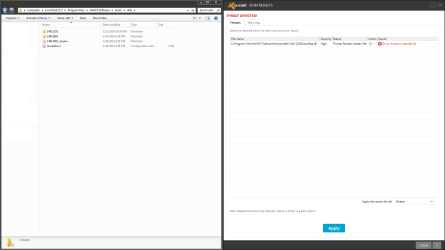
I scanned all of my drives with avast and it found one result, a rookit. When I try to remove it I get an error, saying that access is denied. How can I remove the rootkit properly? I'm aware that a common solution to this problem is to just wipe the drive, but I don't want to do that. The rootkit isn't (noticably) affecting me in anyway so I don't want to go through the hassle of wiping a drive to get rid of it.
 

Attachments
  • 0d506ed066.png
    0d506ed066.png
    27.1 KB · Views: 10

My Computer

OS
Windows 7 Home Premium x64
CPU
Intel i7-2600K
Motherboard
ASUS Sabertooth Z77
Memory
G.SKILL Ripjaws (16 GB Total)
Graphics Card(s)
EVGA GeForce GTX 560 Ti
Monitor(s) Displays
ASUS
Screen Resolution
1920x1080 (2 Monitors)
Hard Drives
Hitachi GST Deskstar 2 TB (HDD)
Samsung 840 Pro 256 GB (SSD)
PSU
SeaSonic X Series X650 Gold
Case
Antec DF 85
Keyboard
Microsoft SideWinder X4
Mouse
MadCatz M.M.O. 7 & Logitech G35
Internet Speed
50 down
Antivirus
Avast Free, SuperAntiSpyware Free, Malwarebytes Free
Browser
Mozilla Firefox
Avast detected it's own entry

Looks to me like Avast scanner picked up the file name from within it's own definitions database. On that basis it's a false positive detection. Check your scan settings and make them less aggressive or set that Avast Definitions folder to the list of files/ folders to be ignored.

Sorry but I can't post specific instructions as I stopped using Avast many months ago.
 

My Computer

Computer type
Laptop
Computer Manufacturer/Model Number
ASUS
OS
Microsoft Windows 7 Home Premium 64-bit 7601 Multiprocessor Free Service Pack 1
CPU
AMD C-60 APU with Radeon(tm) HD Graphics
Motherboard
ASUSTeK COMPUTER INC. X501U
Memory
4.00 GB
Graphics Card(s)
AMD Radeon HD 6290 Graphics
Sound Card
(1) AMD High Definition Audio Device (2) Realtek High Defi
Screen Resolution
1366 x 768 x 32 bits (4294967296 colors) @ 60 Hz
Hard Drives
Hitachi HTS545050A7E380 SATA Disk Device
Antivirus
Comodo CIS & FW, SecureAplus App Whitelisting, Threatfire
Browser
Cyberfox 64bit, Opera 64bit, Airfox
Other Info
Spy-The-Spy, HitmanPro.Alert, Norton Connect Safe, MJRegWatcher, BitDefender TrafficLight, Voodoo Shield, Zemana AntiMalware
Looks to me like Avast scanner picked up the file name from within it's own definitions database. On that basis it's a false positive detection. Check your scan settings and make them less aggressive or set that Avast Definitions folder to the list of files/ folders to be ignored.

Sorry but I can't post specific instructions as I stopped using Avast many months ago.

That's okay, good to know it's probably a false positive. Thanks.
 

My Computer

OS
Windows 7 Home Premium x64
CPU
Intel i7-2600K
Motherboard
ASUS Sabertooth Z77
Memory
G.SKILL Ripjaws (16 GB Total)
Graphics Card(s)
EVGA GeForce GTX 560 Ti
Monitor(s) Displays
ASUS
Screen Resolution
1920x1080 (2 Monitors)
Hard Drives
Hitachi GST Deskstar 2 TB (HDD)
Samsung 840 Pro 256 GB (SSD)
PSU
SeaSonic X Series X650 Gold
Case
Antec DF 85
Keyboard
Microsoft SideWinder X4
Mouse
MadCatz M.M.O. 7 & Logitech G35
Internet Speed
50 down
Antivirus
Avast Free, SuperAntiSpyware Free, Malwarebytes Free
Browser
Mozilla Firefox
Back
Top