Solved removing the index.dat - Windows 7

grizzly

New member
Local time
8:32 AM
Messages
15
Greetings. I used a utility called "super winspy 3.3" to find my index.dat file located in:
C:\Users\[username]\AppData\Local\Microsoft\Windows\Temporary Internet Files\Low\Content.IE5\index.dat

I know the file is there and contains a ton of data even though my privacy settings in IE8 are set very private. I can view the file with Super Winspy but I would like to be able to purge the data from that file regularly or overwrite it with an empty file or delete it and let it re-create a new empty one, but no matter what I try, I get "Access Denied" message. Is there any free or open source (not trial versions or shareware) software that keeps index.dat file wiped clean.?
 

My Computer

Computer Manufacturer/Model Number
Dell T7400
OS
windows 7
CPU
Dual Xeon

My Computer

Computer type
PC/Desktop
Computer Manufacturer/Model Number
Airbot 2.0
OS
Windows 7 Ultimate x64 SP1
CPU
Core i7 920 (D0) @ 4Ghz, *26c idle *65c full load on air
Motherboard
Asus P6X58D Premium - Sata 6Gb/s - USB 3.0
Memory
12GB DDR3 Corsair Dominator -CMD12GX3M6A1600C8 at 1600MHz
Graphics Card(s)
Zotac Geforce GTX 770
Sound Card
ASUS Xonar D2X
Monitor(s) Displays
1 LG 24" Flatron W2453V-PF 1 Samsung 24" P2450H both 2ms RT
Screen Resolution
1920x1080@60hz
Hard Drives
1 Samsung 250GB 840 Evo SSD
1 OCZ Vertex2 180GB SSD
1 TB Samsung Spinpoint F1 7200RPM 32MB cache
2 500GB WD Caviar Blacks 7200RPM 32MB cache (WD5001AALS)

Pioneer DVD Burner DVR-S18M
PSU
Corsair HX1000W
Case
Cooler Master HAF 932
Cooling
Case Fans *3 230mm, *1 140mm/CPU - *Tuniq Tower 120 Extreme
Keyboard
Logitech Wireless MK700
Mouse
Logitech Wireless MK700
Internet Speed
DL 15 Mbps UL 0.98 Mbps
Antivirus
None
Browser
Firefox Nightly
Other Info
Processor-7.7 *RAM- 7.9 *Graphics-7.9 *Gaming Graphics- 7.9 *SSD- 7.8 W.E.I final score= 7.7
*Phone- LG Nexus 5
Thanks airbot - I thougt ccleaner would do the trick too but it didn't. When I first ran it (ccleaner) it found 4 index.dat files in my user profile with the analyzer. When I clicked on "Run Cleaner" it appeared that ccleaner removed the index.dat infestations, but when I look from the command line, they are still there and all of the old data is still there too. Also, when I use a different program like 'Winspy' they are still there and the old data is still in them.Now when I run ccleaner, it no longer finds them, probably thinking that it already got rid of them. Has to be a better way. I don't seem to be able to change the attributes on them either with the attrib command. They have changed something in Windows 7 (from vista / xp) to make it more difficult to rid yourself of the data in these files.
 

My Computer

Computer Manufacturer/Model Number
Dell T7400
OS
windows 7
CPU
Dual Xeon
I've never heard of Winspy. Might want to use Malware Bytes.
 

My Computer

Computer Manufacturer/Model Number
Gateway KAV60
OS
Windows 7 Home Premium 32-bit
Memory
2 GB
Screen Resolution
1024x600
Hard Drives
250 GB HDD
Internet Speed
Time Warner Cable/Road Runner
Other Info
Intel Atom processor N270
Multi-in-1 card reader
802.11b/g
NO optical drive
NO WWAN
NO Bluetooth
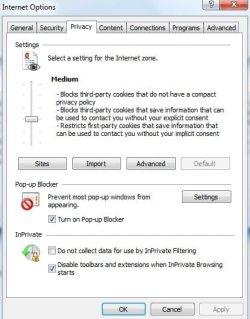
Click on Internet options and check both privacy boxes at the bottom.
 

Attachments

  • privacy.jpg
    privacy.jpg
    35 KB · Views: 295

My Computer

Computer type
PC/Desktop
Computer Manufacturer/Model Number
Bruce ... somewhere in his 40's
OS
Windows 7 Ultimate 32bit SP1
CPU
Intel(R) Core(TM)2 Quad CPU @ 2.40GHz, 2400 MHz
Motherboard
INTEL/D975XBX2
Memory
4 GB
Graphics Card(s)
ATI Radeon HD 2600 Pro
Monitor(s) Displays
Samsung SyncMaster 914v
Screen Resolution
1280 x 1024
Hard Drives
2/500GB each ... ST3500630AS ATA Device.
One is not connected
PSU
Rocketfish 700 W
Case
G.Skill Gigabyte Chassis
Keyboard
Standard PS/2 Keyboard
Mouse
Microsoft PS/2 Mouse
Internet Speed
DSL
Antivirus
Avira Internet Security
Browser
IE 11
Other Info
ATI HDMI Audio
Thanks for the suggestion Jacee. I tried that but the index.dat files are still there and still contain all of the old browser data and as far as I can tell are STILL accumulating data. I tried another utility called "Privacy Mantra". It too appears to clean the files. After an initial cleaning with only the index.dat selected, it says that they are already clean, BUT, they are still there and they STILL contain all of the old data. This is getting frustrating. With Windows XP, you could simply overwrite them with new, empty files of the same name, or boot into safe mode and delete them.

Ridding yourself of them in Vista wasn't that difficult either. Does anyone have any other suggestions on how to either remove, or to truly clean the index.dat infestations on Windows 7.?
 

My Computer

Computer Manufacturer/Model Number
Dell T7400
OS
windows 7
CPU
Dual Xeon
Try this:
LockHunter
Download LockHunter 64/32 bit For Free
It is a free tool to delete files blocked by something you do not know. LockHunter is useful for fighting against malware, and other programs that are blocking files without a reason. Unlike other similar tools it deletes files into the recycle bin so you may restore them if deleted by mistake.
 

My Computer

Computer Manufacturer/Model Number
MasterB/Custom
OS
Windows 7 Professional x64
CPU
QuadCore AMD Phenom II X4 Black Edition 955 3.2 GHz
Motherboard
Asus M4A785TD-V Evo
Memory
8 GB Crucial DDR3
Graphics Card(s)
SAPPHIRE Radeon HD 4890 1GB HDMI New Edition
Sound Card
VIA VT1708S HD Audio 7.1 onboard/ ATI HDMI video card
Monitor(s) Displays
Acer H233H 23'' LCD HDMI
Screen Resolution
1920x1080
Hard Drives
1x 500GB and 1x 1TB 7200RPM 32MB Cache WD Caviar Black
PSU
CORSAIR CMPSU-620HX 620W
Case
COOLER MASTER Storm Scout SGC-2000
Cooling
2x 140mm and 1x 120mm case fans, Stock CPU fan
Keyboard
Logitech MX 3200
Mouse
Logitech MX 3200
Internet Speed
15 Mbps
Other Info
My first build!
this is easy to do
1. Restart in "Safe Mode with Command Prompt"
2. type "cd.." (without quotes) as many times as needed to get to the root of C
3. type: del index.dat /s
4. type shutdown -r

system will restart normally with a new (and clean) index.dat file
 

My Computer

Computer Manufacturer/Model Number
Dell Precision M6500
OS
Windows 7 Enterprise 64-bit
CPU
Intel Core i7
Memory
16GB
Graphics Card(s)
ATI FirePro M7740
Sound Card
IDT HD Audio; Broadcom Bluetooth Hands Free Audio
Monitor(s) Displays
LCD + Widescreen monitor (2nd display)
Screen Resolution
1920 x 1200
Hard Drives
Two hard drives; one mechanical the other SSD
Mechanical: 500GB drive in two partitions (c:=60GB; d:=remaining
SSD: 180GB
Case
Laptop
Keyboard
Integrated
Mouse
touchpad; stick and Bluetooth PC Card mouse
Internet Speed
40MB Fiber Op with Belkin N+ wireless router
what about deleting them from a linux live cd?
 

My Computer

Computer Manufacturer/Model Number
HP dv6519tx
OS
Windows 7 Ultimate x64
CPU
1.80 GHz Intel Core 2 Duo processor T7100
Memory
3 gig ddr2
Graphics Card(s)
NVIDIA GeForce 8400M GS
Sound Card
Realtek High Definition Audio
Monitor(s) Displays
15.4” WXGA High Definition BrightView Widescreen
Screen Resolution
1280 x 800
Hard Drives
Hitachi 320 GB (5400 rpm)
PSU
90 W AC Power Adapter
Cooling
Kitchen plate under the lappy
Keyboard
101 key compatible
Mouse
Touch Pad with On/Off button and dedicated vertical Scroll
Internet Speed
Three Wireless internet prepaid using E160G USB dongle
Hi! Loganman67, welcome to W7F :)

In step #2, instead of drilling down as you suggest wouldn't entering

cd\Users\[username]\AppData\Local\Microsoft\Windows\Temporary Internet Files\Low\Content.IE5\index.dat

Get you there a little faster?
 

My Computer

Computer type
PC/Desktop
Computer Manufacturer/Model Number
Gateway DX4831-01e (Mid-Tower Desktop)
OS
Originally Win 7 Hm Prem x64 Ver 6.1.7600 Build 7601-SP1 | Upgraded to Windows 10 December 14, 2019
CPU
Intel i3 530 2.93GHz, 2933MHz 2 Cores 4 Logical Processors
Motherboard
Gateway H57M01 133 megahertz
Memory
6GB of 1,333MHz DDR3 SDRAM
Graphics Card(s)
32MB Intel Graphics Media Accelerator HD IGChip
Sound Card
Realtek High Definition Audio
Monitor(s) Displays
Gateway HX2000 20inch TFT active matrix TN
Screen Resolution
1600 x 900 x 59 hertz
Hard Drives
WDC WD10EADS-00M2B0 [HDD] (1000.20 GB) -- drive 0,
HL-DT-ST DVDRAM GH41N [CD-ROM dr]
Four card readers, and Four USB 2.0
PSU
300watts.
Case
Mid-Tower Desktop
Cooling
Stock from Gateway
Keyboard
Natural Ergonomic Keyboard 4000, see Other Info
Mouse
Orig. Gateway wore out now using Insignia USB wired optical
Internet Speed
Vz FIOS 10ms png 57.64Mbps down 65.53Mbps up Speedtest.org
Antivirus
Zamana Anti-logger with Anti-malware, MSE, Windows Firewall,
Browser
IE11.0.9600.19399-Upd ver11.0.135, Firefox 68.0.1 x64
Other Info
System Specs by Belarc.

BIOS: American Megatrends Inc. P01-A0 11/17/2009

Replaced the MS 'Natural' Standard PS/2 Enhanced 101-102 Keyboard with a new Natural Ergonomic Keyboard 4000 on August 1st 2014.

Canon Pixma MG3222 Printer.

Updated to IE11 on 12102015 | Fios Quantum Router g1100

Additional AV: SpywareBlaster, manual Mbam, SAS
I wanted something a little more automatic than having to manually clean the index.dat virus. Since the index.dat is a hidden system file and it can't be edited w/o changing the attributes every time (you can remove -h and -s attributes manually but the next time you log on they are reapplied) I wrote a simple batch file and put it in the folder where index.dat is located, and put a shortcut to it in my profile startup folder:
-----------------------
attrib -h -s index.dat
date /t > index.dat
time /t >> index.dat
------------------------
Then I put a shortcut to index.dat on my desktop. When I open it, I can verify that the only thing in the file is the date and time when I last logged on.

The only problem with this is when the batch file tries to run at logon, I get a security warning dialog each and every time that I have to OK before it will run. Surely there is a way to make windows recognize this as a safe file to run ?
 

My Computer

Computer Manufacturer/Model Number
Dell T7400
OS
windows 7
CPU
Dual Xeon
found a solution

" Surely there is a way to make windows recognize this as a safe file to run ?"

You have to give windows the OK to run bat files without the security warning first. Of course this will diminish the intended security settings of Windows 7 but in my case I run batch and vb scripts pretty regularly.

Open regedit and drill down to HKEY_CURRENT_USER\ Software \ Microsoft \ Windows \ CurrentVersion \ Policies
and add a new key "Associations" (if it's not already there) and in this new key, change or add a string value "LowRiskFileTyes" and set the value with the file extensions you want Windows to recognize as safe. Seperate the file extensions with a semicolon .vbs;.bat;.exe

Then close regedit and reboot.
 

Attachments

  • reg.jpg
    reg.jpg
    7.9 KB · Views: 99

My Computer

Computer Manufacturer/Model Number
Dell T7400
OS
windows 7
CPU
Dual Xeon
Hi, grizzly.

If you're serious about cleaning temp files, I suggest occasionally running TFC by Old Timer.

TFC (Temp File Cleaner) will clear out all temp folders for all user accounts (temp, IE temp, java, FF, Opera, Chrome, Safari), including Administrator, All Users, LocalService, NetworkService, and any other accounts in the user folder. It also cleans out the %systemroot%\temp folder and checks for .tmp files in the %systemdrive% root folder, %systemroot%, and the system32 folder (both 32bit and 64bit on 64bit OSs). It shows the amount removed for each location found (in bytes) and the total removed (in MB).

Before running, it will stop Explorer and all other running applications. When finished, if a reboot is required the user must reboot to finish clearing any in-use temp files.
-- TFC only cleans temp folders.
-- TFC will not clean URL history, prefetch, or cookies. Depending on how often someone cleans their temp folders, their system hardware, and how many accounts are present, it can take anywhere from a few seconds to a minute or more. TFC will completely clear all temp files where other temp file cleaners may fail.

Following are the instructions:

Download TFC by Old Timer from here (direct download): http://www.itxassociates.com/OT-Tools/TFC.exe

  • First, save any files as TFC will close ALL open programs including your browser!
  • Double-click on TFC.exe to run it. If you are using Vista/Windows 7 right-click on the file and choose Run As Administrator.
  • Click the Start button to begin the cleaning process and let it run uninterrupted to completion.
  • Important! If TFC prompts you to reboot, please do so immediately. If not prompted, manually reboot the machine anyway to ensure a complete clean.


TFC requires a reboot immediately after running. Be sure to save any unsaved work before running TFC.
 

My Computer

OS
Windows 7 & Windows Vista Ultimate
Thanks Corrine. I don't know anything about TFC and I'm sure it probably does a good job removing temporary files, but the index.dat is a different kind of file. Very few utilities including temporary file removers will do anything to the index.dat and that's the file I want cleaned. My batch file is handling it very well and automatically at every logon without any manual steps on my part. As far as I can tell, these files are nothing more than viral-like infestations, tracking viruses, that Microsoft, for whatever reason, includes in Windows. They retain almost all of your internet and other computer use history long after all of your temporary files, cookies and browsing history has been deleted. They are a little more difficult to clean or get rid of.
 

My Computer

Computer Manufacturer/Model Number
Dell T7400
OS
windows 7
CPU
Dual Xeon
this is easy to do
1. Restart in "Safe Mode with Command Prompt"
2. type "cd.." (without quotes) as many times as needed to get to the root of C
3. type: del index.dat /s
4. type shutdown -r

system will restart normally with a new (and clean) index.dat file

The above method is the smartest method. Good job Loganman67. :D
forward slash after cd.

2. type cd/
 

My Computer

Computer Manufacturer/Model Number
My own Custom Build: Asus, Corsair, Transcend, AMD, PNY, Ultra
OS
W7 64 Bit
CPU
AMD Phenom x4 4000Mhz
Memory
8 GB DDR-2
Graphics Card(s)
PNY-NVIDIA GeForce GTX 460 1GB GDDR5 PCI-e
Monitor(s) Displays
Dual: Flatron L1942T
Hard Drives
C: Drive (Agility 2 Solid State Drive 60 GB)
D: Drive (HDD Internal Western Digital 640 GB)
PSU
650 Watt
Cooling
Corsair Hydro H6 Liquid Cooler
Internet Speed
25 mbps down - 3 mbps up
i went throught the steaps, and it's telling me it can't find index.dat files. is there any other way to delete index files in Win 7 64 bit? or did it actually delete them?
 

My Computer

OS
windows 7 64 bit
Do not attempt to remove the Index.dat file in Windows 7. There is not one Index.dat file. There are several buried away in different locations. In Windows XP it was easy. There is a program called Index Dat Suite. Index Dat Suite when run located all the Index.dat files and created a batch file which kicked in on the next bootup. On the reboot the batch file deleted all the Index.dat files before Windows took over. Very simple. Windows XP once loaded recreated its Index.dat files. but all your previous browsing history was gone. I tried this in Windows 7 and it led to untold problems later on. Flashget my download manager failed to function anymore. I tried a reinstallation. I tried installing different versions. No luck! Suffice to say Microsoft Windows 7 is always in control. Any attempts to remove or modify its Index.dat files are doomed to failure. Safe mode and a series of DOS commands doesn't work. There are too many Index.dat files buried away in too many locations for the user to access. I strongly advise not to mess around with Windows 7.
 

My Computer

Computer type
PC/Desktop
Computer Manufacturer/Model Number
Acer Aspire
OS
windows 7 home premium
CPU
3 Ghz
Memory
4 Mb
Hard Drives
1.5TB
Antivirus
AVG
Browser
IE
There are several Index,dat files in Windows 7 but the main body of data is contained in one large one. Tweak Now 7.26 (Freeware) detects this and safely remove it after a reboot.
 

My Computer

Computer type
PC/Desktop
Computer Manufacturer/Model Number
Acer Aspire
OS
windows 7 home premium
CPU
3 Ghz
Memory
4 Mb
Hard Drives
1.5TB
Antivirus
AVG
Browser
IE
How to delete index.dat file

Here's a free and easy solution that works for me. Perhaps you'd like to do your own research on it before deciding if you'd like to use it.

I installed a utility called MRU Blaster from brightfort.com (link not provided). I usually run it with admin rights from an elevated shortcut.

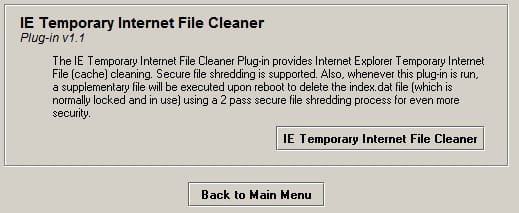
To delete the main index.dat file run the program and from the main window choose "Settings" then "Go to plugins"

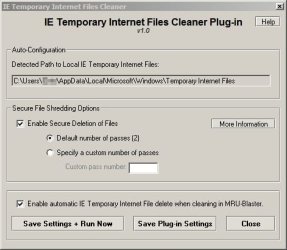
On the "temporary internet file cleaner menu" you'll find options to select file deletion and to run now.

If you choose to run now - the index.dat file will be deleted on reboot.

If you wish to remove the index.dat file for privacy reasons be aware that copies of the file will exist in volume shadow copies.

Note: Be careful what you're selecting in the main settings window as it will delete items that you might not want to be deleted.
 

Attachments

  • MRU-Blaster Plug-in Control Panel.jpg
    MRU-Blaster Plug-in Control Panel.jpg
    16.9 KB · Views: 15
  • Temporary Internet Files Cleaner.jpg
    Temporary Internet Files Cleaner.jpg
    27 KB · Views: 16
Last edited:

My Computer

Computer type
Laptop
Computer Manufacturer/Model Number
ASUS
OS
Microsoft Windows 7 Home Premium 64-bit 7601 Multiprocessor Free Service Pack 1
CPU
AMD C-60 APU with Radeon(tm) HD Graphics
Motherboard
ASUSTeK COMPUTER INC. X501U
Memory
4.00 GB
Graphics Card(s)
AMD Radeon HD 6290 Graphics
Sound Card
(1) AMD High Definition Audio Device (2) Realtek High Defi
Screen Resolution
1366 x 768 x 32 bits (4294967296 colors) @ 60 Hz
Hard Drives
Hitachi HTS545050A7E380 SATA Disk Device
Antivirus
Comodo CIS & FW, SecureAplus App Whitelisting, Threatfire
Browser
Cyberfox 64bit, Opera 64bit, Airfox
Other Info
Spy-The-Spy, HitmanPro.Alert, Norton Connect Safe, MJRegWatcher, BitDefender TrafficLight, Voodoo Shield, Zemana AntiMalware
Edit: I've been had. It looks like someone here just bumped a necro-post.
Oh well. if anyone sees this in the future maybe it will help them.

Before I make my point, I'd like to point out that I've ALWAYS been told IE is a terribly insecure browser, I see many users with viruses who use IE as their primary browser, and from my experience it's always the slowest. I personally prefer Google Chrome, but I've always heard Firefox and Opera have good security- I can't vouch for that, but I would stay clean from IE personally.

This is just speculation- but maybe it will work for you:

Try disabling UAC. I've always been able to run batch files on boot up without any nag prompts when i have UAC disabled, this may make your system more vulnerable to viruses though. You can disable it in User Account Controls.

Perhaps taking ownership of the folder containing the said file would prevent the nag prompt.

To do this:
You'll want to take ownership of the parent folder of folder index.dat is located within, according to you that's:
"C:\Users\[username]\AppData\Local\Microsoft\Windows\Temporary Internet Files\Low\Content.IE5"
Locate Content.IE5 -> Right Click -> Properties -> Security (tab) ->Advanced -> Owner (tab) -> Edit (Button) ->

If your username is available from the list, click it and hit apply, otherwise click "Other users or groups" and type in your username.

You should now get a message that says if you took ownership of the file to close and reopen properties, so do that. Close it and right-click properties on the folder again.

Properties-> Security(tab) -> Advanced -> Change Permissions -> Click your username (Not Administrator unless it is the actual built-in administrator account) -> Uncheck "Include inheritable permissions from this objects parent" -> Remove -> Edit ->

It's really your choice what you set, but you want to make sure "delete" is checked on allow, and NOT checked on deny, furthermore, make sure "apply to" has any setting containing "files", as that will still allow you to delete files contained within this folder, manually or through batch script, or any other way. or at least, I think it should.

If you do try this, I'd love to hear your results, unfortunately i don't appear to have the path specified on my machine (perhaps due to a lack of internet explorer updates.) so I cannot test it myself. If it as a matter of permissions and not a matter of "In use" this should solve the problem.
 

My Computer

Computer type
Laptop
Computer Manufacturer/Model Number
Acer
OS
Windows 7
CPU
Intel i7-3632QM 2.2GHz
Memory
6GB DDR3
Graphics Card(s)
Nvidia GeForce GT 640M 2GB
Hard Drives
500GB HDD
Antivirus
N/A
Browser
Chrome
Back
Top