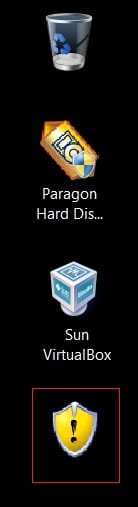
If, like me, you're the kind of person who can't pass a picture hanging wonkily without wanting to straighten it, you may find the Win7 icon overlays unappealing. I dealt with the ugly shortcut arrow easily with Option Two of Brink's typically expert tutorial at http://www.sevenforums.com/tutorials/3606-shortcut-arrow-change-remove-restore.html.
The UAC shield was more problematic. The solutions I found were either too technical for me - sledgehammers to crack nuts - or didn't work or turned up other issues. So I gave up. Then, out of the blue, I thought of creating a shortcut to the program's folder location and replacing the resulting folder icon with something more appropriate from imageres.dll or SHELL32.dll, or the original from the program's .exe file. The result requires two clicks instead of one, but it's only a mallet to crack the aforesaid nut.
I don't claim this as an expert suggestion, but it may be useful to someone who thinks a prettier desktop is worth a little extra effort.
The UAC shield was more problematic. The solutions I found were either too technical for me - sledgehammers to crack nuts - or didn't work or turned up other issues. So I gave up. Then, out of the blue, I thought of creating a shortcut to the program's folder location and replacing the resulting folder icon with something more appropriate from imageres.dll or SHELL32.dll, or the original from the program's .exe file. The result requires two clicks instead of one, but it's only a mallet to crack the aforesaid nut.
I don't claim this as an expert suggestion, but it may be useful to someone who thinks a prettier desktop is worth a little extra effort.
Last edited:
My Computer
At a glance
Windows 7 Home Premium 64-bit, Version 6.1, B...
- Computer Manufacturer/Model Number
- Sony Vaio NW-20SF - all following items as manufacturer installed
- OS
- Windows 7 Home Premium 64-bit, Version 6.1, Build 7600
- Mouse
- Logitech V450 Laser
- Internet Speed
- 6 Mbps
- Other Info
- Samsung N150 Plus netbook (2Gb RAM upgrade) for travelling