Renaming Downloaded Msstyles

CorneliusM

Religiously Free
Power User
Local time
12:17 AM
Messages
120
Location
Edinburgh
Hi guys and gals,
I've got a few downloaded msstyle themes for Windows 7, It has been baffling me how to copy one msstyle, edit and use it with a different name.
When I rename the .msstyle and .theme to what I want and apply it, it still goes by the original name. I have to apply a different theme before using the original theme I edited.
I know some of you are experts in this but, I'm not I just got comfortable with changing the aero glass background and I haven't had much time to become acquainted with anything more than that.
 

My Computer

Computer Manufacturer/Model Number
Hp Compaq CQ56 156SA
OS
windows 7 Home Premium 64 Bit
CPU
AMD V140
Memory
2GB
Graphics Card(s)
ATI Mobility Radeon HD 4250
Sound Card
Realtek
Monitor(s) Displays
Generic
Screen Resolution
1366 x 768
Hard Drives
Hitachi
Mouse
Wireless LG
Internet Speed
Finger-licking good
Other Info
Windows 7 Home Premium Pre-Installed.
Old Machine: HP Pavilion DV6 1120sa (R.I.P)

My Computer

Computer Manufacturer/Model Number
HP M9077c
OS
Windows 7 Home Premium 64bit
CPU
Intel(R)Core(TM)2 quad [email protected] 2.39GHz
Motherboard
ASUSeK
Memory
6GB DDR2 6400
Graphics Card(s)
GeForce 8500/512MB
Sound Card
Realtek High Def Audio
Monitor(s) Displays
HP w2408 LCD 24" widescreen
Screen Resolution
1920x1200
Cooling
6 pack of Bud
Keyboard
MS wireless Inteli
Mouse
MS wireless Inteli
Hi guys and gals,
When I rename the .msstyle and .theme to what I want and apply it, it still goes by the original name. I have to apply a different theme before using the original theme I edited.
I know some of you are experts in this .......

Hi, CorneliusM,
I,m absolutely not an expert ~~~ :D
Did you follow the steps to rename the themes?

Assume that theme be renamed as 'AaeroA':

STEP ONE:
Rename all folders and files of that theme as the following example:
1.png


STEP TWO:
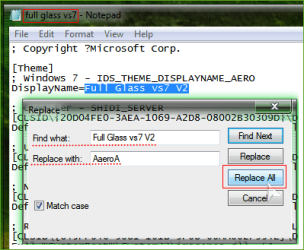
1. Open the original ( take 'full glass vs7 v2' as example ).theme file with notepad,
2. Select Edit >> choose Replace >> then follow image underneath >> when done,
save file as 'AaeroA.theme'.
2.png

Hope it helps,
 
Last edited:

My Computer

OS
Server 2008 R2 SP1, Win7 x64 Pro SP1
CPU
Intel Core 2 Duo E6700 @3.3GHz
Motherboard
ASUS P5W DH DELUXE
Memory
Transcend DDRII 800 4GB (2 x 2GB )
Graphics Card(s)
GeForce 7950GX2
Sound Card
Realtek ALC882M Integrated on board
Monitor(s) Displays
ACER AL2723 27" LCD
Screen Resolution
1920x1200
Hard Drives
WD 6401 AALS 640G x 1
Seagate 160 GB (Barracuda 7200.7) x 2
PSU
Zippy PSL-6720P(G1)720W
Case
Thermaltake Kandalf VA9000SWA
Cooling
Zalman CNPS9500
Keyboard
Standard
Mouse
Standard
Internet Speed
10M, Cable
Other Info
Above is one of my desktops.
Hi guys and gals,
When I rename the .msstyle and .theme to what I want and apply it, it still goes by the original name. I have to apply a different theme before using the original theme I edited.
I know some of you are experts in this .......

Hi, CorneliusM,
I,m absolutely not an expert ~~~ :D
Did you follow the steps to rename the themes?

Assume that theme be renamed as 'AaeroA':

STEP ONE:
Rename all folders and files of that theme as the following example:
View attachment 84432


STEP TWO:
1. Open the original ( take 'full glass vs7 v2' as example ).theme file with notepad,
2. Select Edit >> choose Replace >> then follow image underneath >> when done,
save file as 'AaeroA.theme'.
View attachment 84433

Hope it helps,

Cheers for that dude, not tried that before but, I'll give it a go today at some point :)

EDIT: Is that the Lucid theme you're using?
 

My Computer

Computer Manufacturer/Model Number
Hp Compaq CQ56 156SA
OS
windows 7 Home Premium 64 Bit
CPU
AMD V140
Memory
2GB
Graphics Card(s)
ATI Mobility Radeon HD 4250
Sound Card
Realtek
Monitor(s) Displays
Generic
Screen Resolution
1366 x 768
Hard Drives
Hitachi
Mouse
Wireless LG
Internet Speed
Finger-licking good
Other Info
Windows 7 Home Premium Pre-Installed.
Old Machine: HP Pavilion DV6 1120sa (R.I.P)
Hi guys and gals,
When I rename the .msstyle and .theme to what I want and apply it, it still goes by the original name. I have to apply a different theme before using the original theme I edited.
I know some of you are experts in this .......

Hi, CorneliusM,
I,m absolutely not an expert ~~~ :D
Did you follow the steps to rename the themes?

Assume that theme be renamed as 'AaeroA':

STEP ONE:
Rename all folders and files of that theme as the following example:
View attachment 84432


STEP TWO:
1. Open the original ( take 'full glass vs7 v2' as example ).theme file with notepad,
2. Select Edit >> choose Replace >> then follow image underneath >> when done,
save file as 'AaeroA.theme'.
View attachment 84433

Hope it helps,

Hey man thanks for that, I just tried it and it worked a bloody charm :) now I can create my aero theme by name so it doesn't double up in the Personalization :) cheers!!!
 

My Computer

Computer Manufacturer/Model Number
Hp Compaq CQ56 156SA
OS
windows 7 Home Premium 64 Bit
CPU
AMD V140
Memory
2GB
Graphics Card(s)
ATI Mobility Radeon HD 4250
Sound Card
Realtek
Monitor(s) Displays
Generic
Screen Resolution
1366 x 768
Hard Drives
Hitachi
Mouse
Wireless LG
Internet Speed
Finger-licking good
Other Info
Windows 7 Home Premium Pre-Installed.
Old Machine: HP Pavilion DV6 1120sa (R.I.P)
CorneliusM said:
Hey man thanks for that, I just tried it and it worked a bloody charm :) now I can create my aero theme by name so it doesn't double up in the Personalization :) cheers!!!

Glad to learn that you got it solved! :D
 

My Computer

OS
Server 2008 R2 SP1, Win7 x64 Pro SP1
CPU
Intel Core 2 Duo E6700 @3.3GHz
Motherboard
ASUS P5W DH DELUXE
Memory
Transcend DDRII 800 4GB (2 x 2GB )
Graphics Card(s)
GeForce 7950GX2
Sound Card
Realtek ALC882M Integrated on board
Monitor(s) Displays
ACER AL2723 27" LCD
Screen Resolution
1920x1200
Hard Drives
WD 6401 AALS 640G x 1
Seagate 160 GB (Barracuda 7200.7) x 2
PSU
Zippy PSL-6720P(G1)720W
Case
Thermaltake Kandalf VA9000SWA
Cooling
Zalman CNPS9500
Keyboard
Standard
Mouse
Standard
Internet Speed
10M, Cable
Other Info
Above is one of my desktops.
CorneliusM said:
Hey man thanks for that, I just tried it and it worked a bloody charm :) now I can create my aero theme by name so it doesn't double up in the Personalization :) cheers!!!

Glad to learn that you got it solved! :D

Cheers, It's been a big help I've seen some say to just edit the folders and msstyles themselves but what you said has helped me big time especially when editing someone else's theme, so I can rename it and users get a choice rather than an overwritten copy :)
 

My Computer

Computer Manufacturer/Model Number
Hp Compaq CQ56 156SA
OS
windows 7 Home Premium 64 Bit
CPU
AMD V140
Memory
2GB
Graphics Card(s)
ATI Mobility Radeon HD 4250
Sound Card
Realtek
Monitor(s) Displays
Generic
Screen Resolution
1366 x 768
Hard Drives
Hitachi
Mouse
Wireless LG
Internet Speed
Finger-licking good
Other Info
Windows 7 Home Premium Pre-Installed.
Old Machine: HP Pavilion DV6 1120sa (R.I.P)
Attachments

  • capture2.PNG
    capture2.PNG
    229.4 KB · Views: 65

My Computer

Computer Manufacturer/Model Number
Hp Compaq CQ56 156SA
OS
windows 7 Home Premium 64 Bit
CPU
AMD V140
Memory
2GB
Graphics Card(s)
ATI Mobility Radeon HD 4250
Sound Card
Realtek
Monitor(s) Displays
Generic
Screen Resolution
1366 x 768
Hard Drives
Hitachi
Mouse
Wireless LG
Internet Speed
Finger-licking good
Other Info
Windows 7 Home Premium Pre-Installed.
Old Machine: HP Pavilion DV6 1120sa (R.I.P)
Back
Top