Repair and restore Win 7 Home Premium USB locking up!

brgarcia1376

New member
Local time
5:24 PM
Messages
5
Hello again I am the one with the Sony Vaio that the guy kicked off the ottoman mid reset, well I created a repair and restore USB drive that finally booted the computer. Well, it started the Vaio Care Rescue, and I got to the section that is asking me to select the rescue type (Easy or Custom rescue) but it has now frozen, and I am unable to do anything. I don't want to go through what I have the past couple of days trying to find the correct software to get me this far. Can someone please tell me what I should do? I am afraid to try and reboot it again and fry the thing. TIA
 

Attachments

  • Vaio screen frozen 1.9mb.jpg
    Vaio screen frozen 1.9mb.jpg
    1.2 MB · Views: 0

My Computers My Computers

  • At a glance

    windows 7 home premiumverious
    Computer type
    Laptop
    Computer Manufacturer/Model Number
    verious
    OS
    windows 7 home premium
    CPU
    verious
    Motherboard
    marious
  • Computer type
    PC/Desktop
Have you got an external storage device attached?

which sony vaio is it ? there are many
 

My Computers My Computers

  • At a glance

    7 X64i5 84002x8gb 3200mhz
    Computer type
    PC/Desktop
    OS
    7 X64
    CPU
    i5 8400
    Motherboard
    gigabyte b365m ds3h
    Memory
    2x8gb 3200mhz
    Hard Drives
    various
    PSU
    pure power 11 400w cm
    Case
    Coolermaster
    Cooling
    cryorig m9i
  • At a glance

    7x64g54008gb ddr4 2400
    Computer type
    PC/Desktop
    OS
    7x64
    CPU
    g5400
    Motherboard
    ga b365m ds3h
    Memory
    8gb ddr4 2400
    PSU
    xfx pro 450w
Repair and Restore Win 7, Problem with reset, now what?

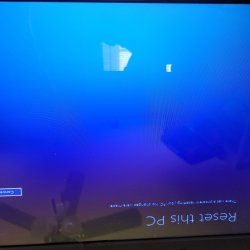
Ok I got up this morning after fighting with this stupid thing until 4 am and it states there was a problem with the reset, picture attached. With this said I should now be able to try to download 7 or upgrade it to 10 correct? I am about to hit cancel and see if it boots normally, but I will not do anything else until I hear back from you. Thank you so much for your help with this craziness! Sorry I forgot to add that this is a PCG-71911L, since I posted this, I have tried to download the Win 10 to the computer, but it says that I am unable to do so, and I am sorry I forgot to take a picture of the screen.
 

Attachments

  • 20250203_101542.jpg
    20250203_101542.jpg
    706 KB · Views: 1
Last edited:

My Computers My Computers

  • At a glance

    windows 7 home premiumverious
    Computer type
    Laptop
    Computer Manufacturer/Model Number
    verious
    OS
    windows 7 home premium
    CPU
    verious
    Motherboard
    marious
  • Computer type
    PC/Desktop
I would just perform clean installation. The last time I used one of those 'system restore' partition deals on a Sony Vaio from 2011-ish it took like 8 hours! Same with a couple Dells. And it will still be lacking all updates since that PC was new.

But if you truly need some of the data on there, then you are limited. Best case would be to boot that PC from a bootable DVD or USB containing Linux "Live" distro that will allow you to locate those files and copy them over to another media. Or perhaps even create a new partition on the current hard drive, at the end, large enough to save your data and copy it over. Then make sure, when you do clean install of Windows, you do NOT install Windows to that partition. Another option, remove the storage drive and install into another PC as 2nd storage device (not as boot/system drive) and get the files that way.

Sony usually offers most of the Sony applications (if you wanted them) for download from the support and downloads portal. Drivers won't be a problem you can obtain either from Snappy Driver Installer (SDI Tool) or other sources.
 

My Computer My Computer

At a glance

Windows XP
OS
Windows XP
Back
Top