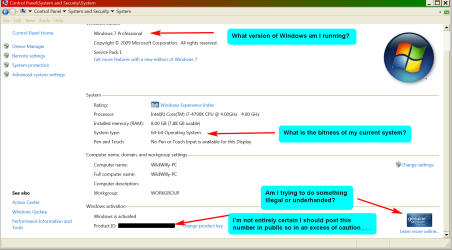
Let's say I have W7 installed on C:.
Let's say I have my original W7 installation DVD & my activation key.
Let's say I copy the DVD to N:\W7InstallDVD. Think drag'n'drop from the DVD to the HDD.
Let's say I remove the DVD from the drive.
Let's say I go into Windows Explorer, navigate to directory N:\W7InstallDVD.
Let's say I execute setup.exe via run as administrator.
Will I be able to do a repair install without putting the DVD in the drive?
My reason for this. I do need to do a repair install, having eliminated the things I should try first. But it's giving me a catch-22 pair of compatibility errors saying my system is not 64-bit when it is. I found this thread https://www.sevenforums.com/general...install-dvd-contains-32bit-64bit-version.html that says the autorun.inf on my 64-bit installation DVD is for 32-bt W7. I originally installed this 64-bit W7 by booting from this DVD. But the repair install claims my system is not 64-bit even though Control Panel says it is. If that other thread is correct (it's old but it may still be correct), then somehow the autorun.inf in the root directory of the installation DVD is for 32-bit W7. So I thought I would copy the DVD to my hard drive & then I could replace autorun.inf with the 64-bit version given in that other thread.
But there's multiple boots during this process, or so I am led to believe by the tutorial on repair install I found elsewhere here. If I don't have the installation DVD in the drive for those reboots, will the repair install proceed anyway?
Alternatively, if running install.exe from N: with the replaced autorun.inf gets me past the compatibility check, will the reboots work from the DVD? Put another way, I'm thinking I can run the first segment of the repair install from my hard drive but let the reboots go from the DVD.
Or am I dreaming of making endless problems for myself? If I can't get this to work, there won't be any recourse for me but to do a full install by wiping C:. Not an attractive prospect.
Let's say I have my original W7 installation DVD & my activation key.
Let's say I copy the DVD to N:\W7InstallDVD. Think drag'n'drop from the DVD to the HDD.
Let's say I remove the DVD from the drive.
Let's say I go into Windows Explorer, navigate to directory N:\W7InstallDVD.
Let's say I execute setup.exe via run as administrator.
Will I be able to do a repair install without putting the DVD in the drive?
My reason for this. I do need to do a repair install, having eliminated the things I should try first. But it's giving me a catch-22 pair of compatibility errors saying my system is not 64-bit when it is. I found this thread https://www.sevenforums.com/general...install-dvd-contains-32bit-64bit-version.html that says the autorun.inf on my 64-bit installation DVD is for 32-bt W7. I originally installed this 64-bit W7 by booting from this DVD. But the repair install claims my system is not 64-bit even though Control Panel says it is. If that other thread is correct (it's old but it may still be correct), then somehow the autorun.inf in the root directory of the installation DVD is for 32-bit W7. So I thought I would copy the DVD to my hard drive & then I could replace autorun.inf with the 64-bit version given in that other thread.
But there's multiple boots during this process, or so I am led to believe by the tutorial on repair install I found elsewhere here. If I don't have the installation DVD in the drive for those reboots, will the repair install proceed anyway?
Alternatively, if running install.exe from N: with the replaced autorun.inf gets me past the compatibility check, will the reboots work from the DVD? Put another way, I'm thinking I can run the first segment of the repair install from my hard drive but let the reboots go from the DVD.
Or am I dreaming of making endless problems for myself? If I can't get this to work, there won't be any recourse for me but to do a full install by wiping C:. Not an attractive prospect.
My Computer
At a glance
Windows 7 Professional 64-bitIntel Core i7-4790K Quad CPU @ 4.00 GHz2x4G DDR3 1600MHz DIMMsIntel HD Graphics 4600 on mobo; NVidia GeForc...
- Computer type
- PC/Desktop
- Computer Manufacturer/Model Number
- ASUS (assembled myself)
- OS
- Windows 7 Professional 64-bit
- CPU
- Intel Core i7-4790K Quad CPU @ 4.00 GHz
- Motherboard
- ASUS Z97-AR, Intel Z97 Express chipset, ATX form factor
- Memory
- 2x4G DDR3 1600MHz DIMMs
- Graphics Card(s)
- Intel HD Graphics 4600 on mobo; NVidia GeForce GT 710 PCI-E
- Sound Card
- Realtek High Definition Audio, integrated on mobo
- Monitor(s) Displays
- Dell SE2417HGX, 20.5"x11.5" viewable area; 32" Toshiba HDTV
- Screen Resolution
- 1920 x 1080 @ 60 Hz, 32-bit color depth
- Hard Drives
- Western Digital 500G SATA
Seagate 150G SATA
2 x Seagate 6T SATA
2 x Seagate 18T SATA
- PSU
- EVGA 500B (500 Watts)
- Case
- NZXT H230 mid-tower
- Cooling
- CPU fan, PSU fan, 2 case fans, NVidia fan
- Keyboard
- Perixx 513H
- Mouse
- Touch pad integrated into keyboard
- Internet Speed
- Intel Ethernet Conn(2)I218-V, on mobo, ISP=cableTV 400Mbps
- Antivirus
- Comodo
- Browser
- Firefox
- Other Info
- Ext'l DVD rec: LG HL-DT-ST DVDRAM GP10NB20 USB
Monitor conn to VideoPort via HDMI-to-VideoPort adap
Realtek ALC892 8-channel High Definition Audio CODEC featuring Crystal Sound 2
Audio conn to surr recv via 25' optical S/PDIF TOSLINK audio cable
SYSINFO: 11 NIC ports but only 1 actively conn via DHCP to ISP
ISP bundled w/ cable TV+cell, claims 400Mbps,
but really 50 million bytes/sec

 meets the minimum requirements for free disk space, but for best results we recommend at least 16 gigabytes (GB) of free disk space before installing. Installing Windows with minimal disk space available can reduce performance. Try using Disk Cleanup, uninstalling old programs, or moving files to another location such as a CD, DVD, or external hard drive.