
Solved Repair install from HDD

WildWilly

New member
Power User
Local time
11:07 AM
Messages
96
Location
Cincinnati
Let's say I have W7 installed on C:.
Let's say I have my original W7 installation DVD & my activation key.
Let's say I copy the DVD to N:\W7InstallDVD. Think drag'n'drop from the DVD to the HDD.
Let's say I remove the DVD from the drive.
Let's say I go into Windows Explorer, navigate to directory N:\W7InstallDVD.
Let's say I execute setup.exe via run as administrator.

Will I be able to do a repair install without putting the DVD in the drive?

My reason for this. I do need to do a repair install, having eliminated the things I should try first. But it's giving me a catch-22 pair of compatibility errors saying my system is not 64-bit when it is. I found this thread https://www.sevenforums.com/general...install-dvd-contains-32bit-64bit-version.html that says the autorun.inf on my 64-bit installation DVD is for 32-bt W7. I originally installed this 64-bit W7 by booting from this DVD. But the repair install claims my system is not 64-bit even though Control Panel says it is. If that other thread is correct (it's old but it may still be correct), then somehow the autorun.inf in the root directory of the installation DVD is for 32-bit W7. So I thought I would copy the DVD to my hard drive & then I could replace autorun.inf with the 64-bit version given in that other thread.

But there's multiple boots during this process, or so I am led to believe by the tutorial on repair install I found elsewhere here. If I don't have the installation DVD in the drive for those reboots, will the repair install proceed anyway?

Alternatively, if running install.exe from N: with the replaced autorun.inf gets me past the compatibility check, will the reboots work from the DVD? Put another way, I'm thinking I can run the first segment of the repair install from my hard drive but let the reboots go from the DVD.

Or am I dreaming of making endless problems for myself? If I can't get this to work, there won't be any recourse for me but to do a full install by wiping C:. Not an attractive prospect.
 

My Computer

Computer type
PC/Desktop
Computer Manufacturer/Model Number
ASUS (assembled myself)
OS
Windows 7 Professional 64-bit
CPU
Intel Core i7-4790K Quad CPU @ 4.00 GHz
Motherboard
ASUS Z97-AR, Intel Z97 Express chipset, ATX form factor
Memory
2x4G DDR3 1600MHz DIMMs
Graphics Card(s)
Intel HD Graphics 4600 on mobo; NVidia GeForce GT 710 PCI-E
Sound Card
Realtek High Definition Audio, integrated on mobo
Monitor(s) Displays
Dell SE2417HGX, 20.5"x11.5" viewable area; 32" Toshiba HDTV
Screen Resolution
1920 x 1080 @ 60 Hz, 32-bit color depth
Hard Drives
Western Digital 500G SATA
Seagate 150G SATA
2 x Seagate 6T SATA
2 x Seagate 18T SATA
PSU
EVGA 500B (500 Watts)
Case
NZXT H230 mid-tower
Cooling
CPU fan, PSU fan, 2 case fans, NVidia fan
Keyboard
Perixx 513H
Mouse
Touch pad integrated into keyboard
Internet Speed
Intel Ethernet Conn(2)I218-V, on mobo, ISP=cableTV 400Mbps
Antivirus
Comodo
Browser
Firefox
Other Info
Ext'l DVD rec: LG HL-DT-ST DVDRAM GP10NB20 USB
Monitor conn to VideoPort via HDMI-to-VideoPort adap
Realtek ALC892 8-channel High Definition Audio CODEC featuring Crystal Sound 2
Audio conn to surr recv via 25' optical S/PDIF TOSLINK audio cable
SYSINFO: 11 NIC ports but only 1 actively conn via DHCP to ISP
ISP bundled w/ cable TV+cell, claims 400Mbps,
but really 50 million bytes/sec
If you copy all files and folders from the DVD to a folder and run setup it will do a repair install.

To find out what version is installed, open Explorer and right click on Computer - Properties - System
or
Control Panel\All Control Panel Items\System
 

My Computers

System One System Two

  • Computer type
    PC/Desktop
    Computer Manufacturer/Model Number
    custom build
    OS
    Windows 7 HP 64
    CPU
    i5 6600K - 800MHz to 4200MHz
    Motherboard
    GA-Z170-HD3P
    Memory
    4+4G GSkill DDR4 3000
    Graphics Card(s)
    IG - Intel 530
    Monitor(s) Displays
    Samsung 226BW
    Screen Resolution
    1680x1050
    Hard Drives
    (1) -1 SM951 – 128GB M.2 AHCI PCIe SSD drive for Windows 7 and Lubuntu
    (2) -1 WD SATA 3 - 1T for Data
    (3) -1 WD SATA 3 - 1T for backup
    PSU
    Thermaltake 450W TR2 gold
    Keyboard
    Old and good Chicony mechanical keyboard
    Mouse
    Logitech mX performance - 9 buttons (had to disable some)
    Internet Speed
    500Mb/s
    Browser
    Firefox 64
    Other Info
    TinyWall firewall
  • Computer type
    Laptop
    System Manufacturer/Model Number
    Asus Q550LF
    OS
    Windows 7 Pro
    CPU
    i7-4500U 800MHz to 3.0GHz
    Motherboard
    Asus Q550LF
    Memory
    (4+4)G DDR3 1600
    Graphics Card(s)
    IG intel 4400 + NVIDIA GeForce GT 745M
    Sound Card
    Realtek
    Monitor(s) Displays
    LG Display LP156WF4-SPH1
    Screen Resolution
    1920 x 1080
    Hard Drives
    BX500 120G SSD for Windows and programs +
    1T HDD for data
    Internet Speed
    500 Mb/s
    Browser
    Firefox
    Other Info
    TinyWall firewall
Megahertz07, thank you very much for responding. What with W7 being (allegedly) dead, I wasn't sure anybody would notice my post.

I am happy to hear confirmation of my intuition that I can just execute the repair install from a HDD folder, as long as that folder is not within the W7 boot partition. But what about reboots? Are there not multiple reboots during the repair install process? Brink's tutorial hints at that being the case. If I leave the DVD drive empty, what will the reboots reboot to? Will the repair install simply resume? Does the repair install just know it's been interrupted by a planned reboot? Does it leave some sort of bread crumbs lying about so that it knows to resume the repair install? Or has it put enough things into the partition under repair before the first planned reboot that rebooting to that partition simply resumes the repair install? I did a from-scratch W7 install from this DVD but I've never done a repair install before. So I don't really know what it looks like outside of Brink's typically detailed tutorial, which I have written on a piece of paper so I can refer to it as this goes along.

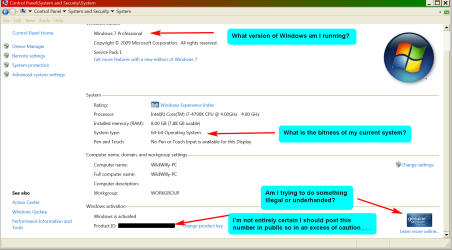
As for what Control Panel tells me, this is a Genuine Microsoft W7 Pro with SP1 (and several years' worth of automatically pushed maintenance from MS, until that stopped this past January). System Type says this is a 64-bit Operating System. It's most curious that the compatibility check failed early in the process when I tried to run a repair install from the very same DVD I used to install this system in the first place. Something isn't properly detecting that I am running W7 Pro 64-bit & my "upgrade" target is also W7 Pro 64-bit, which should be a routine step that says yeah, OK, this is good, let this guy continue. Hence my extraordinary evasive maneuvers.
 

My Computer

Computer type
PC/Desktop
Computer Manufacturer/Model Number
ASUS (assembled myself)
OS
Windows 7 Professional 64-bit
CPU
Intel Core i7-4790K Quad CPU @ 4.00 GHz
Motherboard
ASUS Z97-AR, Intel Z97 Express chipset, ATX form factor
Memory
2x4G DDR3 1600MHz DIMMs
Graphics Card(s)
Intel HD Graphics 4600 on mobo; NVidia GeForce GT 710 PCI-E
Sound Card
Realtek High Definition Audio, integrated on mobo
Monitor(s) Displays
Dell SE2417HGX, 20.5"x11.5" viewable area; 32" Toshiba HDTV
Screen Resolution
1920 x 1080 @ 60 Hz, 32-bit color depth
Hard Drives
Western Digital 500G SATA
Seagate 150G SATA
2 x Seagate 6T SATA
2 x Seagate 18T SATA
PSU
EVGA 500B (500 Watts)
Case
NZXT H230 mid-tower
Cooling
CPU fan, PSU fan, 2 case fans, NVidia fan
Keyboard
Perixx 513H
Mouse
Touch pad integrated into keyboard
Internet Speed
Intel Ethernet Conn(2)I218-V, on mobo, ISP=cableTV 400Mbps
Antivirus
Comodo
Browser
Firefox
Other Info
Ext'l DVD rec: LG HL-DT-ST DVDRAM GP10NB20 USB
Monitor conn to VideoPort via HDMI-to-VideoPort adap
Realtek ALC892 8-channel High Definition Audio CODEC featuring Crystal Sound 2
Audio conn to surr recv via 25' optical S/PDIF TOSLINK audio cable
SYSINFO: 11 NIC ports but only 1 actively conn via DHCP to ISP
ISP bundled w/ cable TV+cell, claims 400Mbps,
but really 50 million bytes/sec
When you run setup (from a running Windows) it will begin a "upgrade Install" with same version (repair install).
- It will copy and expand the installation files to the computer and reboot.
- It will boot from the main drive. Installation files (on the drive or DVD) are not used. It will begin to reinstall Windows keeping programs data and some trash.
- As a new Windows installation, it will need to be updated. To avoid telemetry and other useless updates, I suggest you use Simplix
 

My Computers

System One System Two

  • Computer type
    PC/Desktop
    Computer Manufacturer/Model Number
    custom build
    OS
    Windows 7 HP 64
    CPU
    i5 6600K - 800MHz to 4200MHz
    Motherboard
    GA-Z170-HD3P
    Memory
    4+4G GSkill DDR4 3000
    Graphics Card(s)
    IG - Intel 530
    Monitor(s) Displays
    Samsung 226BW
    Screen Resolution
    1680x1050
    Hard Drives
    (1) -1 SM951 – 128GB M.2 AHCI PCIe SSD drive for Windows 7 and Lubuntu
    (2) -1 WD SATA 3 - 1T for Data
    (3) -1 WD SATA 3 - 1T for backup
    PSU
    Thermaltake 450W TR2 gold
    Keyboard
    Old and good Chicony mechanical keyboard
    Mouse
    Logitech mX performance - 9 buttons (had to disable some)
    Internet Speed
    500Mb/s
    Browser
    Firefox 64
    Other Info
    TinyWall firewall
  • Computer type
    Laptop
    System Manufacturer/Model Number
    Asus Q550LF
    OS
    Windows 7 Pro
    CPU
    i7-4500U 800MHz to 3.0GHz
    Motherboard
    Asus Q550LF
    Memory
    (4+4)G DDR3 1600
    Graphics Card(s)
    IG intel 4400 + NVIDIA GeForce GT 745M
    Sound Card
    Realtek
    Monitor(s) Displays
    LG Display LP156WF4-SPH1
    Screen Resolution
    1920 x 1080
    Hard Drives
    BX500 120G SSD for Windows and programs +
    1T HDD for data
    Internet Speed
    500 Mb/s
    Browser
    Firefox
    Other Info
    TinyWall firewall
Excellent! Thank you!
 

My Computer

Computer type
PC/Desktop
Computer Manufacturer/Model Number
ASUS (assembled myself)
OS
Windows 7 Professional 64-bit
CPU
Intel Core i7-4790K Quad CPU @ 4.00 GHz
Motherboard
ASUS Z97-AR, Intel Z97 Express chipset, ATX form factor
Memory
2x4G DDR3 1600MHz DIMMs
Graphics Card(s)
Intel HD Graphics 4600 on mobo; NVidia GeForce GT 710 PCI-E
Sound Card
Realtek High Definition Audio, integrated on mobo
Monitor(s) Displays
Dell SE2417HGX, 20.5"x11.5" viewable area; 32" Toshiba HDTV
Screen Resolution
1920 x 1080 @ 60 Hz, 32-bit color depth
Hard Drives
Western Digital 500G SATA
Seagate 150G SATA
2 x Seagate 6T SATA
2 x Seagate 18T SATA
PSU
EVGA 500B (500 Watts)
Case
NZXT H230 mid-tower
Cooling
CPU fan, PSU fan, 2 case fans, NVidia fan
Keyboard
Perixx 513H
Mouse
Touch pad integrated into keyboard
Internet Speed
Intel Ethernet Conn(2)I218-V, on mobo, ISP=cableTV 400Mbps
Antivirus
Comodo
Browser
Firefox
Other Info
Ext'l DVD rec: LG HL-DT-ST DVDRAM GP10NB20 USB
Monitor conn to VideoPort via HDMI-to-VideoPort adap
Realtek ALC892 8-channel High Definition Audio CODEC featuring Crystal Sound 2
Audio conn to surr recv via 25' optical S/PDIF TOSLINK audio cable
SYSINFO: 11 NIC ports but only 1 actively conn via DHCP to ISP
ISP bundled w/ cable TV+cell, claims 400Mbps,
but really 50 million bytes/sec
I have tried yet another time to do this repair install. I have my install DVD copied to my hard drive. This is what is in autorun.inf in the root directory of my DVD on my hard drive:

Code:
[AutoRun.Amd64]
open=setup.exe
icon=setup.exe,0

[AutoRun]
open=sources\sperr32.exe x64
icon=sources\sperr32.exe,0
This is what it says in this thread is what you're supposed to have if you have a 64-bit install DVD:

How to detect if a Win7 install DVD contains 32bit or 64bit version? (post #5)

My physical install DVD has what that other thread claims is the 32-bit autorun.inf. Nevertheless I used this DVD to install this system several years ago. And this is what Control Panel says I am running:

attachment.php


(Sorry. I don't think I've inserted the image correctly. I've apparently done both an insert & an attach. No harm done, though, since I got the URL for the inserted image from the attach dialog, so it's the same image, just twice.)

I want to emphasize this point. This is the DVD that I used to install this system.

After the first few minor steps, the repair install offers me a list of operating systems from which to choose. I chose the one near the bottom that read:

Windows 7 Professional x64

That is the right one, right? Despite that, the installation dumps this on my Desktop in an HTML file:

The following issues are preventing Windows from upgrading. Cancel the upgrade, complete each task, and then restart the upgrade to continue.

You can’t upgrade 64-bit Windows to a 32-bit version of Windows. To upgrade, obtain a 64-bit version of the installation disc, or go online to see how to install Windows 7 and keep your files and settings.


32-bit Windows cannot be upgraded to a 64-bit version of Windows. To upgrade, obtain a 32-bit version of the Windows installation disc.


Upgrading Windows will affect the following features:

The Windows partition (C:) meets the minimum requirements for free disk space, but for best results we recommend at least 16 gigabytes (GB) of free disk space before installing. Installing Windows with minimal disk space available can reduce performance. Try using Disk Cleanup, uninstalling old programs, or moving files to another location such as a CD, DVD, or external hard drive.
The first error messsage seems to be acknowledging that I am running a 64-bit system but it's not recognizing my selection of a 64-bit system as the target. The second error message seems to be incorrectly believing I'm running a 32-bit system. It's talking out both sides of its mouth! But it goes on to acknowledge that I am indeed trying to upgrade to a target system that is 64-bits, which contradicts what it said in the first error message. More talking out both sides of its mouth! The final error message is true. I have just under 15G free on my target boot partition. Just a tad under the ideal, but this error message acknowledges that it's enough space nonetheless. If it gets to be critical, I can run CCleaner & remove some junk from the partition.

In the first error message where it says "go online" that is a link to a page at Microsoft. Of course, all the Windows 7 information is no longer available. I would have gotten a 64-bit ISO & figured out how to extract it to my hard drive. But now I'm stuck with this DVD that appears to be a 32-bit DVD even though I installed 64-bit W7 from it.

I feel like I'm trapped in catch-22-land. Is there something I'm doing wrong? Is there something I can fix somewhere in the bowels of my install DVD (which now conveniently resides on my hard drive)? I find these error messages completely ridiculous. They are claiming things that are not only self-contradictory but simply not true. I have to conclude that there is something on this DVD that is making the process believe there's 32-bitness somewhere but I haven't the foggiest idea what that would be.
 

Attachments

  • Control Panel.png
    Control Panel.png
    150.8 KB · Views: 26

My Computer

Computer type
PC/Desktop
Computer Manufacturer/Model Number
ASUS (assembled myself)
OS
Windows 7 Professional 64-bit
CPU
Intel Core i7-4790K Quad CPU @ 4.00 GHz
Motherboard
ASUS Z97-AR, Intel Z97 Express chipset, ATX form factor
Memory
2x4G DDR3 1600MHz DIMMs
Graphics Card(s)
Intel HD Graphics 4600 on mobo; NVidia GeForce GT 710 PCI-E
Sound Card
Realtek High Definition Audio, integrated on mobo
Monitor(s) Displays
Dell SE2417HGX, 20.5"x11.5" viewable area; 32" Toshiba HDTV
Screen Resolution
1920 x 1080 @ 60 Hz, 32-bit color depth
Hard Drives
Western Digital 500G SATA
Seagate 150G SATA
2 x Seagate 6T SATA
2 x Seagate 18T SATA
PSU
EVGA 500B (500 Watts)
Case
NZXT H230 mid-tower
Cooling
CPU fan, PSU fan, 2 case fans, NVidia fan
Keyboard
Perixx 513H
Mouse
Touch pad integrated into keyboard
Internet Speed
Intel Ethernet Conn(2)I218-V, on mobo, ISP=cableTV 400Mbps
Antivirus
Comodo
Browser
Firefox
Other Info
Ext'l DVD rec: LG HL-DT-ST DVDRAM GP10NB20 USB
Monitor conn to VideoPort via HDMI-to-VideoPort adap
Realtek ALC892 8-channel High Definition Audio CODEC featuring Crystal Sound 2
Audio conn to surr recv via 25' optical S/PDIF TOSLINK audio cable
SYSINFO: 11 NIC ports but only 1 actively conn via DHCP to ISP
ISP bundled w/ cable TV+cell, claims 400Mbps,
but really 50 million bytes/sec
I have found this page:

Where to Download Windows 10, 8.1, and 7 ISOs Legally

It contains a link to an ISO download tool. Using that tool, I have launched the download of something they call Windows 7 2018. I have selected Windows 7 Pro 64-bit from the menu inside this tool. This download is in progress as I write this. This will give me an ISO for a 64-bit install disk. At least, that's what I hope & pray. I'll expand that into a directory on my hard drive & try this repair install again with that. I fervently hope this works. Given the date of this ISO, I'm guessing it may include SP1 as well as all the Simplix stuff you've referred to. (I've already downloaded the Simplix executable but it's possible I won't need it.) I'm guessing that once I've run the repair install & it has succeeded (he said with undying optimism), looking at the installed software via Control Panel will show me the KB numbers & dates of all the installed maintenance. That's my theory. Needs to be tested.

Before I found that tool, I found a page at Microsoft that allegedly will give you access to ISOs of various releases of Windows, including W7. But it prompts me for my installation key. I entered the key I used when I installed this W7 years ago. The site said the key was either "invalid or unsupported." Their words. Are all old W7 activation keys no longer supported? Am I going to be up the creek when it comes time to activate my W7 again after the repair works? I guess I'll find out. Why do these things have to be so difficult?
 

My Computer

Computer type
PC/Desktop
Computer Manufacturer/Model Number
ASUS (assembled myself)
OS
Windows 7 Professional 64-bit
CPU
Intel Core i7-4790K Quad CPU @ 4.00 GHz
Motherboard
ASUS Z97-AR, Intel Z97 Express chipset, ATX form factor
Memory
2x4G DDR3 1600MHz DIMMs
Graphics Card(s)
Intel HD Graphics 4600 on mobo; NVidia GeForce GT 710 PCI-E
Sound Card
Realtek High Definition Audio, integrated on mobo
Monitor(s) Displays
Dell SE2417HGX, 20.5"x11.5" viewable area; 32" Toshiba HDTV
Screen Resolution
1920 x 1080 @ 60 Hz, 32-bit color depth
Hard Drives
Western Digital 500G SATA
Seagate 150G SATA
2 x Seagate 6T SATA
2 x Seagate 18T SATA
PSU
EVGA 500B (500 Watts)
Case
NZXT H230 mid-tower
Cooling
CPU fan, PSU fan, 2 case fans, NVidia fan
Keyboard
Perixx 513H
Mouse
Touch pad integrated into keyboard
Internet Speed
Intel Ethernet Conn(2)I218-V, on mobo, ISP=cableTV 400Mbps
Antivirus
Comodo
Browser
Firefox
Other Info
Ext'l DVD rec: LG HL-DT-ST DVDRAM GP10NB20 USB
Monitor conn to VideoPort via HDMI-to-VideoPort adap
Realtek ALC892 8-channel High Definition Audio CODEC featuring Crystal Sound 2
Audio conn to surr recv via 25' optical S/PDIF TOSLINK audio cable
SYSINFO: 11 NIC ports but only 1 actively conn via DHCP to ISP
ISP bundled w/ cable TV+cell, claims 400Mbps,
but really 50 million bytes/sec
Do I have this right? An ISO is just a zip archive? All I need to do is feed the ISO into my unzipper & poof, I'll have a copy of the install DVD on my hard drive without the inconvenience of having to actually burn a DVD? Yes, I have an unzipper that works with large zip archives, although I do believe an ISO is under the magic 4G limit. Yes? No? No. I see this download is going to be 5.5G. OK. No problem.
 

My Computer

Computer type
PC/Desktop
Computer Manufacturer/Model Number
ASUS (assembled myself)
OS
Windows 7 Professional 64-bit
CPU
Intel Core i7-4790K Quad CPU @ 4.00 GHz
Motherboard
ASUS Z97-AR, Intel Z97 Express chipset, ATX form factor
Memory
2x4G DDR3 1600MHz DIMMs
Graphics Card(s)
Intel HD Graphics 4600 on mobo; NVidia GeForce GT 710 PCI-E
Sound Card
Realtek High Definition Audio, integrated on mobo
Monitor(s) Displays
Dell SE2417HGX, 20.5"x11.5" viewable area; 32" Toshiba HDTV
Screen Resolution
1920 x 1080 @ 60 Hz, 32-bit color depth
Hard Drives
Western Digital 500G SATA
Seagate 150G SATA
2 x Seagate 6T SATA
2 x Seagate 18T SATA
PSU
EVGA 500B (500 Watts)
Case
NZXT H230 mid-tower
Cooling
CPU fan, PSU fan, 2 case fans, NVidia fan
Keyboard
Perixx 513H
Mouse
Touch pad integrated into keyboard
Internet Speed
Intel Ethernet Conn(2)I218-V, on mobo, ISP=cableTV 400Mbps
Antivirus
Comodo
Browser
Firefox
Other Info
Ext'l DVD rec: LG HL-DT-ST DVDRAM GP10NB20 USB
Monitor conn to VideoPort via HDMI-to-VideoPort adap
Realtek ALC892 8-channel High Definition Audio CODEC featuring Crystal Sound 2
Audio conn to surr recv via 25' optical S/PDIF TOSLINK audio cable
SYSINFO: 11 NIC ports but only 1 actively conn via DHCP to ISP
ISP bundled w/ cable TV+cell, claims 400Mbps,
but really 50 million bytes/sec
Here's a few random things I've learned in the process of getting things straightened out here.

I think the evidence is pretty strong that I have a 32-bit install DVD. I installed 64-bit Windows 7 Pro off this DVD but it's a 32-bit DVD. It's totally ridiculous that Microsoft would corner its users this way. If you can do an install from scratch, formatting your boot partition, of a 64-bit operating system off this DVD, you should equally be able to do a repair install of that operating system later from the same DVD. But you can't. The compatibility checking is faulty. Of course, at this stage in the W7 lifecycle, we shouldn't be expecting a fix from Microsoft.

Swapping in a 64-bit autorun.inf to replace the 32-bit one doesn't magically turn a 32-bit install DVD into a 64-bit one. I don't know what all is different between the 32-bit & 64-bit install DVDs, but it's more than just the autorun.inf in the root directory. This is the voice of experience speaking here. Incidentally, using the 64-bit autorun.inf with the 32-bit install DVD appears to work the same as the 32-bit autorun.inf. I got the same compatibility catch-22 I described in an earlier post with either autorun.inf.

An ISO is just a zip archive. I've read discussions of ISO images over the years but not paid them too much attention because I've never needed one before now. What I have read always seemed to talk about special software you need to pick selected files out of an ISO. I gather there is a particular International Standards Organization (ISO) document that describes the structure of an ISO, which is supposed to be a sector-oriented image of a DVD. But I have a 64-bit unzipper (PeaZip) that treats the ISO I obtained as if it were just another zip archive. Maybe this helpful app is letting me gloss over some of the subtleties of the concept. But from where I sit, an ISO is just a zip archive. Now, I'll admit I'm not planning on burning this ISO to a DVD. Maybe if I were, I'd be more concerned about some of the finer points. But I'm not as mystified as I was about what an ISO is.

I should elaborate a bit on how I acquired this ISO. I did a Google search for W7 ISO images. The first hit in the results list took me to a page at Microsoft. It said there that sure, we'll give you any ISO you want. Just enter your 25-character activation key. I have mine. Proof of that is in the screenshot of my Control Panel above. When I entered the key, I got an error message that it was either invalid (no, I quadruple checked I had made no typos) or not supported. That last bit doesn't sound good. With W7 now being out of support, will my perfectly valid activation key suddenly not be accepted? I find this a most ominous thought.

The second hit in that search results list took me here:

Where to Download Windows 10, 8.1, and 7 ISOs Legally

If you scroll a bit past half way down that page, you'll come to a section that offers a link to a third-party ISO Download Tool. I went there & got that. It's a 7M executable, no installation required. According to the update history that displays when you first launch this app, it's version 8.45 from 2020/12/12, less than a month old. And it appears to be in very active maintenance if not development. The window is not resizable. I wish it were because there's some text truncated on the right side of the window.

When I first launched this app, I selected the radio button at the top of the list on the right: Windows 7. This begins a dialog that prompts you for a couple of intuitively obvious responses, but it ends with a message that what you're asking for isn't available, but it might be next month.

So then I selected the second radio button on the right. What you can read of the label on that button says Windows 7 but there's more on the line. Unfortunately, it's truncated by this window you can't resize so you are kind of going on a pick & a prayer. The dialog that comes from this second radio button shows a title of Windows 7 (August 2018). Again, you go through some intuitively obvious questions & responses & ultimately, it launches a download of an ISO in Firefox. I selected the Windows 7 Pro 64-bit ISO. At this point you can close the app because the Firefox download manager has taken over. Among the intuitively obvious responses is NOT one that prompts for your 25-character activation key. How convenient. So why does the page at Microsoft insist on you entering your key? That's just a rhetorical question born of frustration. There is no why. It's just Microsoft being Microsoft.

I am hoping this title of Windows 7 (August 2018) means this install DVD image includes all the standard W7 maintenance from recent years, thus shortening my time to get this repaired W7 up to snuff. Our buddy Megahertz07 provided a list of all the relevant fix numbers over here:

MS releases SP2 for Windows 7

I plan to check whether those fixes appear in the repaired system I will be trying to get from my new 64-bit install DVD that now resides on my HDD. If I appear to be missing a bunch of maintenance, I'll run the Simplix thing Megaherz07 has mentioned. I already downloaded that so it's ready to be run. Worst comes to worst, I'll run Windows Update manually one last time. Taking Megahert07's advice, I have disabled Windows Update. It's not like I'll be missing out on anything, what with support ending back in January.

So when will I try yet again to do a repair install? Soon. I'm not committing yet. But I'll post when I've tried again.
 

My Computer

Computer type
PC/Desktop
Computer Manufacturer/Model Number
ASUS (assembled myself)
OS
Windows 7 Professional 64-bit
CPU
Intel Core i7-4790K Quad CPU @ 4.00 GHz
Motherboard
ASUS Z97-AR, Intel Z97 Express chipset, ATX form factor
Memory
2x4G DDR3 1600MHz DIMMs
Graphics Card(s)
Intel HD Graphics 4600 on mobo; NVidia GeForce GT 710 PCI-E
Sound Card
Realtek High Definition Audio, integrated on mobo
Monitor(s) Displays
Dell SE2417HGX, 20.5"x11.5" viewable area; 32" Toshiba HDTV
Screen Resolution
1920 x 1080 @ 60 Hz, 32-bit color depth
Hard Drives
Western Digital 500G SATA
Seagate 150G SATA
2 x Seagate 6T SATA
2 x Seagate 18T SATA
PSU
EVGA 500B (500 Watts)
Case
NZXT H230 mid-tower
Cooling
CPU fan, PSU fan, 2 case fans, NVidia fan
Keyboard
Perixx 513H
Mouse
Touch pad integrated into keyboard
Internet Speed
Intel Ethernet Conn(2)I218-V, on mobo, ISP=cableTV 400Mbps
Antivirus
Comodo
Browser
Firefox
Other Info
Ext'l DVD rec: LG HL-DT-ST DVDRAM GP10NB20 USB
Monitor conn to VideoPort via HDMI-to-VideoPort adap
Realtek ALC892 8-channel High Definition Audio CODEC featuring Crystal Sound 2
Audio conn to surr recv via 25' optical S/PDIF TOSLINK audio cable
SYSINFO: 11 NIC ports but only 1 actively conn via DHCP to ISP
ISP bundled w/ cable TV+cell, claims 400Mbps,
but really 50 million bytes/sec
WildWilly, you're right, a ISO file is a kind of zip file.
Best way to open a iso file and extract all files and folders is using 7zip
You have different iso for win 7 32 bits and 64bits.
Any 64bits iso has all types on it (HB, HP, Pro and ultimate)
Any 32bits iso has all types on it (Starter, HB, HP, Pro and ultimate)
To make a iso universal (all types) all you have to do is to remove \sorces\ei.cfg and it will ask what version you want you want to install. Use ei.cfg removal tool.

On a MB like your ASUS Z97-AR, Windows can be installed in two ways: Legacy-MBR or UEFI-GPT
To install as Legacy-MBR you must boot the installation drive as Legacy
To install as UEFI-GPT you must boot the installation drive as UEFI.

During POST, press F8 to launch the boot menu. You will see two options for the USB drive. USB UEFI (Name) and USB (Name). Select USB UEFI (Name).
Go to install and delete ALL partitions on the SSD till you have one and only one unallocated space and then proceed.

To do a repair install just run setup.exe on the root of the installation DVD or extract all files and folders from a Iso to a folder and run setup.exe

For the updates, my suggestion is to use Simplix
 
Last edited:

My Computers

System One System Two

  • Computer type
    PC/Desktop
    Computer Manufacturer/Model Number
    custom build
    OS
    Windows 7 HP 64
    CPU
    i5 6600K - 800MHz to 4200MHz
    Motherboard
    GA-Z170-HD3P
    Memory
    4+4G GSkill DDR4 3000
    Graphics Card(s)
    IG - Intel 530
    Monitor(s) Displays
    Samsung 226BW
    Screen Resolution
    1680x1050
    Hard Drives
    (1) -1 SM951 – 128GB M.2 AHCI PCIe SSD drive for Windows 7 and Lubuntu
    (2) -1 WD SATA 3 - 1T for Data
    (3) -1 WD SATA 3 - 1T for backup
    PSU
    Thermaltake 450W TR2 gold
    Keyboard
    Old and good Chicony mechanical keyboard
    Mouse
    Logitech mX performance - 9 buttons (had to disable some)
    Internet Speed
    500Mb/s
    Browser
    Firefox 64
    Other Info
    TinyWall firewall
  • Computer type
    Laptop
    System Manufacturer/Model Number
    Asus Q550LF
    OS
    Windows 7 Pro
    CPU
    i7-4500U 800MHz to 3.0GHz
    Motherboard
    Asus Q550LF
    Memory
    (4+4)G DDR3 1600
    Graphics Card(s)
    IG intel 4400 + NVIDIA GeForce GT 745M
    Sound Card
    Realtek
    Monitor(s) Displays
    LG Display LP156WF4-SPH1
    Screen Resolution
    1920 x 1080
    Hard Drives
    BX500 120G SSD for Windows and programs +
    1T HDD for data
    Internet Speed
    500 Mb/s
    Browser
    Firefox
    Other Info
    TinyWall firewall
I'm very happy to see you staying on top of things here, Megahertz07.

> Best way to open a iso file and extract all files and folders is using 7zip

I have PeaZip. It extracted the ISO to a directory tree on my hard drive. I guess the proof of whether it's just as good as 7zip will come when I try the repair install again.

> To make a iso universal (all types) all you have to do is to remove \sorces\ei.cfg and it will ask
> what version you want you want to install. Use ei.cfg removal tool

Interesting. I wonder if this would have gotten me around my compatibility problem. Seems a bit moot now since I have downloaded a 64-bit ISO & I expect I will not need this tool. But I did download this ei.cfg removal tool & read the readme. I may consider using this if my repair install continues to fail.

> On a MB like your ASUS Z97-AR, Windows can be installed in two ways: Legacy-MBR or UEFI-GPT
> To install as Legacy-MBR you must boot the installation drive as Legacy

I believe this must have been what I did back I think it was 8 years ago. Might have even been longer ago than that. The HDD that contains my boot partition is "512G." I put that in quotation marks because Computer Management -> Disk Management talls me the drive capacity is actually 465.76G. I believe that is a Legacy-MBR device.

> To install as UEFI-GPT you must boot the installation drive as UEFI.

After using the system for a few years, I got myself a couple of 6T HDDs. One of them is where I've put my unpacked install disk images. I've got the one for the physical install DVD I've had for years, and I've got the one I downloaded within the past couple of days. They're both unpacked there, in separate directory trees, of course. In any case, I had to do some special things with UEFI to make the 6T HDDs accessible. So I know about UEFI (kind of) but I'm not sure it's an issue here. I'm not booting from my 6T HDDs. My boot partition is on a 512G HDD.

> To do a repair install just run setup.exe on the root of the installation DVD or extract all files
> and folders from a Iso to a folder and run setup.exe

I extracted the 64-bit ISO I downloaded onto one of my HDDs & I intend to run setup.exe from there to do my repair install. This was the technique I used for the last attempt I made to run the repair install from a copy on my HDD of my physical install DVD. That failed attempt is what prompted me to post above about the self-contradictory error messages I got from the compatibility check. Since then, I've gotten the 64-bit ISO. I just haven't made another attempt at the repair install yet.

> For the updates, my suggestion is to use Simplix

I do already have the Simplix tool on my HDD ready to use once I get the repair install completed.
 

My Computer

Computer type
PC/Desktop
Computer Manufacturer/Model Number
ASUS (assembled myself)
OS
Windows 7 Professional 64-bit
CPU
Intel Core i7-4790K Quad CPU @ 4.00 GHz
Motherboard
ASUS Z97-AR, Intel Z97 Express chipset, ATX form factor
Memory
2x4G DDR3 1600MHz DIMMs
Graphics Card(s)
Intel HD Graphics 4600 on mobo; NVidia GeForce GT 710 PCI-E
Sound Card
Realtek High Definition Audio, integrated on mobo
Monitor(s) Displays
Dell SE2417HGX, 20.5"x11.5" viewable area; 32" Toshiba HDTV
Screen Resolution
1920 x 1080 @ 60 Hz, 32-bit color depth
Hard Drives
Western Digital 500G SATA
Seagate 150G SATA
2 x Seagate 6T SATA
2 x Seagate 18T SATA
PSU
EVGA 500B (500 Watts)
Case
NZXT H230 mid-tower
Cooling
CPU fan, PSU fan, 2 case fans, NVidia fan
Keyboard
Perixx 513H
Mouse
Touch pad integrated into keyboard
Internet Speed
Intel Ethernet Conn(2)I218-V, on mobo, ISP=cableTV 400Mbps
Antivirus
Comodo
Browser
Firefox
Other Info
Ext'l DVD rec: LG HL-DT-ST DVDRAM GP10NB20 USB
Monitor conn to VideoPort via HDMI-to-VideoPort adap
Realtek ALC892 8-channel High Definition Audio CODEC featuring Crystal Sound 2
Audio conn to surr recv via 25' optical S/PDIF TOSLINK audio cable
SYSINFO: 11 NIC ports but only 1 actively conn via DHCP to ISP
ISP bundled w/ cable TV+cell, claims 400Mbps,
but really 50 million bytes/sec
To see if your current disks are MBR or GPT, open Disk manager and on top menu select View - top - List disk.
For sure your 6 TB disk is GPT. What kind is your 500G HDD.

Why don't you have a small SSD (120G - US$25) for windows and programs and use the HDD for data only? It is a way to have the speed of a SSD anpd the space of a HDD at low cost. That is what I have on my desktop and laptop.
 

My Computers

System One System Two

  • Computer type
    PC/Desktop
    Computer Manufacturer/Model Number
    custom build
    OS
    Windows 7 HP 64
    CPU
    i5 6600K - 800MHz to 4200MHz
    Motherboard
    GA-Z170-HD3P
    Memory
    4+4G GSkill DDR4 3000
    Graphics Card(s)
    IG - Intel 530
    Monitor(s) Displays
    Samsung 226BW
    Screen Resolution
    1680x1050
    Hard Drives
    (1) -1 SM951 – 128GB M.2 AHCI PCIe SSD drive for Windows 7 and Lubuntu
    (2) -1 WD SATA 3 - 1T for Data
    (3) -1 WD SATA 3 - 1T for backup
    PSU
    Thermaltake 450W TR2 gold
    Keyboard
    Old and good Chicony mechanical keyboard
    Mouse
    Logitech mX performance - 9 buttons (had to disable some)
    Internet Speed
    500Mb/s
    Browser
    Firefox 64
    Other Info
    TinyWall firewall
  • Computer type
    Laptop
    System Manufacturer/Model Number
    Asus Q550LF
    OS
    Windows 7 Pro
    CPU
    i7-4500U 800MHz to 3.0GHz
    Motherboard
    Asus Q550LF
    Memory
    (4+4)G DDR3 1600
    Graphics Card(s)
    IG intel 4400 + NVIDIA GeForce GT 745M
    Sound Card
    Realtek
    Monitor(s) Displays
    LG Display LP156WF4-SPH1
    Screen Resolution
    1920 x 1080
    Hard Drives
    BX500 120G SSD for Windows and programs +
    1T HDD for data
    Internet Speed
    500 Mb/s
    Browser
    Firefox
    Other Info
    TinyWall firewall
View -> Top -> Disk list
Never knew about that. Thanks for that. Yes, my 512G/465.76G boot drive is MBR & my two 6T drives are GPT.

SSD . . . I'm not sure SSDs were altogether that common when I was first constructing this system. My understanding is an SSD is absolutely necessary to run W10 at any level of acceptable performance. But I will probably resist the temptation to use W10 for as long as I possibly can. As long as W7 continues to serve my needs, I'll use it. When it starts getting to the point that software updates stop routinely working on W7, I'll see what version is current then & decide what to upgrade to. I suppose that moment will require me to install an SSD. By then, I may need to revamp the whole system (new motherboard, new CPU, etc.). But I'm hoping that's still a few years into the future.

If I got an SSD, I'd have to do some sort of migration of my W7 boot partition over to it from where it is now. I'm sure that's not too difficult but my system serves my needs now. Its performance is acceptable to me. So the hassle/benefit ratio is still too high for me at present.
 

My Computer

Computer type
PC/Desktop
Computer Manufacturer/Model Number
ASUS (assembled myself)
OS
Windows 7 Professional 64-bit
CPU
Intel Core i7-4790K Quad CPU @ 4.00 GHz
Motherboard
ASUS Z97-AR, Intel Z97 Express chipset, ATX form factor
Memory
2x4G DDR3 1600MHz DIMMs
Graphics Card(s)
Intel HD Graphics 4600 on mobo; NVidia GeForce GT 710 PCI-E
Sound Card
Realtek High Definition Audio, integrated on mobo
Monitor(s) Displays
Dell SE2417HGX, 20.5"x11.5" viewable area; 32" Toshiba HDTV
Screen Resolution
1920 x 1080 @ 60 Hz, 32-bit color depth
Hard Drives
Western Digital 500G SATA
Seagate 150G SATA
2 x Seagate 6T SATA
2 x Seagate 18T SATA
PSU
EVGA 500B (500 Watts)
Case
NZXT H230 mid-tower
Cooling
CPU fan, PSU fan, 2 case fans, NVidia fan
Keyboard
Perixx 513H
Mouse
Touch pad integrated into keyboard
Internet Speed
Intel Ethernet Conn(2)I218-V, on mobo, ISP=cableTV 400Mbps
Antivirus
Comodo
Browser
Firefox
Other Info
Ext'l DVD rec: LG HL-DT-ST DVDRAM GP10NB20 USB
Monitor conn to VideoPort via HDMI-to-VideoPort adap
Realtek ALC892 8-channel High Definition Audio CODEC featuring Crystal Sound 2
Audio conn to surr recv via 25' optical S/PDIF TOSLINK audio cable
SYSINFO: 11 NIC ports but only 1 actively conn via DHCP to ISP
ISP bundled w/ cable TV+cell, claims 400Mbps,
but really 50 million bytes/sec
There is no SSD relation to win 10.
I have win 7 and Win 10 on my desktop and win 7 on my laptop, all are SSD with windows and programs and i use a HDD for data.
The main difference between a SSD and a HHD is that a SSD doesn't have moving parts and it is almost 5 times faster than a HDD.
It boots in ~20sec and opens programs at a blink of an eye.

You don't know what you're missing. And it only cost US$25
 

My Computers

System One System Two

  • Computer type
    PC/Desktop
    Computer Manufacturer/Model Number
    custom build
    OS
    Windows 7 HP 64
    CPU
    i5 6600K - 800MHz to 4200MHz
    Motherboard
    GA-Z170-HD3P
    Memory
    4+4G GSkill DDR4 3000
    Graphics Card(s)
    IG - Intel 530
    Monitor(s) Displays
    Samsung 226BW
    Screen Resolution
    1680x1050
    Hard Drives
    (1) -1 SM951 – 128GB M.2 AHCI PCIe SSD drive for Windows 7 and Lubuntu
    (2) -1 WD SATA 3 - 1T for Data
    (3) -1 WD SATA 3 - 1T for backup
    PSU
    Thermaltake 450W TR2 gold
    Keyboard
    Old and good Chicony mechanical keyboard
    Mouse
    Logitech mX performance - 9 buttons (had to disable some)
    Internet Speed
    500Mb/s
    Browser
    Firefox 64
    Other Info
    TinyWall firewall
  • Computer type
    Laptop
    System Manufacturer/Model Number
    Asus Q550LF
    OS
    Windows 7 Pro
    CPU
    i7-4500U 800MHz to 3.0GHz
    Motherboard
    Asus Q550LF
    Memory
    (4+4)G DDR3 1600
    Graphics Card(s)
    IG intel 4400 + NVIDIA GeForce GT 745M
    Sound Card
    Realtek
    Monitor(s) Displays
    LG Display LP156WF4-SPH1
    Screen Resolution
    1920 x 1080
    Hard Drives
    BX500 120G SSD for Windows and programs +
    1T HDD for data
    Internet Speed
    500 Mb/s
    Browser
    Firefox
    Other Info
    TinyWall firewall
I finally tried the repair install again this evening. Disturbingly long stretches of it looked like it wasn't doing anything if you went by just what you could see on the display. Nothing changes for extremely long periods. Progress is displayed in some places as a percentage & in others as a number of files in the form of "x of y." But the percentages & the file counts don't update continuously in increments of 1. You'll sit there on 42% for half an hour & then boom, suddenly it changes. And it might just change to 44% or it might jump to 67%. There's no consistency in it. The only reliable indicators are the disk activity light, which would vary between on nearly solid to just the occasional flicker, and once in a while my case fans would speed up. My system case has 2 chassis fans, there's a fan in the power supply, & there's the fan glued onto the CPU chip. I don't know if only 1 or more than 1 of these speeds up when CPU usage gets above the usual nearly idle state, but they become audible when CPU usage ramps up.

At no point did the repair install prompt me for the target system. My failed attempts to do this repair install all came to a certain point & put up the list of target Windows 7 variants from which I had to choose. I never saw that screen tonight. I just launched the repair install & it started doing its thing. I guess having a proper install ISO is kind of important.

As an aside, I really wish the wording in the user interface for this thing used the words "repair install." The label that it does show is "upgrade." It tells you it's "upgrading" Windows. Well, I don't expect Microsoft will be fixing this, but it's still something that made me a bit uneasy.

So, understanding that patience is very much required here, I sat here for about 2 hours while this thing churned along. I have 2 monitors. My primary monitor is a run-of-the-mill computer monitor connected to the DisplayPort outlet on my motherboard. My secondary monitor is my TV. I have added an NVidia video card to this system to support the secondary monitor. I've got an HDMI cable running from the video card to my surround receiver, and another HDMI cable from the receiver to the TV. I do not always have the TV on as monitor #2, but I can enable & disable it on demand using the relevant page in Control Panel. (Actually, I use an aftermarket piece of software called UltraMon, but it's just a way of giving me hotkeys to do the enabling/disabling of #2 & the swapping of windows between the monitors.) Trial & error has taught me that in order to allow #2 to be enabled once I'm booted to my desktop, I have to have the receiver & the TV powered on & set for computer use at boot time. The TV is blank & the receiver is putting out no sound, but they have to be on when I boot or I won't be able to activate #2 later. Once I'm booted to the desktop, I can turn the receiver & TV off until I want to actually use the secondary monitor. Curiously, during bootup, the initial Windows boot loader screen & the initial "Windows is starting" screen display on #2. At a certain point, #2 goes dead & further display activity continues on #1. I describe all of this because beginning with the first reboot after launching setup.exe for the repair install, the install process used the TV through its several reboots. When I started, the TV was on but not activated. But at the first reboot, oops, everything happened on the TV. It wasn't until the very end that #1 came back into use by default, as per normal operations. I'm sure my situation is not what would be considered "normal." Not everybody has 2 monitors. But if you do, be aware of this possibility. On my system, the repair install used monitor #2, the TV, for pretty much the whole process. At first, the resolution looked like it might have been 1280x720 or maybe less. It wasn't as bad as 640x480, but it wasn't at the highest resolution, either. But at a certain point it clicked up to 1920x1080 & remained like that thereafter.

Throughout this process, my DVD drive was empty. I never put my physical install DVD into the drive. It's the wrong bitness anyway.

Once everything completed & it rebooted to my desktop, I started checking to make sure this did indeed leave all my installed software in place, as expected. It did. I began to feel good about this. But there were several reasons I was doing a repair install.

First was that Aero themes wouldn't apply. I had been using an Aero desktop theme for years but the system had begun simply not letting me activate the theme. It was listed but it refused to go live. I believe I rebooted at least 1 extra time after the repair install completed before I started messing with this. But once I did get into the Control Panel to change my theme, it wouldn't work. There was no change from my previous problem. I tried running the diagnostic that's offered at the bottom of the theme page in Control Panel. Interestingly, my antivirus kept complaining about several steps in the diagnostic. It even ran ThemeTool.exe in isolation. I kept telling it to not isolate the program but it kept doing it. It turns out that Windows copies ThemeTool.exe to the %TEMP% directory & executes it from there. So, it gets a different name on each invocation. That's why my antivirus kept isolating it. Why would Windows run a system utility by copying it to %TEMP% & executing it from there? (Rhetorical question.) Well, eventually I just completely turned my antivirus off but the diagnostic continued to not fix my problem. Curiously, it kept telling me the Desktop Window Manager Session Manager was not enabled. When I went into the Services tool, I found that thing was active & it's set to automatic startup. So, I don't know what the problem was with the diagnostic. I decided I would give up on this effort temporarily & come to 7Forums to see if I could find any advice on the topic here.

Another problem that I had been seeing was that my Start Orb wouldn't change. I've had 2 small orb apps for several years. I probably found out about them here on 7Forums, but it's been so long I don't remember. In any case, one app builds the image needed as an orb & the other app actually puts the orb into use. I tried to put my orb into use & it failed like it's been failing recently.

Another problem that I had been seeing was that I was getting a message after booting to my desktop that Windows couldn't communicate with the Windows Event Logger. Again, the service claimed to be auto-started & active but I was getting this error anyway. This problem is gone. I noticed it on the first reboot after the repair install was complete. Yay. One thing was fixed.

At that point, I said forget it. I need to just re-enable all my usual startup processes, reboot, & get into 7Forums to look for answers. So, I used CCleaner to enable all the startup things I had disabled before starting the repair install. All of the items that had been available before the repair install were still available after. This was a major concern I had, but true to the documentation, all my old things survived the repair install & simply needed to be re-enabled.

When I rebooted at this point, my Start Orb was changed & I had an Aero desktop theme. Don't ask me how that happened. Everything I had done before the reboot failed over & over. I tried multiple times to make the Aero theme apply & it wouldn't. At the moment I shut down, I did not have an Aero theme, & I did not have my custom Start Orb. When I rebooted, I did. Both of them. One of the grand mysteries of the universe that, trust me, I shall have no interest in ever resolving.

One last severe problem I had been having was with Resource Monitor. It would launch but it wouldn't populate its window with the usual monitoring information. This is now solved. One odd behavior remains, however. When I first launch resmon, it opens a window that is the full width of the display but occupies only a narrow strip across the top of the display, perhaps 20% of the height of my display. It's no big deal to just resize the window. But it refuses to remember its size every time I close & reopen it. Oh well. I can live with that. I couldn't live with a completely non-functional resmon but if it doesn't want to open its window at the right size, that's not a huge hardship.

I discovered that Windows Update had gotten some things for me. Apparently, Windows Update is not one of the things that gets preserved in a repair install. I had disabled automatic updates, as per Megahertz07's advice. But before I had a chance to even verify that after the repair install was complete, oops, here I had 4 important updates. They were a .NET update & 3 security updates. The status log after the fact claims that I have one failed .NET update & 3 failed security updates, but there is a FOURTH security update that actually succeeded & successfully installed when I rebooted. I don't know where that one came from. And Mr. T. ran, although he wasn't listed as being in the available updates. Anyway, I've disabled Windows Update once again & will make no attempt to install the updates that failed. I will eventually do the Simplix thing & come back here to report how that goes. I may not bother with that for a couple of days. The system seems to be working fine for now so I feel no sense of urgency. Yeah, yeah, security updates. I'll get to them.

Brink's tutorial talks about getting the system to generate a new Windows Experience Index. I don't know if mine got copied from before or if it generated a new one automatically at some point during the repair install. All I know is the first time I went looking for it in Control Panel, it was already set.

Brink's tutorial mentions the cleanmgr utility. I ran that & recovered about 5M on the boot partition. However, I happened to notice a strange directory on another partition. It was called Program Files & the directory, all its subdirectories, & all the (not many) files contained within it had a time stamp that was 1 hour into the future from the time I was looking at it. The few files in there looked to be log files from the repair install. I ran cleanmgr on that partition & it found nothing to delete. So, there is at least one small bit of leftovers that cleanmgr does not recognize. I went ahead & deleted the directory tree myself. I haven't looked at all my partitions to see if they've got something else like this. I did run cleanmgr on all my partitions but the only one where it found anything to clean up was the boot partition.

I did put in my activation key. After the error I got online, as I described upthread, I decided to use the option that said something like enter your activation key without going online. Sorry, I don't recall the exact wording but that was the gist of what it said. That did work. I was really worried that my activation key had been obsoleted by the termination of W7 support. But no, it still works. I had flashing lights on my Internet hub to say there was some online access going on to validate the key. But it worked so I'm happy.

Bottom line: Thanks to Brink's excellent tutorial on the topic of repair install, I now have my system back to proper operation. It's still Windows 7 Pro 64-bit with Service Pack 1. So, I can confirm that repair install works. It repaired all the problems I was having.
 

My Computer

Computer type
PC/Desktop
Computer Manufacturer/Model Number
ASUS (assembled myself)
OS
Windows 7 Professional 64-bit
CPU
Intel Core i7-4790K Quad CPU @ 4.00 GHz
Motherboard
ASUS Z97-AR, Intel Z97 Express chipset, ATX form factor
Memory
2x4G DDR3 1600MHz DIMMs
Graphics Card(s)
Intel HD Graphics 4600 on mobo; NVidia GeForce GT 710 PCI-E
Sound Card
Realtek High Definition Audio, integrated on mobo
Monitor(s) Displays
Dell SE2417HGX, 20.5"x11.5" viewable area; 32" Toshiba HDTV
Screen Resolution
1920 x 1080 @ 60 Hz, 32-bit color depth
Hard Drives
Western Digital 500G SATA
Seagate 150G SATA
2 x Seagate 6T SATA
2 x Seagate 18T SATA
PSU
EVGA 500B (500 Watts)
Case
NZXT H230 mid-tower
Cooling
CPU fan, PSU fan, 2 case fans, NVidia fan
Keyboard
Perixx 513H
Mouse
Touch pad integrated into keyboard
Internet Speed
Intel Ethernet Conn(2)I218-V, on mobo, ISP=cableTV 400Mbps
Antivirus
Comodo
Browser
Firefox
Other Info
Ext'l DVD rec: LG HL-DT-ST DVDRAM GP10NB20 USB
Monitor conn to VideoPort via HDMI-to-VideoPort adap
Realtek ALC892 8-channel High Definition Audio CODEC featuring Crystal Sound 2
Audio conn to surr recv via 25' optical S/PDIF TOSLINK audio cable
SYSINFO: 11 NIC ports but only 1 actively conn via DHCP to ISP
ISP bundled w/ cable TV+cell, claims 400Mbps,
but really 50 million bytes/sec
You did not follow my first line instructions:
set Services - Windows Update - Manual
on WU page set it to Never check.
 

My Computers

System One System Two

  • Computer type
    PC/Desktop
    Computer Manufacturer/Model Number
    custom build
    OS
    Windows 7 HP 64
    CPU
    i5 6600K - 800MHz to 4200MHz
    Motherboard
    GA-Z170-HD3P
    Memory
    4+4G GSkill DDR4 3000
    Graphics Card(s)
    IG - Intel 530
    Monitor(s) Displays
    Samsung 226BW
    Screen Resolution
    1680x1050
    Hard Drives
    (1) -1 SM951 – 128GB M.2 AHCI PCIe SSD drive for Windows 7 and Lubuntu
    (2) -1 WD SATA 3 - 1T for Data
    (3) -1 WD SATA 3 - 1T for backup
    PSU
    Thermaltake 450W TR2 gold
    Keyboard
    Old and good Chicony mechanical keyboard
    Mouse
    Logitech mX performance - 9 buttons (had to disable some)
    Internet Speed
    500Mb/s
    Browser
    Firefox 64
    Other Info
    TinyWall firewall
  • Computer type
    Laptop
    System Manufacturer/Model Number
    Asus Q550LF
    OS
    Windows 7 Pro
    CPU
    i7-4500U 800MHz to 3.0GHz
    Motherboard
    Asus Q550LF
    Memory
    (4+4)G DDR3 1600
    Graphics Card(s)
    IG intel 4400 + NVIDIA GeForce GT 745M
    Sound Card
    Realtek
    Monitor(s) Displays
    LG Display LP156WF4-SPH1
    Screen Resolution
    1920 x 1080
    Hard Drives
    BX500 120G SSD for Windows and programs +
    1T HDD for data
    Internet Speed
    500 Mb/s
    Browser
    Firefox
    Other Info
    TinyWall firewall
Not true. I did exactly what you said. I had it like that for a couple of days & that's how it was when I launched the repair install. But the repair install changed both things. At the first normal boot to the desktop after the repair install completed, the little floating message on the System Tray said I had updates waiting for me to install. My first opportunity to check those things after completing the repair install was already too late. The service had reverted to automatic startup & was active. When I went into the Control Panel, there were updates waiting for me & the setting had changed to always get updates. I have reverted both things once again but it was too late. The repair install changed things & Windows Update got some updates for me before I had a chance to stop it. Not a big deal, but it's something to know.
 

My Computer

Computer type
PC/Desktop
Computer Manufacturer/Model Number
ASUS (assembled myself)
OS
Windows 7 Professional 64-bit
CPU
Intel Core i7-4790K Quad CPU @ 4.00 GHz
Motherboard
ASUS Z97-AR, Intel Z97 Express chipset, ATX form factor
Memory
2x4G DDR3 1600MHz DIMMs
Graphics Card(s)
Intel HD Graphics 4600 on mobo; NVidia GeForce GT 710 PCI-E
Sound Card
Realtek High Definition Audio, integrated on mobo
Monitor(s) Displays
Dell SE2417HGX, 20.5"x11.5" viewable area; 32" Toshiba HDTV
Screen Resolution
1920 x 1080 @ 60 Hz, 32-bit color depth
Hard Drives
Western Digital 500G SATA
Seagate 150G SATA
2 x Seagate 6T SATA
2 x Seagate 18T SATA
PSU
EVGA 500B (500 Watts)
Case
NZXT H230 mid-tower
Cooling
CPU fan, PSU fan, 2 case fans, NVidia fan
Keyboard
Perixx 513H
Mouse
Touch pad integrated into keyboard
Internet Speed
Intel Ethernet Conn(2)I218-V, on mobo, ISP=cableTV 400Mbps
Antivirus
Comodo
Browser
Firefox
Other Info
Ext'l DVD rec: LG HL-DT-ST DVDRAM GP10NB20 USB
Monitor conn to VideoPort via HDMI-to-VideoPort adap
Realtek ALC892 8-channel High Definition Audio CODEC featuring Crystal Sound 2
Audio conn to surr recv via 25' optical S/PDIF TOSLINK audio cable
SYSINFO: 11 NIC ports but only 1 actively conn via DHCP to ISP
ISP bundled w/ cable TV+cell, claims 400Mbps,
but really 50 million bytes/sec
I got around to doing the Simplix thing today. I launched the executable that Megahertz07 has referred to a number of times. I've had it on my system for a bit, just sitting there waiting for today. When you launch this program, it just starts downloading something. It doesn't offer to let you tell it where you want the download to go. Fortunately, it uses the directory from which you launch the program as the target location for what it downloads, which is what I would have chosen anyway, so all was good. On my Internet connection, it took 26 minutes to download a file of 788M. Yes, it's a slow connection. It downloaded a file named UpdatePack7R2-20.12.10.exe. I assume that means it's the December 10, 2020 version of the update pack. Even though there's no instructions, it doesn't take a genius to figure out you're supposed to execute that downloaded file. Maybe there are instructions in the other threads on the forum here but I haven't checked in the past day or two. No doubt I read those instructions at some point, but that would have been when I wasn't exactly sure how it all applied to me. Once I had the downloaded file on my system, I saw what I had to do.

And that was the obvious thing: run the Update Pack executable. It said it was scanning my system to see what it needed to install. It decided I needed 13 updates, which it then proceeded to begin installing. At a certain point, it claimed the installation of updates was interrupted. I don't know by what, but that's what it said. Interrupted. So it offered to get WinRepair & try to fix the problem. I clicked YES to let it proceed. It downloaded something somewhere, not into the same directory, & started to execute that, being WinRepair. After a lengthy time "Checking components storage," during which time I had a lot of disk activity, it moved on to "Checking files checksums." That also took rather a long time. Then "Checking system storage." Then "Repairing system storage." Then "Recovering system files." Maybe a few steps slipped by too fast for me to notice. The steps I've named here each took a decent chunk of time. This all took the better part of an hour, the Update Pack & WinRepair combined.

Then suddenly it opened a text file for me: C:\Windows\SmartFix\WinRepair.log. Here's what it told me.

WinRepair 1.2 | Check start time - 17:35:48 08.01.2021
Operating system - Windows 7 Professional SP1 x64

Damage of the components storage are not detected.

Checksums of system files is good.

File not signed - amd64_microsoft-windows-explorer_31bf3856ad364e35_6.1.7601.23537_none_b0517adca98752cc\explorer.exe
File does not exist -

A bunch of file does not exist messages.

File restored - amd64_microsoft-windows-explorer_31bf3856ad364e35_6.1.7601.23537_none_b0517adca98752cc\explorer.exe

A bunch of messages saying files were being restored.

Restart the computer and run the check again, the code is 1.

Important SMART parameters of the system HDD is good.

Check end time - 18:12:06 08.01.2021 | Total check time - 36:18
Run the check? I don't know where they put it! They didn't download it into the same directory as the Simplix stuff. They didn't plop it on my desktop. They didn't put it in my Start Menu. How am I supposed to rerun the check? Then I thought, the name of the log file they opened for me seems to imply they've installed a new product on my system that goes by the name of SmartFix. Yep. Their executable is in the same directory as their log file. They're the only 2 files in that directory. So I did a system restart, expecting to see the usual messages on the Welcome screen about how it's configuring my system, what you always see when a system update has been installed that requires a reboot to complete. Then I planned to run this WinRepair.exe after I got booted to my desktop.

Actually, some of the system configuring happened during shutdown & some more during bootup, but that's all normal. It booted to my desktop. Then I went into the SmartFix directory & tried to execute WinRepair. It gave me a prompt about going to a web site & downloading something if I wanted to just run it. I thought, never mind. I'll just run the Update Pack again. It ought to see what it's already done & retry what it missed the first time. If it needs to do WinRepair again, I'll let it do its thing same as the first time.

This pass with the Update Pack told me I needed only 2 updates. The first one went in rather quickly but the second one took a few minutes. When it was done, a message in the updater window said I needed to reboot. No surprise there. That's totally to be expected. So I closed everything (which wasn't much at this point) & rebooted. It said it was configuring stuff on both the shutdown & the reboot. But instead of booting to my desktop, it rebooted again. A bit unusual but not unheard of. I was not concerned.

At the next opportunity I was expecting to get my desktop, instead I got the Update Pack that had taken over my system. It said it had 3 more updates to install, which it automatically went ahead & did. Each of these updates said it needed a reboot to complete its install. The system then automatically rebooted when this step was done.

More configuring at both shutdown & reboot, and another double reboot. This time when I expected my desktop, here was Update Pack again. This time it had no updates to install. But then it automatically launched the Disk Cleanup tool that Brink mentions in his tutorial. But unlike when you launch the Disk Cleanup tool, it didn't stop to get prompts from the user, who was patiently sitting here watching all of this. No, it just did the cleanup, then automatically rebooted. This was another double reboot, with yet more configuring on both the shutdowns & the reboots.

And finally it booted up to my desktop & everything appears to be running normally. Just for grins & giggles, I went into Services to check on Windows Update. It was set to manual start, which I want, & it was not active. Then I went into Control Panel to check on Windows Update. This caused the service to start, which is not entirely unexpected. All you have to do is open the Windows Update page in the Control Panel, and the Windows Update service starts. I went into the log of installed updates from there & it didn't have much. So I went to the Programs page of Control Panel & looked at the Installed Updates from there. There were a lot of them, most of them from 2 years ago -- doubtless from the date of the 64-bit ISO I downloaded, as I discussed upthread -- a handful from a few days ago when I did the repair install & some updates got installed as I mentioned upthread, & a few of them were installed today by the Simplix Update Pack.

My attitude towards system updates has always been you -- and by "you" I mean Microsoft -- get one shot at installing this. If there's an error, I'm just going to ignore the error, hide the update if necessary. If you can't put out an update that simply installs without my taking extraordinary evasive measures (which is any measures at all), then I'm not troubleshooting your problem for you. I don't know what interrupted the Update Pack the first time & I don't care. I'm not investigating it in any way. My system has rebooted multiple times, the Update Pack has had multiple cracks at updating my system, and the process appears to be complete. The last time the Update Pack auto-ran, it didn't find anything to install. Everything seems to be functioning just fine. I'm closing the book on this.

So here's a recap:

The Update Pack took almost a half hour to download.
The first attempt by the Update Pack to install its updates, which took a fair bit of time, got interrupted for unknown reasons.
That fired up WinRepair, which took about a half hour.
Once that was done, the Update Pack needed 2 further passes at my syetem to get everything installed.
Every time the process automatically rebooted, it did a double reboot.

So it took at least as long to get these system updates installed as it took to do the repair install, maybe longer. But I'm not complaining. It's all a one-time thing & I should never have to do it again. Well, that's what I said before I had to do all this in the first place, so I can only hope I'll never have to do it again. At least I'll save the time it took to download the Update Pack, because I'm keeping that safely stored on my HDD.

Thank you, Megahertz07, for your attention to this. I was not entirely confident about running an install from a copy of the DVD on my hard drive but you put that worry to bed. Also, thanks for the pointer to the Simplix thing. And of course thanks to Brink for his tutorial on doing a repair install.
 

My Computer

Computer type
PC/Desktop
Computer Manufacturer/Model Number
ASUS (assembled myself)
OS
Windows 7 Professional 64-bit
CPU
Intel Core i7-4790K Quad CPU @ 4.00 GHz
Motherboard
ASUS Z97-AR, Intel Z97 Express chipset, ATX form factor
Memory
2x4G DDR3 1600MHz DIMMs
Graphics Card(s)
Intel HD Graphics 4600 on mobo; NVidia GeForce GT 710 PCI-E
Sound Card
Realtek High Definition Audio, integrated on mobo
Monitor(s) Displays
Dell SE2417HGX, 20.5"x11.5" viewable area; 32" Toshiba HDTV
Screen Resolution
1920 x 1080 @ 60 Hz, 32-bit color depth
Hard Drives
Western Digital 500G SATA
Seagate 150G SATA
2 x Seagate 6T SATA
2 x Seagate 18T SATA
PSU
EVGA 500B (500 Watts)
Case
NZXT H230 mid-tower
Cooling
CPU fan, PSU fan, 2 case fans, NVidia fan
Keyboard
Perixx 513H
Mouse
Touch pad integrated into keyboard
Internet Speed
Intel Ethernet Conn(2)I218-V, on mobo, ISP=cableTV 400Mbps
Antivirus
Comodo
Browser
Firefox
Other Info
Ext'l DVD rec: LG HL-DT-ST DVDRAM GP10NB20 USB
Monitor conn to VideoPort via HDMI-to-VideoPort adap
Realtek ALC892 8-channel High Definition Audio CODEC featuring Crystal Sound 2
Audio conn to surr recv via 25' optical S/PDIF TOSLINK audio cable
SYSINFO: 11 NIC ports but only 1 actively conn via DHCP to ISP
ISP bundled w/ cable TV+cell, claims 400Mbps,
but really 50 million bytes/sec
A couple of things I've noticed after running this repaired system for a few days.

Used to be that on my boot partition, I had this imaginary directory structure that looked something more or less like this:

AppData\AppData\AppData\AppData\ etc. for maybe 15 or 20 more instances.

I think this directory tree was at some level of the hierarchy under my Users\ tree. I don't completely remember now. The only time I ever noticed this thing was when I did a dir command on my boot partition to look for some file. It didn't even need to be a dir /s searching the entire partition. Any dir command would generate maybe 1,000 lines of error messages telling me that this directory name was too long. Well, yeah, it is. But I never created it. I discovered years ago that I could make the bogus directory tree go away by scheduling a chkdsk on my boot partition & then rebooting to let the chkdsk execute. But within just a few minutes after getting booted back to my desktop, the bogus directory tree would return. I gave up trying to fix this years ago. It caused utterly no observable effects on the way my system was running, no performance problems, no problems running applications, nothing. The only symptom of the problem was the endless error reporting during a dir command on the boot partition. A dir command on any other partition never exhibited this behavior. I had gotten in the habit of redirecting the dir output via 1> & 2> so I could separate the valuable results from the errors & not overflow the buffer in the command prompt session. This problem has magically disappeared since the repair install. It's been a few days since I completed the whole process & I only just a little while ago happened to have a reason to try a dir /s on my boot partition. I was startled to find it ran without the 1,000 errors. I've got my fingers crossed this problem doesn't come back.

I mentioned in one of my earler posts upthread that I had barely 15G of free space on my boot partition, a fact that one of my failed attempts to do a repair install warned me about. Since completing the repair install, I now have 48% of my boot partition as free space. That's 48G free in a 100G partition. I'm frankly stunned. Did I really have that much garbage on my boot partition before? I seriously doubt that the Disk Cleanup tool (cleanmgr) gave me back that much space. I have run CCleaner to clean up files on my boot partition every now & then over the years, but it's never given me back any more than a few G, typically maybe 2G or 3G. I would not mind getting some pointers from someone to tell me what I might keep an eye on over time in the way of junk usage on my boot partition. Maybe I should just do a repair install as a routine thing every 3 or 4 years.
 

My Computer

Computer type
PC/Desktop
Computer Manufacturer/Model Number
ASUS (assembled myself)
OS
Windows 7 Professional 64-bit
CPU
Intel Core i7-4790K Quad CPU @ 4.00 GHz
Motherboard
ASUS Z97-AR, Intel Z97 Express chipset, ATX form factor
Memory
2x4G DDR3 1600MHz DIMMs
Graphics Card(s)
Intel HD Graphics 4600 on mobo; NVidia GeForce GT 710 PCI-E
Sound Card
Realtek High Definition Audio, integrated on mobo
Monitor(s) Displays
Dell SE2417HGX, 20.5"x11.5" viewable area; 32" Toshiba HDTV
Screen Resolution
1920 x 1080 @ 60 Hz, 32-bit color depth
Hard Drives
Western Digital 500G SATA
Seagate 150G SATA
2 x Seagate 6T SATA
2 x Seagate 18T SATA
PSU
EVGA 500B (500 Watts)
Case
NZXT H230 mid-tower
Cooling
CPU fan, PSU fan, 2 case fans, NVidia fan
Keyboard
Perixx 513H
Mouse
Touch pad integrated into keyboard
Internet Speed
Intel Ethernet Conn(2)I218-V, on mobo, ISP=cableTV 400Mbps
Antivirus
Comodo
Browser
Firefox
Other Info
Ext'l DVD rec: LG HL-DT-ST DVDRAM GP10NB20 USB
Monitor conn to VideoPort via HDMI-to-VideoPort adap
Realtek ALC892 8-channel High Definition Audio CODEC featuring Crystal Sound 2
Audio conn to surr recv via 25' optical S/PDIF TOSLINK audio cable
SYSINFO: 11 NIC ports but only 1 actively conn via DHCP to ISP
ISP bundled w/ cable TV+cell, claims 400Mbps,
but really 50 million bytes/sec
Back
Top