Repair Install

How to Do a Repair Install to Fix Windows 7


   Information
This will show you how to do a repair install (aka: in-place upgrade install) to fix your currently installed Windows 7 and preserve your user accounts, data, programs, and system drivers.
   Note
Do a Repair installation if:
  • A System Restore did not help fix your Windows 7.
  • There is no other easier option left that can fix your Windows 7.
  • You DO NOT want to do a Clean reinstall of Windows 7.
  • You DO want to preserve your user accounts, data, programs, and system drivers.
   Tip
ITEMS THAT WILL BE RESET TO DEFAULT OR AFFECTED:
  • Sounds
  • Services
  • Visual Effects Settings
  • Device Drivers - Be sure to have these handy to reinstall. They do not always remain after the repair (upgrade) install.
  • You may lose the ability to sign on to MSN Messenger, to solve this problem have a look at this thread Unable to sign in to WLM.
  • You may lose your custom themes due to not having permisions set on the old themes. Go to the hidden themes folder at C:/Users/(User-Name)/AppData/Local/Microsoft/Windows/Themes, then Take Ownership of the themes folder and you will now have all your themes back.
  • It has been reported that you may also lose your Media Center gadget after doing the repair install.
  • Windows Updates will need to be checked and reinstalled again.
   Warning

  • You can only do a repair install with the same edition Windows 7 installation disc for the same edition of Windows 7 that you have installed.
  • You cannot use a OEM Windows 7 "Factory" Restore/Recovery type of installation disc that came with or created from a store bought computer to do a repair install with. These can only be used do a clean install instead.
  • You can do a repair install on a factory OEM installation with the latest official Windows 7 with SP1 ISO file here: Microsoft: Windows 7 Direct Download Links, and use Windows 7 USB-DVD Download Tool to create a bootable DVD or USB flash drive with the ISO to do the repair install from within Windows 7.
  • You can use a retail OEM Windows 7 installation disc to do a repair install with.
  • You can use a retail (full or upgrade) Windows 7 installation disc to do a repair install with.
  • You cannot do a repair install with a System Repair Disc. A System Repair Disc is not a installation disc, and will only boot to the System Recovery Options screen.
  • If you have a 32-bit (x86) Windows 7 currently installed, then you must use a 32-bit Windows 7 installation disc to be able to do a repair install with.
  • If you have a 64-bit (x64) Windows 7 currently installed, then you must use a 64-bit Windows 7 installation disc to be able to do a repair install with.
  • You can use a retail Windows 7 SP1 installation disc (ex: Technet (available), MSDN (available), or retail (when available)) to do a repair install with on a currently installed Windows 7 SP1.
  • You can use a Windows 7 SP1 installation disc (ex: Technet (available), MSDN (available), or retail (when available)) to do a repair install with on a currently installed slipstream Windows 7 SP1.
  • You cannot use a slipstream Windows 7 installation disc to do a repair install with on a currently installed Windows 7 SP1.
  • You cannot use a slipstream Windows 7 installation disc to do a repair install with on a currently installed slipstream Windows 7 SP1.
  • You can only do a repair install from within Windows 7.
  • You cannot do a repair install at boot or in Safe Mode.
  • You must be logged into Windows 7 in a administrator account to be able to do a repair install.
  • You must have at least 8.87 GB + what is currently being used of free space (more if you have a larger installation) on the hard drive/partition Windows 7 is installed on to do a repair install.
  • If you changed the default location of a user account's profile folder, then you will need to change it back to the default C:\Users location first.
  • If you moved the default location of a user folder, then you will need to change it back to the default C:\Users\(user-name) location first.


Here's How:
NOTE: Be sure to back up anything that you do not want to lose first to be extra safe.1. Start Windows 7, and log on to an administrator account.

2. Disable any 3rd party firewall, antivirus, or other security program to avoid it from possibly preventing the repair in-place upgrade installation of Windows 7.

3. Do either step 4, step 5, or step 6 below depending if your retail Windows 7 installation ISO/DVD/USB has SP1 or not, and if your currently installed Windows 7 has SP1 installed or not.

4. Repair Installed Windows 7 SP1 using Windows 7 with SP1 ISO

   Note
If you do not have a Windows 7 with SP1 ISO, then you can download an official ISO with your retail product key from Microsoft at the link below.

:ar: Microsoft Software Recovery

You can also download the latest official Windows 7 SP1 Media Refresh (SP1 U) ISO file at the link below, but this link is not always available for download.

:ar: Microsoft: Windows 7 Direct Download Links

A) If you have not already, you will need to install a program like 7-Zip that supports extracting a ISO to a folder.

B) Using the program (ex: 7-Zip) from step 1, extract the Windows 7 SP1 ISO file to a folder on a partition or HDD other than the current Windows 7 partition. (see screenshot below)
NOTE: For example with 7-Zip, right click on ISO, click on 7-Zip, Extract files, browse button, select where you want to extract to, and click on OK twice.7-Zip.jpg
C) While in Windows 7 SP1, open the folder that you extracted the ISO into, and run the setup.exe file.

D) Go to step 7 below.
5. Repair Installed Windows 7 SP1 using Windows 7 with SP1 DVD/USB

   Note
If you do not have a Windows 7 with SP1 ISO, then you can download an official ISO with your retail product key from Microsoft at the link below.

:ar: http://www.microsoft.com/en-us/software-recovery

You can also download the latest official Windows 7 SP1 Media Refresh (SP1 U) ISO file at the link below, but this link is not always available for download.

:ar: Microsoft: Windows 7 Direct Download Links

Afterwards, you can use Windows 7 USB-DVD Download Tool to create a bootable DVD or USB flash drive with the ISO to do the repair install from within Windows 7 using this step.

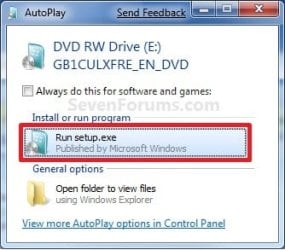
A) While in Windows 7 SP1, insert your retail Windows 7 SP1 installation DVD into the DVD drive, or connect your Windows 7 with SP1 installation USB thumb drive, and click on the Run setup.exe option in AutoPlay. (see screenshot below)
NOTE: If the AutoPlay window does not open, then open the drive folder in Computer and run the setup.exe file.AutoPlay.jpg
B) Go to Go to step 7 below.
6. Repair Installed Windows 7 without SP1 using Windows 7 without SP1 DVD/USB

   Note
If you do not have a Windows 7 without SP1 installation DVD/USB, then you can download the latest official Windows 7 Professional or Home Premium without SP1 ISO file here: Microsoft: Windows 7 Direct Download Links, and use Windows 7 USB-DVD Download Tool to create a bootable DVD or USB flash drive with the ISO to do the repair install from within Windows 7 using this step.

It is preferred to have SP1 installed on your PC and to use step 4 or step 5 above to do a repair install with instead though.

A) While in Windows 7 SP1 installed, insert your retail Windows 7 installation DVD into the DVD drive, or connect your Windows 7 installation USB thumb drive, and click on the Run setup.exe option in AutoPlay. (see screenshot below)
NOTE: If the AutoPlay window does not open, then open the drive folder in Computer and run the setup.exe file.AutoPlay.jpg
B) Go to Go to step 7 below.
7. If prompted by UAC, then click on Yes.

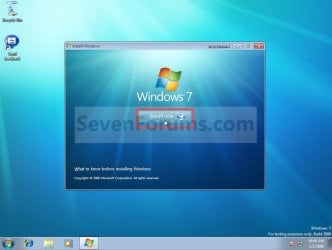
8. Click on the Install Now button to start the installation. (see screenshot below)Step1.jpg
9. If prompted, uncheck the I want to help make Windows installation better box (unless you would like to :) ), and click on the Go online to get the latest updates for installation option. (see screenshot below)Step2.jpg
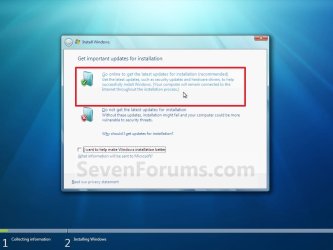
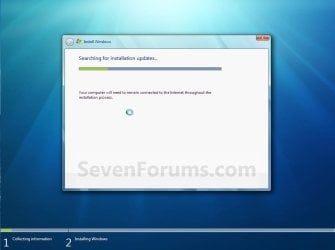
A) Windows 7 will now check online for and install any available installation updates. (see screenshots below)Step2A.jpg

Step2B.jpg

10. Check the I accept the license terms box, and click on Next. (see screenshot below)Step3.jpg
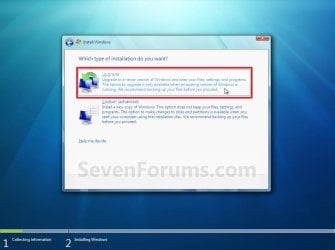
11. Click on the Upgrade option. (see screenshot below)Step4.jpg
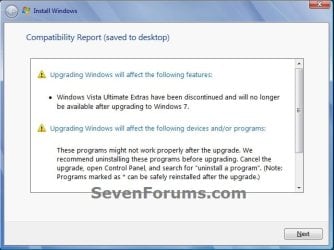
12. Windows will now check for any compatibility issues. If any are found like in the example below, click on the red X to cancel the repair install and close this "Install Windows" window, take care of any found issues (ex: uninstall any incompatible program), then restart the repair install process over again.Compatibility-Report.jpg
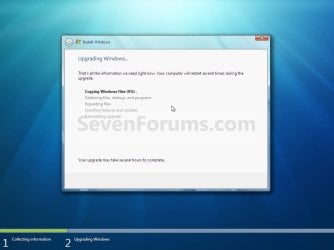
13. The installation of Windows 7 will now begin. (see screenshot below)
NOTE: During the installation process, your screen may flash and computer will restart a few times.Step5.jpg
14. After the final restart, you will see this screen for a moment. (see screenshot below)Step6.jpg
15. Type in your Windows 7 product key number. (see screenshot below step 16)

16. Uncheck the Automatically activate Windows when I'm online box unchecked, then click on the Next button. (see screenshot below)
NOTE: You can activate Windows 7 later after you make sure it is running properly. (see step 23 below)
If you chose to automatically activate Windows online when you set up your computer, automatic activation begins trying to activate your copy of Windows three days after you log on for the first time.Step7.jpg
17. Click on Use recommended settings. (see screenshot below)

:note: You will always be able to change your Windows Update settings at anytime in Windows 7.

Step8.jpg
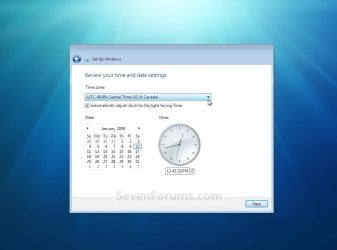
18. Select your time zone and set your time and date settings, then click on the Next button. (see screenshot below)Step9.jpg
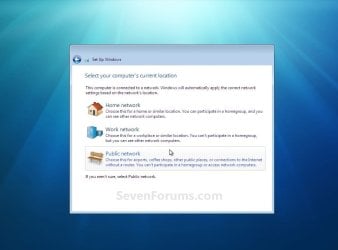
19. Click on the option for your computer's location to select the correct network location type settings to be applied for that location. (see screenshot below)
NOTE: It is best to select Public location for the best security.Step10.jpg
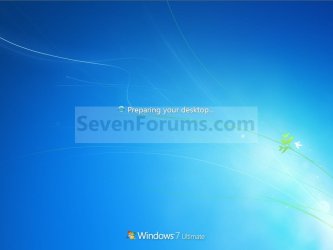
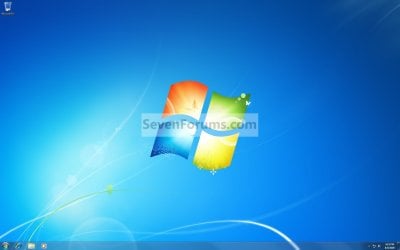
20. Windows 7 will now prepare your desktop to startup. (see screenshots below)Step11A.jpg

Desktop.jpg

21. If you used a DVD or USB to do the repair install with, then you can remove the DVD or USB when the repair install has successfully completed and you are logged in to Windows 7.

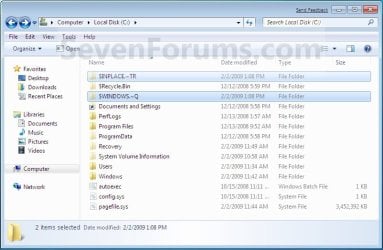
22. Check to see if you are missing any user files. If you are, then you can copy them from the C:\Windows.old or the hidden protected operating system C:\$INPLACE.~TR and C:\WINDOWS.~Q backup folders. (see screenshot below)Old_Install.jpg
23. If everything checks out in step 21, then you can run Disk Cleanup (step 5 at this link). You will need to click on the Clean up system files button first, and then could check the Files discarded by Windows upgrade, Previous Windows installations, and Windows upgrade log files boxes. (see screenshot below)
NOTE: This will delete the C:\Windows.old, C:\$INPLACE.~TR and C:\WINDOWS.~Q folders from step 21 above.Disk_Cleanup.jpg
24. Refresh your Windows Experience Index (WEI) score.

25. When finished, activate Windows 7, and make sure that your 3rd party security programs (if applicable) are enabled again.
That's it,
Shawn


Last edited:
I still can't install the Windows 7 SP1 update successfully. I tried at least five times. If you have an idea how that can be fixed, I'd be grateful to hear your suggestion.

In registry: HKEY_LOCAL_MACHINE\SYSTEM\CurrentControlSet\services\msiserver
Value ImagePath was probably missing/corrupt(?)

Please make a new thread that explain the problems you still have. And send a PM or post a link to that thread.
 

My Computer

Computer type
Laptop
Computer Manufacturer/Model Number
ACER ASPIRE 5742G
OS
Microsoft Windows 7 Home Premium 64-bits 7601 Multiprocessor Free Service Pack 1
CPU
Intel(R) Core(TM) i3 CPU M 370 @ 2.40GHz
Motherboard
Acer Aspire 5742G
Memory
4,00 GB
Graphics Card(s)
ATI Mobility Radeon HD 5400 Series
Sound Card
(1) AMD High Definition Audio Device (2) Realtek High Defi
Screen Resolution
1366 x 768 x 32 bits (4294967296 colors) @ 60 Hz
Hard Drives
WDC WD5000BEVT-22ZAT0
In registry: HKEY_LOCAL_MACHINE\SYSTEM\CurrentControlSet\services\msiserver
Value ImagePath was probably missing/corrupt(?)

Please make a new thread that explain the problems you still have. And send a PM or post a link to that thread.


The ImagePath value is %systemroot%\system32\msiexec.exe /V, which is correct.

In a new thread posting I'll describe the problem I've had with Windows Update, and send a link to the thread here.
 

My Computer

Computer type
Laptop
Computer Manufacturer/Model Number
HP
OS
Windows 7 64 bit
CPU
Intel Core i3 CPU M330 @2.13 GHz
Memory
8 GB
Graphics Card(s)
Intel Graphics Media Accelerator HD
Sound Card
Intel
Monitor(s) Displays
Generic PnP monitor
Screen Resolution
1366 x 768
Hard Drives
ST9500420AS Internal 500 GB
Seagate External 110 GB
Seagate FreeAgent GoFlex External 1 TB
Keyboard
Microsoft
Mouse
Microsoft
Internet Speed
87 Mbps download speed, 12.16 Mbps upload speed
Antivirus
Microsoft Security Essentials
Browser
MS IE, Google Chrome, Mozilla Firefox, Apple Safari
In registry: HKEY_LOCAL_MACHINE\SYSTEM\CurrentControlSet\services\msiserver
Value ImagePath was probably missing/corrupt(?)

Please make a new thread that explain the problems you still have. And send a PM or post a link to that thread.


The ImagePath value is %systemroot%\system32\msiexec.exe /V, which is correct.

In a new thread posting I'll describe the problem I've had with Windows Update, and send a link to the thread here.
Al right. I thought it was a SP1 installation problem???!! Or is it really a windows update problem?
 

My Computer

Computer type
Laptop
Computer Manufacturer/Model Number
ACER ASPIRE 5742G
OS
Microsoft Windows 7 Home Premium 64-bits 7601 Multiprocessor Free Service Pack 1
CPU
Intel(R) Core(TM) i3 CPU M 370 @ 2.40GHz
Motherboard
Acer Aspire 5742G
Memory
4,00 GB
Graphics Card(s)
ATI Mobility Radeon HD 5400 Series
Sound Card
(1) AMD High Definition Audio Device (2) Realtek High Defi
Screen Resolution
1366 x 768 x 32 bits (4294967296 colors) @ 60 Hz
Hard Drives
WDC WD5000BEVT-22ZAT0
Will this upgrade my windows from windows 7 to 8/8.1?
As i don't want to :/
 
Last edited:

My Computer

Computer type
Laptop
Computer Manufacturer/Model Number
Asus
OS
Windows 7 Home Premium 64bit
CPU
intel core i7-740QM, 1.73GHz
Memory
6GB
Graphics Card(s)
Nvdia GeForce GT425M
Antivirus
ESET Smart Security 7, MalwareBytes Anti-Malware/Exploit.
Browser
FireFox
Will this upgrade my windows from windows 7 to 8/8.1?
As i don't want to :/

Hello Malis, and welcome to Seven Forums.

No. An repair install (inplace upgrade) only reinstalls what you currently have installed to repair it. :)
 

My Computer

Computer type
PC/Desktop
Computer Manufacturer/Model Number
Self built custom
OS
64-bit Windows 11 Pro for Workstations
CPU
Intel i7-8700K OC'd to 5 GHz
Motherboard
ASUS ROG Maximus XI Formula Z390
Memory
64 GB (4x16GB) G.SKILL TridentZ RGB DDR4 3600 MHz
Graphics Card(s)
ASUS ROG-STRIX-GTX1080TI-O11G-GAMING
Sound Card
Integrated
Monitor(s) Displays
2 x Samsung Odyssey G7 27"
Screen Resolution
2560x1440
Hard Drives
1TB Samsung 990 PRO M.2,
4TB Samsung 990 PRO PRO M.2,
TerraMaster F8 SSD Plus NAS
PSU
Seasonic Prime Titanium 850W
Case
Thermaltake Core P3
Cooling
Corsair Hydro H115i
Keyboard
Logitech wireless K800
Mouse
Logitech MX Master 4
Internet Speed
2 Gb/s Download and 100 Mb/s Upload
Antivirus
Malwarebyte Anti-Malware Premium
Browser
Google Chrome
Other Info
Logitech Z625 speaker system,
Logitech BRIO 4K Pro webcam,
HP Color LaserJet Pro MFP M477fdn,
APC SMART-UPS RT 1000 XL - SURT1000XLI,
Galaxy S23 Plus phone
Hi, I recently found this tutorial on non-destructive repair install for Win 7.
I have Win 7 Pro, and have burnt a version with SP1in the iso [as I have tried - but failed - to uninstall SP1, it just keeps trying to configure the changes and reverting the uninstall [?] - and my retail Win 7 does not have SP1.
I have followed the details exactly [compatibility etc] but when I get to the install part it fails with the message:
Windows 7 Professional cannot be upgraded to Windows 7 Professional. You can choose to install a new copy of Windows 7 Professional instead, [etc].

This seems a very strange error to be getting, when the whole point is to repair install the same version that you already have on the system.

Any thoughts or words of inspirational delight that can get this repair fixed?
 

My Computer

Computer type
PC/Desktop
Computer Manufacturer/Model Number
self build
OS
Win 7 Pro 32bit
CPU
AMD 64 X2 dual core 4600+ 2.41Ghz
Motherboard
Asrock 939
Memory
4 Gb [?]
Graphics Card(s)
NVIDIA GeForce 7900 GT-GTO
Hard Drives
120Gb primary
750Gb secondary
Antivirus
Avast
Browser
IE10
Hello Caswell, and welcome to Seven Forums. :)

That would be the problem. You're not using the same version. The installation media you use must be exactly the same as what you currently have installed.

Windows 7 Pro w/SP1 installation media will not work with an installed Windows 7 Pro without SP1 for a repair install.
 

My Computer

Computer type
PC/Desktop
Computer Manufacturer/Model Number
Self built custom
OS
64-bit Windows 11 Pro for Workstations
CPU
Intel i7-8700K OC'd to 5 GHz
Motherboard
ASUS ROG Maximus XI Formula Z390
Memory
64 GB (4x16GB) G.SKILL TridentZ RGB DDR4 3600 MHz
Graphics Card(s)
ASUS ROG-STRIX-GTX1080TI-O11G-GAMING
Sound Card
Integrated
Monitor(s) Displays
2 x Samsung Odyssey G7 27"
Screen Resolution
2560x1440
Hard Drives
1TB Samsung 990 PRO M.2,
4TB Samsung 990 PRO PRO M.2,
TerraMaster F8 SSD Plus NAS
PSU
Seasonic Prime Titanium 850W
Case
Thermaltake Core P3
Cooling
Corsair Hydro H115i
Keyboard
Logitech wireless K800
Mouse
Logitech MX Master 4
Internet Speed
2 Gb/s Download and 100 Mb/s Upload
Antivirus
Malwarebyte Anti-Malware Premium
Browser
Google Chrome
Other Info
Logitech Z625 speaker system,
Logitech BRIO 4K Pro webcam,
HP Color LaserJet Pro MFP M477fdn,
APC SMART-UPS RT 1000 XL - SURT1000XLI,
Galaxy S23 Plus phone
Hello Brink, Thanks for the speedy reply.
However - a slight misunderstanding [maybe mine as well - we shall see].

As mentioned, my retail disk does not have SP1 - but my O/S , as a result of updates, has SP1 installed.

I therefore burnt an iso with SP1 included.

If it still recognizes the fact that the original installation was via a disk without SP1 [?? even though it now resides within {:D} I still have a problem in so far as I have tried previously to uninstall SP1 [to originally try my retail disk] but it will not uninstall.
It tells me it has [little liar] then on closing down it states configuring windows, and on rebooting says [eventually] unable to configure SP1 - reverting changes. SP1 has not been uninstalled.

Any further words of wisdom to sort this out - very appreciated :doh:
 

My Computer

Computer type
PC/Desktop
Computer Manufacturer/Model Number
self build
OS
Win 7 Pro 32bit
CPU
AMD 64 X2 dual core 4600+ 2.41Ghz
Motherboard
Asrock 939
Memory
4 Gb [?]
Graphics Card(s)
NVIDIA GeForce 7900 GT-GTO
Hard Drives
120Gb primary
750Gb secondary
Antivirus
Avast
Browser
IE10
Ah, ok.

In that case, you may need to do a clean install instead since it won't recognize it as the same. :(
 

My Computer

Computer type
PC/Desktop
Computer Manufacturer/Model Number
Self built custom
OS
64-bit Windows 11 Pro for Workstations
CPU
Intel i7-8700K OC'd to 5 GHz
Motherboard
ASUS ROG Maximus XI Formula Z390
Memory
64 GB (4x16GB) G.SKILL TridentZ RGB DDR4 3600 MHz
Graphics Card(s)
ASUS ROG-STRIX-GTX1080TI-O11G-GAMING
Sound Card
Integrated
Monitor(s) Displays
2 x Samsung Odyssey G7 27"
Screen Resolution
2560x1440
Hard Drives
1TB Samsung 990 PRO M.2,
4TB Samsung 990 PRO PRO M.2,
TerraMaster F8 SSD Plus NAS
PSU
Seasonic Prime Titanium 850W
Case
Thermaltake Core P3
Cooling
Corsair Hydro H115i
Keyboard
Logitech wireless K800
Mouse
Logitech MX Master 4
Internet Speed
2 Gb/s Download and 100 Mb/s Upload
Antivirus
Malwarebyte Anti-Malware Premium
Browser
Google Chrome
Other Info
Logitech Z625 speaker system,
Logitech BRIO 4K Pro webcam,
HP Color LaserJet Pro MFP M477fdn,
APC SMART-UPS RT 1000 XL - SURT1000XLI,
Galaxy S23 Plus phone
Hi,
Really - really - trying to avoid that. That would cause a huge amount of work for me.

Why should there be such a problem uninstalling SP1?

Is there a way to ensure it gets done without having this annoying configure/revert changes issue?
 

My Computer

Computer type
PC/Desktop
Computer Manufacturer/Model Number
self build
OS
Win 7 Pro 32bit
CPU
AMD 64 X2 dual core 4600+ 2.41Ghz
Motherboard
Asrock 939
Memory
4 Gb [?]
Graphics Card(s)
NVIDIA GeForce 7900 GT-GTO
Hard Drives
120Gb primary
750Gb secondary
Antivirus
Avast
Browser
IE10
Hi,
Really - really - trying to avoid that. That would cause a huge amount of work for me.

Why should there be such a problem uninstalling SP1?

Is there a way to ensure it gets done without having this annoying configure/revert changes issue?

That's the problem. You don't always know it's going to fail until it actually fails with the configure/revert error.

Usually when a repair install keeps failing like this for whatever reason, a clean install is about the only other option. :(

What was the original reason for wanting to do a repair install? Perhaps there may be a way to sort it without having to reinstall.
 

My Computer

Computer type
PC/Desktop
Computer Manufacturer/Model Number
Self built custom
OS
64-bit Windows 11 Pro for Workstations
CPU
Intel i7-8700K OC'd to 5 GHz
Motherboard
ASUS ROG Maximus XI Formula Z390
Memory
64 GB (4x16GB) G.SKILL TridentZ RGB DDR4 3600 MHz
Graphics Card(s)
ASUS ROG-STRIX-GTX1080TI-O11G-GAMING
Sound Card
Integrated
Monitor(s) Displays
2 x Samsung Odyssey G7 27"
Screen Resolution
2560x1440
Hard Drives
1TB Samsung 990 PRO M.2,
4TB Samsung 990 PRO PRO M.2,
TerraMaster F8 SSD Plus NAS
PSU
Seasonic Prime Titanium 850W
Case
Thermaltake Core P3
Cooling
Corsair Hydro H115i
Keyboard
Logitech wireless K800
Mouse
Logitech MX Master 4
Internet Speed
2 Gb/s Download and 100 Mb/s Upload
Antivirus
Malwarebyte Anti-Malware Premium
Browser
Google Chrome
Other Info
Logitech Z625 speaker system,
Logitech BRIO 4K Pro webcam,
HP Color LaserJet Pro MFP M477fdn,
APC SMART-UPS RT 1000 XL - SURT1000XLI,
Galaxy S23 Plus phone
Still at crossed purposes here.

It is the uninstall of SP1 via Add/Remove programs that is failing to happen.
After trying to uninstall it says configuring, then says unable to do so and then reverts and says SP1 has not been uninstalled.
I need to know how to get rid of SP1 - if I have to try the repair install with the original retail disk, which did not install SP1.

If it try the upgrade with SP1 installed [even though I have burnt a disk with SP1 on it] I get the message that Windows 7 Professional cannot be upgraded to Windows 7 Professional. [which is what this repair is supposed to e for?]

One of the main reasons for doing this is to restore Personalization options [I have tried every listed one I can find - and nothing has worked]
 

My Computer

Computer type
PC/Desktop
Computer Manufacturer/Model Number
self build
OS
Win 7 Pro 32bit
CPU
AMD 64 X2 dual core 4600+ 2.41Ghz
Motherboard
Asrock 939
Memory
4 Gb [?]
Graphics Card(s)
NVIDIA GeForce 7900 GT-GTO
Hard Drives
120Gb primary
750Gb secondary
Antivirus
Avast
Browser
IE10
Most likely you may have used Disk Cleanup to remove old update files. This would prevent the uninstall of SP1.

What is wrong with your Personalization options?
 

My Computer

Computer type
PC/Desktop
Computer Manufacturer/Model Number
Self built custom
OS
64-bit Windows 11 Pro for Workstations
CPU
Intel i7-8700K OC'd to 5 GHz
Motherboard
ASUS ROG Maximus XI Formula Z390
Memory
64 GB (4x16GB) G.SKILL TridentZ RGB DDR4 3600 MHz
Graphics Card(s)
ASUS ROG-STRIX-GTX1080TI-O11G-GAMING
Sound Card
Integrated
Monitor(s) Displays
2 x Samsung Odyssey G7 27"
Screen Resolution
2560x1440
Hard Drives
1TB Samsung 990 PRO M.2,
4TB Samsung 990 PRO PRO M.2,
TerraMaster F8 SSD Plus NAS
PSU
Seasonic Prime Titanium 850W
Case
Thermaltake Core P3
Cooling
Corsair Hydro H115i
Keyboard
Logitech wireless K800
Mouse
Logitech MX Master 4
Internet Speed
2 Gb/s Download and 100 Mb/s Upload
Antivirus
Malwarebyte Anti-Malware Premium
Browser
Google Chrome
Other Info
Logitech Z625 speaker system,
Logitech BRIO 4K Pro webcam,
HP Color LaserJet Pro MFP M477fdn,
APC SMART-UPS RT 1000 XL - SURT1000XLI,
Galaxy S23 Plus phone
Might be the result of a platform update.

Try rt clicking setup.exe>properties>compatibilty tab>Vista(SP2) >OK
 

My Computers

System One System Two

  • Computer type
    PC/Desktop
    OS
    7 X64
    CPU
    i5 8400
    Motherboard
    gigabyte b365m ds3h
    Memory
    2x8gb 3200mhz
    Hard Drives
    various
    PSU
    pure power 11 400w cm
    Case
    Coolermaster
    Cooling
    cryorig m9i
  • Computer type
    PC/Desktop
    OS
    7x64
    CPU
    g5400
    Motherboard
    ga b365m ds3h
    Memory
    8gb ddr4 2400
    PSU
    xfx pro 450w
Hello,
I have never used disk clean up.

Personalisation no longer exists [?] It stopped working for no apparent reason. Rt click on desktop returns IE unspecified error.
Not available in Control panel.
scannow makes no diference.
Group policy unable to create snapin.

All online suggestions found to "cure" have failed.
 

My Computer

Computer type
PC/Desktop
Computer Manufacturer/Model Number
self build
OS
Win 7 Pro 32bit
CPU
AMD 64 X2 dual core 4600+ 2.41Ghz
Motherboard
Asrock 939
Memory
4 Gb [?]
Graphics Card(s)
NVIDIA GeForce 7900 GT-GTO
Hard Drives
120Gb primary
750Gb secondary
Antivirus
Avast
Browser
IE10
I hate to say it, but a clean install would serve you better. :(
 

My Computer

Computer type
PC/Desktop
Computer Manufacturer/Model Number
Self built custom
OS
64-bit Windows 11 Pro for Workstations
CPU
Intel i7-8700K OC'd to 5 GHz
Motherboard
ASUS ROG Maximus XI Formula Z390
Memory
64 GB (4x16GB) G.SKILL TridentZ RGB DDR4 3600 MHz
Graphics Card(s)
ASUS ROG-STRIX-GTX1080TI-O11G-GAMING
Sound Card
Integrated
Monitor(s) Displays
2 x Samsung Odyssey G7 27"
Screen Resolution
2560x1440
Hard Drives
1TB Samsung 990 PRO M.2,
4TB Samsung 990 PRO PRO M.2,
TerraMaster F8 SSD Plus NAS
PSU
Seasonic Prime Titanium 850W
Case
Thermaltake Core P3
Cooling
Corsair Hydro H115i
Keyboard
Logitech wireless K800
Mouse
Logitech MX Master 4
Internet Speed
2 Gb/s Download and 100 Mb/s Upload
Antivirus
Malwarebyte Anti-Malware Premium
Browser
Google Chrome
Other Info
Logitech Z625 speaker system,
Logitech BRIO 4K Pro webcam,
HP Color LaserJet Pro MFP M477fdn,
APC SMART-UPS RT 1000 XL - SURT1000XLI,
Galaxy S23 Plus phone
:cry: - The lonnnng Road Back - :cry:
 

My Computer

Computer type
PC/Desktop
Computer Manufacturer/Model Number
self build
OS
Win 7 Pro 32bit
CPU
AMD 64 X2 dual core 4600+ 2.41Ghz
Motherboard
Asrock 939
Memory
4 Gb [?]
Graphics Card(s)
NVIDIA GeForce 7900 GT-GTO
Hard Drives
120Gb primary
750Gb secondary
Antivirus
Avast
Browser
IE10
Windows repair install tutorial

The in-place repair installation worked like a charm on my computer. Your clear instructions gave me reassurance that the procedure was the best solution for my problems with Windows. Now that I've completed the installation, almost all my computer problems, including the re-installation of MS Office 2007 and failed installations of several Windows updates, including Windows 7 SP 1, have vanished. The computer performs like new again! It's a pleasure to use it! Thanks SO MUCH, Shawn, for the tutorial. You saved me from having to endure additional grief and aggravation.
 

My Computer

Computer type
Laptop
Computer Manufacturer/Model Number
HP
OS
Windows 7 64 bit
CPU
Intel Core i3 CPU M330 @2.13 GHz
Memory
8 GB
Graphics Card(s)
Intel Graphics Media Accelerator HD
Sound Card
Intel
Monitor(s) Displays
Generic PnP monitor
Screen Resolution
1366 x 768
Hard Drives
ST9500420AS Internal 500 GB
Seagate External 110 GB
Seagate FreeAgent GoFlex External 1 TB
Keyboard
Microsoft
Mouse
Microsoft
Internet Speed
87 Mbps download speed, 12.16 Mbps upload speed
Antivirus
Microsoft Security Essentials
Browser
MS IE, Google Chrome, Mozilla Firefox, Apple Safari
The in-place repair installation worked like a charm on my computer. Your clear instructions gave me reassurance that the procedure was the best solution for my problems with Windows. Now that I've completed the installation, almost all my computer problems, including the re-installation of MS Office 2007 and failed installations of several Windows updates, including Windows 7 SP 1, have vanished. The computer performs like new again! It's a pleasure to use it! Thanks SO MUCH, Shawn, for the tutorial. You saved me from having to endure additional grief and aggravation.

You're most welcome Gary. I'm glad it was able to help. :)
 

My Computer

Computer type
PC/Desktop
Computer Manufacturer/Model Number
Self built custom
OS
64-bit Windows 11 Pro for Workstations
CPU
Intel i7-8700K OC'd to 5 GHz
Motherboard
ASUS ROG Maximus XI Formula Z390
Memory
64 GB (4x16GB) G.SKILL TridentZ RGB DDR4 3600 MHz
Graphics Card(s)
ASUS ROG-STRIX-GTX1080TI-O11G-GAMING
Sound Card
Integrated
Monitor(s) Displays
2 x Samsung Odyssey G7 27"
Screen Resolution
2560x1440
Hard Drives
1TB Samsung 990 PRO M.2,
4TB Samsung 990 PRO PRO M.2,
TerraMaster F8 SSD Plus NAS
PSU
Seasonic Prime Titanium 850W
Case
Thermaltake Core P3
Cooling
Corsair Hydro H115i
Keyboard
Logitech wireless K800
Mouse
Logitech MX Master 4
Internet Speed
2 Gb/s Download and 100 Mb/s Upload
Antivirus
Malwarebyte Anti-Malware Premium
Browser
Google Chrome
Other Info
Logitech Z625 speaker system,
Logitech BRIO 4K Pro webcam,
HP Color LaserJet Pro MFP M477fdn,
APC SMART-UPS RT 1000 XL - SURT1000XLI,
Galaxy S23 Plus phone
If I have Windows 7 Professional installed with SP1 but my disk doesn't specify anything about SP1 then which should I use? I'm afraid of running the wrong one and causing a greater problem than I now have. I would just like to have my computer operating as it should be and was before these glitches started up. Your help is greatly appreciated:)
 
Last edited:

My Computer

Computer type
PC/Desktop
Computer Manufacturer/Model Number
custom build
OS
Microsoft Windows 7 Professional 64-bit 7601 Multiprocessor Free Service Pack 1
CPU
AMD Athlon(tm) 64 X2 Dual Core Processor 4800+
Motherboard
Gigabyte Technology Co., Ltd. M61P-S3
Memory
8.00 GB
Graphics Card(s)
NVIDIA GeForce 8400GS
Sound Card
(1) NVIDIA High Definition Audio (2) NVIDIA High Definitio
Monitor(s) Displays
HP L1750 LCD F/W VERSION STM049 60HZ
Screen Resolution
1280 x 1024 x 32 bits (4294967296 colors) @ 60 Hz
Hard Drives
(1) WDC WD2500JB-00REA0 ATA Device (2) SAMSUNG SP2004C SCSI Disk Device
Keyboard
Dell USB entry
Mouse
Dell Optical USB MOuse
Antivirus
Microsoft Security Essentials
Browser
IE11, Chrome, Google
Back
Top