Repair Install

How to Do a Repair Install to Fix Windows 7


   Information
This will show you how to do a repair install (aka: in-place upgrade install) to fix your currently installed Windows 7 and preserve your user accounts, data, programs, and system drivers.
   Note
Do a Repair installation if:
  • A System Restore did not help fix your Windows 7.
  • There is no other easier option left that can fix your Windows 7.
  • You DO NOT want to do a Clean reinstall of Windows 7.
  • You DO want to preserve your user accounts, data, programs, and system drivers.
   Tip
ITEMS THAT WILL BE RESET TO DEFAULT OR AFFECTED:
  • Sounds
  • Services
  • Visual Effects Settings
  • Device Drivers - Be sure to have these handy to reinstall. They do not always remain after the repair (upgrade) install.
  • You may lose the ability to sign on to MSN Messenger, to solve this problem have a look at this thread Unable to sign in to WLM.
  • You may lose your custom themes due to not having permisions set on the old themes. Go to the hidden themes folder at C:/Users/(User-Name)/AppData/Local/Microsoft/Windows/Themes, then Take Ownership of the themes folder and you will now have all your themes back.
  • It has been reported that you may also lose your Media Center gadget after doing the repair install.
  • Windows Updates will need to be checked and reinstalled again.
   Warning

  • You can only do a repair install with the same edition Windows 7 installation disc for the same edition of Windows 7 that you have installed.
  • You cannot use a OEM Windows 7 "Factory" Restore/Recovery type of installation disc that came with or created from a store bought computer to do a repair install with. These can only be used do a clean install instead.
  • You can do a repair install on a factory OEM installation with the latest official Windows 7 with SP1 ISO file here: Microsoft: Windows 7 Direct Download Links, and use Windows 7 USB-DVD Download Tool to create a bootable DVD or USB flash drive with the ISO to do the repair install from within Windows 7.
  • You can use a retail OEM Windows 7 installation disc to do a repair install with.
  • You can use a retail (full or upgrade) Windows 7 installation disc to do a repair install with.
  • You cannot do a repair install with a System Repair Disc. A System Repair Disc is not a installation disc, and will only boot to the System Recovery Options screen.
  • If you have a 32-bit (x86) Windows 7 currently installed, then you must use a 32-bit Windows 7 installation disc to be able to do a repair install with.
  • If you have a 64-bit (x64) Windows 7 currently installed, then you must use a 64-bit Windows 7 installation disc to be able to do a repair install with.
  • You can use a retail Windows 7 SP1 installation disc (ex: Technet (available), MSDN (available), or retail (when available)) to do a repair install with on a currently installed Windows 7 SP1.
  • You can use a Windows 7 SP1 installation disc (ex: Technet (available), MSDN (available), or retail (when available)) to do a repair install with on a currently installed slipstream Windows 7 SP1.
  • You cannot use a slipstream Windows 7 installation disc to do a repair install with on a currently installed Windows 7 SP1.
  • You cannot use a slipstream Windows 7 installation disc to do a repair install with on a currently installed slipstream Windows 7 SP1.
  • You can only do a repair install from within Windows 7.
  • You cannot do a repair install at boot or in Safe Mode.
  • You must be logged into Windows 7 in a administrator account to be able to do a repair install.
  • You must have at least 8.87 GB + what is currently being used of free space (more if you have a larger installation) on the hard drive/partition Windows 7 is installed on to do a repair install.
  • If you changed the default location of a user account's profile folder, then you will need to change it back to the default C:\Users location first.
  • If you moved the default location of a user folder, then you will need to change it back to the default C:\Users\(user-name) location first.


Here's How:
NOTE: Be sure to back up anything that you do not want to lose first to be extra safe.1. Start Windows 7, and log on to an administrator account.

2. Disable any 3rd party firewall, antivirus, or other security program to avoid it from possibly preventing the repair in-place upgrade installation of Windows 7.

3. Do either step 4, step 5, or step 6 below depending if your retail Windows 7 installation ISO/DVD/USB has SP1 or not, and if your currently installed Windows 7 has SP1 installed or not.

4. Repair Installed Windows 7 SP1 using Windows 7 with SP1 ISO

   Note
If you do not have a Windows 7 with SP1 ISO, then you can download an official ISO with your retail product key from Microsoft at the link below.

:ar: Microsoft Software Recovery

You can also download the latest official Windows 7 SP1 Media Refresh (SP1 U) ISO file at the link below, but this link is not always available for download.

:ar: Microsoft: Windows 7 Direct Download Links

A) If you have not already, you will need to install a program like 7-Zip that supports extracting a ISO to a folder.

B) Using the program (ex: 7-Zip) from step 1, extract the Windows 7 SP1 ISO file to a folder on a partition or HDD other than the current Windows 7 partition. (see screenshot below)
NOTE: For example with 7-Zip, right click on ISO, click on 7-Zip, Extract files, browse button, select where you want to extract to, and click on OK twice.7-Zip.jpg
C) While in Windows 7 SP1, open the folder that you extracted the ISO into, and run the setup.exe file.

D) Go to step 7 below.
5. Repair Installed Windows 7 SP1 using Windows 7 with SP1 DVD/USB

   Note
If you do not have a Windows 7 with SP1 ISO, then you can download an official ISO with your retail product key from Microsoft at the link below.

:ar: http://www.microsoft.com/en-us/software-recovery

You can also download the latest official Windows 7 SP1 Media Refresh (SP1 U) ISO file at the link below, but this link is not always available for download.

:ar: Microsoft: Windows 7 Direct Download Links

Afterwards, you can use Windows 7 USB-DVD Download Tool to create a bootable DVD or USB flash drive with the ISO to do the repair install from within Windows 7 using this step.

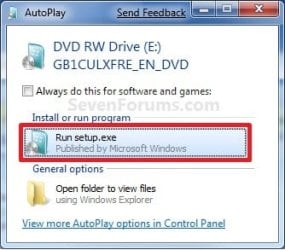
A) While in Windows 7 SP1, insert your retail Windows 7 SP1 installation DVD into the DVD drive, or connect your Windows 7 with SP1 installation USB thumb drive, and click on the Run setup.exe option in AutoPlay. (see screenshot below)
NOTE: If the AutoPlay window does not open, then open the drive folder in Computer and run the setup.exe file.AutoPlay.jpg
B) Go to Go to step 7 below.
6. Repair Installed Windows 7 without SP1 using Windows 7 without SP1 DVD/USB

   Note
If you do not have a Windows 7 without SP1 installation DVD/USB, then you can download the latest official Windows 7 Professional or Home Premium without SP1 ISO file here: Microsoft: Windows 7 Direct Download Links, and use Windows 7 USB-DVD Download Tool to create a bootable DVD or USB flash drive with the ISO to do the repair install from within Windows 7 using this step.

It is preferred to have SP1 installed on your PC and to use step 4 or step 5 above to do a repair install with instead though.

A) While in Windows 7 SP1 installed, insert your retail Windows 7 installation DVD into the DVD drive, or connect your Windows 7 installation USB thumb drive, and click on the Run setup.exe option in AutoPlay. (see screenshot below)
NOTE: If the AutoPlay window does not open, then open the drive folder in Computer and run the setup.exe file.AutoPlay.jpg
B) Go to Go to step 7 below.
7. If prompted by UAC, then click on Yes.

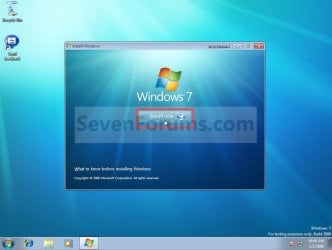
8. Click on the Install Now button to start the installation. (see screenshot below)Step1.jpg
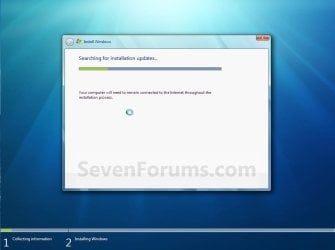
9. If prompted, uncheck the I want to help make Windows installation better box (unless you would like to :) ), and click on the Go online to get the latest updates for installation option. (see screenshot below)Step2.jpg
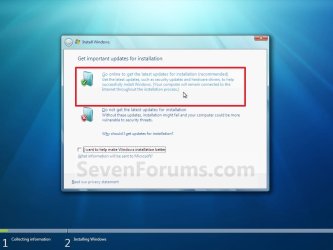
A) Windows 7 will now check online for and install any available installation updates. (see screenshots below)Step2A.jpg

Step2B.jpg

10. Check the I accept the license terms box, and click on Next. (see screenshot below)Step3.jpg
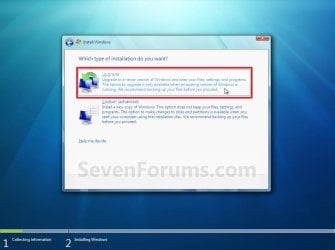
11. Click on the Upgrade option. (see screenshot below)Step4.jpg
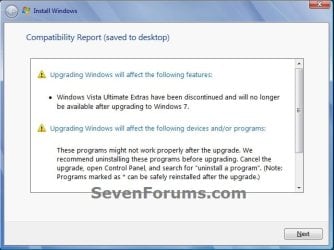
12. Windows will now check for any compatibility issues. If any are found like in the example below, click on the red X to cancel the repair install and close this "Install Windows" window, take care of any found issues (ex: uninstall any incompatible program), then restart the repair install process over again.Compatibility-Report.jpg
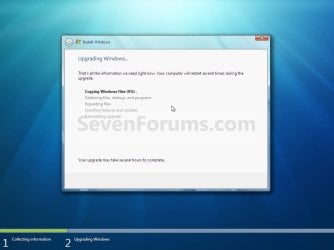
13. The installation of Windows 7 will now begin. (see screenshot below)
NOTE: During the installation process, your screen may flash and computer will restart a few times.Step5.jpg
14. After the final restart, you will see this screen for a moment. (see screenshot below)Step6.jpg
15. Type in your Windows 7 product key number. (see screenshot below step 16)

16. Uncheck the Automatically activate Windows when I'm online box unchecked, then click on the Next button. (see screenshot below)
NOTE: You can activate Windows 7 later after you make sure it is running properly. (see step 23 below)
If you chose to automatically activate Windows online when you set up your computer, automatic activation begins trying to activate your copy of Windows three days after you log on for the first time.Step7.jpg
17. Click on Use recommended settings. (see screenshot below)

:note: You will always be able to change your Windows Update settings at anytime in Windows 7.

Step8.jpg
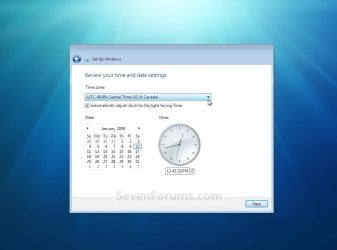
18. Select your time zone and set your time and date settings, then click on the Next button. (see screenshot below)Step9.jpg
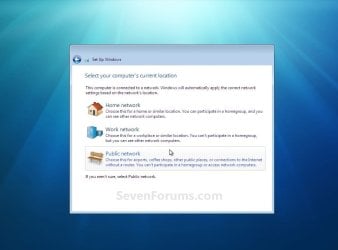
19. Click on the option for your computer's location to select the correct network location type settings to be applied for that location. (see screenshot below)
NOTE: It is best to select Public location for the best security.Step10.jpg
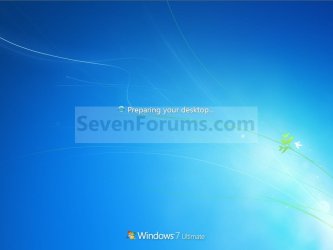
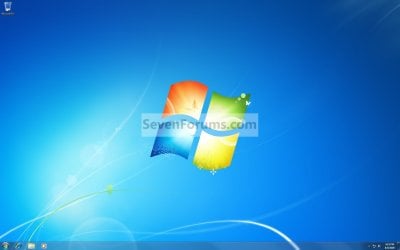
20. Windows 7 will now prepare your desktop to startup. (see screenshots below)Step11A.jpg

Desktop.jpg

21. If you used a DVD or USB to do the repair install with, then you can remove the DVD or USB when the repair install has successfully completed and you are logged in to Windows 7.

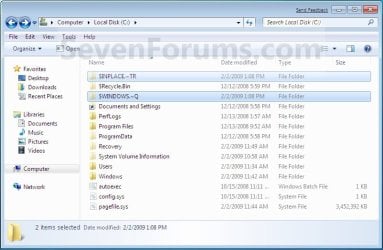
22. Check to see if you are missing any user files. If you are, then you can copy them from the C:\Windows.old or the hidden protected operating system C:\$INPLACE.~TR and C:\WINDOWS.~Q backup folders. (see screenshot below)Old_Install.jpg
23. If everything checks out in step 21, then you can run Disk Cleanup (step 5 at this link). You will need to click on the Clean up system files button first, and then could check the Files discarded by Windows upgrade, Previous Windows installations, and Windows upgrade log files boxes. (see screenshot below)
NOTE: This will delete the C:\Windows.old, C:\$INPLACE.~TR and C:\WINDOWS.~Q folders from step 21 above.Disk_Cleanup.jpg
24. Refresh your Windows Experience Index (WEI) score.

25. When finished, activate Windows 7, and make sure that your 3rd party security programs (if applicable) are enabled again.
That's it,
Shawn


Last edited:
I remember it showing Windows Ultimate.

I am in the middle of a repair. I can only boot to the "Type your windows product key" screen.

Because it's doing a repair It probably can't load the ram drive.

Thanks,

Docfxit
 

My Computer

Computer type
PC/Desktop
OS
Win 7 Ultimate x32, x64, Win 7 Pro x32, x64 Win 7 Home x64, XP Pro sp3
I am planning on doing a repair install in the future due to significant corruption of my system files but I see a lot of repair installs fail due to the current installation being more recent than the iso image. My question, can the this problem be solved by uninstalling windows updates?
 

My Computer

Computer type
PC/Desktop
OS
Win7 64bit
CPU
Intel i7 950 3.7GHz
Memory
6GB
Graphics Card(s)
ATI Radeon DH 5800 Seies
Hard Drives
RAID 1 954GB * 2
Antivirus
AVG Free
Browser
Firefox
I am planning on doing a repair install in the future due to significant corruption of my system files but I see a lot of repair installs fail due to the current installation being more recent than the iso image. My question, can the this problem be solved by uninstalling windows updates?

Hello Dave, :)

Uninstalling updates will usually just cause more issues, and there's no telling which ones you will have to uninstall. If a repair install is not an option, then it's best to bite the bullet and do a clean install instead.
 

My Computer

Computer type
PC/Desktop
Computer Manufacturer/Model Number
Self built custom
OS
64-bit Windows 11 Pro for Workstations
CPU
Intel i7-8700K OC'd to 5 GHz
Motherboard
ASUS ROG Maximus XI Formula Z390
Memory
64 GB (4x16GB) G.SKILL TridentZ RGB DDR4 3600 MHz
Graphics Card(s)
ASUS ROG-STRIX-GTX1080TI-O11G-GAMING
Sound Card
Integrated
Monitor(s) Displays
2 x Samsung Odyssey G7 27"
Screen Resolution
2560x1440
Hard Drives
1TB Samsung 990 PRO M.2,
4TB Samsung 990 PRO PRO M.2,
TerraMaster F8 SSD Plus NAS
PSU
Seasonic Prime Titanium 850W
Case
Thermaltake Core P3
Cooling
Corsair Hydro H115i
Keyboard
Logitech wireless K800
Mouse
Logitech MX Master 4
Internet Speed
2 Gb/s Download and 100 Mb/s Upload
Antivirus
Malwarebyte Anti-Malware Premium
Browser
Google Chrome
Other Info
Logitech Z625 speaker system,
Logitech BRIO 4K Pro webcam,
HP Color LaserJet Pro MFP M477fdn,
APC SMART-UPS RT 1000 XL - SURT1000XLI,
Galaxy S23 Plus phone
Thanks Brink
I'll no doubt be back with many issues when I try a repair/reinstall.
 

My Computer

Computer type
PC/Desktop
OS
Win7 64bit
CPU
Intel i7 950 3.7GHz
Memory
6GB
Graphics Card(s)
ATI Radeon DH 5800 Seies
Hard Drives
RAID 1 954GB * 2
Antivirus
AVG Free
Browser
Firefox
Confused ... OEM version, "what should I do to get Repair?"

Hi ..

I seem to be stopped in getting my OEM Win 7 SP1 x64 installation DVD to work with these instructions. I need direct advice/ideas about how to get to the Windows Repair function described here that WILL NOT wipe my programs/data. What simple step-by-steps do I need to make. [Apologies in advance if I am seeing the right words but blanked out on the 1-2-3 to get to where I need to get BECAUSE ...

I am trying to clean up the OS as best I can before Windows 10, but the SFC Sannow cbs.log is full of dozens upon dozens of "Cannot repair ..." and a few "Cannot verify ..."]


Hi ...

Similar but different flavor on this issue.

1) I run the SBC Scannow and get a CBS.log filled with multiple dozens of "Cannot repair ..." and a few "Cannot repair ..." statements.

2) I go to the link mentioned in SevenForums and ...

3) turns out I have an OEM/Volume/Enteprise CD from 2009 of Windows 7 SP1 Professional x64 and

4) I cannot get to the 'Repair ...' choice during Installation because these OEM versions only allow a clean install, no repair shows up.

Help!

Ideas? Suggestions?

Let me know.

Thank you.

John
 

My Computer

Computer type
PC/Desktop
Computer Manufacturer/Model Number
white box
OS
Windows 7 Professional x64
CPU
Intel 920
Motherboard
Gigabyte EX58 UD3R
Memory
16 gb
Graphics Card(s)
AMD Radeon 6450
Hard Drives
SSD 120 Gb
Western Digital 750
Western Digital 1 Tb
Antivirus
SUPERAntiSpyware, MalwareBytes & iObit Malware Fighter
Browser
Chrome ( and IE as needed)
Hello John, and welcome to Seven Forums. :)

I'm afraid that you will not be able to use OEM factory recovery media to do a repair install with. A repair install can only be done using retail installation media that's at least as updated as the current installation.

Since you are wanting to install Windows 10 with the free offer, you could do the method in the tutorial instead if you like.

Clean Install Windows 10 Directly without having to Upgrade First - Windows 10 Forums
 

My Computer

Computer type
PC/Desktop
Computer Manufacturer/Model Number
Self built custom
OS
64-bit Windows 11 Pro for Workstations
CPU
Intel i7-8700K OC'd to 5 GHz
Motherboard
ASUS ROG Maximus XI Formula Z390
Memory
64 GB (4x16GB) G.SKILL TridentZ RGB DDR4 3600 MHz
Graphics Card(s)
ASUS ROG-STRIX-GTX1080TI-O11G-GAMING
Sound Card
Integrated
Monitor(s) Displays
2 x Samsung Odyssey G7 27"
Screen Resolution
2560x1440
Hard Drives
1TB Samsung 990 PRO M.2,
4TB Samsung 990 PRO PRO M.2,
TerraMaster F8 SSD Plus NAS
PSU
Seasonic Prime Titanium 850W
Case
Thermaltake Core P3
Cooling
Corsair Hydro H115i
Keyboard
Logitech wireless K800
Mouse
Logitech MX Master 4
Internet Speed
2 Gb/s Download and 100 Mb/s Upload
Antivirus
Malwarebyte Anti-Malware Premium
Browser
Google Chrome
Other Info
Logitech Z625 speaker system,
Logitech BRIO 4K Pro webcam,
HP Color LaserJet Pro MFP M477fdn,
APC SMART-UPS RT 1000 XL - SURT1000XLI,
Galaxy S23 Plus phone
Brink,

Thanks for the info. Yes, you confirmed one aspect. NOW I need help in what is the work around to get a usable Win 7 SP1 Professional x64 OS DVD or ISO I can use on my computer to do the Repair.

Thanks for the Win 10 info, BUT I first want to do all I can to make sure Win 7 I have is as healthy as possible.

Please, more ideas/suggestions to my originally post using what Brink just wrote as the crux of the issue to find a legal workaround of step-by-step simplicity based on this original repair/re-install thread.

Let me know.

Thanks.

Johnb
 

My Computer

Computer type
PC/Desktop
Computer Manufacturer/Model Number
white box
OS
Windows 7 Professional x64
CPU
Intel 920
Motherboard
Gigabyte EX58 UD3R
Memory
16 gb
Graphics Card(s)
AMD Radeon 6450
Hard Drives
SSD 120 Gb
Western Digital 750
Western Digital 1 Tb
Antivirus
SUPERAntiSpyware, MalwareBytes & iObit Malware Fighter
Browser
Chrome ( and IE as needed)
John,

It's most likely not going to be possible to do a repair install since there's not any Windows 7 ISOs available that's as up to date as a fully updated current installation.

You may be able to download a Windows 7 ISO from Microsoft at the link below, but it doesn't always work. Plus, what I mentioned above.

https://www.microsoft.com/en-us/software-download/windows7
 

My Computer

Computer type
PC/Desktop
Computer Manufacturer/Model Number
Self built custom
OS
64-bit Windows 11 Pro for Workstations
CPU
Intel i7-8700K OC'd to 5 GHz
Motherboard
ASUS ROG Maximus XI Formula Z390
Memory
64 GB (4x16GB) G.SKILL TridentZ RGB DDR4 3600 MHz
Graphics Card(s)
ASUS ROG-STRIX-GTX1080TI-O11G-GAMING
Sound Card
Integrated
Monitor(s) Displays
2 x Samsung Odyssey G7 27"
Screen Resolution
2560x1440
Hard Drives
1TB Samsung 990 PRO M.2,
4TB Samsung 990 PRO PRO M.2,
TerraMaster F8 SSD Plus NAS
PSU
Seasonic Prime Titanium 850W
Case
Thermaltake Core P3
Cooling
Corsair Hydro H115i
Keyboard
Logitech wireless K800
Mouse
Logitech MX Master 4
Internet Speed
2 Gb/s Download and 100 Mb/s Upload
Antivirus
Malwarebyte Anti-Malware Premium
Browser
Google Chrome
Other Info
Logitech Z625 speaker system,
Logitech BRIO 4K Pro webcam,
HP Color LaserJet Pro MFP M477fdn,
APC SMART-UPS RT 1000 XL - SURT1000XLI,
Galaxy S23 Plus phone
Brink,

Thanks again for the idea. Went to that link, put in CD Key and get back referral message that I need to contact my Enterprise or Volume license supplier. Store I purchased from six years ago is out of business and no one to contact.

Found a link buried in one of the links in the original thread that sent me to

https://support.microsoft.com/en-us/kb/326246

[[ How to replace Microsoft software or hardware and order service packs ]]

I will have to make a call to their suggested 800# during the week and hope for the best.

Any other ideas, let me know.

Thanks.

John
 

My Computer

Computer type
PC/Desktop
Computer Manufacturer/Model Number
white box
OS
Windows 7 Professional x64
CPU
Intel 920
Motherboard
Gigabyte EX58 UD3R
Memory
16 gb
Graphics Card(s)
AMD Radeon 6450
Hard Drives
SSD 120 Gb
Western Digital 750
Western Digital 1 Tb
Antivirus
SUPERAntiSpyware, MalwareBytes & iObit Malware Fighter
Browser
Chrome ( and IE as needed)
Shawn, if someone could get to desktop a repair install would be a better option than re-installing, right?
 

My Computer

Computer type
PC/Desktop
Computer Manufacturer/Model Number
Custom Build
OS
Windows 7 Ultimate x64 SP1
CPU
AMD Phenom 2 1090T
Motherboard
Gigabyte GA-890FXA-UD5
Memory
2x8GB Kingston HyperX Fury Black 1600Mhz Unganged
Graphics Card(s)
MSI GTX 970 Gaming 4G
Sound Card
Realtek On-Board HD 7.1 Audio / Logitech G35
Monitor(s) Displays
3xAcer GD245HQ
Screen Resolution
1920x1080
Hard Drives
Samsung 850 Pro 512GB SSD - OS /
WD Caviar Black SATA 3 - 1 TBx2 - Dynamic RAID 0 /
WD Caviar Green SATA 2 - 640GBx2 - Dynamic RAID 0 /
WD Caviar Green SATA 2 - 640GB - Internal Backup /
Seagate Barracude SATA 3 - 3TB - External Backup/ Sync
PSU
HighPower 1000W
Case
Cooler Master HAF 932
Cooling
Noctua NH-D14
Keyboard
Logitech G19
Mouse
Logitech G500
Internet Speed
100/4 Mbit Cable (100GB quota)
Antivirus
ZoneAlarm Extreme Security / MBAM Pro / MBAE Free / SAS Free
Browser
IE 11 - Firefox - Chrome
Other Info
Logitech F710/ G27/ G940/ Z5500 // TrackIR 5 // Nvidia 3D Surround Vision
Shawn, if someone could get to desktop a repair install would be a better option than re-installing, right?

Yes, that would be a better option. However, it's currently impossible to find an official Windows 7 ISO that is at least as updated as the currently installed Windows 7 to be able to do the repair install with. :(
 

My Computer

Computer type
PC/Desktop
Computer Manufacturer/Model Number
Self built custom
OS
64-bit Windows 11 Pro for Workstations
CPU
Intel i7-8700K OC'd to 5 GHz
Motherboard
ASUS ROG Maximus XI Formula Z390
Memory
64 GB (4x16GB) G.SKILL TridentZ RGB DDR4 3600 MHz
Graphics Card(s)
ASUS ROG-STRIX-GTX1080TI-O11G-GAMING
Sound Card
Integrated
Monitor(s) Displays
2 x Samsung Odyssey G7 27"
Screen Resolution
2560x1440
Hard Drives
1TB Samsung 990 PRO M.2,
4TB Samsung 990 PRO PRO M.2,
TerraMaster F8 SSD Plus NAS
PSU
Seasonic Prime Titanium 850W
Case
Thermaltake Core P3
Cooling
Corsair Hydro H115i
Keyboard
Logitech wireless K800
Mouse
Logitech MX Master 4
Internet Speed
2 Gb/s Download and 100 Mb/s Upload
Antivirus
Malwarebyte Anti-Malware Premium
Browser
Google Chrome
Other Info
Logitech Z625 speaker system,
Logitech BRIO 4K Pro webcam,
HP Color LaserJet Pro MFP M477fdn,
APC SMART-UPS RT 1000 XL - SURT1000XLI,
Galaxy S23 Plus phone
Hmm, can we not use a SP1 ISO on a fully updated installation? I will stop suggesting it to people if so. Or is it because all updates after SP1 will be lost and need to be re-installed?
 

My Computer

Computer type
PC/Desktop
Computer Manufacturer/Model Number
Custom Build
OS
Windows 7 Ultimate x64 SP1
CPU
AMD Phenom 2 1090T
Motherboard
Gigabyte GA-890FXA-UD5
Memory
2x8GB Kingston HyperX Fury Black 1600Mhz Unganged
Graphics Card(s)
MSI GTX 970 Gaming 4G
Sound Card
Realtek On-Board HD 7.1 Audio / Logitech G35
Monitor(s) Displays
3xAcer GD245HQ
Screen Resolution
1920x1080
Hard Drives
Samsung 850 Pro 512GB SSD - OS /
WD Caviar Black SATA 3 - 1 TBx2 - Dynamic RAID 0 /
WD Caviar Green SATA 2 - 640GBx2 - Dynamic RAID 0 /
WD Caviar Green SATA 2 - 640GB - Internal Backup /
Seagate Barracude SATA 3 - 3TB - External Backup/ Sync
PSU
HighPower 1000W
Case
Cooler Master HAF 932
Cooling
Noctua NH-D14
Keyboard
Logitech G19
Mouse
Logitech G500
Internet Speed
100/4 Mbit Cable (100GB quota)
Antivirus
ZoneAlarm Extreme Security / MBAM Pro / MBAE Free / SAS Free
Browser
IE 11 - Firefox - Chrome
Other Info
Logitech F710/ G27/ G940/ Z5500 // TrackIR 5 // Nvidia 3D Surround Vision
The problem is that if the ISO is not as updated, the repair install will fail with a "Current installation is newer than installation media" type error message.

Since Microsoft is no longer keeping Windows 7 ISO files updated, or available to download reliably, it's pretty much to do a repair install on a fully updated installation. This pretty much only leaves a clean install as a last option.
 

My Computer

Computer type
PC/Desktop
Computer Manufacturer/Model Number
Self built custom
OS
64-bit Windows 11 Pro for Workstations
CPU
Intel i7-8700K OC'd to 5 GHz
Motherboard
ASUS ROG Maximus XI Formula Z390
Memory
64 GB (4x16GB) G.SKILL TridentZ RGB DDR4 3600 MHz
Graphics Card(s)
ASUS ROG-STRIX-GTX1080TI-O11G-GAMING
Sound Card
Integrated
Monitor(s) Displays
2 x Samsung Odyssey G7 27"
Screen Resolution
2560x1440
Hard Drives
1TB Samsung 990 PRO M.2,
4TB Samsung 990 PRO PRO M.2,
TerraMaster F8 SSD Plus NAS
PSU
Seasonic Prime Titanium 850W
Case
Thermaltake Core P3
Cooling
Corsair Hydro H115i
Keyboard
Logitech wireless K800
Mouse
Logitech MX Master 4
Internet Speed
2 Gb/s Download and 100 Mb/s Upload
Antivirus
Malwarebyte Anti-Malware Premium
Browser
Google Chrome
Other Info
Logitech Z625 speaker system,
Logitech BRIO 4K Pro webcam,
HP Color LaserJet Pro MFP M477fdn,
APC SMART-UPS RT 1000 XL - SURT1000XLI,
Galaxy S23 Plus phone
I see, shame on MS really. Thank you for the info though :) So I guess then it is "try a repair install but know that it will likely fail". We should let more people know about free imaging options like Macrium :D
 

My Computer

Computer type
PC/Desktop
Computer Manufacturer/Model Number
Custom Build
OS
Windows 7 Ultimate x64 SP1
CPU
AMD Phenom 2 1090T
Motherboard
Gigabyte GA-890FXA-UD5
Memory
2x8GB Kingston HyperX Fury Black 1600Mhz Unganged
Graphics Card(s)
MSI GTX 970 Gaming 4G
Sound Card
Realtek On-Board HD 7.1 Audio / Logitech G35
Monitor(s) Displays
3xAcer GD245HQ
Screen Resolution
1920x1080
Hard Drives
Samsung 850 Pro 512GB SSD - OS /
WD Caviar Black SATA 3 - 1 TBx2 - Dynamic RAID 0 /
WD Caviar Green SATA 2 - 640GBx2 - Dynamic RAID 0 /
WD Caviar Green SATA 2 - 640GB - Internal Backup /
Seagate Barracude SATA 3 - 3TB - External Backup/ Sync
PSU
HighPower 1000W
Case
Cooler Master HAF 932
Cooling
Noctua NH-D14
Keyboard
Logitech G19
Mouse
Logitech G500
Internet Speed
100/4 Mbit Cable (100GB quota)
Antivirus
ZoneAlarm Extreme Security / MBAM Pro / MBAE Free / SAS Free
Browser
IE 11 - Firefox - Chrome
Other Info
Logitech F710/ G27/ G940/ Z5500 // TrackIR 5 // Nvidia 3D Surround Vision
Agreed. :)
 

My Computer

Computer type
PC/Desktop
Computer Manufacturer/Model Number
Self built custom
OS
64-bit Windows 11 Pro for Workstations
CPU
Intel i7-8700K OC'd to 5 GHz
Motherboard
ASUS ROG Maximus XI Formula Z390
Memory
64 GB (4x16GB) G.SKILL TridentZ RGB DDR4 3600 MHz
Graphics Card(s)
ASUS ROG-STRIX-GTX1080TI-O11G-GAMING
Sound Card
Integrated
Monitor(s) Displays
2 x Samsung Odyssey G7 27"
Screen Resolution
2560x1440
Hard Drives
1TB Samsung 990 PRO M.2,
4TB Samsung 990 PRO PRO M.2,
TerraMaster F8 SSD Plus NAS
PSU
Seasonic Prime Titanium 850W
Case
Thermaltake Core P3
Cooling
Corsair Hydro H115i
Keyboard
Logitech wireless K800
Mouse
Logitech MX Master 4
Internet Speed
2 Gb/s Download and 100 Mb/s Upload
Antivirus
Malwarebyte Anti-Malware Premium
Browser
Google Chrome
Other Info
Logitech Z625 speaker system,
Logitech BRIO 4K Pro webcam,
HP Color LaserJet Pro MFP M477fdn,
APC SMART-UPS RT 1000 XL - SURT1000XLI,
Galaxy S23 Plus phone
howdy Shawn,

haven't been here maybe for a couple of years.
it's good to seeing that you just fine and still running this always helpful web.

well... i got z very much odd issue with one of my numbered win7sp1x64u ultimate laptops.

this troubled quite old but fully updated win7 installation is running very very nice except this odd problem:

1. a problem of install some selected M$ updates in regular way - like NET Framework 4.6 ones, although it's always possible to download same updates as standalone installers, extract them and install then... or like Malicious SW Removal Tool - also requires manual install...
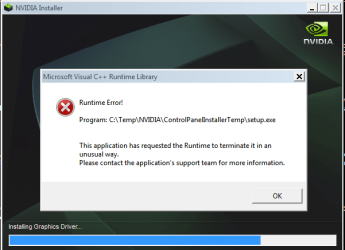
2. a problem of install of quite new NVidia drivers either from nVidia itself or from M$. The funny point that driver itself installation is ok but its integrated part - driver Control Panel - always fail in abnormal way with some Visual C++ error as picture attached... then the whole install fails as well... however, an install of quite aged drivers like 2010 is beyond any problems...

assuming culprits as Windows Installer + Windows Modules Installer and/or some of the multiple Visual C++ redistributables installed I've duly checked all around but everything seem to operate normally.

well. finally I've decided to perform in-place upgrade/repair using my genuine full Dell Win7 sp1u x64 OEM DVD, which was originally used for a clean install of this copy of win7 but... OOPS... FAILED again.

actually it starts ok to copying install files to new install folder, then shows something like 'Install start' for a second... but then big window just vanishing... with neither any error popup nor any error record in win7 logs... and I'm being flashed back to initial small "Install now" win7 dvd window.

any pro ideas?

always appreciate you time.

yours,
 

Attachments

  • ControlPanelInstall Error = Some Visual C++.PNG
    ControlPanelInstall Error = Some Visual C++.PNG
    98.5 KB · Views: 197
Last edited:

My Computer

Computer type
Laptop
Computer Manufacturer/Model Number
Dell Laptop & Asus Desktop
OS
Windows 7 Ultimate x64 SP1u OEM Dell & OEM Asus
CPU
Intel Core 2 T9500 2.60GHz & Core 2 Duo E7500 @ 2.93GHz
Motherboard
DELL PRECISION M4300 & ASUS P5Q-EM
Memory
DDR2 - 2x4GB Hyundai SODIMM 800Mhz & 2x2GB GeIL DIMM 1066MHz
Graphics Card(s)
nVIDIA Quadro FX360M & Mobo Integrated Intel4500
Sound Card
Mobos' Integrated SigmaTel & RealTek ALC1200 8Ch HD Audio
Monitor(s) Displays
Samsung 15.4" LCD & Samsung SyncMaster 245B+ Monitor
Screen Resolution
1920x1200 both
Hard Drives
SSDs Kingston, HDDs WDC & HGST - many
PSU
DELL & Some PSU of 450W
Case
DELL & IRBIS
Cooling
Dell & Cooler Master
Keyboard
Dell & Logitech
Mouse
Logitech & Genuis
Internet Speed
100Mbps
Antivirus
N360 + MalwareBytes on both
Browser
IE11 + latest Chrome on both

My Computer

Computer type
PC/Desktop
Computer Manufacturer/Model Number
Self built custom
OS
64-bit Windows 11 Pro for Workstations
CPU
Intel i7-8700K OC'd to 5 GHz
Motherboard
ASUS ROG Maximus XI Formula Z390
Memory
64 GB (4x16GB) G.SKILL TridentZ RGB DDR4 3600 MHz
Graphics Card(s)
ASUS ROG-STRIX-GTX1080TI-O11G-GAMING
Sound Card
Integrated
Monitor(s) Displays
2 x Samsung Odyssey G7 27"
Screen Resolution
2560x1440
Hard Drives
1TB Samsung 990 PRO M.2,
4TB Samsung 990 PRO PRO M.2,
TerraMaster F8 SSD Plus NAS
PSU
Seasonic Prime Titanium 850W
Case
Thermaltake Core P3
Cooling
Corsair Hydro H115i
Keyboard
Logitech wireless K800
Mouse
Logitech MX Master 4
Internet Speed
2 Gb/s Download and 100 Mb/s Upload
Antivirus
Malwarebyte Anti-Malware Premium
Browser
Google Chrome
Other Info
Logitech Z625 speaker system,
Logitech BRIO 4K Pro webcam,
HP Color LaserJet Pro MFP M477fdn,
APC SMART-UPS RT 1000 XL - SURT1000XLI,
Galaxy S23 Plus phone
Did you try running the installer and the app as admin? Sometimes helps..
 

My Computer

Computer type
PC/Desktop
Computer Manufacturer/Model Number
Custom Build
OS
Windows 7 Ultimate x64 SP1
CPU
AMD Phenom 2 1090T
Motherboard
Gigabyte GA-890FXA-UD5
Memory
2x8GB Kingston HyperX Fury Black 1600Mhz Unganged
Graphics Card(s)
MSI GTX 970 Gaming 4G
Sound Card
Realtek On-Board HD 7.1 Audio / Logitech G35
Monitor(s) Displays
3xAcer GD245HQ
Screen Resolution
1920x1080
Hard Drives
Samsung 850 Pro 512GB SSD - OS /
WD Caviar Black SATA 3 - 1 TBx2 - Dynamic RAID 0 /
WD Caviar Green SATA 2 - 640GBx2 - Dynamic RAID 0 /
WD Caviar Green SATA 2 - 640GB - Internal Backup /
Seagate Barracude SATA 3 - 3TB - External Backup/ Sync
PSU
HighPower 1000W
Case
Cooler Master HAF 932
Cooling
Noctua NH-D14
Keyboard
Logitech G19
Mouse
Logitech G500
Internet Speed
100/4 Mbit Cable (100GB quota)
Antivirus
ZoneAlarm Extreme Security / MBAM Pro / MBAE Free / SAS Free
Browser
IE 11 - Firefox - Chrome
Other Info
Logitech F710/ G27/ G940/ Z5500 // TrackIR 5 // Nvidia 3D Surround Vision
Shawn, it's nice to hearing from you...

well, OF COURSE NO! The worst thing that I truly hate is to do/restore all my personal settings after z clean win7 install. So I yet stay away from clean install when I'll loose all precious settings in this case...

And what do you mean by clean install @ boot? To load win7 from install media - dvd or flash - and 1. repair the current installation OR 2. upgrade the current installation? Is there any difference when I'll loose all my settings in both options? right?

Thanx.
 

My Computer

Computer type
Laptop
Computer Manufacturer/Model Number
Dell Laptop & Asus Desktop
OS
Windows 7 Ultimate x64 SP1u OEM Dell & OEM Asus
CPU
Intel Core 2 T9500 2.60GHz & Core 2 Duo E7500 @ 2.93GHz
Motherboard
DELL PRECISION M4300 & ASUS P5Q-EM
Memory
DDR2 - 2x4GB Hyundai SODIMM 800Mhz & 2x2GB GeIL DIMM 1066MHz
Graphics Card(s)
nVIDIA Quadro FX360M & Mobo Integrated Intel4500
Sound Card
Mobos' Integrated SigmaTel & RealTek ALC1200 8Ch HD Audio
Monitor(s) Displays
Samsung 15.4" LCD & Samsung SyncMaster 245B+ Monitor
Screen Resolution
1920x1200 both
Hard Drives
SSDs Kingston, HDDs WDC & HGST - many
PSU
DELL & Some PSU of 450W
Case
DELL & IRBIS
Cooling
Dell & Cooler Master
Keyboard
Dell & Logitech
Mouse
Logitech & Genuis
Internet Speed
100Mbps
Antivirus
N360 + MalwareBytes on both
Browser
IE11 + latest Chrome on both
howdy GokAy,

yep. sure. always run almost everything as admin. also all of my PCs commonly have 1 user = admin account with UAC always OFF!

p.s. common way sfc /scannow returns no errors. NEVER, ABSOLUTELY!
 

My Computer

Computer type
Laptop
Computer Manufacturer/Model Number
Dell Laptop & Asus Desktop
OS
Windows 7 Ultimate x64 SP1u OEM Dell & OEM Asus
CPU
Intel Core 2 T9500 2.60GHz & Core 2 Duo E7500 @ 2.93GHz
Motherboard
DELL PRECISION M4300 & ASUS P5Q-EM
Memory
DDR2 - 2x4GB Hyundai SODIMM 800Mhz & 2x2GB GeIL DIMM 1066MHz
Graphics Card(s)
nVIDIA Quadro FX360M & Mobo Integrated Intel4500
Sound Card
Mobos' Integrated SigmaTel & RealTek ALC1200 8Ch HD Audio
Monitor(s) Displays
Samsung 15.4" LCD & Samsung SyncMaster 245B+ Monitor
Screen Resolution
1920x1200 both
Hard Drives
SSDs Kingston, HDDs WDC & HGST - many
PSU
DELL & Some PSU of 450W
Case
DELL & IRBIS
Cooling
Dell & Cooler Master
Keyboard
Dell & Logitech
Mouse
Logitech & Genuis
Internet Speed
100Mbps
Antivirus
N360 + MalwareBytes on both
Browser
IE11 + latest Chrome on both
Back
Top