Repair Install

How to Do a Repair Install to Fix Windows 7


   Information
This will show you how to do a repair install (aka: in-place upgrade install) to fix your currently installed Windows 7 and preserve your user accounts, data, programs, and system drivers.
   Note
Do a Repair installation if:
  • A System Restore did not help fix your Windows 7.
  • There is no other easier option left that can fix your Windows 7.
  • You DO NOT want to do a Clean reinstall of Windows 7.
  • You DO want to preserve your user accounts, data, programs, and system drivers.
   Tip
ITEMS THAT WILL BE RESET TO DEFAULT OR AFFECTED:
  • Sounds
  • Services
  • Visual Effects Settings
  • Device Drivers - Be sure to have these handy to reinstall. They do not always remain after the repair (upgrade) install.
  • You may lose the ability to sign on to MSN Messenger, to solve this problem have a look at this thread Unable to sign in to WLM.
  • You may lose your custom themes due to not having permisions set on the old themes. Go to the hidden themes folder at C:/Users/(User-Name)/AppData/Local/Microsoft/Windows/Themes, then Take Ownership of the themes folder and you will now have all your themes back.
  • It has been reported that you may also lose your Media Center gadget after doing the repair install.
  • Windows Updates will need to be checked and reinstalled again.
   Warning

  • You can only do a repair install with the same edition Windows 7 installation disc for the same edition of Windows 7 that you have installed.
  • You cannot use a OEM Windows 7 "Factory" Restore/Recovery type of installation disc that came with or created from a store bought computer to do a repair install with. These can only be used do a clean install instead.
  • You can do a repair install on a factory OEM installation with the latest official Windows 7 with SP1 ISO file here: Microsoft: Windows 7 Direct Download Links, and use Windows 7 USB-DVD Download Tool to create a bootable DVD or USB flash drive with the ISO to do the repair install from within Windows 7.
  • You can use a retail OEM Windows 7 installation disc to do a repair install with.
  • You can use a retail (full or upgrade) Windows 7 installation disc to do a repair install with.
  • You cannot do a repair install with a System Repair Disc. A System Repair Disc is not a installation disc, and will only boot to the System Recovery Options screen.
  • If you have a 32-bit (x86) Windows 7 currently installed, then you must use a 32-bit Windows 7 installation disc to be able to do a repair install with.
  • If you have a 64-bit (x64) Windows 7 currently installed, then you must use a 64-bit Windows 7 installation disc to be able to do a repair install with.
  • You can use a retail Windows 7 SP1 installation disc (ex: Technet (available), MSDN (available), or retail (when available)) to do a repair install with on a currently installed Windows 7 SP1.
  • You can use a Windows 7 SP1 installation disc (ex: Technet (available), MSDN (available), or retail (when available)) to do a repair install with on a currently installed slipstream Windows 7 SP1.
  • You cannot use a slipstream Windows 7 installation disc to do a repair install with on a currently installed Windows 7 SP1.
  • You cannot use a slipstream Windows 7 installation disc to do a repair install with on a currently installed slipstream Windows 7 SP1.
  • You can only do a repair install from within Windows 7.
  • You cannot do a repair install at boot or in Safe Mode.
  • You must be logged into Windows 7 in a administrator account to be able to do a repair install.
  • You must have at least 8.87 GB + what is currently being used of free space (more if you have a larger installation) on the hard drive/partition Windows 7 is installed on to do a repair install.
  • If you changed the default location of a user account's profile folder, then you will need to change it back to the default C:\Users location first.
  • If you moved the default location of a user folder, then you will need to change it back to the default C:\Users\(user-name) location first.


Here's How:
NOTE: Be sure to back up anything that you do not want to lose first to be extra safe.1. Start Windows 7, and log on to an administrator account.

2. Disable any 3rd party firewall, antivirus, or other security program to avoid it from possibly preventing the repair in-place upgrade installation of Windows 7.

3. Do either step 4, step 5, or step 6 below depending if your retail Windows 7 installation ISO/DVD/USB has SP1 or not, and if your currently installed Windows 7 has SP1 installed or not.

4. Repair Installed Windows 7 SP1 using Windows 7 with SP1 ISO

   Note
If you do not have a Windows 7 with SP1 ISO, then you can download an official ISO with your retail product key from Microsoft at the link below.

:ar: Microsoft Software Recovery

You can also download the latest official Windows 7 SP1 Media Refresh (SP1 U) ISO file at the link below, but this link is not always available for download.

:ar: Microsoft: Windows 7 Direct Download Links

A) If you have not already, you will need to install a program like 7-Zip that supports extracting a ISO to a folder.

B) Using the program (ex: 7-Zip) from step 1, extract the Windows 7 SP1 ISO file to a folder on a partition or HDD other than the current Windows 7 partition. (see screenshot below)
NOTE: For example with 7-Zip, right click on ISO, click on 7-Zip, Extract files, browse button, select where you want to extract to, and click on OK twice.7-Zip.jpg
C) While in Windows 7 SP1, open the folder that you extracted the ISO into, and run the setup.exe file.

D) Go to step 7 below.
5. Repair Installed Windows 7 SP1 using Windows 7 with SP1 DVD/USB

   Note
If you do not have a Windows 7 with SP1 ISO, then you can download an official ISO with your retail product key from Microsoft at the link below.

:ar: http://www.microsoft.com/en-us/software-recovery

You can also download the latest official Windows 7 SP1 Media Refresh (SP1 U) ISO file at the link below, but this link is not always available for download.

:ar: Microsoft: Windows 7 Direct Download Links

Afterwards, you can use Windows 7 USB-DVD Download Tool to create a bootable DVD or USB flash drive with the ISO to do the repair install from within Windows 7 using this step.

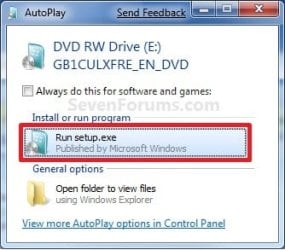
A) While in Windows 7 SP1, insert your retail Windows 7 SP1 installation DVD into the DVD drive, or connect your Windows 7 with SP1 installation USB thumb drive, and click on the Run setup.exe option in AutoPlay. (see screenshot below)
NOTE: If the AutoPlay window does not open, then open the drive folder in Computer and run the setup.exe file.AutoPlay.jpg
B) Go to Go to step 7 below.
6. Repair Installed Windows 7 without SP1 using Windows 7 without SP1 DVD/USB

   Note
If you do not have a Windows 7 without SP1 installation DVD/USB, then you can download the latest official Windows 7 Professional or Home Premium without SP1 ISO file here: Microsoft: Windows 7 Direct Download Links, and use Windows 7 USB-DVD Download Tool to create a bootable DVD or USB flash drive with the ISO to do the repair install from within Windows 7 using this step.

It is preferred to have SP1 installed on your PC and to use step 4 or step 5 above to do a repair install with instead though.

A) While in Windows 7 SP1 installed, insert your retail Windows 7 installation DVD into the DVD drive, or connect your Windows 7 installation USB thumb drive, and click on the Run setup.exe option in AutoPlay. (see screenshot below)
NOTE: If the AutoPlay window does not open, then open the drive folder in Computer and run the setup.exe file.AutoPlay.jpg
B) Go to Go to step 7 below.
7. If prompted by UAC, then click on Yes.

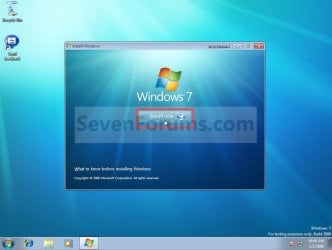
8. Click on the Install Now button to start the installation. (see screenshot below)Step1.jpg
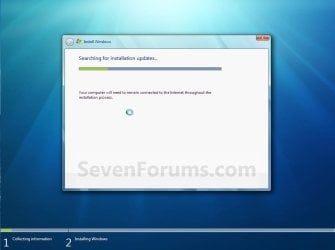
9. If prompted, uncheck the I want to help make Windows installation better box (unless you would like to :) ), and click on the Go online to get the latest updates for installation option. (see screenshot below)Step2.jpg
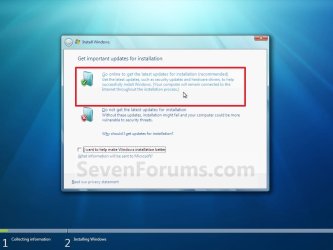
A) Windows 7 will now check online for and install any available installation updates. (see screenshots below)Step2A.jpg

Step2B.jpg

10. Check the I accept the license terms box, and click on Next. (see screenshot below)Step3.jpg
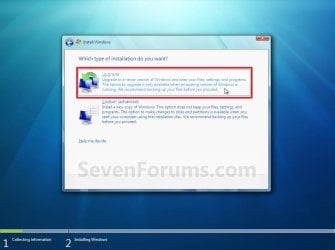
11. Click on the Upgrade option. (see screenshot below)Step4.jpg
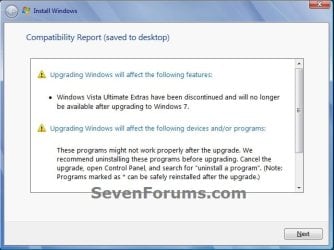
12. Windows will now check for any compatibility issues. If any are found like in the example below, click on the red X to cancel the repair install and close this "Install Windows" window, take care of any found issues (ex: uninstall any incompatible program), then restart the repair install process over again.Compatibility-Report.jpg
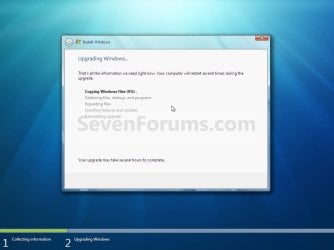
13. The installation of Windows 7 will now begin. (see screenshot below)
NOTE: During the installation process, your screen may flash and computer will restart a few times.Step5.jpg
14. After the final restart, you will see this screen for a moment. (see screenshot below)Step6.jpg
15. Type in your Windows 7 product key number. (see screenshot below step 16)

16. Uncheck the Automatically activate Windows when I'm online box unchecked, then click on the Next button. (see screenshot below)
NOTE: You can activate Windows 7 later after you make sure it is running properly. (see step 23 below)
If you chose to automatically activate Windows online when you set up your computer, automatic activation begins trying to activate your copy of Windows three days after you log on for the first time.Step7.jpg
17. Click on Use recommended settings. (see screenshot below)

:note: You will always be able to change your Windows Update settings at anytime in Windows 7.

Step8.jpg
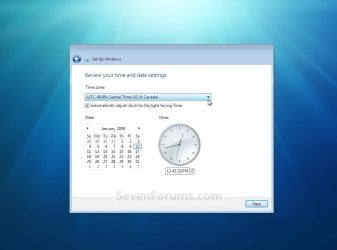
18. Select your time zone and set your time and date settings, then click on the Next button. (see screenshot below)Step9.jpg
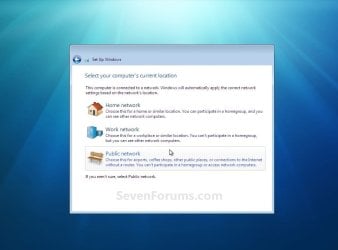
19. Click on the option for your computer's location to select the correct network location type settings to be applied for that location. (see screenshot below)
NOTE: It is best to select Public location for the best security.Step10.jpg
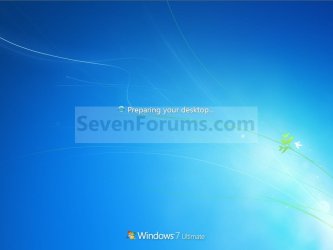
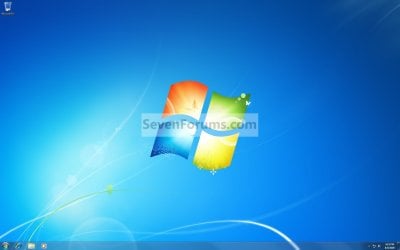
20. Windows 7 will now prepare your desktop to startup. (see screenshots below)Step11A.jpg

Desktop.jpg

21. If you used a DVD or USB to do the repair install with, then you can remove the DVD or USB when the repair install has successfully completed and you are logged in to Windows 7.

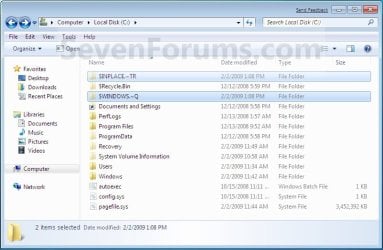
22. Check to see if you are missing any user files. If you are, then you can copy them from the C:\Windows.old or the hidden protected operating system C:\$INPLACE.~TR and C:\WINDOWS.~Q backup folders. (see screenshot below)Old_Install.jpg
23. If everything checks out in step 21, then you can run Disk Cleanup (step 5 at this link). You will need to click on the Clean up system files button first, and then could check the Files discarded by Windows upgrade, Previous Windows installations, and Windows upgrade log files boxes. (see screenshot below)
NOTE: This will delete the C:\Windows.old, C:\$INPLACE.~TR and C:\WINDOWS.~Q folders from step 21 above.Disk_Cleanup.jpg
24. Refresh your Windows Experience Index (WEI) score.

25. When finished, activate Windows 7, and make sure that your 3rd party security programs (if applicable) are enabled again.
That's it,
Shawn


Last edited:
Hello Mycenius, and welcome to Seven Forums.

Sorry, but no. A repair install (aka: in-place upgrade) can only be done from within Windows started. :(

However, you could do a custom install at boot to have everything in your current installation placed inside the C:\Windows.old folder in the new installation. You will then be able to copy what you like back into the new installation from the C:\Windows.old folder.

Hope this helps,
Shawn
 

My Computer

Computer type
PC/Desktop
Computer Manufacturer/Model Number
Self built custom
OS
64-bit Windows 11 Pro for Workstations
CPU
Intel i7-8700K OC'd to 5 GHz
Motherboard
ASUS ROG Maximus XI Formula Z390
Memory
64 GB (4x16GB) G.SKILL TridentZ RGB DDR4 3600 MHz
Graphics Card(s)
ASUS ROG-STRIX-GTX1080TI-O11G-GAMING
Sound Card
Integrated
Monitor(s) Displays
2 x Samsung Odyssey G7 27"
Screen Resolution
2560x1440
Hard Drives
1TB Samsung 990 PRO M.2,
4TB Samsung 990 PRO PRO M.2,
TerraMaster F8 SSD Plus NAS
PSU
Seasonic Prime Titanium 850W
Case
Thermaltake Core P3
Cooling
Corsair Hydro H115i
Keyboard
Logitech wireless K800
Mouse
Logitech MX Master 4
Internet Speed
2 Gb/s Download and 100 Mb/s Upload
Antivirus
Malwarebyte Anti-Malware Premium
Browser
Google Chrome
Other Info
Logitech Z625 speaker system,
Logitech BRIO 4K Pro webcam,
HP Color LaserJet Pro MFP M477fdn,
APC SMART-UPS RT 1000 XL - SURT1000XLI,
Galaxy S23 Plus phone
Thanks Shawn - appreciate the info. I am going to try rolling back the 3 update 'packages' first using the command prompt in recovery mode, and if that fails I will try the custom install as per your suggestion.

FTR this is the error I repeatedly get when my box loops in Recovery State:

Problem Event Name: StartupRepairOffline
Sig 1: 6.1.7600.16385
Sig 2: 6.1.7600.16385
Sig 3: unknown
Sig 4: 21201049
Sig 5: AutoFailover
Sig 6: 7
Sig 7: CorruptFile
OS Version: 6.1.7600.2.0.0.256.1
Locale ID: 1033


Cheers,

John
 

My Computer

Computer type
PC/Desktop
Computer Manufacturer/Model Number
Self-Built Custom Config
OS
Windows 7 64-bit Ultimate
CPU
i7-940 2.93 GHz/3.06GHz
Motherboard
Gigabyte EX58-UD5
Memory
3 x Corsair 2GB 1600MHz
Graphics Card(s)
ATI Radeon Sapphire HD5870 2GB DDR5
Sound Card
Onboard RealTek HD Audio
Monitor(s) Displays
Dell 24" Widescreen LCD
Screen Resolution
1920x1200
Hard Drives
3 x RAID Volumes (two of twin 1TB SATA2; one of twin 500GB SATA2).
Hi. I have qestions. Point 7 says "Windows 7 will now check online for and install any available installation updates", will this work on wireless broadband? and can someone please explain point 18 to me. I ahve read it many times but its like reading Chinese. Please, what does all this mean "18. Check to see if you are missing any user files. If you are, then you can copy them from the C:\Windows.old or the hidden protected operating system C:\$INPLACE.~TR and C:\WINDOWS.~Q backup folders." Thank you in advance.
 

My Computer

OS
Windows 7 Pro 64x
CPU
AMD Phenom 9950 BE
Motherboard
Gigabyte
Memory
Corsair
Graphics Card(s)
Gigabyte
PSU
Silverstone 560w
Hello Jimbo, and welcome to Seven Forums.

(Point 7) - Windows will check for a internet connection while doing this. If one is available that Windows can connect to, Windows will check and install the update if one is available. If one is not available, or cannot be used for some reason, Windows will skip the update and continue the installation without it.

(Point 18) - When you do a repair install (in-place upgrade), Windows may make a copy of your current installation or files in the locations in bold above in your post. When the repair install is complete, you would check the files you may have had in your C:\Users\(user-name) user folders to see if you may be missing any. If you are, then you may be able to copy them back from the locations in bold above in your post.

Hope this helps,
Shawn
 

My Computer

Computer type
PC/Desktop
Computer Manufacturer/Model Number
Self built custom
OS
64-bit Windows 11 Pro for Workstations
CPU
Intel i7-8700K OC'd to 5 GHz
Motherboard
ASUS ROG Maximus XI Formula Z390
Memory
64 GB (4x16GB) G.SKILL TridentZ RGB DDR4 3600 MHz
Graphics Card(s)
ASUS ROG-STRIX-GTX1080TI-O11G-GAMING
Sound Card
Integrated
Monitor(s) Displays
2 x Samsung Odyssey G7 27"
Screen Resolution
2560x1440
Hard Drives
1TB Samsung 990 PRO M.2,
4TB Samsung 990 PRO PRO M.2,
TerraMaster F8 SSD Plus NAS
PSU
Seasonic Prime Titanium 850W
Case
Thermaltake Core P3
Cooling
Corsair Hydro H115i
Keyboard
Logitech wireless K800
Mouse
Logitech MX Master 4
Internet Speed
2 Gb/s Download and 100 Mb/s Upload
Antivirus
Malwarebyte Anti-Malware Premium
Browser
Google Chrome
Other Info
Logitech Z625 speaker system,
Logitech BRIO 4K Pro webcam,
HP Color LaserJet Pro MFP M477fdn,
APC SMART-UPS RT 1000 XL - SURT1000XLI,
Galaxy S23 Plus phone
My scenario:

Windows XP and Windows 7 on separate partitions on the same drive. Running low on space (even though I have a separate 750gb drive which is where I install programs and store data, some programs (Visual Studio) have to use the C:\ for some files even if the main program is installed on another drive/partition).

I got a larger drive and used Easus Partition manager to clone the partitions to the new drive. Everything looked like it worked okay, but there are small issues with my user profile, which I don't think made it fully intact. Some of my Windows program icons have a generic icon (Media Player, Microsoft Office), and the main problem is that I want to install Visual Studio 2010 on my computer and it installs fine, but the different components within Visual Studio do not work. No code highlighting or intellisense. I think this has something to do with my user profile corruption from cloning the partitions.

Anyway, sorry to be long-winded about this, but will a repair install fix my user profile corruption?
 

My Computer

OS
Windows 7 Ultimate x64
...When the repair install is complete, you would check the files you may have had in your C:\Users\(user-name) user folders to see if you may be missing any. If you are, then you may be able to copy them back from the locations in bold above in your post.

Hi Shawn - FWIW when I did my Custom Install at the weekend it arbitrarily moved all contents of the Users directory to the C:\Windows.old directory - a copy of my user profile was not preserved in the actual C:\Users directory... Note I did not use the same user name for my default admin/power user at install - in case it overwrote the old directory so this 'may' have been the reason...

However all files appeared to be in the back-up user directory in Windows.old as noted, although a couple were corrupt (but I suspect this related to the original issue with my RAID array that got me stuck in the repair loop and forced me to do the custom re-install).

:)

Cheers,

John
 

My Computer

Computer type
PC/Desktop
Computer Manufacturer/Model Number
Self-Built Custom Config
OS
Windows 7 64-bit Ultimate
CPU
i7-940 2.93 GHz/3.06GHz
Motherboard
Gigabyte EX58-UD5
Memory
3 x Corsair 2GB 1600MHz
Graphics Card(s)
ATI Radeon Sapphire HD5870 2GB DDR5
Sound Card
Onboard RealTek HD Audio
Monitor(s) Displays
Dell 24" Widescreen LCD
Screen Resolution
1920x1200
Hard Drives
3 x RAID Volumes (two of twin 1TB SATA2; one of twin 500GB SATA2).
Ok, I got to Step 7. It looked like it finished downloading updates, but just hung there for over 2 hours. I had to quit, tried to run it again and it still hung. Any suggestions?

If you do a clean install will it save your files to the windows.old folder, or is that only with the custom install?
 

My Computer

Computer Manufacturer/Model Number
Custom Built
OS
Windows 7 Home Premium 64bit
CPU
AMD Phenom II X4 955 Black Edition Deneb 3.2GHz Socket AM3
Motherboard
GIGABYTE GA-770TA-UD3 AM3 AMD 770 SATA 6Gb/s USB 3.0 ATX AMD
Memory
G.SKILL 4GB (2 x 2GB) 240-Pin DDR3 SDRAM DDR3 1600 (PC3 1280
Graphics Card(s)
SAPPHIRE 100283-3L Radeon HD 5770 1GB 128-bit GDDR5 PCI Expr
Sound Card
Onboard
Monitor(s) Displays
Samsung 50" Plasma
Hard Drives
2X 1TB Western Digital Caviar Black Internal Drives
PSU
CORSAIR CMPSU-550VX 550W ATX12V V2.2 SLI Ready CrossFire Rea
Case
nMEDIAPC Red Wood Wood/Steel HTPC 8000 ATX Media Center / HT
Cooling
COOLER MASTER Intel Core i5 compatible GeminII S RR-CCH-PBU1
Hello NokComputer, and welcome to Seven Forums.

You would only get the Windows.old folder when doing a custom install. Depending on why you needed to do a repair install, have you already tried doing a system restore using a restore point dated before the issue to see that may help.

Hope this helps,
Shawn
 

My Computer

Computer type
PC/Desktop
Computer Manufacturer/Model Number
Self built custom
OS
64-bit Windows 11 Pro for Workstations
CPU
Intel i7-8700K OC'd to 5 GHz
Motherboard
ASUS ROG Maximus XI Formula Z390
Memory
64 GB (4x16GB) G.SKILL TridentZ RGB DDR4 3600 MHz
Graphics Card(s)
ASUS ROG-STRIX-GTX1080TI-O11G-GAMING
Sound Card
Integrated
Monitor(s) Displays
2 x Samsung Odyssey G7 27"
Screen Resolution
2560x1440
Hard Drives
1TB Samsung 990 PRO M.2,
4TB Samsung 990 PRO PRO M.2,
TerraMaster F8 SSD Plus NAS
PSU
Seasonic Prime Titanium 850W
Case
Thermaltake Core P3
Cooling
Corsair Hydro H115i
Keyboard
Logitech wireless K800
Mouse
Logitech MX Master 4
Internet Speed
2 Gb/s Download and 100 Mb/s Upload
Antivirus
Malwarebyte Anti-Malware Premium
Browser
Google Chrome
Other Info
Logitech Z625 speaker system,
Logitech BRIO 4K Pro webcam,
HP Color LaserJet Pro MFP M477fdn,
APC SMART-UPS RT 1000 XL - SURT1000XLI,
Galaxy S23 Plus phone
Hello NokComputer, and welcome to Seven Forums.

You would only get the Windows.old folder when doing a custom install. Depending on why you needed to do a repair install, have you already tried doing a system restore using a restore point dated before the issue to see that may help.

Hope this helps,
Shawn

Hi Brink, thanks for the reply. The reason I was doing the repair install was basically my computer is beyond slow now, can't uninstall/install programs, run cmd's hang, event viewer doesn't work, everything hangs and will not complete. Don't know what the culprit is. Earlier this week, I had trouble booting my computer (took an hour or two), then everything in windows slowed to a crawl (it would take add/remove programs 10 minutes to show). I have reason to believe it has something to do with a display driver, some faulty driver - or even possibly an external hard drive that was causing boot problems. But really it could be anything since so many problems starting popping up (it was just a downward spiral). I really doubt it's a virus (hardly ever on internet). This is on a 5-month old system with only a handfull of programs installed, windows updates set to update automatically, well maintained system. Don't understand what went wrong, even thought maybe a windows update could've messed it up.
 

My Computer

Computer Manufacturer/Model Number
Custom Built
OS
Windows 7 Home Premium 64bit
CPU
AMD Phenom II X4 955 Black Edition Deneb 3.2GHz Socket AM3
Motherboard
GIGABYTE GA-770TA-UD3 AM3 AMD 770 SATA 6Gb/s USB 3.0 ATX AMD
Memory
G.SKILL 4GB (2 x 2GB) 240-Pin DDR3 SDRAM DDR3 1600 (PC3 1280
Graphics Card(s)
SAPPHIRE 100283-3L Radeon HD 5770 1GB 128-bit GDDR5 PCI Expr
Sound Card
Onboard
Monitor(s) Displays
Samsung 50" Plasma
Hard Drives
2X 1TB Western Digital Caviar Black Internal Drives
PSU
CORSAIR CMPSU-550VX 550W ATX12V V2.2 SLI Ready CrossFire Rea
Case
nMEDIAPC Red Wood Wood/Steel HTPC 8000 ATX Media Center / HT
Cooling
COOLER MASTER Intel Core i5 compatible GeminII S RR-CCH-PBU1
With that many issues, you might use the free program MalwareBytes to check to see if you have a virus or some other form of malware.

Otherwise, you may be better off doing a custom install to start fresh, copy over any files you wanted from the Windows.old folder, then delete the Windows.old folder when ready to regain that space.
 

My Computer

Computer type
PC/Desktop
Computer Manufacturer/Model Number
Self built custom
OS
64-bit Windows 11 Pro for Workstations
CPU
Intel i7-8700K OC'd to 5 GHz
Motherboard
ASUS ROG Maximus XI Formula Z390
Memory
64 GB (4x16GB) G.SKILL TridentZ RGB DDR4 3600 MHz
Graphics Card(s)
ASUS ROG-STRIX-GTX1080TI-O11G-GAMING
Sound Card
Integrated
Monitor(s) Displays
2 x Samsung Odyssey G7 27"
Screen Resolution
2560x1440
Hard Drives
1TB Samsung 990 PRO M.2,
4TB Samsung 990 PRO PRO M.2,
TerraMaster F8 SSD Plus NAS
PSU
Seasonic Prime Titanium 850W
Case
Thermaltake Core P3
Cooling
Corsair Hydro H115i
Keyboard
Logitech wireless K800
Mouse
Logitech MX Master 4
Internet Speed
2 Gb/s Download and 100 Mb/s Upload
Antivirus
Malwarebyte Anti-Malware Premium
Browser
Google Chrome
Other Info
Logitech Z625 speaker system,
Logitech BRIO 4K Pro webcam,
HP Color LaserJet Pro MFP M477fdn,
APC SMART-UPS RT 1000 XL - SURT1000XLI,
Galaxy S23 Plus phone
If I disconnect my 1TB HDD to make the repair install go faster, will everything work as before if I just connect it afterwards?
Like, all the installed files and such will still be directed to the correct HDD - or would I have to install everything again?
 

My Computer

OS
Windows 7 Home Premium
With that many issues, you might use the free program MalwareBytes to check to see if you have a virus or some other form of malware.

Otherwise, you may be better off doing a custom install to start fresh, copy over any files you wanted from the Windows.old folder, then delete the Windows.old folder when ready to regain that space.

Yeah, MalwareBytes would be great, but i'm 99% sure it would lock up like everything else I tried - even safe mode is slow. I was gonna go ahead with the custom install, but what If I get stuck at the same step and it hangs when trying to install the updates, what should I try after that?
 

My Computer

Computer Manufacturer/Model Number
Custom Built
OS
Windows 7 Home Premium 64bit
CPU
AMD Phenom II X4 955 Black Edition Deneb 3.2GHz Socket AM3
Motherboard
GIGABYTE GA-770TA-UD3 AM3 AMD 770 SATA 6Gb/s USB 3.0 ATX AMD
Memory
G.SKILL 4GB (2 x 2GB) 240-Pin DDR3 SDRAM DDR3 1600 (PC3 1280
Graphics Card(s)
SAPPHIRE 100283-3L Radeon HD 5770 1GB 128-bit GDDR5 PCI Expr
Sound Card
Onboard
Monitor(s) Displays
Samsung 50" Plasma
Hard Drives
2X 1TB Western Digital Caviar Black Internal Drives
PSU
CORSAIR CMPSU-550VX 550W ATX12V V2.2 SLI Ready CrossFire Rea
Case
nMEDIAPC Red Wood Wood/Steel HTPC 8000 ATX Media Center / HT
Cooling
COOLER MASTER Intel Core i5 compatible GeminII S RR-CCH-PBU1
Since a custom install is done at boot with your Windows 7 installation disk, you shouldn't have the same problem like you are trying to do a repair install (in-place upgrade) from within your current Windows 7 installation.
 

My Computer

Computer type
PC/Desktop
Computer Manufacturer/Model Number
Self built custom
OS
64-bit Windows 11 Pro for Workstations
CPU
Intel i7-8700K OC'd to 5 GHz
Motherboard
ASUS ROG Maximus XI Formula Z390
Memory
64 GB (4x16GB) G.SKILL TridentZ RGB DDR4 3600 MHz
Graphics Card(s)
ASUS ROG-STRIX-GTX1080TI-O11G-GAMING
Sound Card
Integrated
Monitor(s) Displays
2 x Samsung Odyssey G7 27"
Screen Resolution
2560x1440
Hard Drives
1TB Samsung 990 PRO M.2,
4TB Samsung 990 PRO PRO M.2,
TerraMaster F8 SSD Plus NAS
PSU
Seasonic Prime Titanium 850W
Case
Thermaltake Core P3
Cooling
Corsair Hydro H115i
Keyboard
Logitech wireless K800
Mouse
Logitech MX Master 4
Internet Speed
2 Gb/s Download and 100 Mb/s Upload
Antivirus
Malwarebyte Anti-Malware Premium
Browser
Google Chrome
Other Info
Logitech Z625 speaker system,
Logitech BRIO 4K Pro webcam,
HP Color LaserJet Pro MFP M477fdn,
APC SMART-UPS RT 1000 XL - SURT1000XLI,
Galaxy S23 Plus phone
Hi ya'll :)
Always here asking help :(
OK, I have a new installed Seven Ultimate 64 (new = 34 days) and in another partition my old Vista Ultimate 64: so I have a dual boot created by Seven.
All was ok until I tried to update the Lightscribe template Labeler as I wrote in a 3d here in the forum.
From that moment started my problems and now I have 3 different problem and all are related to "Services". I don't know what is the problem, but they don't start (not in automatic nor in manual) and I cannot change the situation.
I tried to create a new account as administrator (with password), I tried to run the application that needs the different services as admin, or "run as different user" then
enter the new account and pass and some other way suggested by different user here in tghis forum and in other technical forum (like lightscribe forum or services forum).
No solution: i switch from Error 1053 (the service did not respond to the start in a timely fashion) or The operation could not be completed Access denied or some others.
This morning a new one: I cannot reinstall one of my plugin because when I need to use the Licence manager to enter the manually moved license (from the Vista partition to the Seven partition) I only have this reply :" Unable to install Windows Service". The plugin's technician told that I need to have the AST service running, but mine is stopped (I don't know why) and I cannot start it :(
So Because also this it's a services problem like the previous two, I decided to try a repair of my Seven installation, that - apart this problem, it's perfectly running, without any problem - to try to repair all the services.
So I have read all this tut, but I'm some question.......
First of all, I don't want to lose my installed programs or all my works, the only think I need is to repair the services.
Is this possible? Is there risk to have to reinstall all from zero? :shock::cry:
I have finally accomplished my perfect installation of all my programs, plugins, utility and so on.... so I really don't want to format and reinstall newly Seven and all my stuff.
But it seems to me that with this procedure, I reinstall a new Seven (on a Beta version for example) and not repair something going bad.
Have I misunderstood all? Can I try to run my Seven dvd and try to repair my installation?
I have not tried before to repair an OS, normally my installation don't need anything until the time to reinstall the OS newly, so in the repair situation I'm really newbie.
Can someone of you "guru" help me?
And, as always :o:rolleyes: be patient with my bad english
Thanks in advance, I'll be here waiting for you all.
Lio
 

My Computer

OS
Vista/Seven
CPU
Conroe E6800
Motherboard
ASUS P5W DH Deluxe
Memory
Mushkin XP PC2-6400 8GB (4X2GB) DDR2-800 CL4-3-3-10
Graphics Card(s)
2 x ASUS Radeon X1950 Pro
Monitor(s) Displays
2x Samsung SyncMaster 30" - 1x Samsung SyncMaster 27"
Hard Drives
1x WD Raptor 74GB SATA (for Vista)
2x WD Caviar SE16 500GB SATA2 16MB; 1x WD 1 TB SATA
PSU
OCZ GameXStream 850W
Case
TT Armor LCS Black with an Integrated Water Cooling System
Cooling
Built-in Liquid Cooling System
Keyboard
Logitech
Mouse
Logitech
Internet Speed
10Mbit
Other Info
Camera: Canon 5D - Canon EOS 5D Mark II
Wacom tablet Intuos4 large
Hello Lio,

If Vista was installed first, then Windows 7 later, you will be able to do a repair install of Windows 7 with a retail Windows 7 installation DVD as long as the DVD is for the exact same edition (ex: Ultimate) and type (ex: 64-bit) that you currently have installed.

While you should not lose anything at all, it is highly advisable to backup anything that you do not want to lose just to be extra safe.

Hope this helps,
Shawn
 

My Computer

Computer type
PC/Desktop
Computer Manufacturer/Model Number
Self built custom
OS
64-bit Windows 11 Pro for Workstations
CPU
Intel i7-8700K OC'd to 5 GHz
Motherboard
ASUS ROG Maximus XI Formula Z390
Memory
64 GB (4x16GB) G.SKILL TridentZ RGB DDR4 3600 MHz
Graphics Card(s)
ASUS ROG-STRIX-GTX1080TI-O11G-GAMING
Sound Card
Integrated
Monitor(s) Displays
2 x Samsung Odyssey G7 27"
Screen Resolution
2560x1440
Hard Drives
1TB Samsung 990 PRO M.2,
4TB Samsung 990 PRO PRO M.2,
TerraMaster F8 SSD Plus NAS
PSU
Seasonic Prime Titanium 850W
Case
Thermaltake Core P3
Cooling
Corsair Hydro H115i
Keyboard
Logitech wireless K800
Mouse
Logitech MX Master 4
Internet Speed
2 Gb/s Download and 100 Mb/s Upload
Antivirus
Malwarebyte Anti-Malware Premium
Browser
Google Chrome
Other Info
Logitech Z625 speaker system,
Logitech BRIO 4K Pro webcam,
HP Color LaserJet Pro MFP M477fdn,
APC SMART-UPS RT 1000 XL - SURT1000XLI,
Galaxy S23 Plus phone
hi Shawn,
thanks for the quick reply :)
So I can run my DVD and then boot from it, leave the setup process loading files, then select " Repair your computer" , select the Seven drive, and " Startup Repair ".
If I'll follow this procedure, do you think that my service permission and so on, will be reinstalled?
And the best choice is to boot from DVD?
But after doing all this, have I to erase all the installation files copied by Seven setup?
Thanks again for your patience :)
Lio

PS BTW, yes, Vista was installed 3 years ago ;)
 

My Computer

OS
Vista/Seven
CPU
Conroe E6800
Motherboard
ASUS P5W DH Deluxe
Memory
Mushkin XP PC2-6400 8GB (4X2GB) DDR2-800 CL4-3-3-10
Graphics Card(s)
2 x ASUS Radeon X1950 Pro
Monitor(s) Displays
2x Samsung SyncMaster 30" - 1x Samsung SyncMaster 27"
Hard Drives
1x WD Raptor 74GB SATA (for Vista)
2x WD Caviar SE16 500GB SATA2 16MB; 1x WD 1 TB SATA
PSU
OCZ GameXStream 850W
Case
TT Armor LCS Black with an Integrated Water Cooling System
Cooling
Built-in Liquid Cooling System
Keyboard
Logitech
Mouse
Logitech
Internet Speed
10Mbit
Other Info
Camera: Canon 5D - Canon EOS 5D Mark II
Wacom tablet Intuos4 large
Hello, it's me again!
Just a few things ... :o


I'm setting up a system backup and so I did a search.
Using Windows 7 Manager I've discovered this:

service.jpg


Maybe all my problems are here, but I cannot understand what's the meaning of this:
I have to delete that 2 exe (they are the same service that I cannot run) ?
And then, what I have to do?

Thanks for any help
Lio
 

My Computer

OS
Vista/Seven
CPU
Conroe E6800
Motherboard
ASUS P5W DH Deluxe
Memory
Mushkin XP PC2-6400 8GB (4X2GB) DDR2-800 CL4-3-3-10
Graphics Card(s)
2 x ASUS Radeon X1950 Pro
Monitor(s) Displays
2x Samsung SyncMaster 30" - 1x Samsung SyncMaster 27"
Hard Drives
1x WD Raptor 74GB SATA (for Vista)
2x WD Caviar SE16 500GB SATA2 16MB; 1x WD 1 TB SATA
PSU
OCZ GameXStream 850W
Case
TT Armor LCS Black with an Integrated Water Cooling System
Cooling
Built-in Liquid Cooling System
Keyboard
Logitech
Mouse
Logitech
Internet Speed
10Mbit
Other Info
Camera: Canon 5D - Canon EOS 5D Mark II
Wacom tablet Intuos4 large
Lio,

I'm not sure what that is suppose to be in Windows 7 Manager. I suppose that you could let them be delete to see if it may help.

If not then, see if you might get lucky by doing a system restore at boot using a restore point dated before you had these issues to see if it may be able to undo and fix it.

If still not, then......
A repair install (inplace-upgrade) has to be ran from within your current Windows 7 installation instead of at boot. You can look at a list of items that will be affected in the yellow TIP box at the top of the tutorial. Services will be one of them, so all of them will be reinstalled and reset to default settings.

You would just need to follow the steps step by step while doing this, and you should be fine. You might print the tutorial if needed to make it easier while doing them.
 

My Computer

Computer type
PC/Desktop
Computer Manufacturer/Model Number
Self built custom
OS
64-bit Windows 11 Pro for Workstations
CPU
Intel i7-8700K OC'd to 5 GHz
Motherboard
ASUS ROG Maximus XI Formula Z390
Memory
64 GB (4x16GB) G.SKILL TridentZ RGB DDR4 3600 MHz
Graphics Card(s)
ASUS ROG-STRIX-GTX1080TI-O11G-GAMING
Sound Card
Integrated
Monitor(s) Displays
2 x Samsung Odyssey G7 27"
Screen Resolution
2560x1440
Hard Drives
1TB Samsung 990 PRO M.2,
4TB Samsung 990 PRO PRO M.2,
TerraMaster F8 SSD Plus NAS
PSU
Seasonic Prime Titanium 850W
Case
Thermaltake Core P3
Cooling
Corsair Hydro H115i
Keyboard
Logitech wireless K800
Mouse
Logitech MX Master 4
Internet Speed
2 Gb/s Download and 100 Mb/s Upload
Antivirus
Malwarebyte Anti-Malware Premium
Browser
Google Chrome
Other Info
Logitech Z625 speaker system,
Logitech BRIO 4K Pro webcam,
HP Color LaserJet Pro MFP M477fdn,
APC SMART-UPS RT 1000 XL - SURT1000XLI,
Galaxy S23 Plus phone
Hi Shawn,
finally I solved all my problems ....and without any repair!!
It's absolutely ridiculous :)
As I've written some days ago, I've found that "strange "Hijacked" (for Windows manager) files that was the same files that prevent me to install LSS Lightscribe program and the License manager for OnOne plugins.
All I did is to create a full image backup of my system with Acronis, then I deleted that 2 services through Seven Manager.
After that I rebooted my system and tried newly to install lightscribe and OnOne and all went well :D
As always, computer made me crazy, but I love them so much ;)
Thanks again for your usual kindness and patience :thumbsup:
Lio
 

My Computer

OS
Vista/Seven
CPU
Conroe E6800
Motherboard
ASUS P5W DH Deluxe
Memory
Mushkin XP PC2-6400 8GB (4X2GB) DDR2-800 CL4-3-3-10
Graphics Card(s)
2 x ASUS Radeon X1950 Pro
Monitor(s) Displays
2x Samsung SyncMaster 30" - 1x Samsung SyncMaster 27"
Hard Drives
1x WD Raptor 74GB SATA (for Vista)
2x WD Caviar SE16 500GB SATA2 16MB; 1x WD 1 TB SATA
PSU
OCZ GameXStream 850W
Case
TT Armor LCS Black with an Integrated Water Cooling System
Cooling
Built-in Liquid Cooling System
Keyboard
Logitech
Mouse
Logitech
Internet Speed
10Mbit
Other Info
Camera: Canon 5D - Canon EOS 5D Mark II
Wacom tablet Intuos4 large
That's great news Lio. I'm happy to hear that you got it sorted. Thank you for posting back with your results and solution. :)
 

My Computer

Computer type
PC/Desktop
Computer Manufacturer/Model Number
Self built custom
OS
64-bit Windows 11 Pro for Workstations
CPU
Intel i7-8700K OC'd to 5 GHz
Motherboard
ASUS ROG Maximus XI Formula Z390
Memory
64 GB (4x16GB) G.SKILL TridentZ RGB DDR4 3600 MHz
Graphics Card(s)
ASUS ROG-STRIX-GTX1080TI-O11G-GAMING
Sound Card
Integrated
Monitor(s) Displays
2 x Samsung Odyssey G7 27"
Screen Resolution
2560x1440
Hard Drives
1TB Samsung 990 PRO M.2,
4TB Samsung 990 PRO PRO M.2,
TerraMaster F8 SSD Plus NAS
PSU
Seasonic Prime Titanium 850W
Case
Thermaltake Core P3
Cooling
Corsair Hydro H115i
Keyboard
Logitech wireless K800
Mouse
Logitech MX Master 4
Internet Speed
2 Gb/s Download and 100 Mb/s Upload
Antivirus
Malwarebyte Anti-Malware Premium
Browser
Google Chrome
Other Info
Logitech Z625 speaker system,
Logitech BRIO 4K Pro webcam,
HP Color LaserJet Pro MFP M477fdn,
APC SMART-UPS RT 1000 XL - SURT1000XLI,
Galaxy S23 Plus phone
Back
Top