Hello folks,
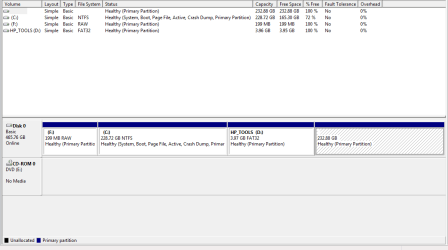
I recently deleted my Linux partition on my dual booter. As you guessed, my Windows 7 installation won't boot. DOH. My backup image doesn't have my work from yesterday on it. I tried several repair solutions from the forums, a couple hours worth of jacking around. The file system read "raw" on the partitions. Got fed up and decided to upgrade Windows 10 over 7, seeing if I had an option of keeping my files intact. Of course it won't upgrade unless you are in Windows 7 to start with. We all know that.
Backed out and clicked on "repair your computer" > troubleshoot> advanced options> startup repair. Clicked on it. It ran for about 2 seconds and my PC rebooted as I impatiently waited for my mouse pointer to appear on the screen. It WORKED! I couldn't believe it. The freaking easiest solution in my life I have encountered for a jacked up boot loader.
Peace!
I recently deleted my Linux partition on my dual booter. As you guessed, my Windows 7 installation won't boot. DOH. My backup image doesn't have my work from yesterday on it. I tried several repair solutions from the forums, a couple hours worth of jacking around. The file system read "raw" on the partitions. Got fed up and decided to upgrade Windows 10 over 7, seeing if I had an option of keeping my files intact. Of course it won't upgrade unless you are in Windows 7 to start with. We all know that.
Backed out and clicked on "repair your computer" > troubleshoot> advanced options> startup repair. Clicked on it. It ran for about 2 seconds and my PC rebooted as I impatiently waited for my mouse pointer to appear on the screen. It WORKED! I couldn't believe it. The freaking easiest solution in my life I have encountered for a jacked up boot loader.
Peace!
My Computer
- Computer type
- PC/Desktop
- Computer Manufacturer/Model Number
- HP Pavilion
- OS
- Professional 64-bit
- CPU
- Tugboat A-4
- Motherboard
- HP
- Memory
- 8GB
- Graphics Card(s)
- Integrated AMD
- Monitor(s) Displays
- Laptop
- Hard Drives
- Momentus Hybrid
- PSU
- Standard
- Case
- Standard
- Cooling
- Standard