Repair your computer option not working (restoring factory backup)

anmolsaluja

New member
Local time
8:15 PM
Messages
25
Hi!

I have Dell Studio 1749 with Windows 7 Home Premium. I want to start its built-in recovery but when after pressing F8, I click on Repair your computer .This option didnt work and windows 7 begins its loading.
Kindly tell me any solution for this problem.

Thanks
 

My Computer My Computer

At a glance

Windows 7 Home Premium 64bit
OS
Windows 7 Home Premium 64bit

My Computer My Computer

At a glance

Windows 7 Ultimate 64 bitAMD Phenom II X4 965 Black EditionGSkill 4 X 2 GB PC 8500XFX Radeon HD 6790 D
Computer Manufacturer/Model Number
Custom built
OS
Windows 7 Ultimate 64 bit
CPU
AMD Phenom II X4 965 Black Edition
Motherboard
Gigabyte GA-MA790X-DS4
Memory
GSkill 4 X 2 GB PC 8500
Graphics Card(s)
XFX Radeon HD 6790 D
Sound Card
On board RealTek HD
Monitor(s) Displays
Dual monitors:Samsung SyncMaster S20B300
Screen Resolution
1600 X 900
Hard Drives
Seagate Barracuda 1TB (primary)
Seagate Barracuda 2 X 320 GB
PSU
Ultra X4 750 watt fully modular
Case
Thermaltake Overseer RX 1 full tower
Cooling
Core-Contact 92 mm CPU Cooler
Keyboard
Logitech G510
Mouse
Razor DeathAdder
Internet Speed
50/5 Mbps UL/DL
Other Info
Optical: Super Muliti DVD burner w/lightscribe, Hauppauge WinTV HVR-1800
I had already checked the link above before posting this.
My main problem is that when i try F8 and repair your computer, it still boots normally and doesn't go into the repair mode.
I want to restore my Laptop to factory defaults.
Please advise.
 

My Computer My Computer

At a glance

Windows 7 Home Premium 64bit
OS
Windows 7 Home Premium 64bit
Try tapping F8 more frequently after the first beep when you are in the BIOS POST. I think F8 needs to be hit just before the Windows splash screen. If you miss it then Windows just starts.
 

My Computer My Computer

At a glance

Windows 7x64 Home Premium SP1Intel i7 2600kG.Skill Ripjaws (DDR3-1600) 2x4GBNvidia GeForce GTS 450; Intel HD Graphics 300...
Computer type
PC/Desktop
Computer Manufacturer/Model Number
Own build
OS
Windows 7x64 Home Premium SP1
CPU
Intel i7 2600k
Motherboard
ASUS P8Z68 Deluxe
Memory
G.Skill Ripjaws (DDR3-1600) 2x4GB
Graphics Card(s)
Nvidia GeForce GTS 450; Intel HD Graphics 3000(GT2+)
Monitor(s) Displays
Dell Ultrasharp IPS panel U2311H, Samsung SyncMaster P2350
Screen Resolution
1920x1080
Hard Drives
Samsung 850 Pro SSD 256GB, Samsung SSD 840 120GB, Seagates 1TB Barracuda ST31000528AS x2
PSU
Seasonic M12II 520W
Case
Lian Li Lancool PC-K60
Cooling
Case: 1x120mm, 3x140mm CPU: Hyper 212+
Keyboard
Logitech MK520 (wireless)
Mouse
Logitech MK520
Internet Speed
6-7 Mbps
Antivirus
Norton Security Premium, Malwarebytes on 2 (MSE on 3rd PC)
Browser
FireFox
Other Info
Audio: Logitech Z523 2.1
hitting F8 works fine and im able to see the Repair your computer thing.... but the problem is when i hit Repair your computer, it starts the Windows normally
 

My Computer My Computer

At a glance

Windows 7 Home Premium 64bit
OS
Windows 7 Home Premium 64bit

My Computer My Computer

At a glance

Microsoft Windows 7 Home Premium 64-bits 7601...Intel(R) Core(TM) i3 CPU M 370 @ 2.40GHz4,00 GBATI Mobility Radeon HD 5400 Series
Computer type
Laptop
Computer Manufacturer/Model Number
ACER ASPIRE 5742G
OS
Microsoft Windows 7 Home Premium 64-bits 7601 Multiprocessor Free Service Pack 1
CPU
Intel(R) Core(TM) i3 CPU M 370 @ 2.40GHz
Motherboard
Acer Aspire 5742G
Memory
4,00 GB
Graphics Card(s)
ATI Mobility Radeon HD 5400 Series
Sound Card
(1) AMD High Definition Audio Device (2) Realtek High Defi
Screen Resolution
1366 x 768 x 32 bits (4294967296 colors) @ 60 Hz
Hard Drives
WDC WD5000BEVT-22ZAT0
Windows Boot Manager
--------------------
identifier {bootmgr}
device partition=\Device\HarddiskVolume2
description Windows Boot Manager
locale en-us
inherit {globalsettings}
default {current}
resumeobject {f1a3e89a-85a2-11df-b1be-faa04de251e1}
displayorder {current}
toolsdisplayorder {memdiag}
timeout 10

Windows Boot Loader
-------------------
identifier {current}
device partition=C:
path \Windows\system32\winload.exe
description Windows 7
locale en-us
inherit {bootloadersettings}
recoverysequence {f1a3e89c-85a2-11df-b1be-faa04de251e1}
recoveryenabled Yes
osdevice partition=C:
systemroot \Windows
resumeobject {f1a3e89a-85a2-11df-b1be-faa04de251e1}
nx OptIn

Windows Boot Loader
-------------------
identifier {f1a3e89c-85a2-11df-b1be-faa04de251e1}
device ramdisk=[\Device\HarddiskVolume2]\Recovery\WindowsRE\Winre.wim,{f1a3e89d-85a2-11df-b1be-faa04de251e1}
path \windows\system32\winload.exe
description Windows Recovery Environment
inherit {bootloadersettings}
osdevice ramdisk=[\Device\HarddiskVolume2]\Recovery\WindowsRE\Winre.wim,{f1a3e89d-85a2-11df-b1be-faa04de251e1}
systemroot \windows
nx OptIn
winpe Yes

Resume from Hibernate
---------------------
identifier {f1a3e89a-85a2-11df-b1be-faa04de251e1}
device partition=C:
path \Windows\system32\winresume.exe
description Windows Resume Application
locale en-US
inherit {resumeloadersettings}
filedevice partition=C:
filepath \hiberfil.sys
debugoptionenabled No

Windows Memory Tester
---------------------
identifier {memdiag}
device partition=\Device\HarddiskVolume2
path \boot\memtest.exe
description Windows Memory Diagnostic
locale en-US
inherit {globalsettings}
badmemoryaccess Yes

EMS Settings
------------
identifier {emssettings}
bootems Yes

Debugger Settings
-----------------
identifier {dbgsettings}
debugtype Serial
debugport 1
baudrate 115200

RAM Defects
-----------
identifier {badmemory}

Global Settings
---------------
identifier {globalsettings}
inherit {dbgsettings}
{emssettings}
{badmemory}

Boot Loader Settings
--------------------
identifier {bootloadersettings}
inherit {globalsettings}
{hypervisorsettings}

Hypervisor Settings
-------------------
identifier {hypervisorsettings}
hypervisordebugtype Serial
hypervisordebugport 1
hypervisorbaudrate 115200

Resume Loader Settings
----------------------
identifier {resumeloadersettings}
inherit {globalsettings}

Device options
--------------
identifier {f1a3e89d-85a2-11df-b1be-faa04de251e1}
description Ramdisk Options
ramdisksdidevice partition=\Device\HarddiskVolume2
ramdisksdipath \Recovery\WindowsRE\boot.sdi
 

My Computer My Computer

At a glance

Windows 7 Home Premium 64bit
OS
Windows 7 Home Premium 64bit
Windows Boot Loader
-------------------
identifier {current}
device partition=C:
path \Windows\system32\winload.exe
description Windows 7
locale en-us
inherit {bootloadersettings}
recoverysequence {f1a3e89c-85a2-11df-b1be-faa04de251e1}
recoveryenabled Yes
osdevice partition=C:
systemroot \Windows
resumeobject {f1a3e89a-85a2-11df-b1be-faa04de251e1}
nx OptIn

Windows Boot Loader
-------------------
identifier {f1a3e89c-85a2-11df-b1be-faa04de251e1}
device ramdisk=[\Device\HarddiskVolume2]\Recovery\WindowsRE\Winre.wim,{f1a3e89d-85a2-11df-b1be-faa04de251e1}
path \windows\system32\winload.exe
description Windows Recovery Environment
inherit {bootloadersettings}
osdevice ramdisk=[\Device\HarddiskVolume2]\Recovery\WindowsRE\Winre.wim,{f1a3e89d-85a2-11df-b1be-faa04de251e1}
systemroot \windows
nx OptIn
winpe Yes


All looks fine! It should run win7 recovery environment "repair your computer"
 

My Computer My Computer

At a glance

Microsoft Windows 7 Home Premium 64-bits 7601...Intel(R) Core(TM) i3 CPU M 370 @ 2.40GHz4,00 GBATI Mobility Radeon HD 5400 Series
Computer type
Laptop
Computer Manufacturer/Model Number
ACER ASPIRE 5742G
OS
Microsoft Windows 7 Home Premium 64-bits 7601 Multiprocessor Free Service Pack 1
CPU
Intel(R) Core(TM) i3 CPU M 370 @ 2.40GHz
Motherboard
Acer Aspire 5742G
Memory
4,00 GB
Graphics Card(s)
ATI Mobility Radeon HD 5400 Series
Sound Card
(1) AMD High Definition Audio Device (2) Realtek High Defi
Screen Resolution
1366 x 768 x 32 bits (4294967296 colors) @ 60 Hz
Hard Drives
WDC WD5000BEVT-22ZAT0
not working... have been trying since last evening...
 

My Computer My Computer

At a glance

Windows 7 Home Premium 64bit
OS
Windows 7 Home Premium 64bit

My Computer My Computer

At a glance

Microsoft Windows 7 Home Premium 64-bits 7601...Intel(R) Core(TM) i3 CPU M 370 @ 2.40GHz4,00 GBATI Mobility Radeon HD 5400 Series
Computer type
Laptop
Computer Manufacturer/Model Number
ACER ASPIRE 5742G
OS
Microsoft Windows 7 Home Premium 64-bits 7601 Multiprocessor Free Service Pack 1
CPU
Intel(R) Core(TM) i3 CPU M 370 @ 2.40GHz
Motherboard
Acer Aspire 5742G
Memory
4,00 GB
Graphics Card(s)
ATI Mobility Radeon HD 5400 Series
Sound Card
(1) AMD High Definition Audio Device (2) Realtek High Defi
Screen Resolution
1366 x 768 x 32 bits (4294967296 colors) @ 60 Hz
Hard Drives
WDC WD5000BEVT-22ZAT0
Please post screenshot of disk management
 

My Computer My Computer

At a glance

Microsoft Windows 7 Home Premium 64-bits 7601...Intel(R) Core(TM) i3 CPU M 370 @ 2.40GHz4,00 GBATI Mobility Radeon HD 5400 Series
Computer type
Laptop
Computer Manufacturer/Model Number
ACER ASPIRE 5742G
OS
Microsoft Windows 7 Home Premium 64-bits 7601 Multiprocessor Free Service Pack 1
CPU
Intel(R) Core(TM) i3 CPU M 370 @ 2.40GHz
Motherboard
Acer Aspire 5742G
Memory
4,00 GB
Graphics Card(s)
ATI Mobility Radeon HD 5400 Series
Sound Card
(1) AMD High Definition Audio Device (2) Realtek High Defi
Screen Resolution
1366 x 768 x 32 bits (4294967296 colors) @ 60 Hz
Hard Drives
WDC WD5000BEVT-22ZAT0
i see windows is loading but just after that nothing happens and Windows starts normally
 

My Computer My Computer

At a glance

Windows 7 Home Premium 64bit
OS
Windows 7 Home Premium 64bit
So you see "windows is loading files". That's a sign win recovery environment is loading!! You see a progress bar as well? How many seconds the text "windows is loading files" is on the screen? Progress bar is flashing?

You don't see a crash or extra information.... maybe a split second?
 

My Computer My Computer

At a glance

Microsoft Windows 7 Home Premium 64-bits 7601...Intel(R) Core(TM) i3 CPU M 370 @ 2.40GHz4,00 GBATI Mobility Radeon HD 5400 Series
Computer type
Laptop
Computer Manufacturer/Model Number
ACER ASPIRE 5742G
OS
Microsoft Windows 7 Home Premium 64-bits 7601 Multiprocessor Free Service Pack 1
CPU
Intel(R) Core(TM) i3 CPU M 370 @ 2.40GHz
Motherboard
Acer Aspire 5742G
Memory
4,00 GB
Graphics Card(s)
ATI Mobility Radeon HD 5400 Series
Sound Card
(1) AMD High Definition Audio Device (2) Realtek High Defi
Screen Resolution
1366 x 768 x 32 bits (4294967296 colors) @ 60 Hz
Hard Drives
WDC WD5000BEVT-22ZAT0
Disk Management Image attached
 

Attachments

  • Disk Management.jpg
    Disk Management.jpg
    83.6 KB · Views: 32

My Computer My Computer

At a glance

Windows 7 Home Premium 64bit
OS
Windows 7 Home Premium 64bit

My Computer My Computer

At a glance

Microsoft Windows 7 Home Premium 64-bits 7601...Intel(R) Core(TM) i3 CPU M 370 @ 2.40GHz4,00 GBATI Mobility Radeon HD 5400 Series
Computer type
Laptop
Computer Manufacturer/Model Number
ACER ASPIRE 5742G
OS
Microsoft Windows 7 Home Premium 64-bits 7601 Multiprocessor Free Service Pack 1
CPU
Intel(R) Core(TM) i3 CPU M 370 @ 2.40GHz
Motherboard
Acer Aspire 5742G
Memory
4,00 GB
Graphics Card(s)
ATI Mobility Radeon HD 5400 Series
Sound Card
(1) AMD High Definition Audio Device (2) Realtek High Defi
Screen Resolution
1366 x 768 x 32 bits (4294967296 colors) @ 60 Hz
Hard Drives
WDC WD5000BEVT-22ZAT0
So you see "windows is loading files". That's a sign win recovery environment is loading!! You see a progress bar as well? YES How many seconds the text "windows is loading files" is on the screen? AROUND 5 SECONDS Progress bar is flashing? ITS A NORMAL PROGRESS BAR BUT IT GOES TO THE END QUICKLY TWICE

You don't see a crash or extra information.... maybe a split second? NOTHING
 

My Computer My Computer

At a glance

Windows 7 Home Premium 64bit
OS
Windows 7 Home Premium 64bit
Did you create a system repair disc already? YES.... If not create it now
System Repair Disc - Create
Enter BIOS and set boot order to boot first from DVD, then Harddisk. So put DVD on top. Most likely it's already set that way. Boot from DVD and press a key when asked.

What happens?
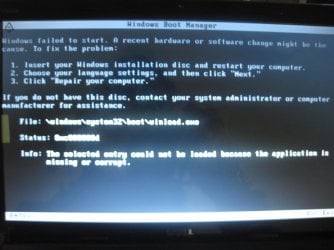
IT GOES INTO WINDOWS BOOT MANAGER.... IMAGE ATTACHED HEREWITH....
 

Attachments

  • IMG_7733.jpg
    IMG_7733.jpg
    382.8 KB · Views: 14

My Computer My Computer

At a glance

Windows 7 Home Premium 64bit
OS
Windows 7 Home Premium 64bit
So you see "windows is loading files". That's a sign win recovery environment is loading!! You see a progress bar as well? YES How many seconds the text "windows is loading files" is on the screen? AROUND 5 SECONDS Progress bar is flashing? ITS A NORMAL PROGRESS BAR BUT IT GOES TO THE END QUICKLY TWICE

You don't see a crash or extra information.... maybe a split second? NOTHING
All quite normal, except it stops without message. Create a system repair disc. This is actually the same as WINRE.WIM you load using "repair your computer". The DVD will be made bootable but starts actually same stuff

Just checked it.... winre.wim and cdrom:\sources\boot.wim are exact the same!
 

My Computer My Computer

At a glance

Microsoft Windows 7 Home Premium 64-bits 7601...Intel(R) Core(TM) i3 CPU M 370 @ 2.40GHz4,00 GBATI Mobility Radeon HD 5400 Series
Computer type
Laptop
Computer Manufacturer/Model Number
ACER ASPIRE 5742G
OS
Microsoft Windows 7 Home Premium 64-bits 7601 Multiprocessor Free Service Pack 1
CPU
Intel(R) Core(TM) i3 CPU M 370 @ 2.40GHz
Motherboard
Acer Aspire 5742G
Memory
4,00 GB
Graphics Card(s)
ATI Mobility Radeon HD 5400 Series
Sound Card
(1) AMD High Definition Audio Device (2) Realtek High Defi
Screen Resolution
1366 x 768 x 32 bits (4294967296 colors) @ 60 Hz
Hard Drives
WDC WD5000BEVT-22ZAT0
After booting from System repair disc..... It goes into Windows Boot Manager.... Image Attached Above....
 

My Computer My Computer

At a glance

Windows 7 Home Premium 64bit
OS
Windows 7 Home Premium 64bit
Did you create a system repair disc already? YES.... If not create it now
System Repair Disc - Create
Enter BIOS and set boot order to boot first from DVD, then Harddisk. So put DVD on top. Most likely it's already set that way. Boot from DVD and press a key when asked.

What happens?
IT GOES INTO WINDOWS BOOT MANAGER.... IMAGE ATTACHED HEREWITH....
Did you see "press any key to boot from DVD"?
 

My Computer My Computer

At a glance

Microsoft Windows 7 Home Premium 64-bits 7601...Intel(R) Core(TM) i3 CPU M 370 @ 2.40GHz4,00 GBATI Mobility Radeon HD 5400 Series
Computer type
Laptop
Computer Manufacturer/Model Number
ACER ASPIRE 5742G
OS
Microsoft Windows 7 Home Premium 64-bits 7601 Multiprocessor Free Service Pack 1
CPU
Intel(R) Core(TM) i3 CPU M 370 @ 2.40GHz
Motherboard
Acer Aspire 5742G
Memory
4,00 GB
Graphics Card(s)
ATI Mobility Radeon HD 5400 Series
Sound Card
(1) AMD High Definition Audio Device (2) Realtek High Defi
Screen Resolution
1366 x 768 x 32 bits (4294967296 colors) @ 60 Hz
Hard Drives
WDC WD5000BEVT-22ZAT0
Back
Top