You need not to extract the drivers form nvidia's download. To have a clean install of the display driver without the bundled things, follow it: Install the latest WHQL only.
- Uninstall All nvidia items in Control Panel > Programs and features
- 3D Vision Control Driver
- 3D Vision Driver
- Graphics Driver
- HD Audio Driver
- PhysX
- nvidia Update
(Are you using nvidia chipset drivers? If so, dont uninstall anything other than those are listed).
- Now follow Drivers - Clean Left over Files after Uninstalling
- Boot normally now. Go to Drivers - Download NVIDIA Drivers, Download the latest WHQL. While installing, Select Custom (Advanced) install. In the next page, follow this settings:
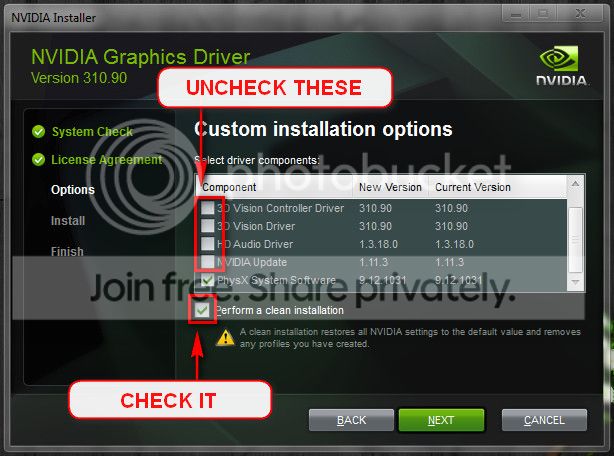
BTW, 314.22 WHQL worked better than 320.18 WHQL.
As per Carrona.org, STOP 0x0000001E: KMODE_EXCEPTION_NOT_HANDLED
http://www.carrona.org/bsodindx.html#top
Usual causes: Device driver, hardware, System service, compatibility, Remote control programs, memory, BIOS
So, the display driver update may not be enough. Stress test the Graphics Card using Furmark.
Video Card - Stress Test with Furmark
Test your RAM modules for possible errors.
How to Test and Diagnose RAM Issues with Memtest86+
Run memtest for at least 8 passes, preferably overnight.
Is the computer hot? Report us the heat of the computer after a couple of hours of your normal usage. Upload a screenshot of the summery tab of
Speccy.
Are you overclocking? As you are getting BSODs, you should stop overclocking and run all the hardware components like CPU, GPU and RAM to their default settings. Also set the BIOS to default, too.
How To Clear CMOS (Reset BIOS)
Also, your BIOS is old.
Code:
BiosMajorRelease = 8
BiosMinorRelease = 15
BiosVendor = American Megatrends Inc.
BiosVersion = 1304
[COLOR=Red]BiosReleaseDate = 06/07/2010[/COLOR]
If possible, update it to Version 170, dated 2011/07/11.
** Please understand that the BIOS update is risky. If you are not sure how to do it, take help of somebody who can do it.
Let us know the results.
______________________________________________________________________________________
BSOD ANALYSIS:
Code:
*******************************************************************************
*                                                                             *
*                        Bugcheck Analysis                                    *
*                                                                             *
*******************************************************************************

Use !analyze -v to get detailed debugging information.

BugCheck 1E, {ffffffffc0000005, fffff880051f4623, 0, ffffffffffffffff}

*** WARNING: Unable to verify timestamp for nvlddmkm.sys
*** ERROR: Module load completed but symbols could not be loaded for nvlddmkm.sys
Probably caused by : nvlddmkm.sys ( nvlddmkm+933623 )

Followup: MachineOwner
---------

3: kd> !analyze -v
*******************************************************************************
*                                                                             *
*                        Bugcheck Analysis                                    *
*                                                                             *
*******************************************************************************

KMODE_EXCEPTION_NOT_HANDLED (1e)
This is a very common bugcheck.  Usually the exception address pinpoints
the driver/function that caused the problem.  Always note this address
as well as the link date of the driver/image that contains this address.
Arguments:
Arg1: ffffffffc0000005, The exception code that was not handled
Arg2: fffff880051f4623, The address that the exception occurred at
Arg3: 0000000000000000, Parameter 0 of the exception
Arg4: ffffffffffffffff, Parameter 1 of the exception

Debugging Details:
------------------


READ_ADDRESS: GetPointerFromAddress: unable to read from fffff80003100100
GetUlongFromAddress: unable to read from fffff800031001c0
 0000000000000000 Nonpaged pool

EXCEPTION_CODE: (NTSTATUS) 0xc0000005 - The instruction at 0x%08lx referenced memory at 0x%08lx. The memory could not be %s.

FAULTING_IP:
nvlddmkm+933623
fffff880`051f4623 c3              ret

BUGCHECK_STR:  0x1E_c0000005_R

CUSTOMER_CRASH_COUNT:  1

DEFAULT_BUCKET_ID:  WIN7_DRIVER_FAULT

PROCESS_NAME:  dwm.exe

CURRENT_IRQL:  0

LAST_CONTROL_TRANSFER:  from fffff80002f13728 to fffff80002ec8c00

STACK_TEXT:
fffff880`07d326e8 fffff800`02f13728 : 00000000`0000001e ffffffff`c0000005 fffff880`051f4623 00000000`00000000 : nt!KeBugCheckEx
fffff880`07d326f0 fffff800`02ec8282 : fffff880`07d32ec8 fffff880`07d33600 fffff880`07d32f70 fffff880`07d33600 : nt! ?? ::FNODOBFM::`string'+0x487ed
fffff880`07d32d90 fffff800`02ec6b8a : fffff880`0eef0000 fffff880`0eef3000 00000000`00000000 00000000`00000000 : nt!KiExceptionDispatch+0xc2
fffff880`07d32f70 fffff880`051f4623 : 07d33600`fffff880 07d33600`fffff880 082ab000`fffff880 00000000`fffffa80 : nt!KiGeneralProtectionFault+0x10a
fffff880`07d3310c 07d33600`fffff880 : 07d33600`fffff880 082ab000`fffff880 00000000`fffffa80 00000000`00000000 : nvlddmkm+0x933623
fffff880`07d33114 07d33600`fffff880 : 082ab000`fffff880 00000000`fffffa80 00000000`00000000 005e0650`00000000 : 0x07d33600`fffff880
fffff880`07d3311c 082ab000`fffff880 : 00000000`fffffa80 00000000`00000000 005e0650`00000000 07d33720`fffff8a0 : 0x07d33600`fffff880
fffff880`07d33124 00000000`fffffa80 : 00000000`00000000 005e0650`00000000 07d33720`fffff8a0 03e6e177`fffff880 : 0x082ab000`fffff880
fffff880`07d3312c 00000000`00000000 : 005e0650`00000000 07d33720`fffff8a0 03e6e177`fffff880 07d33600`fffff880 : 0xfffffa80


STACK_COMMAND:  kb

FOLLOWUP_IP:
nvlddmkm+933623
fffff880`051f4623 c3              ret

SYMBOL_STACK_INDEX:  4

SYMBOL_NAME:  nvlddmkm+933623

FOLLOWUP_NAME:  MachineOwner

MODULE_NAME: nvlddmkm

IMAGE_NAME:  nvlddmkm.sys

DEBUG_FLR_IMAGE_TIMESTAMP:  51427b3c

FAILURE_BUCKET_ID:  X64_0x1E_c0000005_R_nvlddmkm+933623

BUCKET_ID:  X64_0x1E_c0000005_R_nvlddmkm+933623

Followup: MachineOwner
---------

3: kd> lmvm nvlddmkm
start             end                 module name
fffff880`048c1000 fffff880`0536c000   nvlddmkm T (no symbols)
    Loaded symbol image file: nvlddmkm.sys
    Image path: \SystemRoot\system32\DRIVERS\nvlddmkm.sys
    Image name: nvlddmkm.sys
    Timestamp:        Fri Mar 15 07:07:00 2013 (51427B3C)
    CheckSum:         00A8D47C
    ImageSize:        00AAB000
    Translations:     0000.04b0 0000.04e4 0409.04b0 0409.04e4



