Solved Firefox 28 randomly crashing for the last three days

FF Crash

Okay so I use Cyberfox instead of Firefox but when I was using Firefox it would screw up from time to time.

Usual fix:

Download and run Speedyfox to defrag FF SQLite databases:

http://www.crystalidea.com/speedyfox

You need to select the profile labelled "Default" unless you're using a custom profile - in which case you'll need to locate it and drag it into the window.
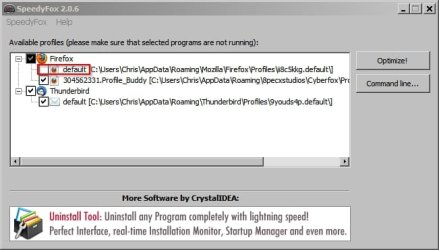
SpeedyFox 2.0.jpg

Run Firefox again and if there's no improvement work through the following:

Use Ecleaner to remove remnants of previously installed add ons that might not have been fully removed:

https://addons.mozilla.org/en-US/firefox/addon/ecleaner/

Once installed navigate to the Ecleaner add on via Tools> Add Ons and find Ecleaner options to run it. Only remove items that you know are left overs from previously installed add ons.

How to backup your profile - reinstall FF - and selectively re-enable add ons:

Create a folder to store your backup file (will have a .pcv extension).

Backup your current profile:

MozBackup - Backup tool for Firefox and Thunderbird

Run the program and choose the profile to backup from the list and browse to your backup folder:
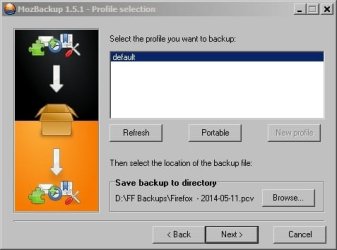
MozBackup.jpg

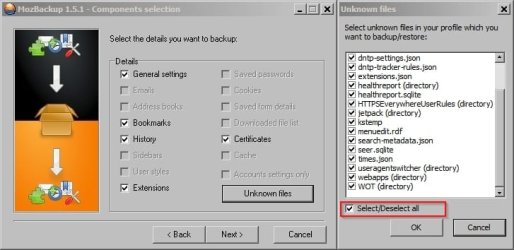
Then backup everything as shown:

MozBackup 1.jpg


Then fully uninstall Firefox as described here:

https://support.mozilla.org/en-US/k...ocale=en-US&redirectslug=Uninstalling+Firefox

Including manually deleting your current profile and .ini file.

Reboot your machine and clean reinstall whatever version of Firefox you wish to use.

Note: Some security software might auto-sandbox important files during the install or even block them completely. If this is the case - temporarily disable it.

If it's working okay and not crashing - it means the problem you were having is related to your profile and add ons (the old profile that you have backed up).

Suggest adding https everywhere first to see if the crash is reproduced.

If all is well the next step is to restore your old profile using MozBackup but restore everything except extensions (add ons).
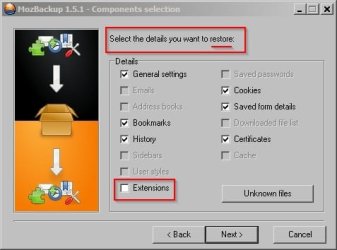
MozBackup 3.jpg

Start Firefox and if it is still working okay restore your add ons one at a time (or a few at a time if you have lots of add ons) until the problem is reproduced - and then suspect the recently added extension.
 
Last edited:

My Computer My Computer

At a glance

Microsoft Windows 7 Home Premium 64-bit 7601 ...AMD C-60 APU with Radeon(tm) HD Graphics4.00 GBAMD Radeon HD 6290 Graphics
Computer type
Laptop
Computer Manufacturer/Model Number
ASUS
OS
Microsoft Windows 7 Home Premium 64-bit 7601 Multiprocessor Free Service Pack 1
CPU
AMD C-60 APU with Radeon(tm) HD Graphics
Motherboard
ASUSTeK COMPUTER INC. X501U
Memory
4.00 GB
Graphics Card(s)
AMD Radeon HD 6290 Graphics
Sound Card
(1) AMD High Definition Audio Device (2) Realtek High Defi
Screen Resolution
1366 x 768 x 32 bits (4294967296 colors) @ 60 Hz
Hard Drives
Hitachi HTS545050A7E380 SATA Disk Device
Antivirus
Comodo CIS & FW, SecureAplus App Whitelisting, Threatfire
Browser
Cyberfox 64bit, Opera 64bit, Airfox
Other Info
Spy-The-Spy, HitmanPro.Alert, Norton Connect Safe, MJRegWatcher, BitDefender TrafficLight, Voodoo Shield, Zemana AntiMalware
febe and cleo is another fantastic addon for firefox that can backup everything, including all addons and user settings and passwords.

Everything
 

My Computer My Computer

At a glance

Windows 10 ProAMD Ryzen 5 2400G Processor with Radeon RX Ve...G.SKILL Ripjaws V Series 16GB (2 x 8GB) 288-P...2047MB NVIDIA GeForce GTX 1060 6GB (EVGA)
Computer type
PC/Desktop
Computer Manufacturer/Model Number
Custom Built
OS
Windows 10 Pro
CPU
AMD Ryzen 5 2400G Processor with Radeon RX Vega 11 Graphics
Motherboard
ASRock X470 Master SLI/AC AM4 AMD Promontory X470 SATA 6Gb/s
Memory
G.SKILL Ripjaws V Series 16GB (2 x 8GB) 288-Pin DDR4 SDRAM D
Graphics Card(s)
2047MB NVIDIA GeForce GTX 1060 6GB (EVGA)
Sound Card
Motherboard Built in
Monitor(s) Displays
Acer R240HY bidx 23.8-Inch IPS HDMI DVI VGA (1920 x 1080) Wi
Screen Resolution
1920 x 1080
Hard Drives
1TB Sandisk SSD PLUS (Main drive)
500 GB Seagate 7200 RPM (Games)
500 GB Western Digital 7200 RPM (Virtual Machines)
PSU
CORSAIR TX Series TX650M 650W 80+ Gold Modular Power Supply
Case
CORSAIR CARBIDE SPEC-02 Mid-Tower Gaming Case, Red LED Fan
Cooling
220mm, two 120mm, and four 60mm fans
Keyboard
Wired Dell keyboard
Mouse
Wireless Logitech mouse
Internet Speed
250mb down, 30mb up
Antivirus
Panda Cloud Antivirus
Browser
Chrome-ish x64
Other Info
Your awesome for reading this.
Sorry I haven't replied in a week. Before I use Speedyfox, I just want to check that all I need to do is select my profile and click optimize, then see if I still get the crashes. If that doesn't fix it, then I go through the rest.
 

My Computer My Computer

At a glance

Windows 7 Home Premium 64bit (Service Pack 1)Intel Core i76.00 GBNVIDIA GeForce GTX 550 Ti
Computer type
PC/Desktop
Computer Manufacturer/Model Number
Packard Bell ipower G5800
OS
Windows 7 Home Premium 64bit (Service Pack 1)
CPU
Intel Core i7
Memory
6.00 GB
Graphics Card(s)
NVIDIA GeForce GTX 550 Ti
Antivirus
Avira Free Antivirus
Browser
Firefox
SpeedFox

Hi,

Yes you can just run SpeedyFox without any issues. If you are using a non-default FF profile just drag it into the program's window and use the checkbox to select it for optimization.

Click image for a demo:

Vacuum_FF_Profile.gif

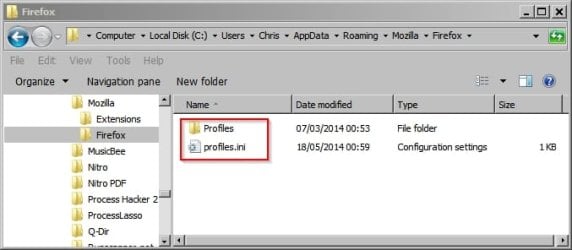
Tip: You can actually backup your existing profile by copying your Profiles and Profile.ini to another folder to allow you to restore things to how they are currently in the event of problems.

You find the folder and file here:

"C:\Users\Username\AppData\Roaming\Mozilla\Firefox"

Firefox Profile.jpg
 

My Computer My Computer

At a glance

Microsoft Windows 7 Home Premium 64-bit 7601 ...AMD C-60 APU with Radeon(tm) HD Graphics4.00 GBAMD Radeon HD 6290 Graphics
Computer type
Laptop
Computer Manufacturer/Model Number
ASUS
OS
Microsoft Windows 7 Home Premium 64-bit 7601 Multiprocessor Free Service Pack 1
CPU
AMD C-60 APU with Radeon(tm) HD Graphics
Motherboard
ASUSTeK COMPUTER INC. X501U
Memory
4.00 GB
Graphics Card(s)
AMD Radeon HD 6290 Graphics
Sound Card
(1) AMD High Definition Audio Device (2) Realtek High Defi
Screen Resolution
1366 x 768 x 32 bits (4294967296 colors) @ 60 Hz
Hard Drives
Hitachi HTS545050A7E380 SATA Disk Device
Antivirus
Comodo CIS & FW, SecureAplus App Whitelisting, Threatfire
Browser
Cyberfox 64bit, Opera 64bit, Airfox
Other Info
Spy-The-Spy, HitmanPro.Alert, Norton Connect Safe, MJRegWatcher, BitDefender TrafficLight, Voodoo Shield, Zemana AntiMalware
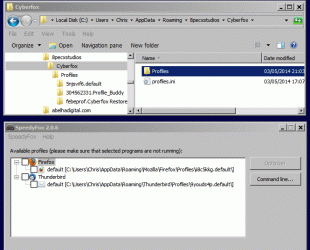
I've run speedyfox but I don't have much time to check for crashes this morning, so I'll have to see what happens this afternoon.
 

My Computer My Computer

At a glance

Windows 7 Home Premium 64bit (Service Pack 1)Intel Core i76.00 GBNVIDIA GeForce GTX 550 Ti
Computer type
PC/Desktop
Computer Manufacturer/Model Number
Packard Bell ipower G5800
OS
Windows 7 Home Premium 64bit (Service Pack 1)
CPU
Intel Core i7
Memory
6.00 GB
Graphics Card(s)
NVIDIA GeForce GTX 550 Ti
Antivirus
Avira Free Antivirus
Browser
Firefox
FF Crashing

Okay so before going ahead with the other stuff I'd suggest downloading a FF variant and importing your FF bookmarks - then at least you'll have a working FF whatever happens. It uses it's own profile so it won't screw up your FF profile.

I see you're using Windows 7 HP 64bit.

For browsing without Java enabled:

https://8pecxstudios.com/cyberfox-web-browser (Intel version 64 bit installer)

If you want Java enabled when browsing you'd need:

https://8pecxstudios.com/cyberfox-web-browser-x32bit (Intel version 32 bit installer - equivalent to FF)

Portable editions here: https://8pecxstudios.com/cyberfox-portable-edition - they're 64bit versions though.

If you download the version that you require use v28.0.1 rather than the new Beta version which isn't ready for general release just yet.

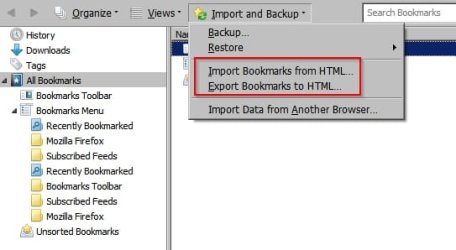
You'd need Import your FF bookmarks.

In FF - Bookmarks> Show All Bookmarks> Import and Backup

Bookmarks.jpg

Export FF bookmarks to html and save the file somewhere.

Use the new browser and import bookmarks using the same method but choose Import rather than Export bookmarks.

If you don't see the menu toolbar right click the blank area at the top of the screen and check "Menu Bar"
 

My Computer My Computer

At a glance

Microsoft Windows 7 Home Premium 64-bit 7601 ...AMD C-60 APU with Radeon(tm) HD Graphics4.00 GBAMD Radeon HD 6290 Graphics
Computer type
Laptop
Computer Manufacturer/Model Number
ASUS
OS
Microsoft Windows 7 Home Premium 64-bit 7601 Multiprocessor Free Service Pack 1
CPU
AMD C-60 APU with Radeon(tm) HD Graphics
Motherboard
ASUSTeK COMPUTER INC. X501U
Memory
4.00 GB
Graphics Card(s)
AMD Radeon HD 6290 Graphics
Sound Card
(1) AMD High Definition Audio Device (2) Realtek High Defi
Screen Resolution
1366 x 768 x 32 bits (4294967296 colors) @ 60 Hz
Hard Drives
Hitachi HTS545050A7E380 SATA Disk Device
Antivirus
Comodo CIS & FW, SecureAplus App Whitelisting, Threatfire
Browser
Cyberfox 64bit, Opera 64bit, Airfox
Other Info
Spy-The-Spy, HitmanPro.Alert, Norton Connect Safe, MJRegWatcher, BitDefender TrafficLight, Voodoo Shield, Zemana AntiMalware
Just got a crash after restarting Firefox. Will take a look at the next steps when I can.
 

My Computer My Computer

At a glance

Windows 7 Home Premium 64bit (Service Pack 1)Intel Core i76.00 GBNVIDIA GeForce GTX 550 Ti
Computer type
PC/Desktop
Computer Manufacturer/Model Number
Packard Bell ipower G5800
OS
Windows 7 Home Premium 64bit (Service Pack 1)
CPU
Intel Core i7
Memory
6.00 GB
Graphics Card(s)
NVIDIA GeForce GTX 550 Ti
Antivirus
Avira Free Antivirus
Browser
Firefox
JAVA should always be disabled

Java is too dangerous to leave enabled as a browser extension. It should be always off and turned on only when you have to go to a website that requires it and those are rare but important (like Dell using Java to detect your Dell's hardware). Per the Office of Homeland Security Users advised to disable Java due to security weakness

I really wish you would consider removing Flash and seeing if the problems go away and then check to see if the nature of the issues change when Flash 11.7 stable is installed. This is a diagnostic step and can give you information. Adobe has made changes in 13 that has allowed some instabilities on many websites.

If you are unwilling to do this then install NoScript and use it as a diagnostic tool.

Also, you can always install a different browser and test the same websites (like PaleMoon or Iron) and see if you are more satisfied with the results.

You've endured this problem far too long.
 

My Computer My Computer

At a glance

Windows 7 Professional 64 bit
Computer type
PC/Desktop
Computer Manufacturer/Model Number
Dell M6400
OS
Windows 7 Professional 64 bit
I uninstalled Java a long time ago. There was a leftover plug-in that was automatically disabled, and I removed that by deleting the associated file. The crash happens on pages without any Flash content, so I don't think it has anything to do with that. NoScript and another browser are options I will consider.
 

My Computer My Computer

At a glance

Windows 7 Home Premium 64bit (Service Pack 1)Intel Core i76.00 GBNVIDIA GeForce GTX 550 Ti
Computer type
PC/Desktop
Computer Manufacturer/Model Number
Packard Bell ipower G5800
OS
Windows 7 Home Premium 64bit (Service Pack 1)
CPU
Intel Core i7
Memory
6.00 GB
Graphics Card(s)
NVIDIA GeForce GTX 550 Ti
Antivirus
Avira Free Antivirus
Browser
Firefox
Switch to Pale Moon.

I’ve just been FED UP with FF because of all of the memory leaks, etc. I've been running v16 forever because whenever I’ve tried to upgrade to newer versions, they’d all pretty much just crash after 30 minutes of heavy use, and not a single version of FF that I’ve ever used has ever fixed the memory leak problems. Not a single one.

I actually installed a tiny batch file on quicklaunch so I could quickly kill FF at the point it’s consumed all of my RAM so I could then start over with “Restore Session” to automatically reload all of my previous tabs. After trying every “solution” to the leak problem, that’s the only one that ever did me any good. Apparently the arrogant tards at mozilla would rather tweak the UI to death rather than make a browser that actually works. They’re worse than even Microsoft because Microsoft has to listen to their customers sooner or later or go broke, whereas nonprofits can just drift along forever.

At any rate, I just finished installing PM, including importing everything from FF with their little importer program, and everything went flawlessly, including all settings and the plethora of add-ons I use. The only difficulty was getting roboform attached, which I can’t live without. I did finally dumb around and got the roboform taskbar program to attach roboform to PM, which then worked flawlessly. It is, however, necessary for the roboform taskbar program to run all the time for roboform to continue to work on PM, but this is a very small price to pay to ditch FF forever.

I've used PM for a week now, opening/closing/keeping hundreds of tabs a day, and I’ve been stunned at how much faster PM is than FF, as well as the VERY small memory footprint occupied by PM vs FF. Even after a week's HEAVY usage, PM has not grown beyond 1 GB, and even better, when I close tabs, ALL of the RAM is given back.

Basically, PM is what FF ought to be. Even better, the genius behind Pale Moon, Mark Straver, has committed to keeping the PM UI fundamentally unmolested. I’ll be installing PM instead of FF on all of my client’s computers in the future as well!

(BTW, ALL of the "recommended fixes" for the firefox memory leak problems are a sick joke. Not one of them works. And plugins DO NOT cause the memory leaks! Firefox does! How do I know? Because I switched to Pale Moon, importing everything EXACTLY like it was in Firefox and guess what? No memory leaks in Pale Moon! Oh, and I use Adblock Plus, Flash, Java, DoNotTrackMe, BetterPrivacy CookieCuller, DownloadHelper, Element Hiding Helper, IE View, ViewAbout, Visited, and roboform. So NONE of those is causing the firefox memory leak problems!)
 

My Computer My Computer

At a glance

Windows 7 ProfessionalIntel I5
Computer Manufacturer/Model Number
Panasonic CF-53
OS
Windows 7 Professional
CPU
Intel I5
I re-enabled HTTPS-Everywhere last week and haven't experienced any crashes so far. There have been several updates over the last four months, so maybe one of those fixed it. If I manage to get to the end of this week without any crashes, I'll mark this as solved.

Update: I think I can go ahead and mark it solved now, actually. After HTTPS-Everywhere updated back in April, there were three things that would cause Firefox to crash: restarting after enabling the add-on, restarting with tabs saved, and visiting certain websites such as the Tumblr homepage. I've been able to do all three of these over the last week without Firefox crashing, so I think it's safe to assume that whatever was causing the crashes has been fixed in one of the updates since April. Thanks for all the help and advice in this thread. It looks like it was one of those problems that solved itself over time.
 
Last edited:

My Computer My Computer

At a glance

Windows 7 Home Premium 64bit (Service Pack 1)Intel Core i76.00 GBNVIDIA GeForce GTX 550 Ti
Computer type
PC/Desktop
Computer Manufacturer/Model Number
Packard Bell ipower G5800
OS
Windows 7 Home Premium 64bit (Service Pack 1)
CPU
Intel Core i7
Memory
6.00 GB
Graphics Card(s)
NVIDIA GeForce GTX 550 Ti
Antivirus
Avira Free Antivirus
Browser
Firefox
Back
Top