Solved Firefox 28 randomly crashing for the last three days

ThisIsMadness91

New member
Member
VIP
Local time
7:00 PM
Messages
204
It started on Tuesday night. I closed Firefox to run a couple of scans with Malwarebytes and Avira (both free versions), and as soon as I reopened it, it crashed and asked me if I wanted to restart it. Every day since then, it's crashed and asked about restarting. I might be wrong, but I'm pretty sure it's always happened around the same time in the evening.

I think my HTTPS-Everywhere extension was updated when I closed Firefox to start the first scan, as the Firefox Add-ons Manager said it was lasted updated on the 15th of April, and the extension's folder says it was last modified about five minutes before I started the scan. Would it be a good idea to try disabling it tomorrow and seeing if it crashes again? I know the update has brought back an old problem where Google Images gives a redirect notice when viewing a full picture (I confirmed it by using Google Images on my laptop both before and after updating the extension, and the redirect notice only started appearing after the update).

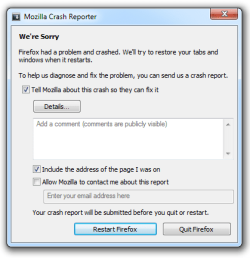
Update: Firefox crashed again today, only it was in the afternoon rather than the evening. If it helps, I'll post a screenshot of the window that opens when it crashes next time it happens. I didn't disable the extension because I didn't get a reply yet.

Update 2: Firefox didn't crash at all on Sunday, and almost went without crashing today, but crashed just a few minutes ago. Unfortunately, I forgot to get a screenshot.
 
Last edited:

My Computer My Computer

At a glance

Windows 7 Home Premium 64bit (Service Pack 1)Intel Core i76.00 GBNVIDIA GeForce GTX 550 Ti
Computer type
PC/Desktop
Computer Manufacturer/Model Number
Packard Bell ipower G5800
OS
Windows 7 Home Premium 64bit (Service Pack 1)
CPU
Intel Core i7
Memory
6.00 GB
Graphics Card(s)
NVIDIA GeForce GTX 550 Ti
Antivirus
Avira Free Antivirus
Browser
Firefox
Have you tried clicking firefox-help-restart with addons disabled?

Does the problem stay gone after having all add ons disabled?
 

My Computer My Computer

At a glance

Windows 10 ProAMD Ryzen 5 2400G Processor with Radeon RX Ve...G.SKILL Ripjaws V Series 16GB (2 x 8GB) 288-P...2047MB NVIDIA GeForce GTX 1060 6GB (EVGA)
Computer type
PC/Desktop
Computer Manufacturer/Model Number
Custom Built
OS
Windows 10 Pro
CPU
AMD Ryzen 5 2400G Processor with Radeon RX Vega 11 Graphics
Motherboard
ASRock X470 Master SLI/AC AM4 AMD Promontory X470 SATA 6Gb/s
Memory
G.SKILL Ripjaws V Series 16GB (2 x 8GB) 288-Pin DDR4 SDRAM D
Graphics Card(s)
2047MB NVIDIA GeForce GTX 1060 6GB (EVGA)
Sound Card
Motherboard Built in
Monitor(s) Displays
Acer R240HY bidx 23.8-Inch IPS HDMI DVI VGA (1920 x 1080) Wi
Screen Resolution
1920 x 1080
Hard Drives
1TB Sandisk SSD PLUS (Main drive)
500 GB Seagate 7200 RPM (Games)
500 GB Western Digital 7200 RPM (Virtual Machines)
PSU
CORSAIR TX Series TX650M 650W 80+ Gold Modular Power Supply
Case
CORSAIR CARBIDE SPEC-02 Mid-Tower Gaming Case, Red LED Fan
Cooling
220mm, two 120mm, and four 60mm fans
Keyboard
Wired Dell keyboard
Mouse
Wireless Logitech mouse
Internet Speed
250mb down, 30mb up
Antivirus
Panda Cloud Antivirus
Browser
Chrome-ish x64
Other Info
Your awesome for reading this.
Not yet. Should I try it with the add-ons disabled for a few days? I thought the problem had gone away, but it happened again last night, so I'm not sure how long to try it without add-ons.
 

My Computer My Computer

At a glance

Windows 7 Home Premium 64bit (Service Pack 1)Intel Core i76.00 GBNVIDIA GeForce GTX 550 Ti
Computer type
PC/Desktop
Computer Manufacturer/Model Number
Packard Bell ipower G5800
OS
Windows 7 Home Premium 64bit (Service Pack 1)
CPU
Intel Core i7
Memory
6.00 GB
Graphics Card(s)
NVIDIA GeForce GTX 550 Ti
Antivirus
Avira Free Antivirus
Browser
Firefox

My Computer My Computer

At a glance

Microsoft Windows 7 Home Premium 64-bit 7601 ...Intel(R) Core(TM) i5-2320 CPU @ 3.00GHz8.00 GBIntel(R) HD Graphics
Computer type
PC/Desktop
Computer Manufacturer/Model Number
Intel(R) Core(TM) i5-2320 CPU @ 3.00GHz (Gateway computer)
OS
Microsoft Windows 7 Home Premium 64-bit 7601 Multiprocessor Free Service Pack 1
CPU
Intel(R) Core(TM) i5-2320 CPU @ 3.00GHz
Motherboard
Gateway IPISB-VR
Memory
8.00 GB
Graphics Card(s)
Intel(R) HD Graphics
Sound Card
(1) Realtek High Definition Audio (2) Intel(R) Display Aud
Monitor(s) Displays
ViewSonic 2250 Series
Screen Resolution
1920 x 1080 x 32 bits (4294967296 colors) @ 60 Hz
Hard Drives
(1) WDC WD10EADX-22TDHB0 (2) Generic Mini SD Reader USB Device (3) Generic USB CF Reader USB Device (4) Generic USB MS Reader USB Device (5) Generic USB SD Reader USB Device (6) Generic USB xD/SM Reader USB Device (7) Seagate FreeAgent Go
Keyboard
Gateway
Mouse
Logitech
Internet Speed
20 Mbps (Theoretical.)
Antivirus
Avast
Browser
Firefox
Thanks for the link. I'll have a read through it.

Update: I've followed the first three steps, but the problem still occurs. I think I'll go ahead and try browsing with HTTPS-Everywhere disabled this weekend. It and Adobe Flash Player were the most recently updated plugins when the crashes began, but Flash updated two days in advance whereas HTTPS updated the day the crashes began (it updated when I restarted Firefox Tuesday evening, and Firefox crashed shortly after restarting it). If the problem still occurs, I'll keep reading for more ideas.

Update 2: I'm actually going to start browsing with it disabled now. Firefox has crashed several times today.
 
Last edited:

My Computer My Computer

At a glance

Windows 7 Home Premium 64bit (Service Pack 1)Intel Core i76.00 GBNVIDIA GeForce GTX 550 Ti
Computer type
PC/Desktop
Computer Manufacturer/Model Number
Packard Bell ipower G5800
OS
Windows 7 Home Premium 64bit (Service Pack 1)
CPU
Intel Core i7
Memory
6.00 GB
Graphics Card(s)
NVIDIA GeForce GTX 550 Ti
Antivirus
Avira Free Antivirus
Browser
Firefox
It's been nearly four days since I disabled HTTPS-Everywhere, and I haven't experienced any crashes yet. If I manage to get through the rest of today and tomorrow without any crashes, I'll re-enable it either tomorrow night or Wednesday night and see if it starts crashing again.

Update: Well, identifying the cause of the crashes may not be as easy as I thought it was. Firefox stopped responding a few minutes ago. However, it wasn't quite the same problem I've been having recently. From the 15th of April (when the add-on was updated) to 24th (when I decided to disable it), when Firefox crashed, it would open the crash reporter seen in this attachment. Tonight, it simply froze then said "not responding" until I closed it, which is what I'm used to seeing when Firefox has a problem. I'll keep it disabled for tomorrow and Wednesday. If I don't have any problems, perhaps I can assume tonight's problem was just a coincidence. Otherwise, the extension isn't what's causing the crashes.

Update 2: Just a quick update as I noticed that HTTPS-Everywhere was updated two days ago. I'll stick with my current plan and keep it disabled until Thursday morning.
 

Attachments

  • 2013-07-05-02-40-13-88a20a.png
    2013-07-05-02-40-13-88a20a.png
    11.8 KB · Views: 45
Last edited:

My Computer My Computer

At a glance

Windows 7 Home Premium 64bit (Service Pack 1)Intel Core i76.00 GBNVIDIA GeForce GTX 550 Ti
Computer type
PC/Desktop
Computer Manufacturer/Model Number
Packard Bell ipower G5800
OS
Windows 7 Home Premium 64bit (Service Pack 1)
CPU
Intel Core i7
Memory
6.00 GB
Graphics Card(s)
NVIDIA GeForce GTX 550 Ti
Antivirus
Avira Free Antivirus
Browser
Firefox
I can confirm that there is an issue between Flash and HTTPS Everywhere that is 100% reproducible on Chromium 33 so I would suspect Firefox implementations might have the same issue.

They don't conflict on other websites but the crash is 100% at Hulu or Comedy Central until HTTPS Everywhere is shut off.

So turn on HTTPS Everywhere and then go to watch something at Hulu and see if you can make the crash 100% consistent that way.

I suspect it is in the advertisement serving technology through Flash using websites that don't support HTTPS.

We should post messages at HTTPS Everywhere's forum.
 

My Computer My Computer

At a glance

Windows 7 Professional 64 bit
Computer type
PC/Desktop
Computer Manufacturer/Model Number
Dell M6400
OS
Windows 7 Professional 64 bit
I may have found the culprit. There were no crashes yesterday or Tuesday, so I re-enabled it last night before going to bed, and I experienced another crash just a few minutes ago. So now I need to try and figure out what it is about HTTPS-Everywhere that's causing Firefox to crash while it's enabled. Could it have something to do with Flash like mistermarmot said? Should I try uninstalling they reinstalling HTTPS-Everywhere?
 

My Computer My Computer

At a glance

Windows 7 Home Premium 64bit (Service Pack 1)Intel Core i76.00 GBNVIDIA GeForce GTX 550 Ti
Computer type
PC/Desktop
Computer Manufacturer/Model Number
Packard Bell ipower G5800
OS
Windows 7 Home Premium 64bit (Service Pack 1)
CPU
Intel Core i7
Memory
6.00 GB
Graphics Card(s)
NVIDIA GeForce GTX 550 Ti
Antivirus
Avira Free Antivirus
Browser
Firefox
What web sites?

Did you try Hulu or Comedy Central to get the crashes?

People are reporting crashes with the new Iron (Chromium) ver 34 and Flash 13 but haven't been reporting their installed extensions. Adobe's forums have a flood of crash posts also but again not a lot of specifics on website and installed extensions but they include browsers from Firefox, IE to Safari on Macs.

I might try uninstalling Flash 13 with their uninstaller : Uninstall Flash Player | Windows
and going back to 12 for now.
Here is a procedure posted for completely removing Flash and going back to a patched earlier version:http://support.muse.adobe.com/message/4487439#4487439

HTTPS Everywhere is almost critical security feature for me.
 

My Computer My Computer

At a glance

Windows 7 Professional 64 bit
Computer type
PC/Desktop
Computer Manufacturer/Model Number
Dell M6400
OS
Windows 7 Professional 64 bit
There is a serious zero-day exploit (supposedly) in all Flash versions earlier than 13.0.0.206 so going backwards is a risky proposition also.

Here's the security announcement:
Adobe Security Bulletin
 

My Computer My Computer

At a glance

Windows 7 Professional 64 bit
Computer type
PC/Desktop
Computer Manufacturer/Model Number
Dell M6400
OS
Windows 7 Professional 64 bit
Hulu videos don't seem to work outside of the US, and I haven't tried watching anything on the Comedy Central website yet. I re-enabled HTTPS-Everywhere to test them, and Firefox crashed the moment it was restarted (neither Hulu nor Comedy Central were open at the time). Rolling back to a previous version of Flash is too risky for me. For now, I'm going to keep HTTPS-Everywhere disabled and look around to see if anyone else is experiencing this problem.
 

My Computer My Computer

At a glance

Windows 7 Home Premium 64bit (Service Pack 1)Intel Core i76.00 GBNVIDIA GeForce GTX 550 Ti
Computer type
PC/Desktop
Computer Manufacturer/Model Number
Packard Bell ipower G5800
OS
Windows 7 Home Premium 64bit (Service Pack 1)
CPU
Intel Core i7
Memory
6.00 GB
Graphics Card(s)
NVIDIA GeForce GTX 550 Ti
Antivirus
Avira Free Antivirus
Browser
Firefox
https://www.eff.org/https-everywhere

HTTPS Everywhere is produced as a collaboration between The Tor Project and the Electronic Frontier Foundation. Many sites on the web offer some limited support for encryption over HTTPS, but make it difficult to use.
 

My Computer My Computer

At a glance

Windows 10 Pro. 64/ version 1709 Windows 7 Pr...Intel i7-6800K @ 4.3Corsair Platinum 16 gig @2400EVGA GTX 1070 OC
Computer type
PC/Desktop
Computer Manufacturer/Model Number
Home made Desktop
OS
Windows 10 Pro. 64/ version 1709 Windows 7 Pro/64
CPU
Intel i7-6800K @ 4.3
Motherboard
ASUS X-99 Deluxe II
Memory
Corsair Platinum 16 gig @2400
Graphics Card(s)
EVGA GTX 1070 OC
Monitor(s) Displays
Asus 27" LED LCD/VE278Q
Screen Resolution
1920-1080 or 1280-720 HDMI
Hard Drives
INTEL SSD 730-240 Gb Sata 3.0/
PSU
EVGA Platium 1200W
Case
Phanteks Luxe Tempered Glass 8 fans/ one radiator
Cooling
XSPC/ Water Cooled CPU
Keyboard
Das 4 Professional
Mouse
Logitech M705/MX Anywhere 2-S
Internet Speed
100 mbits
Antivirus
Microsoft Security Essentials/ Malwarebytes Premium 3.0/ SAS
Browser
I.E. 11 default/Firefox/ ISP Time Warner Cable/Spectrum
Other Info
LG BluRay Burner/
Sound system-KLipsch-THX/
Icy Dock ssd Hot Swap bays.
It's been crashing when I open pages that previously didn't cause any problems.
 

My Computer My Computer

At a glance

Windows 7 Home Premium 64bit (Service Pack 1)Intel Core i76.00 GBNVIDIA GeForce GTX 550 Ti
Computer type
PC/Desktop
Computer Manufacturer/Model Number
Packard Bell ipower G5800
OS
Windows 7 Home Premium 64bit (Service Pack 1)
CPU
Intel Core i7
Memory
6.00 GB
Graphics Card(s)
NVIDIA GeForce GTX 550 Ti
Antivirus
Avira Free Antivirus
Browser
Firefox
Sorry for double posting but I thought this might be better off in a separate post. Firefox just crashed even though I have HTTPS-Everywhere disabled. It seems I'm back to square one:(.

Update: I should probably mention that I'm now using Firefox 29. I'd change the thread title, but I don't think it's possible.
 
Last edited:

My Computer My Computer

At a glance

Windows 7 Home Premium 64bit (Service Pack 1)Intel Core i76.00 GBNVIDIA GeForce GTX 550 Ti
Computer type
PC/Desktop
Computer Manufacturer/Model Number
Packard Bell ipower G5800
OS
Windows 7 Home Premium 64bit (Service Pack 1)
CPU
Intel Core i7
Memory
6.00 GB
Graphics Card(s)
NVIDIA GeForce GTX 550 Ti
Antivirus
Avira Free Antivirus
Browser
Firefox
You will find out that when updating any browser many of the add on's are not updated to work will with the new updated browser.
 
Last edited:

My Computer My Computer

At a glance

Windows 10 Pro. 64/ version 1709 Windows 7 Pr...Intel i7-6800K @ 4.3Corsair Platinum 16 gig @2400EVGA GTX 1070 OC
Computer type
PC/Desktop
Computer Manufacturer/Model Number
Home made Desktop
OS
Windows 10 Pro. 64/ version 1709 Windows 7 Pro/64
CPU
Intel i7-6800K @ 4.3
Motherboard
ASUS X-99 Deluxe II
Memory
Corsair Platinum 16 gig @2400
Graphics Card(s)
EVGA GTX 1070 OC
Monitor(s) Displays
Asus 27" LED LCD/VE278Q
Screen Resolution
1920-1080 or 1280-720 HDMI
Hard Drives
INTEL SSD 730-240 Gb Sata 3.0/
PSU
EVGA Platium 1200W
Case
Phanteks Luxe Tempered Glass 8 fans/ one radiator
Cooling
XSPC/ Water Cooled CPU
Keyboard
Das 4 Professional
Mouse
Logitech M705/MX Anywhere 2-S
Internet Speed
100 mbits
Antivirus
Microsoft Security Essentials/ Malwarebytes Premium 3.0/ SAS
Browser
I.E. 11 default/Firefox/ ISP Time Warner Cable/Spectrum
Other Info
LG BluRay Burner/
Sound system-KLipsch-THX/
Icy Dock ssd Hot Swap bays.
I'm a Pale Moon user. Dead Stable, no conflicts, no crashes.

Firefox gets worse at every release, (not to mention the ugly Asstralis debacle) so why not try a well massaged & performance optimized FFx fork?

They also have a x64 version. Here: The Pale Moon Project homepage
 

My Computer My Computer

At a glance

Windows 7 Professional x64Intel I5 2320 @ 3.0 HHz32 GB DDR3Asus Nvidia 440 GT & Zotac Nvidia 610 GT
Computer type
PC/Desktop
Computer Manufacturer/Model Number
Gateway DX4860
OS
Windows 7 Professional x64
CPU
Intel I5 2320 @ 3.0 HHz
Motherboard
Gateway / Acer
Memory
32 GB DDR3
Graphics Card(s)
Asus Nvidia 440 GT & Zotac Nvidia 610 GT
Sound Card
Realtek HDA
Monitor(s) Displays
(2) Asus VW246H 24" (16:9) & (1) Asus VB198 19" (4:3)
Screen Resolution
5120 Total x 1080
Hard Drives
WD 1.5 TB WD15EARX-22P
PSU
Basiq 650
Case
Gateway Tower
Cooling
(3) Case Fans
Keyboard
1. Saitek Eclipse 2. Focus FK8200
Mouse
Logitech M510
Internet Speed
90 mbps DL / 10 mbps UL (usually 110.5/11.5)
Antivirus
SuperAntiSpyware Pro, MalwareBytes Pro, MSE
Browser
1. Palemoon x64 2. IE 11
Other Info
USB 3.0 Card
Thanks. I'll take that into consideration.
 

My Computer My Computer

At a glance

Windows 7 Home Premium 64bit (Service Pack 1)Intel Core i76.00 GBNVIDIA GeForce GTX 550 Ti
Computer type
PC/Desktop
Computer Manufacturer/Model Number
Packard Bell ipower G5800
OS
Windows 7 Home Premium 64bit (Service Pack 1)
CPU
Intel Core i7
Memory
6.00 GB
Graphics Card(s)
NVIDIA GeForce GTX 550 Ti
Antivirus
Avira Free Antivirus
Browser
Firefox
Palemoon

I highly recommend Palemoon also.
I don't use Firefox anymore, just Iron and Palemoon.
 

My Computer My Computer

At a glance

Windows 7 Professional 64 bit
Computer type
PC/Desktop
Computer Manufacturer/Model Number
Dell M6400
OS
Windows 7 Professional 64 bit
Since you are getting the Crash Reporter when this happens, you can try and get help for this:

https://support.mozilla.org/en-US/kb/firefox-crashes-troubleshoot-prevent-and-get-help

I have seen reports that HTTPS Everywhere 3.5 and 3.5.1 are causing crashes, and downgrading to v3.4.5 "solves" the problem (you would have to disable auto update for that one extension)

Tools> Addons> Extensions> Right click HTTPS Everywhere> Show more information> Auto updates to off

Auto.jpg

https://www.eff.org/https-everywhere

Scroll down to Recent Releases

Stable releases for Firefox (desktop):

https-everywhere-3.4.5.xpi

A Guy
 

My Computer My Computer

At a glance

Windows 10 Home x64INTEL Core i5-750 Quad-Core 3.37GHzHyperX Fury Black Series 8GB (2 x 4GB) 1866MhzEVGA GeForce GTX 750 Superclocked 1GB 128-Bit...
Computer type
PC/Desktop
OS
Windows 10 Home x64
CPU
INTEL Core i5-750 Quad-Core 3.37GHz
Motherboard
ASUS P7P55D
Memory
HyperX Fury Black Series 8GB (2 x 4GB) 1866Mhz
Graphics Card(s)
EVGA GeForce GTX 750 Superclocked 1GB 128-Bit GDDR5
Monitor(s) Displays
LG 32MA68HY 32" IPS
Screen Resolution
1920 x 1080
Hard Drives
Samsung 840 Evo 120GB, SEAGATE 500GB Barracuda® 7200.12, SATA 3 Gb/s, 7200 RPM, 16MB cache
PSU
ANTEC TruePower New TP-550, 80 PLUS, 550W
Case
ANTEC Three Hundred Illusion
Cooling
COOLER MASTER Hyper 212 Plus, 4 x 120mm 1 x 140mm Noctua's
Internet Speed
85 + Mbps
Antivirus
Avast
Browser
Vivaldi
Thanks. I may try downgrading next week. As unfortunate as it is that I don't know why HTTPS-Everywhere is crashing Firefox, it's reassuring to know I'm not the only one who's having this problem.
 

My Computer My Computer

At a glance

Windows 7 Home Premium 64bit (Service Pack 1)Intel Core i76.00 GBNVIDIA GeForce GTX 550 Ti
Computer type
PC/Desktop
Computer Manufacturer/Model Number
Packard Bell ipower G5800
OS
Windows 7 Home Premium 64bit (Service Pack 1)
CPU
Intel Core i7
Memory
6.00 GB
Graphics Card(s)
NVIDIA GeForce GTX 550 Ti
Antivirus
Avira Free Antivirus
Browser
Firefox
Back
Top