Repeated Disc Check

rct2guy

Member
Member
Local time
1:27 AM
Messages
34
Location
St. Louis, MO
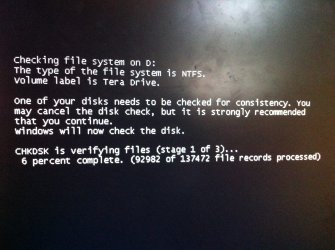
Recently, when I boot up my computer, one out of two times, it will pull up a disc check before "Starting Windows," letting me log in, etc. I was just curious as to why it's so frequent, and if there's a way to stop it.
 

My Computer

OS
Windows 7 Home Premium Edition, 64-bit
CPU
Intel Core i5-2500k, 2nd generation
Motherboard
GIGABYTE GA-Z68-UD3H-B3
Memory
8 GB Corsair
Graphics Card(s)
EVGA NVIDIA GeForce GTX 570
Monitor(s) Displays
LG Flatron Wide
Screen Resolution
1440x900
Hard Drives
1.5 TB Samsung HDD, 5200 RPM
PSU
Antec 620w
Case
BitFēnix Survivor
Cooling
BitFēnix Spectre (2)
Keyboard
Logitech K-270
Mouse
Microsoft Optical Wheel Mouse USB
Internet Speed
20 MB/s download, 5 MB/s upload
Is your computer shutting down normally?
 

My Computer

Computer Manufacturer/Model Number
Toshiba L355D
OS
Windows 7 Ultimate x64 SP1
CPU
Core2 Duo
Motherboard
Intel
Memory
4 GB
Graphics Card(s)
GM965 on-board
Sound Card
RealTek on-board
Monitor(s) Displays
19"+17"(laptop)
Screen Resolution
1440x900 (x 2)
Hard Drives
500GB Ext. 200GB Internal
PSU
N/A
Case
N/A
Cooling
N/A
Yes.

Here's a picture of the disc check being performed.
 

Attachments

  • disc-check.jpg
    disc-check.jpg
    558 KB · Views: 12

My Computer

OS
Windows 7 Home Premium Edition, 64-bit
CPU
Intel Core i5-2500k, 2nd generation
Motherboard
GIGABYTE GA-Z68-UD3H-B3
Memory
8 GB Corsair
Graphics Card(s)
EVGA NVIDIA GeForce GTX 570
Monitor(s) Displays
LG Flatron Wide
Screen Resolution
1440x900
Hard Drives
1.5 TB Samsung HDD, 5200 RPM
PSU
Antec 620w
Case
BitFēnix Survivor
Cooling
BitFēnix Spectre (2)
Keyboard
Logitech K-270
Mouse
Microsoft Optical Wheel Mouse USB
Internet Speed
20 MB/s download, 5 MB/s upload

My Computer

Computer Manufacturer/Model Number
aspire 5920
OS
Windows 8 Professional x64
CPU
core 2 duo T5550
Memory
4 GB
Graphics Card(s)
GMA X3100
Hard Drives
160 GB + 320 GB
Internet Speed
2 mbps
I have recently started having this problem. My laptop appears to always close down correctly. Even though I have let the disk check run and have left it for some time after completion to see if it restarts on its own, nothing happens. It goes into this process every time unless I hit a key to cancel it. Is there perhaps a flag that I can reset to stop the laptop thinking the last close was in error ?
 

My Computer

OS
Windows 7 64 bit
Just got back from holiday and found your reply. I'm not particularly 'techy' and not sure I have the required items/knowledge. I'll follow up and see. Thanks.
 

My Computer

OS
Windows 7 64 bit
All's well that ends well

My laptop has started booting up properly again without any action from me to fix the problem.
 

My Computer

OS
Windows 7 64 bit
Back
Top