repeated echo loop sound on Windows 7

msdragonfan

New member
Local time
11:17 PM
Messages
6
i am experiencing a repeated echo loop sound on my PC as i use Windows 7 and i don't know where else to look as i don't use a mic nor headset as i muted most of the sounds as i got 3 devices in Sounds speakers,Realtek Digital Output and Realtek Digital Output RCA i don't know on how they got in but somehow i have a parent who knows on tech issues and i tried just about everything to stop it but somehow it keeps happening.
 

My Computer

Computer type
PC/Desktop
OS
Windows 7 Professional
Memory
4GB
Graphics Card(s)
Nvidia Geforce 9400
Antivirus
Kaspersky Pure 3.0
Browser
Google Chrome
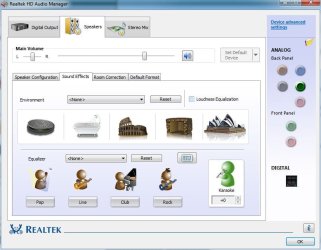
Check the Sound Enhancements in the RealTek HD Audio Manager. It can be accessed from Start/Control Panel/Hardware and Sound. Disable all sound enhancements and see if that fixes it.
 

Attachments

  • Capture.JPG
    Capture.JPG
    61.1 KB · Views: 0

My Computer

Computer type
PC/Desktop
Computer Manufacturer/Model Number
My Own Build
OS
Windows 10 64 bit
CPU
Intel i7 6700K
Motherboard
ASUS ROG Maximus VIII Hero
Memory
16GB Corsair Dominator
Graphics Card(s)
Intel CPU Graphics
Sound Card
RealTek
Monitor(s) Displays
27" Dell S2719dgf
Screen Resolution
2560X1440
Hard Drives
1 TB Samsung 850 EVO SSD for Win 10 Pro
500GB Samsung 850 EVO SSD for Win 10 Insider
2 TB drive for backup
PSU
EVGA Supernova 750G2
Case
BeQuiet Silent Base 600
Cooling
Deepcool Captain 120EX
Keyboard
Microsoft Wireless 2000
Mouse
Microsoft wireless
Internet Speed
100 MB/sec (Cable)
Antivirus
Microsoft Defender and Malwarebytes
Browser
Edge/Firefox
Other Info
Cakewalk (Sonar) by BandLab and Studio One 4.1 Pro recording studio software. MOTU 896Mk3 Hybrid recording interface, Frontier Tranzport wireless control unit, Behringer X-Touch Control Surface.
Five USB connected optical drives for CD Audio production using Nero BurningROM
Check the Sound Enhancements in the RealTek HD Audio Manager. It can be accessed from Start/Control Panel/Hardware and Sound. Disable all sound enhancements and see if that fixes it.

i got all sound enhancements off but it didn't correct the issue as i got all of them off
 

My Computer

Computer type
PC/Desktop
OS
Windows 7 Professional
Memory
4GB
Graphics Card(s)
Nvidia Geforce 9400
Antivirus
Kaspersky Pure 3.0
Browser
Google Chrome
When do you get the echo? On on-line videos (e.g. Youtube)? Audio files on the PC or a commercial audio cd?, etc
 

My Computer

Computer type
PC/Desktop
Computer Manufacturer/Model Number
My Own Build
OS
Windows 10 64 bit
CPU
Intel i7 6700K
Motherboard
ASUS ROG Maximus VIII Hero
Memory
16GB Corsair Dominator
Graphics Card(s)
Intel CPU Graphics
Sound Card
RealTek
Monitor(s) Displays
27" Dell S2719dgf
Screen Resolution
2560X1440
Hard Drives
1 TB Samsung 850 EVO SSD for Win 10 Pro
500GB Samsung 850 EVO SSD for Win 10 Insider
2 TB drive for backup
PSU
EVGA Supernova 750G2
Case
BeQuiet Silent Base 600
Cooling
Deepcool Captain 120EX
Keyboard
Microsoft Wireless 2000
Mouse
Microsoft wireless
Internet Speed
100 MB/sec (Cable)
Antivirus
Microsoft Defender and Malwarebytes
Browser
Edge/Firefox
Other Info
Cakewalk (Sonar) by BandLab and Studio One 4.1 Pro recording studio software. MOTU 896Mk3 Hybrid recording interface, Frontier Tranzport wireless control unit, Behringer X-Touch Control Surface.
Five USB connected optical drives for CD Audio production using Nero BurningROM
When do you get the echo? On on-line videos (e.g. Youtube)? Audio files on the PC or a commercial audio cd?, etc

it happens at random times when i am on my PC as i do not get that random echo from youtube nor audio files same for Audio CD as i am not sure what caused it but i'm thinking it's a GPU failure as i am not sure
 

My Computer

Computer type
PC/Desktop
OS
Windows 7 Professional
Memory
4GB
Graphics Card(s)
Nvidia Geforce 9400
Antivirus
Kaspersky Pure 3.0
Browser
Google Chrome
More system specs would be helpful. e.g. Make of PC and Model Number and CPU and speed. Which Windows 7 do you have the 32 bit or 64 bit version? The Nvidia GeForce 9400 sounds like an "old" video card?
 

My Computer

Computer type
PC/Desktop
Computer Manufacturer/Model Number
My Own Build
OS
Windows 10 64 bit
CPU
Intel i7 6700K
Motherboard
ASUS ROG Maximus VIII Hero
Memory
16GB Corsair Dominator
Graphics Card(s)
Intel CPU Graphics
Sound Card
RealTek
Monitor(s) Displays
27" Dell S2719dgf
Screen Resolution
2560X1440
Hard Drives
1 TB Samsung 850 EVO SSD for Win 10 Pro
500GB Samsung 850 EVO SSD for Win 10 Insider
2 TB drive for backup
PSU
EVGA Supernova 750G2
Case
BeQuiet Silent Base 600
Cooling
Deepcool Captain 120EX
Keyboard
Microsoft Wireless 2000
Mouse
Microsoft wireless
Internet Speed
100 MB/sec (Cable)
Antivirus
Microsoft Defender and Malwarebytes
Browser
Edge/Firefox
Other Info
Cakewalk (Sonar) by BandLab and Studio One 4.1 Pro recording studio software. MOTU 896Mk3 Hybrid recording interface, Frontier Tranzport wireless control unit, Behringer X-Touch Control Surface.
Five USB connected optical drives for CD Audio production using Nero BurningROM
More system specs would be helpful. e.g. Make of PC and Model Number and CPU and speed. Which Windows 7 do you have the 32 bit or 64 bit version? The Nvidia GeForce 9400 sounds like an "old" video card?

well i have a Pentium E5200 2.5ghz and i have the x64 version of Windows 7 and my ACPI is pretty old and hasn't been updated since 2006
 

My Computer

Computer type
PC/Desktop
OS
Windows 7 Professional
Memory
4GB
Graphics Card(s)
Nvidia Geforce 9400
Antivirus
Kaspersky Pure 3.0
Browser
Google Chrome
Back
Top