Replace default Windows 7 "Thin Character" Fonts

pete barnes

New member
I hope I can make this sound sensible. Ever since I obtained a PC with Windows 7 Pro, I have had a very serious problem seeing details in the display window, even though I have turned off all the special effects, switched to a customized Aero display scheme, and so on. The biggest problem is the extremely high level of brightness on all Windows screens, both native Win and non-MS apps, along with a very extensive use of "ultra-thin" characters in fonts and faded, dimmed, or extremely low contrast on the screen text. Sometimes, it gets to a point where my (admittedly aged) eyes just cannot read what is on the screen, especially with the almost pathological fixation Windows has with using very light blue or other similar colors everywhere.

I have been able to compensate by reducing the brightness on my monitor to about 20% of the optimum default setting, using a custom CSS with IE, and by extensively modifying the display characteristics using the Advanced Window Color and Appearance settings, and by totally shutting off all the Win 7 "effects". Although that worked fairly well for the native Windows software and MS apps, and for some other non-MS apps, it still does not totally fill the bill for me. I still have to mostly use the high-contrast theme to comfortably do things like read my email etc.

If I could just completely rid my system of the ultra-thin fonts, I think I could get by good enough. (I should mention that I never had any problems with WinXP Pro on my old PC). So here is my question: Is there any way to either modify the font files that Windows and other oftware use to display their screens to make all fonts visible and legible again by fonts using "normal" old-style characters, or to obtain a replacement system font set that would work with all apps?

I realize that some applications use embedded fonts, in which case what I get is what I get. But if the "ultra-thin" fonts used everywhere were replaced with "normal" old-style fonts when they call on system fonts, at least I would be better off than now. The ultra-thin fonts must be, I presume, a separate font file and style. What I want to do is just replace that whole style with a more conventional font style.

Thanks for any help. (BTW, I do not want to use a custom theme, since I have never found one that does not have other problems in my case. I even bought the entire Stardock suite, but it is beyond my skillset or patience to devise something like this as a custom theme. I did use it to rerplace the Win 7 Logon and shutdown screens, which were actually useless for me because I could not see the text or controls at all on the native Win 7 screens.)

Pete B
 

My Computer

Computer type
PC/Desktop
Computer Manufacturer/Model Number
custom
OS
Microsoft Windows 7 Professional 64-bit 7601 Multiprocessor Free Service Pack 1
CPU
Intel(R) Pentium(R) CPU G645 @ 2.90GHz
Motherboard
Gigabyte Technology Co., Ltd. B75M-D3H
Memory
8.00 GB
Graphics Card(s)
Intel(R) HD Graphics
Sound Card
(1) Realtek High Definition Audio (2) Intel(R) Display Aud
Screen Resolution
1920 x 1080 x 32 bits (4294967296 colors) @ 60 Hz
Hard Drives
(1) WDC WD10EZEX-60ZF5A0 (2) HP Officejet J6400 USB Device (3) WD My Book 1130 USB Device
Antivirus
kasperskys
Browser
ie 10

My Computer

Computer type
Laptop
Computer Manufacturer/Model Number
Sager NP9170
OS
Win 7 Pro x64 / Win 10 Pro
CPU
Intel(R) Core(TM) i7-3630QM CPU @ 2.40GHz
Motherboard
CLEVO P170EM
Memory
12 GB
Graphics Card(s)
(1) Intel(R) HD Graphics 4000 (2) NVIDIA GeForce GTX 675M
Sound Card
(1) Realtek High Definition Audio (2) Intel(R) Display Aud
Monitor(s) Displays
17.3
Screen Resolution
1920x1080
Hard Drives
(1) Samsung 860 EVO 500GB(OS) (1) Samsung 860 EVO 500GB(Data)
Keyboard
Backlite
Antivirus
MSE, Malwarebytes Pro
Browser
Firefox
Other Info
DESKTOP: Custom-built.
OS: Win 10 Pro x64.
CASE: Rosewill R5.
CPU: Intel I5 4670K CPU @ 3.40GHz.
CPU COOLER: Cool Master Hyper 212 EVO.
MOTHERBOARD: Asus Z87-A.
MEMORY: Kingston HyperX 2x4 GB.
GPU: Nvidia Geforce 650 TI.
PSU: Corsair TX750.
DRIVES: (1) Samsung 840 120 GB SSD (2) Western Digital blue 500 GB 7200 RPM.
Changing fonts

Jerry
Thanks. I have no problem changing the registry (I am an old Windows data app programmer). But your post gives me the typical problem: I can read the message, but the picture you posted in that message is almost totally illegible no matter what I do (regular or hi-contrast). It just looks like a white screen with some very faint text on it, cannot make it out. So, could you tell me in plaintext what that screen says? I gather it is some kind of registry operation.

Maybe you have the solution to my problem. Will this affect all the active windows' text display? IOW will it change every screen to the new font style?

AFA what theme I use, I am using a heavy-modified std Win 7 aero theme right now, the one that comes in the theme pack with the Win 7 appearance/accessibility tools. All the mods are via the advanced Win Appear and Color selections.

Pete B
 

My Computer

Computer type
PC/Desktop
Computer Manufacturer/Model Number
custom
OS
Microsoft Windows 7 Professional 64-bit 7601 Multiprocessor Free Service Pack 1
CPU
Intel(R) Pentium(R) CPU G645 @ 2.90GHz
Motherboard
Gigabyte Technology Co., Ltd. B75M-D3H
Memory
8.00 GB
Graphics Card(s)
Intel(R) HD Graphics
Sound Card
(1) Realtek High Definition Audio (2) Intel(R) Display Aud
Screen Resolution
1920 x 1080 x 32 bits (4294967296 colors) @ 60 Hz
Hard Drives
(1) WDC WD10EZEX-60ZF5A0 (2) HP Officejet J6400 USB Device (3) WD My Book 1130 USB Device
Antivirus
kasperskys
Browser
ie 10
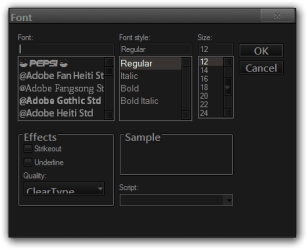
Here is what is on the image, you need to change the Hand of Sean to the font you what to use and save it, then follows the rest of that post.


Windows Registry Editor Version 5.00

[HKEY_LOCAL_MACHINE\SOFTWARE\Microsoft\Windows NT\CurrentVersion\Fonts]
"Segoe UI (TrueType)"=""
"Segoe UI Bold (TrueType)"=""
"Segoe UI Italic (TrueType)"=""
"Segoe UI Bold Italic (TrueType)"=""
"Segoe UI Semibold (TrueType)"=""
"Segoe UI Light (TrueType)"=""
"Segoe UI Symbol (TrueType)"=""

[HKEY_LOCAL_MACHINE\SOFTWARE\Microsoft\Windows NT\CurrentVersion\FontSubstitutes]
"Segoe UI"="Hand of Sean"
"MS Shell Dlg 2"="Hand of Sean"
"MS Shell Dlg"="Hand of Sean"


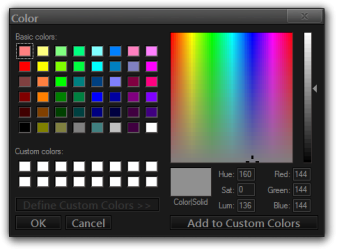
If that does not work, I know you said no custom themes but I can make a custom theme with Windows Style Builder and change all the fonts(size, color) of the Aero theme. And post it here.
Font.pngColor.png

You will need to do 1 of these 2 ways of Enabling custom themes for it to work.
http://www.sevenforums.com/tutorials/34579-enabling-custom-themes-windows-7-a.html
Or
http://www.sevenforums.com/tutorials/28377-theme-how-apply-custom-themes.html?filter

Let me know

Jerry
 

My Computer

Computer type
Laptop
Computer Manufacturer/Model Number
Sager NP9170
OS
Win 7 Pro x64 / Win 10 Pro
CPU
Intel(R) Core(TM) i7-3630QM CPU @ 2.40GHz
Motherboard
CLEVO P170EM
Memory
12 GB
Graphics Card(s)
(1) Intel(R) HD Graphics 4000 (2) NVIDIA GeForce GTX 675M
Sound Card
(1) Realtek High Definition Audio (2) Intel(R) Display Aud
Monitor(s) Displays
17.3
Screen Resolution
1920x1080
Hard Drives
(1) Samsung 860 EVO 500GB(OS) (1) Samsung 860 EVO 500GB(Data)
Keyboard
Backlite
Antivirus
MSE, Malwarebytes Pro
Browser
Firefox
Other Info
DESKTOP: Custom-built.
OS: Win 10 Pro x64.
CASE: Rosewill R5.
CPU: Intel I5 4670K CPU @ 3.40GHz.
CPU COOLER: Cool Master Hyper 212 EVO.
MOTHERBOARD: Asus Z87-A.
MEMORY: Kingston HyperX 2x4 GB.
GPU: Nvidia Geforce 650 TI.
PSU: Corsair TX750.
DRIVES: (1) Samsung 840 120 GB SSD (2) Western Digital blue 500 GB 7200 RPM.
Custom Themes

Jerry

Thanks again for looking into this. I think I would really like that custom theme you describe. But let me be a bit more precise about what I have now. I am currently running (for the standard non-high contrast) a customized Win 7 Classic theme from the Win 7 Personaliztion CP applet. Mostly I have just adjusted colors and such, but I have also used the Win Color and Appearance dialog to extensively modify the Windows standard settings (active screen color, Message box text font/size etc.) I should also mention that I am running ClassicShell.

Some questions: would you have to specify each of the numerous "standard Win" fonts? For example, Windows uses various fixed fonts and also various TT variable fonts, would I have to specify each and every one that I want to use? (Win IE 10 for example uses a slew of different fonts, would this affect IE). All I really want is to just replace all the new-style "ultra-thin" fonts with the old "standard" fonts or bold, etc like were used in WinXP and earlier, to revert to readable screen text everywhere. I hope I am making this clear.

Also, would everything in the custom theme be fixed, or would I still be able to personalize it like I do in Win 7 as described above? For example, would the Windows customization dialog still be available? Or, alternatively, as I mentioned earlier, I have the entire Stardock suite. Would I be able to use the tools in that to modify the custom theme?

Another thought: would it be possible to get a custom theme that is, for all intents and purposes, identical to the WinXP standard "classic" theme? That is what I really wish I had. I never had these problems on my WinXP Pro machine, nor for that matter on my earlier Win versions either. The Win 7 version "WinXP" style is not really a good replacement IMO.

Finally: would it help if I sent you the various theme files for my current theme setup? If you can direct me as to where to find them and what to send, then you would know exactly what I have now. I appreciate this, and would be glad to pay you for all this if you have some way to take charge cards.

Pete B
 

My Computer

Computer type
PC/Desktop
Computer Manufacturer/Model Number
custom
OS
Microsoft Windows 7 Professional 64-bit 7601 Multiprocessor Free Service Pack 1
CPU
Intel(R) Pentium(R) CPU G645 @ 2.90GHz
Motherboard
Gigabyte Technology Co., Ltd. B75M-D3H
Memory
8.00 GB
Graphics Card(s)
Intel(R) HD Graphics
Sound Card
(1) Realtek High Definition Audio (2) Intel(R) Display Aud
Screen Resolution
1920 x 1080 x 32 bits (4294967296 colors) @ 60 Hz
Hard Drives
(1) WDC WD10EZEX-60ZF5A0 (2) HP Officejet J6400 USB Device (3) WD My Book 1130 USB Device
Antivirus
kasperskys
Browser
ie 10
Some questions: would you have to specify each of the numerous "standard Win" fonts? For example, Windows uses various fixed fonts and also various TT variable fonts, would I have to specify each and every one that I want to use? (Win IE 10 for example uses a slew of different fonts, would this affect IE). All I really want is to just replace all the new-style "ultra-thin" fonts with the old "standard" fonts or bold, etc like were used in WinXP and earlier, to revert to readable screen text everywhere. I hope I am making this clear.
It depends on the location there are quite a few areas where the font can be changed, as far as IE 10 goes it will only affect the drop-down menus.

Also, would everything in the custom theme be fixed, or would I still be able to personalize it like I do in Win 7 as described above? For example, would the Windows customization dialog still be available? Or, alternatively, as I mentioned earlier, I have the entire Stardock suite. Would I be able to use the tools in that to modify the custom theme?
You'll still be able to use Windows colorization dialog, I'm not sure about Stardock.

Another thought: would it be possible to get a custom theme that is, for all intents and purposes, identical to the WinXP standard "classic" theme? That is what I really wish I had. I never had these problems on my WinXP Pro machine, nor for that matter on my earlier Win versions either. The Win 7 version "WinXP" style is not really a good replacement IMO.
There are quite a few at deviantart here is an example of one Luna port to Windows 7 -Aero- by ~Satukoro on deviantART

Finally: would it help if I sent you the various theme files for my current theme setup? If you can direct me as to where to find them and what to send, then you would know exactly what I have now. I appreciate this, and would be glad to pay you for all this if you have some way to take charge cards.
I wouldn't need any of your files at this time.
I appreciate the offer to pay me but that's not going to happen I do this voluntarily.

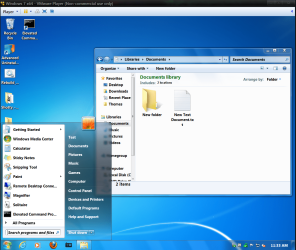
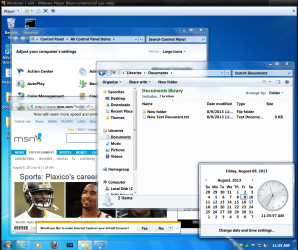
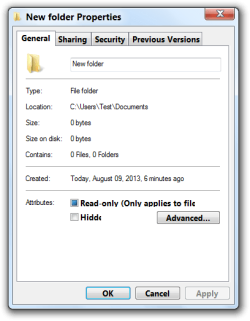
I have a theme I did a while back where the font is Segoe UI and most of the size is 11 point and bold with black font color(the white text in the start menu and also on the taskbar can be changed to black also). Here are some examples of it, as you can see most all of it is pretty readable except some of the property Windows that font size has not been found anywhere yet along with trying to make it bold.

Jerry
1.PNG

2.PNG

New folder Properties.png
 

My Computer

Computer type
Laptop
Computer Manufacturer/Model Number
Sager NP9170
OS
Win 7 Pro x64 / Win 10 Pro
CPU
Intel(R) Core(TM) i7-3630QM CPU @ 2.40GHz
Motherboard
CLEVO P170EM
Memory
12 GB
Graphics Card(s)
(1) Intel(R) HD Graphics 4000 (2) NVIDIA GeForce GTX 675M
Sound Card
(1) Realtek High Definition Audio (2) Intel(R) Display Aud
Monitor(s) Displays
17.3
Screen Resolution
1920x1080
Hard Drives
(1) Samsung 860 EVO 500GB(OS) (1) Samsung 860 EVO 500GB(Data)
Keyboard
Backlite
Antivirus
MSE, Malwarebytes Pro
Browser
Firefox
Other Info
DESKTOP: Custom-built.
OS: Win 10 Pro x64.
CASE: Rosewill R5.
CPU: Intel I5 4670K CPU @ 3.40GHz.
CPU COOLER: Cool Master Hyper 212 EVO.
MOTHERBOARD: Asus Z87-A.
MEMORY: Kingston HyperX 2x4 GB.
GPU: Nvidia Geforce 650 TI.
PSU: Corsair TX750.
DRIVES: (1) Samsung 840 120 GB SSD (2) Western Digital blue 500 GB 7200 RPM.
>It depends on the location there are quite a few areas where the font can be changed, as far as IE 10 goes it >will only affect the drop-down menus

All I meant was, will all the functionality for changing font types, sizes, etc that I now have in Win 7, such as with the personalization and color and appearance options, still be available (example: will I still be able to specifiy, say, text of message box to be Arial Bold 12pt. etc.), what menus use for text of items and so on.

>There are quite a few at deviantart here is an example of one Luna port to Windows 7 -Aero- by ~Satukoro on >deviantART

Yes I had tried that one when I had Stardock running, but it was very limited for customization. Plus, I want the ClassicShell.

>I have a theme I did a while back where the font is Segoe UI and most of the size is 11 point and bold with >black font color(the white text in the start menu and also on the taskbar can be changed to black also). Here >are some examples of it, as you can see most all of it is pretty readable except some of the property Windows >that font size has not been found anywhere yet along with trying to make it bold.

That theme looks pretty good going by the images you posted. Is it available for me to try, and would Classic Shell and the other stuff I mentioned work on it? Can I download it someplace? I think I can handle installing it as a custom theme (I did several with Stardock). If not, I am sure I can do the items you mentioned earlier on customizing changes needed.


>I appreciate the offer to pay me but that's not going to happen I do this voluntarily.

You certainly are a great help here, I appreciate what you have done in this thread to help me out..

Pete B
 

My Computer

Computer type
PC/Desktop
Computer Manufacturer/Model Number
custom
OS
Microsoft Windows 7 Professional 64-bit 7601 Multiprocessor Free Service Pack 1
CPU
Intel(R) Pentium(R) CPU G645 @ 2.90GHz
Motherboard
Gigabyte Technology Co., Ltd. B75M-D3H
Memory
8.00 GB
Graphics Card(s)
Intel(R) HD Graphics
Sound Card
(1) Realtek High Definition Audio (2) Intel(R) Display Aud
Screen Resolution
1920 x 1080 x 32 bits (4294967296 colors) @ 60 Hz
Hard Drives
(1) WDC WD10EZEX-60ZF5A0 (2) HP Officejet J6400 USB Device (3) WD My Book 1130 USB Device
Antivirus
kasperskys
Browser
ie 10
All I meant was, will all the functionality for changing font types, sizes, etc that I now have in Win 7, such as with the personalization and color and appearance options, still be available (example: will I still be able to specifiy, say, text of message box to be Arial Bold 12pt. etc.), what menus use for text of items and so on.
Yes you can.


That theme looks pretty good going by the images you posted. Is it available for me to try, and would Classic Shell and the other stuff I mentioned work on it? Can I download it someplace? I think I can handle installing it as a custom theme (I did several with Stardock). If not, I am sure I can do the items you mentioned earlier on customizing changes needed.
Classic shell and other stuff should work OK.

I put it in the zip folder and it's at the bottom of this post, and I have it at Arial bold most at 11pt then some at 12 and 14pt if it's not big enough I can change it in just a seconds(font and size).

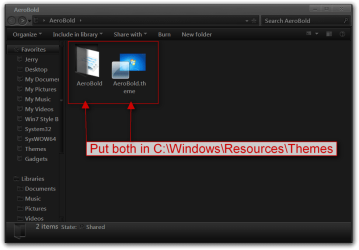
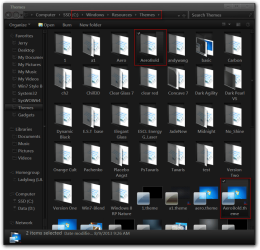
Download and extract the AeroBold.zip to your desktop on put both 1 AeroBold theme folder and 1 AeroBold.theme file in C:\Windows\Resources\Themes folder.
AeroBold.pngThemes.png


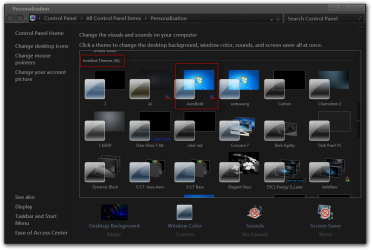
Will show up in Personalization under Installed Themes as AeroBold
Personalization.png


Let me know if you need any changes.

Jerry
 

Attachments

My Computer

Computer type
Laptop
Computer Manufacturer/Model Number
Sager NP9170
OS
Win 7 Pro x64 / Win 10 Pro
CPU
Intel(R) Core(TM) i7-3630QM CPU @ 2.40GHz
Motherboard
CLEVO P170EM
Memory
12 GB
Graphics Card(s)
(1) Intel(R) HD Graphics 4000 (2) NVIDIA GeForce GTX 675M
Sound Card
(1) Realtek High Definition Audio (2) Intel(R) Display Aud
Monitor(s) Displays
17.3
Screen Resolution
1920x1080
Hard Drives
(1) Samsung 860 EVO 500GB(OS) (1) Samsung 860 EVO 500GB(Data)
Keyboard
Backlite
Antivirus
MSE, Malwarebytes Pro
Browser
Firefox
Other Info
DESKTOP: Custom-built.
OS: Win 10 Pro x64.
CASE: Rosewill R5.
CPU: Intel I5 4670K CPU @ 3.40GHz.
CPU COOLER: Cool Master Hyper 212 EVO.
MOTHERBOARD: Asus Z87-A.
MEMORY: Kingston HyperX 2x4 GB.
GPU: Nvidia Geforce 650 TI.
PSU: Corsair TX750.
DRIVES: (1) Samsung 840 120 GB SSD (2) Western Digital blue 500 GB 7200 RPM.
Thanks!

Jerry, that's great. I surely appreciate this. I will let you know how it turns out, may be a day or two before I can try it.

Thanks

Pete B
 

My Computer

Computer type
PC/Desktop
Computer Manufacturer/Model Number
custom
OS
Microsoft Windows 7 Professional 64-bit 7601 Multiprocessor Free Service Pack 1
CPU
Intel(R) Pentium(R) CPU G645 @ 2.90GHz
Motherboard
Gigabyte Technology Co., Ltd. B75M-D3H
Memory
8.00 GB
Graphics Card(s)
Intel(R) HD Graphics
Sound Card
(1) Realtek High Definition Audio (2) Intel(R) Display Aud
Screen Resolution
1920 x 1080 x 32 bits (4294967296 colors) @ 60 Hz
Hard Drives
(1) WDC WD10EZEX-60ZF5A0 (2) HP Officejet J6400 USB Device (3) WD My Book 1130 USB Device
Antivirus
kasperskys
Browser
ie 10
OK let me know how it goes.

Jerry
 

My Computer

Computer type
Laptop
Computer Manufacturer/Model Number
Sager NP9170
OS
Win 7 Pro x64 / Win 10 Pro
CPU
Intel(R) Core(TM) i7-3630QM CPU @ 2.40GHz
Motherboard
CLEVO P170EM
Memory
12 GB
Graphics Card(s)
(1) Intel(R) HD Graphics 4000 (2) NVIDIA GeForce GTX 675M
Sound Card
(1) Realtek High Definition Audio (2) Intel(R) Display Aud
Monitor(s) Displays
17.3
Screen Resolution
1920x1080
Hard Drives
(1) Samsung 860 EVO 500GB(OS) (1) Samsung 860 EVO 500GB(Data)
Keyboard
Backlite
Antivirus
MSE, Malwarebytes Pro
Browser
Firefox
Other Info
DESKTOP: Custom-built.
OS: Win 10 Pro x64.
CASE: Rosewill R5.
CPU: Intel I5 4670K CPU @ 3.40GHz.
CPU COOLER: Cool Master Hyper 212 EVO.
MOTHERBOARD: Asus Z87-A.
MEMORY: Kingston HyperX 2x4 GB.
GPU: Nvidia Geforce 650 TI.
PSU: Corsair TX750.
DRIVES: (1) Samsung 840 120 GB SSD (2) Western Digital blue 500 GB 7200 RPM.
Jerry, the theme works great for me. For the first time, I can actually use Win 7 in the non-high-contrast mode for everything. No problems to speak of, the install process went easy per your instructions. My sincere thanks once again.

Pete B
 

My Computer

Computer type
PC/Desktop
Computer Manufacturer/Model Number
custom
OS
Microsoft Windows 7 Professional 64-bit 7601 Multiprocessor Free Service Pack 1
CPU
Intel(R) Pentium(R) CPU G645 @ 2.90GHz
Motherboard
Gigabyte Technology Co., Ltd. B75M-D3H
Memory
8.00 GB
Graphics Card(s)
Intel(R) HD Graphics
Sound Card
(1) Realtek High Definition Audio (2) Intel(R) Display Aud
Screen Resolution
1920 x 1080 x 32 bits (4294967296 colors) @ 60 Hz
Hard Drives
(1) WDC WD10EZEX-60ZF5A0 (2) HP Officejet J6400 USB Device (3) WD My Book 1130 USB Device
Antivirus
kasperskys
Browser
ie 10
You're Welcome Pete
Glad I could help.
 

My Computer

Computer type
Laptop
Computer Manufacturer/Model Number
Sager NP9170
OS
Win 7 Pro x64 / Win 10 Pro
CPU
Intel(R) Core(TM) i7-3630QM CPU @ 2.40GHz
Motherboard
CLEVO P170EM
Memory
12 GB
Graphics Card(s)
(1) Intel(R) HD Graphics 4000 (2) NVIDIA GeForce GTX 675M
Sound Card
(1) Realtek High Definition Audio (2) Intel(R) Display Aud
Monitor(s) Displays
17.3
Screen Resolution
1920x1080
Hard Drives
(1) Samsung 860 EVO 500GB(OS) (1) Samsung 860 EVO 500GB(Data)
Keyboard
Backlite
Antivirus
MSE, Malwarebytes Pro
Browser
Firefox
Other Info
DESKTOP: Custom-built.
OS: Win 10 Pro x64.
CASE: Rosewill R5.
CPU: Intel I5 4670K CPU @ 3.40GHz.
CPU COOLER: Cool Master Hyper 212 EVO.
MOTHERBOARD: Asus Z87-A.
MEMORY: Kingston HyperX 2x4 GB.
GPU: Nvidia Geforce 650 TI.
PSU: Corsair TX750.
DRIVES: (1) Samsung 840 120 GB SSD (2) Western Digital blue 500 GB 7200 RPM.
Jerry:

I found one strange thing with this theme. I set up the display appearance settings ao that the setting for window border glass colors (in Control Panel\Appearance and Personalization\Personalization\Window Color and Appearance/Enable Trandparency) is disabled (no transparency). Saved the theme.

I then switched to high contrast, then switched back to regular display. The setting for transparency is enabled again. It can be turned off again, but it is annoying to do this. Is this something with the theme? It did not happen before using other themes.

Otherwise looking good....

Pete B
 

My Computer

Computer type
PC/Desktop
Computer Manufacturer/Model Number
custom
OS
Microsoft Windows 7 Professional 64-bit 7601 Multiprocessor Free Service Pack 1
CPU
Intel(R) Pentium(R) CPU G645 @ 2.90GHz
Motherboard
Gigabyte Technology Co., Ltd. B75M-D3H
Memory
8.00 GB
Graphics Card(s)
Intel(R) HD Graphics
Sound Card
(1) Realtek High Definition Audio (2) Intel(R) Display Aud
Screen Resolution
1920 x 1080 x 32 bits (4294967296 colors) @ 60 Hz
Hard Drives
(1) WDC WD10EZEX-60ZF5A0 (2) HP Officejet J6400 USB Device (3) WD My Book 1130 USB Device
Antivirus
kasperskys
Browser
ie 10
Hi Pete sorry for the late reply was busy yesterday, I just checked what you said and you are right I get the same thing even with the default Aero theme and I'm not sure why that is happening.

Doing some testing I found that if you click on a another saved Aero theme and then click back to the one I made for you than the unchecked Enable Trandparency is back.

Jerry
 

My Computer

Computer type
Laptop
Computer Manufacturer/Model Number
Sager NP9170
OS
Win 7 Pro x64 / Win 10 Pro
CPU
Intel(R) Core(TM) i7-3630QM CPU @ 2.40GHz
Motherboard
CLEVO P170EM
Memory
12 GB
Graphics Card(s)
(1) Intel(R) HD Graphics 4000 (2) NVIDIA GeForce GTX 675M
Sound Card
(1) Realtek High Definition Audio (2) Intel(R) Display Aud
Monitor(s) Displays
17.3
Screen Resolution
1920x1080
Hard Drives
(1) Samsung 860 EVO 500GB(OS) (1) Samsung 860 EVO 500GB(Data)
Keyboard
Backlite
Antivirus
MSE, Malwarebytes Pro
Browser
Firefox
Other Info
DESKTOP: Custom-built.
OS: Win 10 Pro x64.
CASE: Rosewill R5.
CPU: Intel I5 4670K CPU @ 3.40GHz.
CPU COOLER: Cool Master Hyper 212 EVO.
MOTHERBOARD: Asus Z87-A.
MEMORY: Kingston HyperX 2x4 GB.
GPU: Nvidia Geforce 650 TI.
PSU: Corsair TX750.
DRIVES: (1) Samsung 840 120 GB SSD (2) Western Digital blue 500 GB 7200 RPM.
Thanks again

Jerry, I also had another problem, maybe related to this maybe not. All I can say is that, after powering down my PC for the night, when I turned it on in the morning again, it booted up in safe mode with a very low res.

Rather than mess with it further, I reset to a previous Restore Point I made before I started changing things, everything is normal now but back to my old theme etc. I am not gouing to pursue this further right now, I have some other business to attend to for the near future. But if you find some solutions, I will maybe try again in the future.

Thanks for all your help

Pete B
 

My Computer

Computer type
PC/Desktop
Computer Manufacturer/Model Number
custom
OS
Microsoft Windows 7 Professional 64-bit 7601 Multiprocessor Free Service Pack 1
CPU
Intel(R) Pentium(R) CPU G645 @ 2.90GHz
Motherboard
Gigabyte Technology Co., Ltd. B75M-D3H
Memory
8.00 GB
Graphics Card(s)
Intel(R) HD Graphics
Sound Card
(1) Realtek High Definition Audio (2) Intel(R) Display Aud
Screen Resolution
1920 x 1080 x 32 bits (4294967296 colors) @ 60 Hz
Hard Drives
(1) WDC WD10EZEX-60ZF5A0 (2) HP Officejet J6400 USB Device (3) WD My Book 1130 USB Device
Antivirus
kasperskys
Browser
ie 10
I can't imagine the theme causing that, when you get the time later try it again and see what happens.

Jerry
 

My Computer

Computer type
Laptop
Computer Manufacturer/Model Number
Sager NP9170
OS
Win 7 Pro x64 / Win 10 Pro
CPU
Intel(R) Core(TM) i7-3630QM CPU @ 2.40GHz
Motherboard
CLEVO P170EM
Memory
12 GB
Graphics Card(s)
(1) Intel(R) HD Graphics 4000 (2) NVIDIA GeForce GTX 675M
Sound Card
(1) Realtek High Definition Audio (2) Intel(R) Display Aud
Monitor(s) Displays
17.3
Screen Resolution
1920x1080
Hard Drives
(1) Samsung 860 EVO 500GB(OS) (1) Samsung 860 EVO 500GB(Data)
Keyboard
Backlite
Antivirus
MSE, Malwarebytes Pro
Browser
Firefox
Other Info
DESKTOP: Custom-built.
OS: Win 10 Pro x64.
CASE: Rosewill R5.
CPU: Intel I5 4670K CPU @ 3.40GHz.
CPU COOLER: Cool Master Hyper 212 EVO.
MOTHERBOARD: Asus Z87-A.
MEMORY: Kingston HyperX 2x4 GB.
GPU: Nvidia Geforce 650 TI.
PSU: Corsair TX750.
DRIVES: (1) Samsung 840 120 GB SSD (2) Western Digital blue 500 GB 7200 RPM.
Back
Top