Replacing 40GB HDD with 64GB SSD - Image restore question

vram

New member
Member
Local time
10:50 PM
Messages
47
As the title says, I will be replacing my old 40GB HDD in my laptop with a 64GB SSD drive. My intent is to image my current install using the built-in system image functionality, install the SSD and then restore the image to the SSD. Since my install is recent and fresh, I would prefer not to have to install from scratch. I'm also using a Win 7 upgrade CD, so I don't want to place extra wear on the new SSD by having to install the OS twice. Will I run into problems restoring an HDD image to an SSD and will it give me the option to use the full 64GB during the imaging process or make a 40GB partition and force me to extend the partition after imaging is complete?
 

My Computer My Computer

At a glance

Windows 7 64-bit
OS
Windows 7 64-bit
You could also consider a clone process (direct transfer) rather than imaging.

You are likely exaggerating the so-called problem of wearing out an SSD by installing Windows twice. At any rate, even with an upgrade DVD, you don't have to install twice. There is another way around it.

I assume you have a 40 GB drive, with a single C partition? In that case an ordinary image restoration should give you the choice of using the entire 64 GB SSD as a single C also. In fact, that may be the default.

But it's very easy to extend after the fact if you had to.
 

My Computer My Computer

At a glance

Windows 7 Home Premium SP1, 64-bitIntel Skylake i5-6600K, not overclocked8 GB HyperX DDR4-2666 (2 x 4 GB)none; graphics are integrated on CPU
Computer type
PC/Desktop
Computer Manufacturer/Model Number
Ignatz Special; 4 speed manual gearbox; factory air conditioning; one of one
OS
Windows 7 Home Premium SP1, 64-bit
CPU
Intel Skylake i5-6600K, not overclocked
Motherboard
AsRock Z170M Extreme 4, micro ATX
Memory
8 GB HyperX DDR4-2666 (2 x 4 GB)
Graphics Card(s)
none; graphics are integrated on CPU
Sound Card
onboard: Realtek ALC1150; external: USB Behringer UF0-202
Monitor(s) Displays
Dell S2340M 23 inch IPS
Screen Resolution
1600 x 900
Hard Drives
System: Crucial MX100 series SSD, 128 GB;
Data: Samsung Spinpoint 103SJ, 1 TB;
Backup: WD Caviar Green WD30EZRX-00D8PB0, 3 TB
PSU
Rosewill SilentNight 500 watt fanless, semi-modular
Case
Antec Solo II
Cooling
Noctua NH-U12S; Noctua F12 intake, Noctua S12A exhaust
Keyboard
Microsoft 200 6JH-00001 USB
Mouse
Dell or Microsoft optical wired; USB
Antivirus
Microsoft Security Essentials and Malwarebytes Premium
Browser
Pale Moon
Other Info
All fans PWM; speeds at idle: CPU circa 500 rpm; intake circa 600 rpm; exhaust circa 600 rpm; CPU temps 27 idle and 47 C load in a warm room (27 C/81 F) when running Intel Extreme Tuning Utility stress test.
You could also consider a clone process (direct transfer) rather than imaging.

You are likely exaggerating the so-called problem of wearing out an SSD by installing Windows twice. At any rate, even with an upgrade DVD, you don't have to install twice. There is another way around it.

I assume you have a 40 GB drive, with a single C partition? In that case an ordinary image restoration should give you the choice of using the entire 64 GB SSD as a single C also. In fact, that may be the default.

But it's very easy to extend after the fact if you had to.

I don't have access to any cloning software. My understanding of a fresh install using an upgrade CD is installing Windows 7 and then installing over the first install. Not really any different than me installing Vista first, honestly.
 

My Computer My Computer

At a glance

Windows 7 64-bit
OS
Windows 7 64-bit
1. Windows imaging may give you problems.

2. do you have a 100MB active system partition on the HDD. Depending on that I may be able to give you a safe procedure.

3. If you image, you first have to align the SSD.
 

My Computer My Computer

At a glance

Vista, Windows7, Mint Mate, Zorin, Windows 8from 1.6GHz Duo to i7
Computer Manufacturer/Model Number
HP, Dell, Gateway, Toshiba - 4 laptops and 2 desktops
OS
Vista, Windows7, Mint Mate, Zorin, Windows 8
CPU
from 1.6GHz Duo to i7
Monitor(s) Displays
2x HP w2207
Hard Drives
5x HDD, 7x SSD, 12x Externals
Keyboard
with trackball - no mices
Mouse
Trackball mice
Internet Speed
DSL 6000
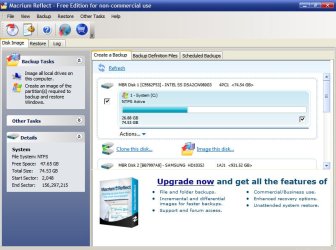
Regarding cloning: Macrium Reflect version 5.0 is free and supports cloning. See the pic below. You can see the "clone this disk" choice near the center of the screen.

My point in the original post was that you do NOT have to do the double install thing in Win 7.

You can, but you don't have to. Double install is one of several methods to do a clean install with an upgrade disc.

See this link:

http://www.sevenforums.com/tutorials/31402-clean-install-upgrade-windows-7-version.html

Cloning works, but it not used as often on this forum. Most choose imaging or an outright clean install.
 

Attachments

  • Untitled-1.jpg
    Untitled-1.jpg
    90.9 KB · Views: 49

My Computer My Computer

At a glance

Windows 7 Home Premium SP1, 64-bitIntel Skylake i5-6600K, not overclocked8 GB HyperX DDR4-2666 (2 x 4 GB)none; graphics are integrated on CPU
Computer type
PC/Desktop
Computer Manufacturer/Model Number
Ignatz Special; 4 speed manual gearbox; factory air conditioning; one of one
OS
Windows 7 Home Premium SP1, 64-bit
CPU
Intel Skylake i5-6600K, not overclocked
Motherboard
AsRock Z170M Extreme 4, micro ATX
Memory
8 GB HyperX DDR4-2666 (2 x 4 GB)
Graphics Card(s)
none; graphics are integrated on CPU
Sound Card
onboard: Realtek ALC1150; external: USB Behringer UF0-202
Monitor(s) Displays
Dell S2340M 23 inch IPS
Screen Resolution
1600 x 900
Hard Drives
System: Crucial MX100 series SSD, 128 GB;
Data: Samsung Spinpoint 103SJ, 1 TB;
Backup: WD Caviar Green WD30EZRX-00D8PB0, 3 TB
PSU
Rosewill SilentNight 500 watt fanless, semi-modular
Case
Antec Solo II
Cooling
Noctua NH-U12S; Noctua F12 intake, Noctua S12A exhaust
Keyboard
Microsoft 200 6JH-00001 USB
Mouse
Dell or Microsoft optical wired; USB
Antivirus
Microsoft Security Essentials and Malwarebytes Premium
Browser
Pale Moon
Other Info
All fans PWM; speeds at idle: CPU circa 500 rpm; intake circa 600 rpm; exhaust circa 600 rpm; CPU temps 27 idle and 47 C load in a warm room (27 C/81 F) when running Intel Extreme Tuning Utility stress test.
1. Windows imaging may give you problems.

2. do you have a 100MB active system partition on the HDD. Depending on that I may be able to give you a safe procedure.

3. If you image, you first have to align the SSD.

What Kind of problems? Yes, I have the 100MB partition you speak of. This is my first go involving SSDs so I'm not familiar with aligning them. Can you explain?

Regarding cloning: Macrium Reflect version 5.0 is free and supports cloning. See the pic below. You can see the "clone this disk" choice near the center of the screen.

My point in the original post was that you do NOT have to do the double install thing in Win 7.

You can, but you don't have to. Double install is one of several methods to do a clean install with an upgrade disc.

See this link:

http://www.sevenforums.com/tutorials/31402-clean-install-upgrade-windows-7-version.html

Cloning works, but it not used as often on this forum. Most choose imaging or an outright clean install.

Thank you for your help. I will look at Macrium :)
 

My Computer My Computer

At a glance

Windows 7 64-bit
OS
Windows 7 64-bit
Windows imaging is fussy and not particularly intuitive. Macrium much less so.

If you have the 100 MB partition, you would need to image it as well as C.

But you can get rid of the 100 MB partition entirely, so then you would only have to image C.
 

My Computer My Computer

At a glance

Windows 7 Home Premium SP1, 64-bitIntel Skylake i5-6600K, not overclocked8 GB HyperX DDR4-2666 (2 x 4 GB)none; graphics are integrated on CPU
Computer type
PC/Desktop
Computer Manufacturer/Model Number
Ignatz Special; 4 speed manual gearbox; factory air conditioning; one of one
OS
Windows 7 Home Premium SP1, 64-bit
CPU
Intel Skylake i5-6600K, not overclocked
Motherboard
AsRock Z170M Extreme 4, micro ATX
Memory
8 GB HyperX DDR4-2666 (2 x 4 GB)
Graphics Card(s)
none; graphics are integrated on CPU
Sound Card
onboard: Realtek ALC1150; external: USB Behringer UF0-202
Monitor(s) Displays
Dell S2340M 23 inch IPS
Screen Resolution
1600 x 900
Hard Drives
System: Crucial MX100 series SSD, 128 GB;
Data: Samsung Spinpoint 103SJ, 1 TB;
Backup: WD Caviar Green WD30EZRX-00D8PB0, 3 TB
PSU
Rosewill SilentNight 500 watt fanless, semi-modular
Case
Antec Solo II
Cooling
Noctua NH-U12S; Noctua F12 intake, Noctua S12A exhaust
Keyboard
Microsoft 200 6JH-00001 USB
Mouse
Dell or Microsoft optical wired; USB
Antivirus
Microsoft Security Essentials and Malwarebytes Premium
Browser
Pale Moon
Other Info
All fans PWM; speeds at idle: CPU circa 500 rpm; intake circa 600 rpm; exhaust circa 600 rpm; CPU temps 27 idle and 47 C load in a warm room (27 C/81 F) when running Intel Extreme Tuning Utility stress test.
ignatz, did you ever clone to an SSD. Does it align the SSD. If not, how do you go about it - with Diskpart ??
 

My Computer My Computer

At a glance

Vista, Windows7, Mint Mate, Zorin, Windows 8from 1.6GHz Duo to i7
Computer Manufacturer/Model Number
HP, Dell, Gateway, Toshiba - 4 laptops and 2 desktops
OS
Vista, Windows7, Mint Mate, Zorin, Windows 8
CPU
from 1.6GHz Duo to i7
Monitor(s) Displays
2x HP w2207
Hard Drives
5x HDD, 7x SSD, 12x Externals
Keyboard
with trackball - no mices
Mouse
Trackball mice
Internet Speed
DSL 6000
ignatz, did you ever clone to an SSD. Does it align the SSD. If not, how do you go about it - with Diskpart ??

No, I have not. It is relatively rare on this forum.

DeaconFrost had a successful experience with cloning that he posted about--no more than 10 days ago. You should be able to find that thread quickly.

He used Acronis if I remember correctly?

I'd certainly assume that Diskpart would be the proper choice---BUT--for all I know if the source disk is properly aligned, the clone will be as well. I cannot confirm as I have not done it.
 

My Computer My Computer

At a glance

Windows 7 Home Premium SP1, 64-bitIntel Skylake i5-6600K, not overclocked8 GB HyperX DDR4-2666 (2 x 4 GB)none; graphics are integrated on CPU
Computer type
PC/Desktop
Computer Manufacturer/Model Number
Ignatz Special; 4 speed manual gearbox; factory air conditioning; one of one
OS
Windows 7 Home Premium SP1, 64-bit
CPU
Intel Skylake i5-6600K, not overclocked
Motherboard
AsRock Z170M Extreme 4, micro ATX
Memory
8 GB HyperX DDR4-2666 (2 x 4 GB)
Graphics Card(s)
none; graphics are integrated on CPU
Sound Card
onboard: Realtek ALC1150; external: USB Behringer UF0-202
Monitor(s) Displays
Dell S2340M 23 inch IPS
Screen Resolution
1600 x 900
Hard Drives
System: Crucial MX100 series SSD, 128 GB;
Data: Samsung Spinpoint 103SJ, 1 TB;
Backup: WD Caviar Green WD30EZRX-00D8PB0, 3 TB
PSU
Rosewill SilentNight 500 watt fanless, semi-modular
Case
Antec Solo II
Cooling
Noctua NH-U12S; Noctua F12 intake, Noctua S12A exhaust
Keyboard
Microsoft 200 6JH-00001 USB
Mouse
Dell or Microsoft optical wired; USB
Antivirus
Microsoft Security Essentials and Malwarebytes Premium
Browser
Pale Moon
Other Info
All fans PWM; speeds at idle: CPU circa 500 rpm; intake circa 600 rpm; exhaust circa 600 rpm; CPU temps 27 idle and 47 C load in a warm room (27 C/81 F) when running Intel Extreme Tuning Utility stress test.
Windows imaging is fussy and not particularly intuitive. Macrium much less so.

If you have the 100 MB partition, you would need to image it as well as C.

But you can get rid of the 100 MB partition entirely, so then you would only have to image C.

I've re-imaged my desktop many times without trouble, but done over same HDD, never to a replacement disc. If I decided to do a fresh install, do I have to perform this alignment procedure?
 

My Computer My Computer

At a glance

Windows 7 64-bit
OS
Windows 7 64-bit
1. As ignatz says, get rid of the 100MB partition like this

2. Align a partition on the SSD like this. VERY IMPORTANT

3. Take an image of only the C partition like this

4. Restore the image to the aligned partition like this.

5. Shut off defrag in the SSD OS (only for the SSD).
 

My Computer My Computer

At a glance

Vista, Windows7, Mint Mate, Zorin, Windows 8from 1.6GHz Duo to i7
Computer Manufacturer/Model Number
HP, Dell, Gateway, Toshiba - 4 laptops and 2 desktops
OS
Vista, Windows7, Mint Mate, Zorin, Windows 8
CPU
from 1.6GHz Duo to i7
Monitor(s) Displays
2x HP w2207
Hard Drives
5x HDD, 7x SSD, 12x Externals
Keyboard
with trackball - no mices
Mouse
Trackball mice
Internet Speed
DSL 6000
A clean install should be automatically aligned correctly. It was in my case and I cannot recall anyone on this forum having bad alignment with a clean install to an SSD

But you can certainly use diskpart early in the install procedure to manually make and align a partition, rather than relying on Windows to do it for you.

It's a 60 second detour to do it with Diskpart if you want to use it. You enter diskpart by hitting shift F10 when you come to the language screen early in the install.

I did not use diskpart and have perfect alignment.
 

My Computer My Computer

At a glance

Windows 7 Home Premium SP1, 64-bitIntel Skylake i5-6600K, not overclocked8 GB HyperX DDR4-2666 (2 x 4 GB)none; graphics are integrated on CPU
Computer type
PC/Desktop
Computer Manufacturer/Model Number
Ignatz Special; 4 speed manual gearbox; factory air conditioning; one of one
OS
Windows 7 Home Premium SP1, 64-bit
CPU
Intel Skylake i5-6600K, not overclocked
Motherboard
AsRock Z170M Extreme 4, micro ATX
Memory
8 GB HyperX DDR4-2666 (2 x 4 GB)
Graphics Card(s)
none; graphics are integrated on CPU
Sound Card
onboard: Realtek ALC1150; external: USB Behringer UF0-202
Monitor(s) Displays
Dell S2340M 23 inch IPS
Screen Resolution
1600 x 900
Hard Drives
System: Crucial MX100 series SSD, 128 GB;
Data: Samsung Spinpoint 103SJ, 1 TB;
Backup: WD Caviar Green WD30EZRX-00D8PB0, 3 TB
PSU
Rosewill SilentNight 500 watt fanless, semi-modular
Case
Antec Solo II
Cooling
Noctua NH-U12S; Noctua F12 intake, Noctua S12A exhaust
Keyboard
Microsoft 200 6JH-00001 USB
Mouse
Dell or Microsoft optical wired; USB
Antivirus
Microsoft Security Essentials and Malwarebytes Premium
Browser
Pale Moon
Other Info
All fans PWM; speeds at idle: CPU circa 500 rpm; intake circa 600 rpm; exhaust circa 600 rpm; CPU temps 27 idle and 47 C load in a warm room (27 C/81 F) when running Intel Extreme Tuning Utility stress test.
Windows imaging is fussy and not particularly intuitive. Macrium much less so.

If you have the 100 MB partition, you would need to image it as well as C.

But you can get rid of the 100 MB partition entirely, so then you would only have to image C.

I've re-imaged my desktop many times without trouble, but done over same HDD, never to a replacement disc. If I decided to do a fresh install, do I have to perform this alignment procedure?
No need to align with a fresh install. The installer will do the alignment.
 

My Computer My Computer

At a glance

Vista, Windows7, Mint Mate, Zorin, Windows 8from 1.6GHz Duo to i7
Computer Manufacturer/Model Number
HP, Dell, Gateway, Toshiba - 4 laptops and 2 desktops
OS
Vista, Windows7, Mint Mate, Zorin, Windows 8
CPU
from 1.6GHz Duo to i7
Monitor(s) Displays
2x HP w2207
Hard Drives
5x HDD, 7x SSD, 12x Externals
Keyboard
with trackball - no mices
Mouse
Trackball mice
Internet Speed
DSL 6000
I won't get my SSD for about another week so I'll post back once I get started on it. Thanks again for all your help :)
 

My Computer My Computer

At a glance

Windows 7 64-bit
OS
Windows 7 64-bit
I got the SSD earlier than expected. Decided to load from scratch to avoid any problems. Everything seems to be working fine, but Windows didn't disable the scheduled defragmenter so who know what else it forgot to do. Used a genuine Vanilla Windows 7 Home Prem Upgrade disc. Also had to perform a double install because the enter product key and activate after install method did work. Probably could have gotten away with the regfix method had I been thinking at the time. Even in this 5~6 yr old Dell E1505 Laptop there is a noticeable speedup! Boots much faster and programs load quicker.

A few questions:

1. If I create a restore image of this SSD install, will I need to re-align the SSD if I need to restore the image?

2. Since Windows 7 didn't disable the defragmenter, is there anything else I should check to verify Windows configured itself properly for SSD?

3. Is there a way for me to verify that Windows Aligned the SSD correctly?
 

My Computer My Computer

At a glance

Windows 7 64-bit
OS
Windows 7 64-bit
On the system image restore, the partition information is also checked/verified to make sure the SAME partition layout exists. If it does, off the restore image goes and everything is already aligned.

If not, it formats all partitions on the drive which is why, if one is taking a system image in preparation for a clone of their old HDD OS partition, you have to have ONLY the SYS resvd partition and the OS partition so the restore image will match.
 

My Computer My Computer

At a glance

Windows 7AMD Phenom II X2 (dual-core)4Gintegrated ATI HD 4200
Computer type
PC/Desktop
Computer Manufacturer/Model Number
Custom
OS
Windows 7
CPU
AMD Phenom II X2 (dual-core)
Motherboard
GA-MA785GM-US2H
Memory
4G
Graphics Card(s)
integrated ATI HD 4200
Sound Card
integrated
Monitor(s) Displays
Samsung 24"
Screen Resolution
1920x1080
Hard Drives
1 SSD - Samsung 840 - 500 GB - OS and DATA partitions
1 SSD - Intel 320 - 120 GB (used for backups) - Misc/BACKUP
1 SATA HD - WD, 500 GB - BACKUP
PSU
Ultra X4 500W
Case
Ultra X-blaster
Keyboard
Microsoft Digital Media Pro
Mouse
Logitech WIRED!
Internet Speed
15 Mbps FIOS
A few questions:

1. If I create a restore image of this SSD install, will I need to re-align the SSD if I need to restore the image?

2. Since Windows 7 didn't disable the defragmenter, is there anything else I should check to verify Windows configured itself properly for SSD?

3. Is there a way for me to verify that Windows Aligned the SSD correctly?

1: I don't think so; not positive as I have not restored.

2: If you go to defrag and check the schedule, is the SSD shown?? In my case, it is not, although it is shown in the earlier screen where you can analyze the disc.

Superfetch is disabled on my Intel SSD, but it may not be on yours---I'm not sure all firmware turns it off and there is some debate about whether it should be on or off.

Enable write-caching in Device Manager.

Take a look at the page file.

You could put your default download folders on another drive, along with your browser cache if you are antsy about too much writing.

I assume TRIM is enabled on your drive?

If it came with any software, you might see if there are any optimization tweaks available in it.

3: You can check the alignment in Diskpart. The offset needs to be evenly divisible by 4 and is typically 1024.
 

My Computer My Computer

At a glance

Windows 7 Home Premium SP1, 64-bitIntel Skylake i5-6600K, not overclocked8 GB HyperX DDR4-2666 (2 x 4 GB)none; graphics are integrated on CPU
Computer type
PC/Desktop
Computer Manufacturer/Model Number
Ignatz Special; 4 speed manual gearbox; factory air conditioning; one of one
OS
Windows 7 Home Premium SP1, 64-bit
CPU
Intel Skylake i5-6600K, not overclocked
Motherboard
AsRock Z170M Extreme 4, micro ATX
Memory
8 GB HyperX DDR4-2666 (2 x 4 GB)
Graphics Card(s)
none; graphics are integrated on CPU
Sound Card
onboard: Realtek ALC1150; external: USB Behringer UF0-202
Monitor(s) Displays
Dell S2340M 23 inch IPS
Screen Resolution
1600 x 900
Hard Drives
System: Crucial MX100 series SSD, 128 GB;
Data: Samsung Spinpoint 103SJ, 1 TB;
Backup: WD Caviar Green WD30EZRX-00D8PB0, 3 TB
PSU
Rosewill SilentNight 500 watt fanless, semi-modular
Case
Antec Solo II
Cooling
Noctua NH-U12S; Noctua F12 intake, Noctua S12A exhaust
Keyboard
Microsoft 200 6JH-00001 USB
Mouse
Dell or Microsoft optical wired; USB
Antivirus
Microsoft Security Essentials and Malwarebytes Premium
Browser
Pale Moon
Other Info
All fans PWM; speeds at idle: CPU circa 500 rpm; intake circa 600 rpm; exhaust circa 600 rpm; CPU temps 27 idle and 47 C load in a warm room (27 C/81 F) when running Intel Extreme Tuning Utility stress test.

My Computer My Computer

At a glance

Vista, Windows7, Mint Mate, Zorin, Windows 8from 1.6GHz Duo to i7
Computer Manufacturer/Model Number
HP, Dell, Gateway, Toshiba - 4 laptops and 2 desktops
OS
Vista, Windows7, Mint Mate, Zorin, Windows 8
CPU
from 1.6GHz Duo to i7
Monitor(s) Displays
2x HP w2207
Hard Drives
5x HDD, 7x SSD, 12x Externals
Keyboard
with trackball - no mices
Mouse
Trackball mice
Internet Speed
DSL 6000
Thanks for the info. Unfortunately, this laptop hardware doesn't support TRIM but I am told the SSD's own garbage collection will do a good enough job. The drive I bought was a Crucial M4 64GB SSD, btw. It seemed to be a decent drive based on reviews over @ NewEgg.

* I did update the firmware based on the warning on this forum
:)
 

My Computer My Computer

At a glance

Windows 7 64-bit
OS
Windows 7 64-bit
this laptop hardware doesn't support TRIM
Hmm, this is news to me. I did not know that there was a hardware dependency for Trim. How did you find that out.

The M4 is a good SSD. I have the same on this system.
 

My Computer My Computer

At a glance

Vista, Windows7, Mint Mate, Zorin, Windows 8from 1.6GHz Duo to i7
Computer Manufacturer/Model Number
HP, Dell, Gateway, Toshiba - 4 laptops and 2 desktops
OS
Vista, Windows7, Mint Mate, Zorin, Windows 8
CPU
from 1.6GHz Duo to i7
Monitor(s) Displays
2x HP w2207
Hard Drives
5x HDD, 7x SSD, 12x Externals
Keyboard
with trackball - no mices
Mouse
Trackball mice
Internet Speed
DSL 6000
Back
Top