Replacing an old hard disk

dhruv17singhal

New member
Member
Local time
5:14 PM
Messages
35
:huh:Hi,

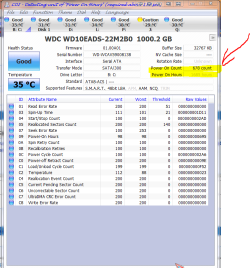
I have a Seagate hard disk which I believe to be old (about 1500 hours of usage). I was thinking of buying a new identical hard disk to keep a backup of my data as well as to test linux distributions. I intend to copy the whole contents of the old hard disk to the new one so that my main OS is safe. I would be making use of gparted (GParted -- About) (linux-based). I had a few questions regarding this upgrade:-

1. Will it distrupt the functioning of my system in any way (like cause instability, crash, memory-errors, etc)?
2. Will it void the EULA (since there is going to be a change in hardware)?
3. Has anyone tried this before?

I would like to know your views about this idea and if you has tried it before do share your experience.

Thanks in advance for your help.
 

My Computer

OS
Windows 7 Ultimate x64
CPU
Intel Core 2 Quad Q9650 3.00 GHz
Motherboard
Intel DQ45CB
Memory
6 GB
Monitor(s) Displays
LCD
Screen Resolution
1360 x 768
Hard Drives
Seagate Barracuda 7200.12 1TB x3;
Western Digital Cavaire Green 1TB x1
PSU
Seasonic 620W Power Supply (S12II-620)
Case
Cooler Master Elite 430 With Side Panel Window
Cooling
Cooler Master Hyper N620 CPU Cooler
Keyboard
Logitech Wireless Keyboard (MK250)
Mouse
Logitech Wireless Mouse (MK250)
Internet Speed
2 Mbps
1. No
2. No
3. Yes

Use whatever cloning software you prefer, like Clonezilla, PartedMagic, Acronis, it should go flawless.
 

My Computer

Computer type
PC/Desktop
OS
Microsoft Windows 10 Professional / Windows 7 Professional
CPU
Intel i5-3570
Motherboard
Lenovo Mahobay
Memory
16GB DDR3
Graphics Card(s)
AMD Radeon HD 7850 2GB
Sound Card
(1) Realtek HD Audio (2) AMD HD Audio
Monitor(s) Displays
LG LS192WS
Screen Resolution
1440 x 900 @ 32bit color
Hard Drives
(1) SUV300S37A/120G (2) ST3500413AS SATA Disk Device AHCI mode enabled.
PSU
Corsair HX620
Case
Thermaltake V4 Black Edition
Cooling
Cooler Master Hyper 212 + Artic Silver 5 on CPU/GPU
Keyboard
Dell SK-8115
Mouse
Razer Copperhead with MAPED mat (awesome!)
Internet Speed
100 Mbps up/down
Browser
Chrome

Attachments

  • hard disk time.PNG
    hard disk time.PNG
    45 KB · Views: 9
  • disk mark.PNG
    disk mark.PNG
    28.6 KB · Views: 6
Last edited:

My Computer

Computer Manufacturer/Model Number
packard bell IXTREME M5722
OS
Operating System : Windows 7 Home Premium Edition 6.01.7600 SP1 (x64)
CPU
Processor : Intel Core 2 Quad Q8300 @ 2500 MHz
Motherboard
Mainboard : Packard Bell (Acer EG43M )
Memory
Physical Memory :8GB Corsair4x 2GB 800MHz C5 DDR2
Graphics Card(s)
Video Card : XFX 6700 AMD
Monitor(s) Displays
Maestro 234DL - BenQ V2220 - BenQ VW2420H
Screen Resolution
Current Display :1920x1080p pixels at 60 Hz in HD LED
Hard Drives
Hard Disks : WDC (1000 GB)
Drive C: (Hard Disk) : 428 GB available on 491 GB
Drive D: (Hard Disk) : 426 GB available on 492 GB
SAMSUNG spinpoint HD103SJ 1000.2 GB
(X 2) KINGSTON SSD NOW V 30GB
PSU
XFX ProSeries 550W PSU
Case
PACKARD BELL IXTREME
Cooling
System Blower Current: 150mA Air Flow16CFM ;Akasa 90mm rear
Keyboard
Gigabyte Aivia K8100
Mouse
TRUST-Wireless Laser Mouse - Carbon edition MI-7770C
Internet Speed
TP-LINK > TL-WN951N / AV500 Gigabit Powerline Adapters
Browser
chrome dev
Other Info
EXTRA COOLING>(FAN CONTROLLER) PC Bay Cooler 3 x 40mm fans; Akasa AK-HD-BL Blue hard drive cooler 2 x 40 mm fan 4500 rpm 29.7 dBA
Bios> American Megatrends Inc.
Version : P01-A1
Date : 08/31/2009
Seagate has a great free Acronis imaging program so you can clone your old HD over to the new one. Seagate Acronis cloning free util

I would then wipe the old HD and use it for the Linux distros to save Win7 from GRUB corruption, since you can boot either via the BIOS and not need GRUB boot mangler.

Be sure to unplug the Win7 HD when you install Linux, and vice versa, setting the remaining drive to boot first in BIOS setup. Then boot the other using the one-time BIOS Boot Menu key which every computer/mobo has.

Save a Win7 backup image so you have a path back, which might also work for imaging the new HD: Backup Complete Computer - Create an Image Backup
 
Last edited:
hi gregrocker im interested in Linus distros to save Windows 7 from GRUB corruption ?
i run lunux distros in my system and dont have a issue with windows 7?
 

My Computer

Computer Manufacturer/Model Number
packard bell IXTREME M5722
OS
Operating System : Windows 7 Home Premium Edition 6.01.7600 SP1 (x64)
CPU
Processor : Intel Core 2 Quad Q8300 @ 2500 MHz
Motherboard
Mainboard : Packard Bell (Acer EG43M )
Memory
Physical Memory :8GB Corsair4x 2GB 800MHz C5 DDR2
Graphics Card(s)
Video Card : XFX 6700 AMD
Monitor(s) Displays
Maestro 234DL - BenQ V2220 - BenQ VW2420H
Screen Resolution
Current Display :1920x1080p pixels at 60 Hz in HD LED
Hard Drives
Hard Disks : WDC (1000 GB)
Drive C: (Hard Disk) : 428 GB available on 491 GB
Drive D: (Hard Disk) : 426 GB available on 492 GB
SAMSUNG spinpoint HD103SJ 1000.2 GB
(X 2) KINGSTON SSD NOW V 30GB
PSU
XFX ProSeries 550W PSU
Case
PACKARD BELL IXTREME
Cooling
System Blower Current: 150mA Air Flow16CFM ;Akasa 90mm rear
Keyboard
Gigabyte Aivia K8100
Mouse
TRUST-Wireless Laser Mouse - Carbon edition MI-7770C
Internet Speed
TP-LINK > TL-WN951N / AV500 Gigabit Powerline Adapters
Browser
chrome dev
Other Info
EXTRA COOLING>(FAN CONTROLLER) PC Bay Cooler 3 x 40mm fans; Akasa AK-HD-BL Blue hard drive cooler 2 x 40 mm fan 4500 rpm 29.7 dBA
Bios> American Megatrends Inc.
Version : P01-A1
Date : 08/31/2009
Perhaps its because we see a dozen cases per week of GRUB corruption of Win7 - making it irreparable by all the normal methods - causing hyper-caution.

The average user might not experience it even once.

But where possible installing OS's on separate HD's is always better for numerous reasons.
 
installing OS's on separate HD's is always better for numerous reasons.
good point totally agree with that advice i use separate drives through learning the hard way. linux seems ok alongside windows with the wubi method of installation but i have had no problems with grub 2 on my machine.
 

My Computer

Computer Manufacturer/Model Number
packard bell IXTREME M5722
OS
Operating System : Windows 7 Home Premium Edition 6.01.7600 SP1 (x64)
CPU
Processor : Intel Core 2 Quad Q8300 @ 2500 MHz
Motherboard
Mainboard : Packard Bell (Acer EG43M )
Memory
Physical Memory :8GB Corsair4x 2GB 800MHz C5 DDR2
Graphics Card(s)
Video Card : XFX 6700 AMD
Monitor(s) Displays
Maestro 234DL - BenQ V2220 - BenQ VW2420H
Screen Resolution
Current Display :1920x1080p pixels at 60 Hz in HD LED
Hard Drives
Hard Disks : WDC (1000 GB)
Drive C: (Hard Disk) : 428 GB available on 491 GB
Drive D: (Hard Disk) : 426 GB available on 492 GB
SAMSUNG spinpoint HD103SJ 1000.2 GB
(X 2) KINGSTON SSD NOW V 30GB
PSU
XFX ProSeries 550W PSU
Case
PACKARD BELL IXTREME
Cooling
System Blower Current: 150mA Air Flow16CFM ;Akasa 90mm rear
Keyboard
Gigabyte Aivia K8100
Mouse
TRUST-Wireless Laser Mouse - Carbon edition MI-7770C
Internet Speed
TP-LINK > TL-WN951N / AV500 Gigabit Powerline Adapters
Browser
chrome dev
Other Info
EXTRA COOLING>(FAN CONTROLLER) PC Bay Cooler 3 x 40mm fans; Akasa AK-HD-BL Blue hard drive cooler 2 x 40 mm fan 4500 rpm 29.7 dBA
Bios> American Megatrends Inc.
Version : P01-A1
Date : 08/31/2009
Thanks gregrocker, for cautioning me about GRUB. I would prefer to keep my Windows 7 system insulated from linux "testing" system. Besides, the new GRUB 2, as I have read, is somewhat buggy and a bit difficult to configure.
 

My Computer

OS
Windows 7 Ultimate x64
CPU
Intel Core 2 Quad Q9650 3.00 GHz
Motherboard
Intel DQ45CB
Memory
6 GB
Monitor(s) Displays
LCD
Screen Resolution
1360 x 768
Hard Drives
Seagate Barracuda 7200.12 1TB x3;
Western Digital Cavaire Green 1TB x1
PSU
Seasonic 620W Power Supply (S12II-620)
Case
Cooler Master Elite 430 With Side Panel Window
Cooling
Cooler Master Hyper N620 CPU Cooler
Keyboard
Logitech Wireless Keyboard (MK250)
Mouse
Logitech Wireless Mouse (MK250)
Internet Speed
2 Mbps
I forgot to ask whether cloning would require a reactivation or anything like that?
 

My Computer

OS
Windows 7 Ultimate x64
CPU
Intel Core 2 Quad Q9650 3.00 GHz
Motherboard
Intel DQ45CB
Memory
6 GB
Monitor(s) Displays
LCD
Screen Resolution
1360 x 768
Hard Drives
Seagate Barracuda 7200.12 1TB x3;
Western Digital Cavaire Green 1TB x1
PSU
Seasonic 620W Power Supply (S12II-620)
Case
Cooler Master Elite 430 With Side Panel Window
Cooling
Cooler Master Hyper N620 CPU Cooler
Keyboard
Logitech Wireless Keyboard (MK250)
Mouse
Logitech Wireless Mouse (MK250)
Internet Speed
2 Mbps
I have a Seagate hard disk which I believe to be old (about 1500 hours of usage).

Lol, this made me laugh, as I have a hard drive from 2002 that still works flawlessly.

Acronis is good software, I recommend it.

And to answer your latest question, no. I did not have to re-activate after I cloned my drive over.
 

My Computer

Computer Manufacturer/Model Number
Pugh Technologies
OS
W7 Professional x64
CPU
AMD Athlon II X3 445 Rana 3.10 GHz
Motherboard
MSI 870A-G54
Memory
PNY XLR DDR3 1600 4x2GB
Graphics Card(s)
NVIDIA GeForce GTS 450 (fermi) 1GB GDDR5
Sound Card
Realtek ALC892 onboard
Monitor(s) Displays
ASUS VE205t, Viewsonic VX2035WM
Screen Resolution
1600x900, 1600x1050
Hard Drives
977GB Hitachi Hitachi HDS721010CLA332
244GB Western Digital WDC WD2500AAJS-65B4A0
488GB Western Digital WDC WD5000AAJS-00A8B0
488GB Western Digital WDC WD5000AAKS-00UU3A0
PSU
Antec EarthWatts EA650 650W
Case
ThermalTake Armor A90 Mid Tower
Cooling
3x 120mm in, 1x 120mm & 200mm out, self built hydro-cooler
Keyboard
Logitec 55
Mouse
Razer Deathadder
Internet Speed
20 Mbps D/L, 9 Mbps U/L
I forgot to ask whether cloning would require a reactivation or anything like that?
Depends on what kind of win7 install you have. If its Royalty oem (meaning win7 came pre-installed and pre-activated), no reactivation would be required.

If its retail/system builder oem/upgrade, you would be fine too, unless you change some other hardware too in tandem with the hdd change.
 

My Computer

Computer Manufacturer/Model Number
Too many to describe...
OS
Windows 7 x64 pro/ Windows 7 x86 Pro/ XP SP3 x86
Back
Top