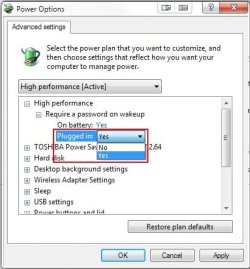
Required password on wakeup

Homeuser66

New member
Member
VIP
Local time
4:16 AM
Messages
183
Ok, I searched but didn't know how to word it properly, so here is my post. Basically, I want to disable the log on when you come back from a hybernation mode. In otherwords, if you walk away from your laptop for a while, and the computer went to sleep, you wake it by shakeing the mouse or hitting space bar, something. Well, after I do this it comes to a screen with the user name and I have to click it to get on. I just want it to wake up to my desktop.

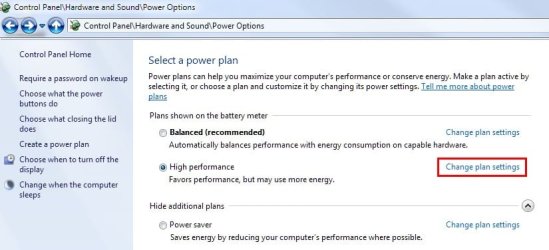
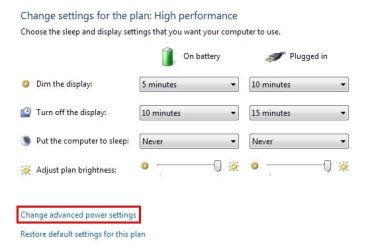
Normally if you go to Start>>>control panel>>>Power Options>>>Change plan settings>>>Change advanced power settings>>>Require password on wakeup>>>here is wher you can change the option to NO or Yes, well, I want it No and I can't, it is ghosted out and stuck on yes...

Ohh, this is for an HP laptop running Windows 7 Ultimate Student 32 bit

Any ideas?

Thanks!
 

My Computer

Computer type
PC/Desktop
Computer Manufacturer/Model Number
ASUS-Self Built
OS
Windows 10 Anniversary, Linux & still Windows 7 Professional x64
CPU
Intel i7-920 2.67 GHz
Motherboard
ASUS-Rampage II Extreme Mobo
Memory
12 GB
Graphics Card(s)
EVGA Nvidia 970 GTX
Sound Card
Supreme FX X-fi-Audigy
Monitor(s) Displays
BenQ XL2730Z,Samsung SyncMaster PX2370 LED,Samsung 226BW LCD
Screen Resolution
2560 x 1440, LED-1920x1080, LCD-1680x1050
Hard Drives
4 internal :
1x TB SSD Samsung Evo
1x 1 TB
1x 3 TB
1x 4 TB
3 TB External
PSU
Coolermaster 750 watt PSU
Case
Thermaltake-Spedo case
Cooling
8 Cooling Fans on case and inside case
Keyboard
Logitech G-15 and G-13
Mouse
Logitech G-9 Optical and Logitech Mx-Revolutiom
Internet Speed
DSL

My Computer

Computer type
PC/Desktop
Computer Manufacturer/Model Number
Self built custom
OS
64-bit Windows 11 Pro for Workstations
CPU
Intel i7-8700K OC'd to 5 GHz
Motherboard
ASUS ROG Maximus XI Formula Z390
Memory
64 GB (4x16GB) G.SKILL TridentZ RGB DDR4 3600 MHz
Graphics Card(s)
ASUS ROG-STRIX-GTX1080TI-O11G-GAMING
Sound Card
Integrated
Monitor(s) Displays
2 x Samsung Odyssey G7 27"
Screen Resolution
2560x1440
Hard Drives
1TB Samsung 990 PRO M.2,
4TB Samsung 990 PRO PRO M.2,
TerraMaster F8 SSD Plus NAS
PSU
Seasonic Prime Titanium 850W
Case
Thermaltake Core P3
Cooling
Corsair Hydro H115i
Keyboard
Logitech wireless K800
Mouse
Logitech MX Master 4
Internet Speed
2 Gb/s Download and 100 Mb/s Upload
Antivirus
Malwarebyte Anti-Malware Premium
Browser
Google Chrome
Other Info
Logitech Z625 speaker system,
Logitech BRIO 4K Pro webcam,
HP Color LaserJet Pro MFP M477fdn,
APC SMART-UPS RT 1000 XL - SURT1000XLI,
Galaxy S23 Plus phone
no shawn, thanks, I'm doing that. This string: Start>>>control panel>>>Power Options>>>Change plan settings>>>Change advanced power settings>>>Require password on wakeup>>> is how you go about changing it, but it is ghosted out and won't let me...I'm thinking I might have to go in the Registry somewhere and change it...
 

My Computer

Computer type
PC/Desktop
Computer Manufacturer/Model Number
ASUS-Self Built
OS
Windows 10 Anniversary, Linux & still Windows 7 Professional x64
CPU
Intel i7-920 2.67 GHz
Motherboard
ASUS-Rampage II Extreme Mobo
Memory
12 GB
Graphics Card(s)
EVGA Nvidia 970 GTX
Sound Card
Supreme FX X-fi-Audigy
Monitor(s) Displays
BenQ XL2730Z,Samsung SyncMaster PX2370 LED,Samsung 226BW LCD
Screen Resolution
2560 x 1440, LED-1920x1080, LCD-1680x1050
Hard Drives
4 internal :
1x TB SSD Samsung Evo
1x 1 TB
1x 3 TB
1x 4 TB
3 TB External
PSU
Coolermaster 750 watt PSU
Case
Thermaltake-Spedo case
Cooling
8 Cooling Fans on case and inside case
Keyboard
Logitech G-15 and G-13
Mouse
Logitech G-9 Optical and Logitech Mx-Revolutiom
Internet Speed
DSL
I get the same thing. When I go to "Change plan settings"
Screenshot_1.jpg

Then "Change advanced power settings"
Screenshot_2.jpg

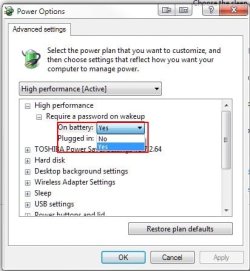
and then attempt to change the "Yes" to a "No"
Screenshot_3.jpg

I cannot. Though it is ill-advised, I don't have a password on my account so the password is not prompted on wakeup. Also, I don't have my system set up to ever go into sleep mode. I changed the setting in "Put the computer to sleep" from "Never" to "10 minutes" and the option to change "Require a password on wakeup" to "No" was still not available.

I have not checked to see if any difference would result were I to have a password on the account.
 

My Computer

Computer Manufacturer/Model Number
Toshiba L355D
OS
Windows 7 Ultimate x64 SP1
CPU
Core2 Duo
Motherboard
Intel
Memory
4 GB
Graphics Card(s)
GM965 on-board
Sound Card
RealTek on-board
Monitor(s) Displays
19"+17"(laptop)
Screen Resolution
1440x900 (x 2)
Hard Drives
500GB Ext. 200GB Internal
PSU
N/A
Case
N/A
Cooling
N/A
No, it won't make a diff. I have the same set up on another comp running 7 Pro x64 not student ed. and it works fine....but try it, and let me know, I didn't go that route....
 

My Computer

Computer type
PC/Desktop
Computer Manufacturer/Model Number
ASUS-Self Built
OS
Windows 10 Anniversary, Linux & still Windows 7 Professional x64
CPU
Intel i7-920 2.67 GHz
Motherboard
ASUS-Rampage II Extreme Mobo
Memory
12 GB
Graphics Card(s)
EVGA Nvidia 970 GTX
Sound Card
Supreme FX X-fi-Audigy
Monitor(s) Displays
BenQ XL2730Z,Samsung SyncMaster PX2370 LED,Samsung 226BW LCD
Screen Resolution
2560 x 1440, LED-1920x1080, LCD-1680x1050
Hard Drives
4 internal :
1x TB SSD Samsung Evo
1x 1 TB
1x 3 TB
1x 4 TB
3 TB External
PSU
Coolermaster 750 watt PSU
Case
Thermaltake-Spedo case
Cooling
8 Cooling Fans on case and inside case
Keyboard
Logitech G-15 and G-13
Mouse
Logitech G-9 Optical and Logitech Mx-Revolutiom
Internet Speed
DSL
You're right. After setting a password, the option of selecting "No" on "Require a password on wakeup" remained unavailable. :confused:
 

My Computer

Computer Manufacturer/Model Number
Toshiba L355D
OS
Windows 7 Ultimate x64 SP1
CPU
Core2 Duo
Motherboard
Intel
Memory
4 GB
Graphics Card(s)
GM965 on-board
Sound Card
RealTek on-board
Monitor(s) Displays
19"+17"(laptop)
Screen Resolution
1440x900 (x 2)
Hard Drives
500GB Ext. 200GB Internal
PSU
N/A
Case
N/A
Cooling
N/A
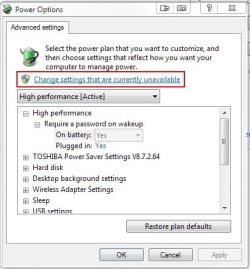
Just as what Shawn said, click the "Change settings that are unavailable" link on top. Changing the setting for "Require password on wakeup" requires administrative privileges and you need to elevate that window to admin.

Edit:
39483489.png
 
Last edited by a moderator:

My Computer

Computer Manufacturer/Model Number
Asus G73SW-XN2
OS
Windows 2000 5.0 Build 2195
CPU
Intel Core i7-2630QM@2GHz(2.9GHz Turbo Boost) [Sandy Bridge]
Motherboard
Asus G73SW (Intel HM65 Chipset)
Memory
Kingston DDR3 1333 16GB (4GBx4)
Graphics Card(s)
nVidia GTX 460m 1.5GB
Sound Card
EAX Advanced HD 5.0, THX TruStudio
Monitor(s) Displays
17.3 in. primary & 23 in. secondary
Screen Resolution
1920x1080
Hard Drives
Seagate Momentus XT (SATA II) 500 GB @ 7200 RPM
Hitachi (SATA II) 500GB @ 7200 RPM

Non Raid because ASUS was crappy to choose an HM65 Chipset
Keyboard
Built-in 102-Key Backlit Keyboard
Other Info
It's a Laptop.
Ah, wonderful, arkhi! I should have read Brink's post a bit more closely. :o

Just as you and Brink mentioned, arkhi, once one clicks on "Change settings that are currently unavailable"

Screenshot_3.jpg

The options become available:
Screenshot_1.jpg
Screenshot_2.jpg

Oops! :( :o
 

My Computer

Computer Manufacturer/Model Number
Toshiba L355D
OS
Windows 7 Ultimate x64 SP1
CPU
Core2 Duo
Motherboard
Intel
Memory
4 GB
Graphics Card(s)
GM965 on-board
Sound Card
RealTek on-board
Monitor(s) Displays
19"+17"(laptop)
Screen Resolution
1440x900 (x 2)
Hard Drives
500GB Ext. 200GB Internal
PSU
N/A
Case
N/A
Cooling
N/A
Homeuser,

Were you able to change the setting afterwards?
 

My Computer

Computer type
PC/Desktop
Computer Manufacturer/Model Number
Self built custom
OS
64-bit Windows 11 Pro for Workstations
CPU
Intel i7-8700K OC'd to 5 GHz
Motherboard
ASUS ROG Maximus XI Formula Z390
Memory
64 GB (4x16GB) G.SKILL TridentZ RGB DDR4 3600 MHz
Graphics Card(s)
ASUS ROG-STRIX-GTX1080TI-O11G-GAMING
Sound Card
Integrated
Monitor(s) Displays
2 x Samsung Odyssey G7 27"
Screen Resolution
2560x1440
Hard Drives
1TB Samsung 990 PRO M.2,
4TB Samsung 990 PRO PRO M.2,
TerraMaster F8 SSD Plus NAS
PSU
Seasonic Prime Titanium 850W
Case
Thermaltake Core P3
Cooling
Corsair Hydro H115i
Keyboard
Logitech wireless K800
Mouse
Logitech MX Master 4
Internet Speed
2 Gb/s Download and 100 Mb/s Upload
Antivirus
Malwarebyte Anti-Malware Premium
Browser
Google Chrome
Other Info
Logitech Z625 speaker system,
Logitech BRIO 4K Pro webcam,
HP Color LaserJet Pro MFP M477fdn,
APC SMART-UPS RT 1000 XL - SURT1000XLI,
Galaxy S23 Plus phone
Yes, I also didn't look closely at his post.....I found it and it worked for me as well.....thanks!!!
 

My Computer

Computer type
PC/Desktop
Computer Manufacturer/Model Number
ASUS-Self Built
OS
Windows 10 Anniversary, Linux & still Windows 7 Professional x64
CPU
Intel i7-920 2.67 GHz
Motherboard
ASUS-Rampage II Extreme Mobo
Memory
12 GB
Graphics Card(s)
EVGA Nvidia 970 GTX
Sound Card
Supreme FX X-fi-Audigy
Monitor(s) Displays
BenQ XL2730Z,Samsung SyncMaster PX2370 LED,Samsung 226BW LCD
Screen Resolution
2560 x 1440, LED-1920x1080, LCD-1680x1050
Hard Drives
4 internal :
1x TB SSD Samsung Evo
1x 1 TB
1x 3 TB
1x 4 TB
3 TB External
PSU
Coolermaster 750 watt PSU
Case
Thermaltake-Spedo case
Cooling
8 Cooling Fans on case and inside case
Keyboard
Logitech G-15 and G-13
Mouse
Logitech G-9 Optical and Logitech Mx-Revolutiom
Internet Speed
DSL
That's great news. I'm glad that we were able to help. :)
 

My Computer

Computer type
PC/Desktop
Computer Manufacturer/Model Number
Self built custom
OS
64-bit Windows 11 Pro for Workstations
CPU
Intel i7-8700K OC'd to 5 GHz
Motherboard
ASUS ROG Maximus XI Formula Z390
Memory
64 GB (4x16GB) G.SKILL TridentZ RGB DDR4 3600 MHz
Graphics Card(s)
ASUS ROG-STRIX-GTX1080TI-O11G-GAMING
Sound Card
Integrated
Monitor(s) Displays
2 x Samsung Odyssey G7 27"
Screen Resolution
2560x1440
Hard Drives
1TB Samsung 990 PRO M.2,
4TB Samsung 990 PRO PRO M.2,
TerraMaster F8 SSD Plus NAS
PSU
Seasonic Prime Titanium 850W
Case
Thermaltake Core P3
Cooling
Corsair Hydro H115i
Keyboard
Logitech wireless K800
Mouse
Logitech MX Master 4
Internet Speed
2 Gb/s Download and 100 Mb/s Upload
Antivirus
Malwarebyte Anti-Malware Premium
Browser
Google Chrome
Other Info
Logitech Z625 speaker system,
Logitech BRIO 4K Pro webcam,
HP Color LaserJet Pro MFP M477fdn,
APC SMART-UPS RT 1000 XL - SURT1000XLI,
Galaxy S23 Plus phone
Back
Top