
Rescue Disc for Win7 Home Premium OEM

bawldiggle

GrayGhost2 ret.
Pro User
VIP
Local time
2:38 AM
Messages
895
Location
Australia
I would like to have a Rescue disc on hand if I ever need it.
- but my Toshiba laptop (Satellite C665) has OEM Win7 Home Premium installed on it
- and all the Toshiba crapware that I never use
- no OS CD/DVD
- there is a partition "*:HDDRECOVERY" which I assume is for repairing (?) or reinstalling Win-7 OS
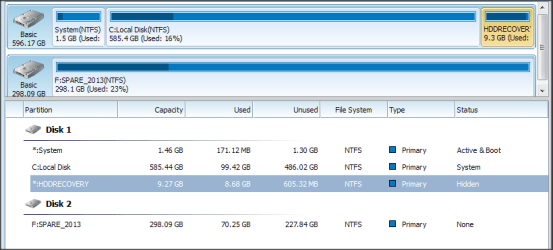
partitions on Toshiba.png
If the OS really falls over (or worse the HDD dies) I want to be able to re-install Win7 on a new HDD
- currently I get little glitches -- OS occasionally stalls -- moments of PC old-timers ;) disease.
- the laptop is 3 years old and is used for about 6 hours per day, (turned off at night)

On Microsoft Software Recovery web page instructions state a 25 character product key.
- but my OEM (on Computer -> Properties) Product ID is 00xxx-oem-8xxxxxx-000xx ... 20 characters
- the Microsoft Software Recovery rejects my "Product ID"

Fortunately I downloaded an ISO from DigitalRiver (Win7 Home Premium - Media ready) before DigitalRiver activities were curtailed by MS.
- (I also have Win7 Pro 32bit + 64bit ISOs ;)

How do I create a "Rescue Disk" ?
- I have spent several hours on the web but have not found anything that is helpful to me.
Would I use the currently installed OS -OR- need the 32bit ISO ?

Thank you in advance :)
 

My Computer My Computer

At a glance

XP Pro (x86) | 7 HP (x86) & (x64) | 7 Pro (x64)
Computer type
PC/Desktop
Computer Manufacturer/Model Number
Toshiba, Lenovo (laptops) + 4 rigs
OS
XP Pro (x86) | 7 HP (x86) & (x64) | 7 Pro (x64)
If I understand you correctly, you want create an install disc from the ISO you downloaded.

You can use this tool,

http://www.sevenforums.com/tutorials/31541-windows-7-usb-dvd-download-tool.html

There are other methods as well but the one above will work for what you need.

Rescue disc usually refers to a bootable repair disc.

By the way the Microsoft site wanted the product key not the product ID, the product key is on the COA sticker,

202840d1331785878-clean-reinstall-factory-oem-windows-7-a-coa-stickers.gif


I'm not sure what you mean by that sentence,

bawldiggle said:
Would I use the currently installed OS -OR- need the 32bit ISO ?

As long as it's the same version (Home Premium, Pro, etc.) it will work, if the one you downloaded is a 64bit and you want 32bit then you will need to get a different one.

If you have 4GB RAM you could use the 64bit with your current product key.
 

My Computer My Computer

At a glance

Win 10 Pro x64Intel I5-2500K @3.3GHz16GB G.Skill Ripjaws X (4x4GB)EVGA GeForce 750 Ti SC 2GB
Computer type
PC/Desktop
Computer Manufacturer/Model Number
Self Built
OS
Win 10 Pro x64
CPU
Intel I5-2500K @3.3GHz
Motherboard
Asrock P67 Extreme4
Memory
16GB G.Skill Ripjaws X (4x4GB)
Graphics Card(s)
EVGA GeForce 750 Ti SC 2GB
Sound Card
ASUS Xonar DG 5.1 Channels 24-bit 96KHz PCI Interface Sound
Monitor(s) Displays
auria eq2367
Screen Resolution
1920 x 1080
Hard Drives
250GB Samsung 850 EVO SSD
1TB WD Blue
1TB Hitachi
PSU
SeaSonic X 650W 80 Plus Gold
Case
Corsair Obsidian 750D
Cooling
Corsair H60, Three 140mm case fans
Keyboard
Logitech Wireless Keyboard K520
Mouse
Logitech Wireless Mouse M310
Internet Speed
Wave Broadband ~ 100 dn 5 up
Antivirus
Windows Defender, Malwarebytes Premium
Browser
Edge, IE11, Chrome
Other Info
Laptop specs: HP g7-1365dx /
CPU: AMD A6-3420M APU with Radeon(tm) HD Graphics /
RAM: Crucial 8Gb (2x4Gb) /
SSD: Crucial M4-CT128M4SSD2 ATA Device/ FW 000F /
GFX: AMD Radeon HD 6520G /
OS: Windows 10 Pro x64
Thanks derekimo -- you were a bit quick for me while I did some more research
- it's past my bedtime (health issues)
- I will pick up your suggestions tomorrow
Thank you for your help :)

--------------------------
Posted here for any sevenforums.com guests:-
Based on a SuperUser thread Where can I download Windows 7 (legally from Microsoft)?] dated May-2014
- Microsoft Software Recovery is not available for OEM

   Note
Based on the comments from an article on another website users with OEM licenses will not be to be able to use Microsoft Software Recovery tool. Additionally it appears this service is only for those users who purchased the retail version of Windows 7. MSDN and TechNet subscribers won't be able to use this tool also.
 

My Computer My Computer

At a glance

XP Pro (x86) | 7 HP (x86) & (x64) | 7 Pro (x64)
Computer type
PC/Desktop
Computer Manufacturer/Model Number
Toshiba, Lenovo (laptops) + 4 rigs
OS
XP Pro (x86) | 7 HP (x86) & (x64) | 7 Pro (x64)
You're welcome, take your time.

Yeah, that Microsoft site hasn't been very useful to anyone that I'm aware of yet, even retail keys get errors there.

I was mainly pointing out that this,

bawldiggle said:
On Microsoft Software Recovery web page instructions state a 25 character product key.
- but my OEM (on Computer -> Properties) Product ID is 00xxx-oem-8xxxxxx-000xx ... 20 characters
- the Microsoft Software Recovery rejects my "Product ID"

Was not the number they want you to input, they want the one one on the COA sticker that is 25 characters.

You are correct that the OEM product key doesn't work there.
 

My Computer My Computer

At a glance

Win 10 Pro x64Intel I5-2500K @3.3GHz16GB G.Skill Ripjaws X (4x4GB)EVGA GeForce 750 Ti SC 2GB
Computer type
PC/Desktop
Computer Manufacturer/Model Number
Self Built
OS
Win 10 Pro x64
CPU
Intel I5-2500K @3.3GHz
Motherboard
Asrock P67 Extreme4
Memory
16GB G.Skill Ripjaws X (4x4GB)
Graphics Card(s)
EVGA GeForce 750 Ti SC 2GB
Sound Card
ASUS Xonar DG 5.1 Channels 24-bit 96KHz PCI Interface Sound
Monitor(s) Displays
auria eq2367
Screen Resolution
1920 x 1080
Hard Drives
250GB Samsung 850 EVO SSD
1TB WD Blue
1TB Hitachi
PSU
SeaSonic X 650W 80 Plus Gold
Case
Corsair Obsidian 750D
Cooling
Corsair H60, Three 140mm case fans
Keyboard
Logitech Wireless Keyboard K520
Mouse
Logitech Wireless Mouse M310
Internet Speed
Wave Broadband ~ 100 dn 5 up
Antivirus
Windows Defender, Malwarebytes Premium
Browser
Edge, IE11, Chrome
Other Info
Laptop specs: HP g7-1365dx /
CPU: AMD A6-3420M APU with Radeon(tm) HD Graphics /
RAM: Crucial 8Gb (2x4Gb) /
SSD: Crucial M4-CT128M4SSD2 ATA Device/ FW 000F /
GFX: AMD Radeon HD 6520G /
OS: Windows 10 Pro x64
Hey,

You can also consider using an imaging software, free Macrium is very popular here at sevenforums.

http://www.sevenforums.com/tutorials/73828-imaging-free-macrium.html

You can simply take an image of the current state of your Disk 1 to Disk 2. With the amount of data on Disk 1, I guess the image file would be around 55-65 GB (normal compression rate, which is default).

If you take 1 now (keep it all the time), and also take a 2nd one later (update this one with a new one every say 10-15 days, even a month if data won't change much, your call really), the size needed would be around 130 GB, give or take.

Then you can just copy these files to an external drive too.

For the Disk2 data, you can use a file sync program (I use FreeFileSync), which detect changes and update the files on your backup drive.

The HDDRECOVER partition is to revert the OS to the day you bought the laptop, should have an option to enter at boot time, usually with a F-button. But you might have to re-install all programs that you installed yourself again.

Hope this helps.
 

My Computer My Computer

At a glance

Windows 7 Ultimate x64 SP1AMD Phenom 2 1090T2x8GB Kingston HyperX Fury Black 1600Mhz Unga...MSI GTX 970 Gaming 4G
Computer type
PC/Desktop
Computer Manufacturer/Model Number
Custom Build
OS
Windows 7 Ultimate x64 SP1
CPU
AMD Phenom 2 1090T
Motherboard
Gigabyte GA-890FXA-UD5
Memory
2x8GB Kingston HyperX Fury Black 1600Mhz Unganged
Graphics Card(s)
MSI GTX 970 Gaming 4G
Sound Card
Realtek On-Board HD 7.1 Audio / Logitech G35
Monitor(s) Displays
3xAcer GD245HQ
Screen Resolution
1920x1080
Hard Drives
Samsung 850 Pro 512GB SSD - OS /
WD Caviar Black SATA 3 - 1 TBx2 - Dynamic RAID 0 /
WD Caviar Green SATA 2 - 640GBx2 - Dynamic RAID 0 /
WD Caviar Green SATA 2 - 640GB - Internal Backup /
Seagate Barracude SATA 3 - 3TB - External Backup/ Sync
PSU
HighPower 1000W
Case
Cooler Master HAF 932
Cooling
Noctua NH-D14
Keyboard
Logitech G19
Mouse
Logitech G500
Internet Speed
100/4 Mbit Cable (100GB quota)
Antivirus
ZoneAlarm Extreme Security / MBAM Pro / MBAE Free / SAS Free
Browser
IE 11 - Firefox - Chrome
Other Info
Logitech F710/ G27/ G940/ Z5500 // TrackIR 5 // Nvidia 3D Surround Vision
Almost all manufacturers give you the ability to create a recovery disc set, see what's available on your system.

Clean install using the downloaded ISO is the best way to go but it doesn't hurt to have more than one option.

You could also check the manufacturers web site, see if you can order a recovery disc for your computer.
 

My Computer My Computer

At a glance

Windows 10 Pro X64Intel Quad Core i7-4770 @ 3.4Ghz16.0GB PC3-12800 DDR3 SDRAM 1600 MHzIntel Integrated HD Graphics
Computer type
PC/Desktop
Computer Manufacturer/Model Number
Lenovo IdeaCenter 450
OS
Windows 10 Pro X64
CPU
Intel Quad Core i7-4770 @ 3.4Ghz
Memory
16.0GB PC3-12800 DDR3 SDRAM 1600 MHz
Graphics Card(s)
Intel Integrated HD Graphics
Sound Card
Realtek HD Audio
Monitor(s) Displays
HP 22" LCD
Screen Resolution
1680 x 1050
Hard Drives
250GB Samsung EVO SATA-3 SSD
2TB Seagate ST2000DM001 SATA-2
1.5TB Seagate ST3150041AS SATA
Keyboard
Dell USB
Mouse
Lenovo USB
Internet Speed
Cable via Road Runner 3MB Upload, 30MB Download
Antivirus
Windows Defender, MBAM Pro, MBAE
Browser
Seamonkey
Other Info
UEFI/GPT
PLDS DVD-RW DH16AERSH
You simply burn the iso file with a program like this free one, it works great.

Free ISO Burner

Burn the iso file at no greater the x4 speeds.

Of course your machine has to have a dvd burner, and you need a blank dvd -R or +R

The term for what you`ll end up with is a Windows 7 install DVD, not a rescue disk. :)

You should really create a disk image with Macrium Reflect and store it on your 298 GB drive now.

Macrium Reflect Free
 

My Computer My Computer

At a glance

Windows 10 Pro x64Intel Core i7 6700KGSkill TridentZ RGB 16GB 3600 16-16-16-36EVGA GTX 980 Ti SC x2
Computer type
PC/Desktop
Computer Manufacturer/Model Number
Skylake Special #666
OS
Windows 10 Pro x64
CPU
Intel Core i7 6700K
Motherboard
Asus Sabertooth Z170 Mark 1
Memory
GSkill TridentZ RGB 16GB 3600 16-16-16-36
Graphics Card(s)
EVGA GTX 980 Ti SC x2
Sound Card
Realtek High Definition
Monitor(s) Displays
AOC G2460PG
Screen Resolution
1920 x 1080 144Hz
Hard Drives
Samsung 860 Pro 256GB, Seagate Barracuda 4TB x2
PSU
EVGA 1000 P2, EVGA White Custom Braided Cables
Case
Corsair Vengeance C70 Gunmetal Black
Cooling
Corsair H100i v2, Corsair ML120 x2, Thermal Grizzly Kryonaut
Keyboard
Logitech G910 Orion Spectrum
Mouse
Logitech G700s
Internet Speed
Verizon Fios Quantum Gateway 75/75
Antivirus
Windows Defender, Malwarebytes Free 3.8.3
Browser
Chrome
Other Info
Corsair SP120 x4, LG Blu-ray Drive, Durabrand HT-395 100 Watt Dolby Digital Amp, Corsair H2100 Wireless 7.1 Headset
Back
Top