
Reset needed, no option given

Sonamsopmist

New member
Local time
8:14 AM
Messages
7
Hi, I searched this forum for this issue, but didn't find the same one.
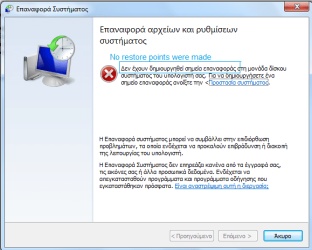
I have an old hp pavilion dv6500, in rather bad shape,win7 ultimate now (though it was Vista originally). I am planning to upgrade RAM in the near future, but for now I want to completely restore the system to clean factory windows. However when I run System Restore, no initial state option is given to choose (or any option really, noone bothered to make a restore point). I do not know if a backup restore point should manually be made immediately after the laptop was purchased, it is quite old. I didn't attend to this laptop all this time because I was not the one using it. But now because of how slowly the device runs and how many errors are occuring, I see no other option - I must restore it. I'd rather not perform a complete format.

How can I restore to original state windows 7 now?
 

Attachments
  • ????? ?????.png
    ????? ?????.png
    21.1 KB · Views: 9

My Computer My Computer

Computer type
Laptop
OS
Windows 7 Home Premium 32bit
Hi Sonamsopmist,

Highly unlikely to have a Factory restore partition on that comp, and it would have only been for Vista,
as you have installed W7 on it.
The furthest the system can take you back now is from System restore - tick the show all box.

Have you still got the media you used to install Ultimate in the first place
Perform a repair Install NO loss of your data
Repair Install - Windows 7 Help Forums
Thats you best option,


otherwise
Download Windows 7 Disc Images (ISO Files)

note your product key MUST be for a Retail version

notes
Ultimate requires a minimum of 2GB (x86) or 3GB for a 64 bit
possibly why its running slowly -only fix is more ram

you could run the following repair tools,

KB947821 - version dependant (X86 or X64)

from an elavated command mode
sfc /scannow

and
Chkdsk /r

Roy
 

My Computer My Computer

Computer type
PC/Desktop
Computer Manufacturer/Model Number
medionl/Aspire 6930G/acer x55a
OS
W7 home premium 32bit/W7HP 64bit/w10 tp insider ring
CPU
E5300 dual core
Motherboard
medion MS7366
Memory
3gb
Graphics Card(s)
Nvidia Geforce 7100 Nforce 630i
Monitor(s) Displays
avixc
Internet Speed
n (isp resticted to 72)
Antivirus
mse/pands
Browser
palemoon
Other Info
Belkin Fd7050 n USB using Railink RT2870 drivers, more upto date
The only way to get to a clean, original factory condition is to run the Factory Restore process. However, this will put you on Windows Vista, if that is what came with the computer. Also, you need to have the factory restore disks. Either that, or you could run the recovery process from the hard drive, if the recovery partition is present. However, if you do this, the drive will be wiped, and you said you didn't want to format the drive.

The other option would be to go back to a restore point. This will not clean the disk, but rather it should bring Windows to whatever condition it was in when the restore point was created. But the popup window says that there are no restore points.

If you have a good backup, then you could restore the backup. But it sounds like you don't.

Your only options are either to manually clean things up, or do a clean install of Windows. If you first backup all of your data, and also make sure you can install and activate all needed software, then a clean install of Windows would be the most effective way to fix things.
 

My Computer My Computer

Computer type
PC/Desktop
Computer Manufacturer/Model Number
Dell
OS
Linux Mint 18.2 xfce 64-bit (VMWare host) / Windows 8.1 Pro 32-bit (VMWare guest)
CPU
Haswell
Memory
4 GB
Monitor(s) Displays
Acer 23"
Screen Resolution
1920 x 1080
Hard Drives
Two hard drives, 1TB each: One for Linux, one for my data.
Keyboard
IBM Model M
Antivirus
Sophos (Linux), Trend Micro (Windows)
Browser
Firefox, Opera
Other Info
I use Samba to share my data drive with the other computers at my house and with my guest session in VMWare Workstation Player.
Back
Top