Resizing wallpaper/need help

1Bowtie

R.I.P.
Guru
Gold Member
VIP
Local time
8:17 AM
Messages
1,114
Location
Oklahoma
I have a few wallpaper's of different sizes, i would like to know if they can be resized up to either 1900x1050 or 1680x1050, i will upload them one at a time to see if anyone wants to take a shot.

View attachment 96473
 
Last edited:

My Computer

Computer Manufacturer/Model Number
Dell XPS 730
OS
Windows 7 Home Premium 64 bit
CPU
Intel Core 2 quad Extreme Q9770 @ 3.2 GHz
Memory
4x2 GB Muskin 1600 MHz ram
Graphics Card(s)
NVidia GTX 250
Sound Card
Soundblaster X-Fi Fatality Champion
Monitor(s) Displays
2 Dell 2007WFP Ultrascans
Screen Resolution
3360 x 1050
Hard Drives
WD Black 1TB sata, 2-WD Black 500 sata, 2-Seagate 500 Go external
PSU
1000 Watt
Cooling
air
Keyboard
MS Natrual Keyboard Pro
Mouse
Logitech Wireless Trackball
Internet Speed
DSL Elite

My Computer

Computer type
PC/Desktop
Computer Manufacturer/Model Number
HP
OS
Windows 7 64Bit
CPU
Intel (R) Core (TM) 2 Duo CPU 2.80GHz
Memory
4,00 GB
Graphics Card(s)
NVIDIA Geforce GT 220
Monitor(s) Displays
Samsung
Screen Resolution
1280x1024
Hard Drives
1t
Thanks lorddennis i appreciate the effort
 

My Computer

Computer Manufacturer/Model Number
Dell XPS 730
OS
Windows 7 Home Premium 64 bit
CPU
Intel Core 2 quad Extreme Q9770 @ 3.2 GHz
Memory
4x2 GB Muskin 1600 MHz ram
Graphics Card(s)
NVidia GTX 250
Sound Card
Soundblaster X-Fi Fatality Champion
Monitor(s) Displays
2 Dell 2007WFP Ultrascans
Screen Resolution
3360 x 1050
Hard Drives
WD Black 1TB sata, 2-WD Black 500 sata, 2-Seagate 500 Go external
PSU
1000 Watt
Cooling
air
Keyboard
MS Natrual Keyboard Pro
Mouse
Logitech Wireless Trackball
Internet Speed
DSL Elite
Images can be resized for different aspect ratios but it takes a bit of work and time.
This also depends allot on the image itself. Sometimes a bit of cropping is required which will result in the image being slightly "cut off" along the edges but this is unfortunately unavoidable with some pics. ;)
 

My Computer

Computer type
PC/Desktop
Computer Manufacturer/Model Number
Self Built
OS
Windows 7 Ultimate 64bit
CPU
AMD Phenom Quad core 9950 black edition
Motherboard
Gigabyte
Memory
16Gb
Graphics Card(s)
2x XFX Radeon 5850
Sound Card
PCI Express X-Fi Titanium / Logitech G35
Monitor(s) Displays
2x HP 2410i
Screen Resolution
1920x1080
Hard Drives
2x 500Gb Seagate
1x 300Gb Seagate
1x 1Tb Seagate
2x 1Tb Hitatchi
PSU
Jean Tech Storm 700W
Case
Cooler Master COSMOS S
Cooling
Akasa Evo Blue Pro
Keyboard
Logitech G15
Mouse
Mad Catz M.M.O. 7
Internet Speed
12mb
Thanks PooMan i just thought it was a cool pic, it's no big deal i was just curious if it could be done
 

My Computer

Computer Manufacturer/Model Number
Dell XPS 730
OS
Windows 7 Home Premium 64 bit
CPU
Intel Core 2 quad Extreme Q9770 @ 3.2 GHz
Memory
4x2 GB Muskin 1600 MHz ram
Graphics Card(s)
NVidia GTX 250
Sound Card
Soundblaster X-Fi Fatality Champion
Monitor(s) Displays
2 Dell 2007WFP Ultrascans
Screen Resolution
3360 x 1050
Hard Drives
WD Black 1TB sata, 2-WD Black 500 sata, 2-Seagate 500 Go external
PSU
1000 Watt
Cooling
air
Keyboard
MS Natrual Keyboard Pro
Mouse
Logitech Wireless Trackball
Internet Speed
DSL Elite
Last edited:

My Computer

Computer Manufacturer/Model Number
Dell XPS 730
OS
Windows 7 Home Premium 64 bit
CPU
Intel Core 2 quad Extreme Q9770 @ 3.2 GHz
Memory
4x2 GB Muskin 1600 MHz ram
Graphics Card(s)
NVidia GTX 250
Sound Card
Soundblaster X-Fi Fatality Champion
Monitor(s) Displays
2 Dell 2007WFP Ultrascans
Screen Resolution
3360 x 1050
Hard Drives
WD Black 1TB sata, 2-WD Black 500 sata, 2-Seagate 500 Go external
PSU
1000 Watt
Cooling
air
Keyboard
MS Natrual Keyboard Pro
Mouse
Logitech Wireless Trackball
Internet Speed
DSL Elite
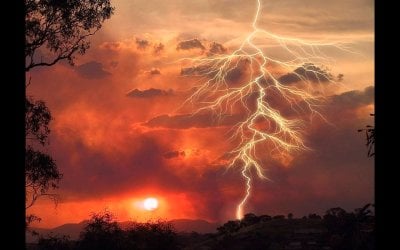
I opened your image in photoshop, selected pixels, created work path, applied a layer and vector mask, then resized it with the ration fixed. This left an image with 1680x1264. I removed the layer and vector mask, deleted the work path, the using the rectangle select to mark the upper half of the image above the sunset. Then using the select tool with the box at top checked for 'show transformation controls' selected, grabbed the box at top and drug it down approx. 180px. Then selected the image only and cropped off the clear space left at the top of the canvas. I got lucky and it came out at 1680x1046, so a simple resize later this is your 1680x1050. :D
 

Attachments

  • W7fResize1680x1050.png
    W7fResize1680x1050.png
    664.5 KB · Views: 18
  • W7fResize2.png
    W7fResize2.png
    290.5 KB · Views: 12
Last edited:

My Computer

Computer type
Laptop
Computer Manufacturer/Model Number
HP 17-ak0xx, dv7 3173nr
OS
Win7 Home Premium x64 W10Pro&Home
CPU
A12 9720p 4+8 TurionII M520
Motherboard
HP 3839
Memory
6GB 8GB
Graphics Card(s)
R7
Monitor(s) Displays
24" sa550
Screen Resolution
1600x900 1920x1080
Mouse
Logitechx2
Internet Speed
120Mb/s down 12up
I got lucky and it came out at 1680x1046, so a simple resize later this is your 1680x1050. :D

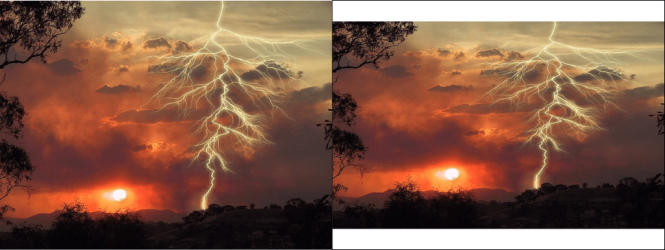
Pal I'm not trying to put a damper on things but it looks a bit squashed to me ... or is it my eyes :confused:
 

Attachments

  • lighning.png
    lighning.png
    161 KB · Views: 7

My Computer

Computer type
PC/Desktop
Computer Manufacturer/Model Number
Self Built
OS
Windows 7 Ultimate 64bit
CPU
AMD Phenom Quad core 9950 black edition
Motherboard
Gigabyte
Memory
16Gb
Graphics Card(s)
2x XFX Radeon 5850
Sound Card
PCI Express X-Fi Titanium / Logitech G35
Monitor(s) Displays
2x HP 2410i
Screen Resolution
1920x1080
Hard Drives
2x 500Gb Seagate
1x 300Gb Seagate
1x 1Tb Seagate
2x 1Tb Hitatchi
PSU
Jean Tech Storm 700W
Case
Cooler Master COSMOS S
Cooling
Akasa Evo Blue Pro
Keyboard
Logitech G15
Mouse
Mad Catz M.M.O. 7
Internet Speed
12mb
my main objective was to keep the sun round, and make the picture fit his screen, my approach may be different than yours...pal... :)
 

My Computer

Computer type
Laptop
Computer Manufacturer/Model Number
HP 17-ak0xx, dv7 3173nr
OS
Win7 Home Premium x64 W10Pro&Home
CPU
A12 9720p 4+8 TurionII M520
Motherboard
HP 3839
Memory
6GB 8GB
Graphics Card(s)
R7
Monitor(s) Displays
24" sa550
Screen Resolution
1600x900 1920x1080
Mouse
Logitechx2
Internet Speed
120Mb/s down 12up
Best I can do with your predefined dimensions. I also enhanced the color a bit. May I ask why u need it in those exact dimensions? There's no way to change the dimensions without either cropping it, layering it (as I did a bit of both), or "squashing" it, to quote u. lol As for doubling the size without losing resolution, not much chance of that either. If it's pixilation you're trying to avoid, then I suggest using a softening tool.
 

Attachments

  • Picture2.jpg
    Picture2.jpg
    146.9 KB · Views: 8

My Computer

Computer Manufacturer/Model Number
DELL Inspiron 1564
OS
Windows 7 64 bit
CPU
Intel Core Processor i3-330M
Motherboard
4 GB
Memory
320 GB Harddrive
Graphics Card(s)
Integrated Intel Graphics Media Accelerator HD
Sound Card
Realtek HD Audio
Keyboard
Standard PS/2
Mouse
DELL Touchpad
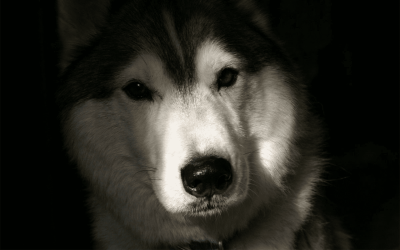
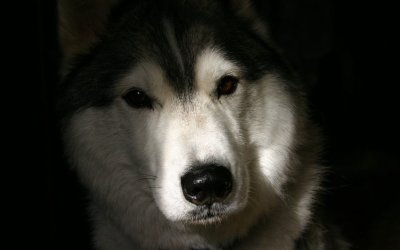
I cropped the images a bit :o
 

Attachments

  • Huskie.jpg
    Huskie.jpg
    103 KB · Views: 7
  • Picture2.jpg
    Picture2.jpg
    143.8 KB · Views: 7

My Computer

Computer type
PC/Desktop
Computer Manufacturer/Model Number
Self Assembled
OS
Microsoft Windows 10 Pro Insider Preview 64-bit
CPU
Intel(R) Core(TM) i3-4130 CPU @ 3.40GHz
Motherboard
Gigabyte Technology Co., Ltd. B85M-D3H
Memory
Corsair Vengence 4GB x2 (8.00GB Dual-Channel DDR3 @ 798MHz)
Graphics Card(s)
2047MB GeForce GTS 450 (ZOTAC International)
Sound Card
Onboard (Realtek High Definition Audio)
Monitor(s) Displays
LG Flatron E2040T
Screen Resolution
1600x900
Hard Drives
Western Digital 1 TB
Seagate 500 GB
PSU
Corsair VS550
Case
Cooler Master K380
Cooling
Cooler Master Seidon 120V Plus
Keyboard
Logitech MK260r
Mouse
Logitech MK260r
Internet Speed
PMPL Broadband
Antivirus
Windows Defender + MBAM
Browser
Firefox
Other Info
Dell Studio 15" Laptop
Best I can do with your predefined dimensions. I also enhanced the color a bit. May I ask why u need it in those exact dimensions? There's no way to change the dimensions without either cropping it, layering it (as I did a bit of both), or "squashing" it, to quote u. lol As for doubling the size without losing resolution, not much chance of that either. If it's pixilation you're trying to avoid, then I suggest using a softening tool.

Thanks for trying Valor D, it was mainly for screen size, back when i got them i had small monitor, now with wide monitor, Arc and DHolt57 have done a great job on them so if anyone wants them your more than welcome:D
 

My Computer

Computer Manufacturer/Model Number
Dell XPS 730
OS
Windows 7 Home Premium 64 bit
CPU
Intel Core 2 quad Extreme Q9770 @ 3.2 GHz
Memory
4x2 GB Muskin 1600 MHz ram
Graphics Card(s)
NVidia GTX 250
Sound Card
Soundblaster X-Fi Fatality Champion
Monitor(s) Displays
2 Dell 2007WFP Ultrascans
Screen Resolution
3360 x 1050
Hard Drives
WD Black 1TB sata, 2-WD Black 500 sata, 2-Seagate 500 Go external
PSU
1000 Watt
Cooling
air
Keyboard
MS Natrual Keyboard Pro
Mouse
Logitech Wireless Trackball
Internet Speed
DSL Elite
Back
Top