Solved Respoure Monitor -not running?

BrassCat

New member
Local time
1:22 PM
Messages
29
Hello the Forum, I have had my system up perhaps 12 weeks, new to win 7, being a grouchy XP luddite.
Had been scavenging stuff off my older system's hard disks (no longer bootable. Also wading thru W7, wishing I would have moved sooner.

Well, resmon.exe do not work. First time I tried it was from w task manager, it does :start" by producing the box and top lettering. That's it. Still see through it onto what's underneath. And! I am not using Aero features, no semi transparency features' any where else.

I have also began resmon.exe by typing in from the start menu.

Anyone else have this issue?

Stan
 

My Computer My Computer

At a glance

Win 7 Pro 64 bitAMD Opteron 612816 gig DDR3 ECCAMD v5800
Computer type
PC/Desktop
Computer Manufacturer/Model Number
Home build
OS
Win 7 Pro 64 bit
CPU
AMD Opteron 6128
Motherboard
Supermicro
Memory
16 gig DDR3 ECC
Graphics Card(s)
AMD v5800
Sound Card
Zonar DG
Monitor(s) Displays
Dual SyncMaster 204B
Screen Resolution
2x 1600x1200
Hard Drives
Corsair Force 480g
WD 3TB
PSU
XFX XTR 750
Case
yes
Cooling
by means of air and fans
Keyboard
Logitech S520
Mouse
Logitech S520 combo'd
Internet Speed
basic DSL
Antivirus
Bit Defender
Browser
IE
What I do is when you type in resmon.exe Drag and Drop to Desktop or Taskbar and you should have a icon you can use to open it.

Or you can right tick on it and select Send To and then select to send it to the Desktop. (create a shortcut).
 

My Computer My Computer

At a glance

Windows 10 Pro. 64/ version 1709 Windows 7 Pr...Intel i7-6800K @ 4.3Corsair Platinum 16 gig @2400EVGA GTX 1070 OC
Computer type
PC/Desktop
Computer Manufacturer/Model Number
Home made Desktop
OS
Windows 10 Pro. 64/ version 1709 Windows 7 Pro/64
CPU
Intel i7-6800K @ 4.3
Motherboard
ASUS X-99 Deluxe II
Memory
Corsair Platinum 16 gig @2400
Graphics Card(s)
EVGA GTX 1070 OC
Monitor(s) Displays
Asus 27" LED LCD/VE278Q
Screen Resolution
1920-1080 or 1280-720 HDMI
Hard Drives
INTEL SSD 730-240 Gb Sata 3.0/
PSU
EVGA Platium 1200W
Case
Phanteks Luxe Tempered Glass 8 fans/ one radiator
Cooling
XSPC/ Water Cooled CPU
Keyboard
Das 4 Professional
Mouse
Logitech M705/MX Anywhere 2-S
Internet Speed
100 mbits
Antivirus
Microsoft Security Essentials/ Malwarebytes Premium 3.0/ SAS
Browser
I.E. 11 default/Firefox/ ISP Time Warner Cable/Spectrum
Other Info
LG BluRay Burner/
Sound system-KLipsch-THX/
Icy Dock ssd Hot Swap bays.
Have you been "tuning" Windows 7 like you did XP? If so that is probably the reason. Go back and start turning on the stuff you stopped a few at a time until you find the cause.

Otherwise, try running sfc /scannow from a Elevated Command Prompt.
 

My Computer My Computer

At a glance

Windows 10 Pro X64Intel Quad Core i7-4770 @ 3.4Ghz16.0GB PC3-12800 DDR3 SDRAM 1600 MHzIntel Integrated HD Graphics
Computer type
PC/Desktop
Computer Manufacturer/Model Number
Lenovo IdeaCenter 450
OS
Windows 10 Pro X64
CPU
Intel Quad Core i7-4770 @ 3.4Ghz
Memory
16.0GB PC3-12800 DDR3 SDRAM 1600 MHz
Graphics Card(s)
Intel Integrated HD Graphics
Sound Card
Realtek HD Audio
Monitor(s) Displays
HP 22" LCD
Screen Resolution
1680 x 1050
Hard Drives
250GB Samsung EVO SATA-3 SSD
2TB Seagate ST2000DM001 SATA-2
1.5TB Seagate ST3150041AS SATA
Keyboard
Dell USB
Mouse
Lenovo USB
Internet Speed
Cable via Road Runner 3MB Upload, 30MB Download
Antivirus
Windows Defender, MBAM Pro, MBAE
Browser
Seamonkey
Other Info
UEFI/GPT
PLDS DVD-RW DH16AERSH
Hello, thanks for the responses.

I must have been very tired when I wrote the post. First, I can get resmon.exe to run, every time. I can start it with the RESOURCE BUTTON in Task Manager - Performance. I can also start it from the command prompt. When running, it shows up in Task Manager Applications list. I can close resmon.exe, no problem. It disappears from the Task Manager Applications list. When running, I can view it in the process tab in TASK MANGER. it shows up there as perfmon.exe

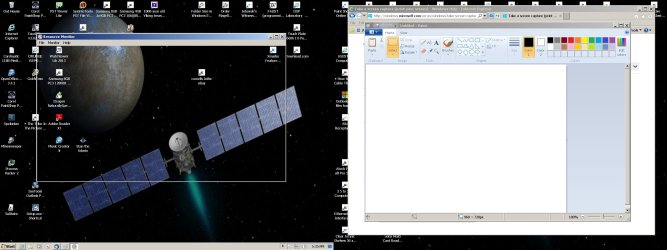
So, this is what I see when it runs. I see the outline of the Resource Monitor window. I also see the top line with an Icon at left and the title Resource Monitor. On the right of this line, I have the three boxes; minimize, maximize, and close. Those buttons do work. On the second line I see the File, Monitor and help drop down box key words. The three items in the Monitor column do nothing. I can open help. But the rest of the window, the major area for whatever it is supposed to display never fills in. Not even a blank screen. What was on the desktop behind it (before running resmon.exe) is still displayed in the resmon.exe window. If I drag the resmon.exe window, the "copied" contents in the window move with the resmon.exe window.

Just doesn't seem to be part of Windows normal was of working.

I have not turned any services off. Yet. And will do it slowly.

Again, any help would be appreciated. Thanks.

Ztruker - I did run sfr /scannow as you have suggested. It takes awhile. It finished with no problems found.
 
Last edited:

My Computer My Computer

At a glance

Win 7 Pro 64 bitAMD Opteron 612816 gig DDR3 ECCAMD v5800
Computer type
PC/Desktop
Computer Manufacturer/Model Number
Home build
OS
Win 7 Pro 64 bit
CPU
AMD Opteron 6128
Motherboard
Supermicro
Memory
16 gig DDR3 ECC
Graphics Card(s)
AMD v5800
Sound Card
Zonar DG
Monitor(s) Displays
Dual SyncMaster 204B
Screen Resolution
2x 1600x1200
Hard Drives
Corsair Force 480g
WD 3TB
PSU
XFX XTR 750
Case
yes
Cooling
by means of air and fans
Keyboard
Logitech S520
Mouse
Logitech S520 combo'd
Internet Speed
basic DSL
Antivirus
Bit Defender
Browser
IE
Hi BrassCat,

Congratulations for upgrading. Win 7 will be good to you. After a while I grew to appreciate Win 7, and now I much prefer it to XP. I suspect that will likely be your experience, once you get the hang of how things are done in Win 7, and you let go of trying to run 7 like XP. I was guilty of that for such a long time. :o

Can you download and install Process Hacker from here:

Downloads - Process Hacker

and let me know if it has any problems displaying System Info.

Also, right click the taskbar, click [Start Task Manager] and then click the [Performance] Tab.

Does it display the information you're looking for?

Also, can you post a screenshot of your Resource Monitor so we can see what you're seeing?
 

My Computer My Computer

At a glance

Dual Boot Win 8.1 x64; Win 7 SP1 x64i7-3610QM @ 2.3 GHz8 GB Dual-Channel DDR3 @ 798MHzIntel HD Graphics 4000
Computer type
Laptop
Computer Manufacturer/Model Number
HP
OS
Dual Boot Win 8.1 x64; Win 7 SP1 x64
CPU
i7-3610QM @ 2.3 GHz
Motherboard
Hewlett-Packard 181C (U3E1)
Memory
8 GB Dual-Channel DDR3 @ 798MHz
Graphics Card(s)
Intel HD Graphics 4000
Hard Drives
Hitachi HTS547575A9E384 SCSI Disk Device;
WD Elements 1042 USB Device
Antivirus
Microsoft Security Essentials; Comodo Firewall w/ Defense +
Hello Platypus Knight,

Process Hacker runs fine. Nonetheless, something remains wrong in that I can not run resmon. I hope I post the screen shots correctly. Interesting, screen capture grabs both monitors. You can see thru the body of resmon, to the desktop. Resmon grabs the desktop, it's image in resmon follows the resmon window.

well, it did not post the screen shot, I'll try again.
 

Attachments

  • resmon running.jpg
    resmon running.jpg
    251.4 KB · Views: 3

My Computer My Computer

At a glance

Win 7 Pro 64 bitAMD Opteron 612816 gig DDR3 ECCAMD v5800
Computer type
PC/Desktop
Computer Manufacturer/Model Number
Home build
OS
Win 7 Pro 64 bit
CPU
AMD Opteron 6128
Motherboard
Supermicro
Memory
16 gig DDR3 ECC
Graphics Card(s)
AMD v5800
Sound Card
Zonar DG
Monitor(s) Displays
Dual SyncMaster 204B
Screen Resolution
2x 1600x1200
Hard Drives
Corsair Force 480g
WD 3TB
PSU
XFX XTR 750
Case
yes
Cooling
by means of air and fans
Keyboard
Logitech S520
Mouse
Logitech S520 combo'd
Internet Speed
basic DSL
Antivirus
Bit Defender
Browser
IE
The only thing I notice is that you have Aero disabled, or you've otherwise altered Win 7's visual style. I wonder if that contributes.
 

My Computer My Computer

At a glance

Dual Boot Win 8.1 x64; Win 7 SP1 x64i7-3610QM @ 2.3 GHz8 GB Dual-Channel DDR3 @ 798MHzIntel HD Graphics 4000
Computer type
Laptop
Computer Manufacturer/Model Number
HP
OS
Dual Boot Win 8.1 x64; Win 7 SP1 x64
CPU
i7-3610QM @ 2.3 GHz
Motherboard
Hewlett-Packard 181C (U3E1)
Memory
8 GB Dual-Channel DDR3 @ 798MHz
Graphics Card(s)
Intel HD Graphics 4000
Hard Drives
Hitachi HTS547575A9E384 SCSI Disk Device;
WD Elements 1042 USB Device
Antivirus
Microsoft Security Essentials; Comodo Firewall w/ Defense +
When was the last time you did a Windows Update?
 

My Computer My Computer

At a glance

Dual Boot Win 8.1 x64; Win 7 SP1 x64i7-3610QM @ 2.3 GHz8 GB Dual-Channel DDR3 @ 798MHzIntel HD Graphics 4000
Computer type
Laptop
Computer Manufacturer/Model Number
HP
OS
Dual Boot Win 8.1 x64; Win 7 SP1 x64
CPU
i7-3610QM @ 2.3 GHz
Motherboard
Hewlett-Packard 181C (U3E1)
Memory
8 GB Dual-Channel DDR3 @ 798MHz
Graphics Card(s)
Intel HD Graphics 4000
Hard Drives
Hitachi HTS547575A9E384 SCSI Disk Device;
WD Elements 1042 USB Device
Antivirus
Microsoft Security Essentials; Comodo Firewall w/ Defense +
Hello Platypus. Yes, I turned Aero off, but it is a collect of display styles. I have not turned any services off. I have all windows 7 updates installed, as they are issued. I continue to explore 7 and iron out issues as I find them. This one persists, but is not a high priority.

Thanks

ps: does not seem to be a common problem.
 

My Computer My Computer

At a glance

Win 7 Pro 64 bitAMD Opteron 612816 gig DDR3 ECCAMD v5800
Computer type
PC/Desktop
Computer Manufacturer/Model Number
Home build
OS
Win 7 Pro 64 bit
CPU
AMD Opteron 6128
Motherboard
Supermicro
Memory
16 gig DDR3 ECC
Graphics Card(s)
AMD v5800
Sound Card
Zonar DG
Monitor(s) Displays
Dual SyncMaster 204B
Screen Resolution
2x 1600x1200
Hard Drives
Corsair Force 480g
WD 3TB
PSU
XFX XTR 750
Case
yes
Cooling
by means of air and fans
Keyboard
Logitech S520
Mouse
Logitech S520 combo'd
Internet Speed
basic DSL
Antivirus
Bit Defender
Browser
IE
Right click your desktop. Choose "personalize". Then click "display" in the lower left of the window that opens. Are you shown as using smaller, medium, larger, or custom text size? I have known a custom size to cause a similar problem.

Do you have KB 2670838 Windows update installed? It's related to Internet Explorer, which I don't use. I found that it caused Resource Monitor display problems, so I uninstalled that update and the problem went away.
 

My Computer My Computer

At a glance

Windows 7 Home Premium SP1, 64-bitIntel Skylake i5-6600K, not overclocked8 GB HyperX DDR4-2666 (2 x 4 GB)none; graphics are integrated on CPU
Computer type
PC/Desktop
Computer Manufacturer/Model Number
Ignatz Special; 4 speed manual gearbox; factory air conditioning; one of one
OS
Windows 7 Home Premium SP1, 64-bit
CPU
Intel Skylake i5-6600K, not overclocked
Motherboard
AsRock Z170M Extreme 4, micro ATX
Memory
8 GB HyperX DDR4-2666 (2 x 4 GB)
Graphics Card(s)
none; graphics are integrated on CPU
Sound Card
onboard: Realtek ALC1150; external: USB Behringer UF0-202
Monitor(s) Displays
Dell S2340M 23 inch IPS
Screen Resolution
1600 x 900
Hard Drives
System: Crucial MX100 series SSD, 128 GB;
Data: Samsung Spinpoint 103SJ, 1 TB;
Backup: WD Caviar Green WD30EZRX-00D8PB0, 3 TB
PSU
Rosewill SilentNight 500 watt fanless, semi-modular
Case
Antec Solo II
Cooling
Noctua NH-U12S; Noctua F12 intake, Noctua S12A exhaust
Keyboard
Microsoft 200 6JH-00001 USB
Mouse
Dell or Microsoft optical wired; USB
Antivirus
Microsoft Security Essentials and Malwarebytes Premium
Browser
Pale Moon
Other Info
All fans PWM; speeds at idle: CPU circa 500 rpm; intake circa 600 rpm; exhaust circa 600 rpm; CPU temps 27 idle and 47 C load in a warm room (27 C/81 F) when running Intel Extreme Tuning Utility stress test.
Hello ignatzatsonic, what a handle. You won the prize my friend. I was running at radio button 150% sizing. Moved it down to 100%, reclogged in, and resmon now works.

Thanks for the help on that.
 

My Computer My Computer

At a glance

Win 7 Pro 64 bitAMD Opteron 612816 gig DDR3 ECCAMD v5800
Computer type
PC/Desktop
Computer Manufacturer/Model Number
Home build
OS
Win 7 Pro 64 bit
CPU
AMD Opteron 6128
Motherboard
Supermicro
Memory
16 gig DDR3 ECC
Graphics Card(s)
AMD v5800
Sound Card
Zonar DG
Monitor(s) Displays
Dual SyncMaster 204B
Screen Resolution
2x 1600x1200
Hard Drives
Corsair Force 480g
WD 3TB
PSU
XFX XTR 750
Case
yes
Cooling
by means of air and fans
Keyboard
Logitech S520
Mouse
Logitech S520 combo'd
Internet Speed
basic DSL
Antivirus
Bit Defender
Browser
IE
Thanks for the suggestion. I was running screen at 150%, selected default 100%. Problem solved

BrassCat
 

My Computer My Computer

At a glance

Win 7 Pro 64 bitAMD Opteron 612816 gig DDR3 ECCAMD v5800
Computer type
PC/Desktop
Computer Manufacturer/Model Number
Home build
OS
Win 7 Pro 64 bit
CPU
AMD Opteron 6128
Motherboard
Supermicro
Memory
16 gig DDR3 ECC
Graphics Card(s)
AMD v5800
Sound Card
Zonar DG
Monitor(s) Displays
Dual SyncMaster 204B
Screen Resolution
2x 1600x1200
Hard Drives
Corsair Force 480g
WD 3TB
PSU
XFX XTR 750
Case
yes
Cooling
by means of air and fans
Keyboard
Logitech S520
Mouse
Logitech S520 combo'd
Internet Speed
basic DSL
Antivirus
Bit Defender
Browser
IE
Hello ignatzatsonic, what a handle. You won the prize my friend. I was running at radio button 150% sizing. Moved it down to 100%, reclogged in, and resmon now works.

Thanks for the help on that.

I use custom 165 percent. It worked OK for several years and then I ran into an application that did not display all of its menu choices unless I went back to a lower resolution. I didn't much care as I rarely used the app. At this time, Resource Monitor was not causing problems. It was just this other single application.

A few months later Resource Monitor started acting up, so I made a wild guess that it might be due to that text size thing and I guessed right. Going back to a lower text size cured the problem.

But I needed 165 due to my eyesight. The only solution I found is to get rid of that particular KB Windows Update. I think I got a clue about that through Google.

I have no idea if Microsoft is aware of the problem or if it has been fixed. As of right now, I can use 165 and Resource Monitor works as expected.
 

My Computer My Computer

At a glance

Windows 7 Home Premium SP1, 64-bitIntel Skylake i5-6600K, not overclocked8 GB HyperX DDR4-2666 (2 x 4 GB)none; graphics are integrated on CPU
Computer type
PC/Desktop
Computer Manufacturer/Model Number
Ignatz Special; 4 speed manual gearbox; factory air conditioning; one of one
OS
Windows 7 Home Premium SP1, 64-bit
CPU
Intel Skylake i5-6600K, not overclocked
Motherboard
AsRock Z170M Extreme 4, micro ATX
Memory
8 GB HyperX DDR4-2666 (2 x 4 GB)
Graphics Card(s)
none; graphics are integrated on CPU
Sound Card
onboard: Realtek ALC1150; external: USB Behringer UF0-202
Monitor(s) Displays
Dell S2340M 23 inch IPS
Screen Resolution
1600 x 900
Hard Drives
System: Crucial MX100 series SSD, 128 GB;
Data: Samsung Spinpoint 103SJ, 1 TB;
Backup: WD Caviar Green WD30EZRX-00D8PB0, 3 TB
PSU
Rosewill SilentNight 500 watt fanless, semi-modular
Case
Antec Solo II
Cooling
Noctua NH-U12S; Noctua F12 intake, Noctua S12A exhaust
Keyboard
Microsoft 200 6JH-00001 USB
Mouse
Dell or Microsoft optical wired; USB
Antivirus
Microsoft Security Essentials and Malwarebytes Premium
Browser
Pale Moon
Other Info
All fans PWM; speeds at idle: CPU circa 500 rpm; intake circa 600 rpm; exhaust circa 600 rpm; CPU temps 27 idle and 47 C load in a warm room (27 C/81 F) when running Intel Extreme Tuning Utility stress test.
I run Aero so your mileage may vary but you can increase the text size without using that personalization option.

I also ran into issues with that display setting. I'm guessing there aren't too many of us who actually do use that personalization option so MS rarely ever gets complaints about it.

I solved my issue by:

Right-click desktop
Click [Personalization]
Click [Window Color] -- that's in the bottom center
Click [Advanced appearance settings]

This dialog box should be familiar to any Win XP (Win 2000, Win 98) customizer

I increase the default font sizes (and change some colors) and that works for me.
Hope that helps. Microsoft Explorer does not respond to this though, so a third party explorer is probably necessary if you do a lot of file management.

Glad you're sorted. :)
 

My Computer My Computer

At a glance

Dual Boot Win 8.1 x64; Win 7 SP1 x64i7-3610QM @ 2.3 GHz8 GB Dual-Channel DDR3 @ 798MHzIntel HD Graphics 4000
Computer type
Laptop
Computer Manufacturer/Model Number
HP
OS
Dual Boot Win 8.1 x64; Win 7 SP1 x64
CPU
i7-3610QM @ 2.3 GHz
Motherboard
Hewlett-Packard 181C (U3E1)
Memory
8 GB Dual-Channel DDR3 @ 798MHz
Graphics Card(s)
Intel HD Graphics 4000
Hard Drives
Hitachi HTS547575A9E384 SCSI Disk Device;
WD Elements 1042 USB Device
Antivirus
Microsoft Security Essentials; Comodo Firewall w/ Defense +
Back
Top