Solved Restore an OS split image w/ Macrium

MadSupra354

Supra
Pro User
Local time
1:31 PM
Messages
792
Location
On my chair, in my room
I'm having to restore back to early December as I think my boot drive's data is corrupt and it's had to perform system repairs since. I record the image onto a 2 partition hard drive, and the image has to be recorded onto both because of the size of it. I didn't think it was possible to restore from 2 partitions, so I've moved it to my single partition 500GB drive. I need help now with actually restoring that image, as I have to go into Windows PE, which I don't think I've done before. Sorry if this is blatantly displayed in a tutorial, I haven't had many resources to check and I've just recovered this computer back from having a stroke. :confused:

I appreciate the help in advance.
 

My Computer My Computer

Computer type
PC/Desktop
OS
10 Home x64
CPU
Intel Core i5 4670K
Motherboard
Gigabyte GA-Z87-D3HP
Memory
Corsair XMS3 8GB DDr3 1600MHz
Graphics Card(s)
Sapphire NITRO Radeon R9 Fury
Sound Card
Asus Xonar DX
Monitor(s) Displays
Acer H236HLbmjd
Screen Resolution
1920x1080
Hard Drives
Force GS 128GB - Seagate 320GB - WD Caviar Black 1TB - WD Caviar Blue 500GB
PSU
EVGA SuperNOVA 650 P2
Case
Silverstone Raven 3 RV03B-W
Keyboard
Topre Realforce 104UG-HiPro
Mouse
Mionix Naos 7000
Internet Speed
76/4 On a good day
Antivirus
SmartScreen
Browser
Internet Explorer 11
Hmm, there are a few flaws. Let's unravel them:

1. Do you have a working Macriun WinPE CD. If not, download the .iso from here and burn it to CD.

2. What was this story of imaging to 2 partitions. How did you do that anyhow.

3. Now that you have the image on 1 partition, double click on the image and mount it. Then look into My Computer, double click on the virtual drive (usually F) and have a look whether that is the complete image.

4. For more details regarding the recovery procedure, have a look at this excellent tutorial which Keith has made for the purpose. For more info on Macrium consult this tutorial.

If you have more questions, post back.
 

My Computer My Computer

Computer Manufacturer/Model Number
HP, Dell, Gateway, Toshiba - 4 laptops and 2 desktops
OS
Vista, Windows7, Mint Mate, Zorin, Windows 8
CPU
from 1.6GHz Duo to i7
Monitor(s) Displays
2x HP w2207
Hard Drives
5x HDD, 7x SSD, 12x Externals
Keyboard
with trackball - no mices
Mouse
Trackball mice
Internet Speed
DSL 6000
Do you have a working Macriun WinPE CD. If not, download the .iso from here and burn it to CD.
Is it possible to use a flash drive instead of a CD? It's really awkward for how my setup is.
What was this story of imaging to 2 partitions. How did you do that anyhow.
I backup my OS drive (~300GB) onto my Seagate hard drive (~285GB, fit it in by using high compression on Reflect) but I'd still not have the space to backup to 1, 142GB partition, so it would prompt me with There's not enough space on this volume, select another volume to record the rest of the image...
 

My Computer My Computer

Computer type
PC/Desktop
OS
10 Home x64
CPU
Intel Core i5 4670K
Motherboard
Gigabyte GA-Z87-D3HP
Memory
Corsair XMS3 8GB DDr3 1600MHz
Graphics Card(s)
Sapphire NITRO Radeon R9 Fury
Sound Card
Asus Xonar DX
Monitor(s) Displays
Acer H236HLbmjd
Screen Resolution
1920x1080
Hard Drives
Force GS 128GB - Seagate 320GB - WD Caviar Black 1TB - WD Caviar Blue 500GB
PSU
EVGA SuperNOVA 650 P2
Case
Silverstone Raven 3 RV03B-W
Keyboard
Topre Realforce 104UG-HiPro
Mouse
Mionix Naos 7000
Internet Speed
76/4 On a good day
Antivirus
SmartScreen
Browser
Internet Explorer 11
Is it possible to use a flash drive instead of a CD? It's really awkward for how my setup is.
Sure, just burn the iso to a flash drive. You can use Rufus. Rufus - Create bootable USB drives the easy way

I backup my OS drive (~300GB) onto my Seagate hard drive (~285GB, fit it in by using high compression on Reflect) but I'd still not have the space to backup to 1, 142GB partition, so it would prompt me with There's not enough space on this volume, select another volume to record the rest of the image...
So what did you do then ?

Did you mount the image as I suggested and does it contain all your stuff.

PS: If you have such a big C partition, you have to split it into OS on C and user data on a data partition. But we'll discuss that later.
 

My Computer My Computer

Computer Manufacturer/Model Number
HP, Dell, Gateway, Toshiba - 4 laptops and 2 desktops
OS
Vista, Windows7, Mint Mate, Zorin, Windows 8
CPU
from 1.6GHz Duo to i7
Monitor(s) Displays
2x HP w2207
Hard Drives
5x HDD, 7x SSD, 12x Externals
Keyboard
with trackball - no mices
Mouse
Trackball mice
Internet Speed
DSL 6000
So what did you do then? Did you mount the image as I suggested and does it contain all your stuff.
PS: If you have such a big C partition, you have to split it into OS on C and user data on a data partition. But we'll discuss that later.
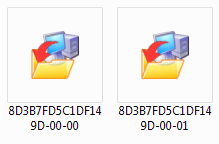
It would prompt me to select another volume to record the rest of that image. They look like this:
Capture.PNG
I'm in the process of mounting that .iso with Rufus. Is it as simple as, after it's mounted, boot into Windows PE (I may need reminding of how to find myself there), have a wonder around the UI...? I'm unsure of which image I'd begin restoring with.
 

My Computer My Computer

Computer type
PC/Desktop
OS
10 Home x64
CPU
Intel Core i5 4670K
Motherboard
Gigabyte GA-Z87-D3HP
Memory
Corsair XMS3 8GB DDr3 1600MHz
Graphics Card(s)
Sapphire NITRO Radeon R9 Fury
Sound Card
Asus Xonar DX
Monitor(s) Displays
Acer H236HLbmjd
Screen Resolution
1920x1080
Hard Drives
Force GS 128GB - Seagate 320GB - WD Caviar Black 1TB - WD Caviar Blue 500GB
PSU
EVGA SuperNOVA 650 P2
Case
Silverstone Raven 3 RV03B-W
Keyboard
Topre Realforce 104UG-HiPro
Mouse
Mionix Naos 7000
Internet Speed
76/4 On a good day
Antivirus
SmartScreen
Browser
Internet Explorer 11
I would think you start with the image that has the lower number - 00 at the end. The 01 seems to be the extension. I have never dealt with a split image. Will be interesting to see how that works. Let's hope it still works after you moved the 2 pieces.
 

My Computer My Computer

Computer Manufacturer/Model Number
HP, Dell, Gateway, Toshiba - 4 laptops and 2 desktops
OS
Vista, Windows7, Mint Mate, Zorin, Windows 8
CPU
from 1.6GHz Duo to i7
Monitor(s) Displays
2x HP w2207
Hard Drives
5x HDD, 7x SSD, 12x Externals
Keyboard
with trackball - no mices
Mouse
Trackball mice
Internet Speed
DSL 6000
Move them where? I've copied them to my 500GB HDD. Should I go ahead with the restore process? I can't check them for my stuff but I have verified the first image with Reflect. How would I go about booting into PE?

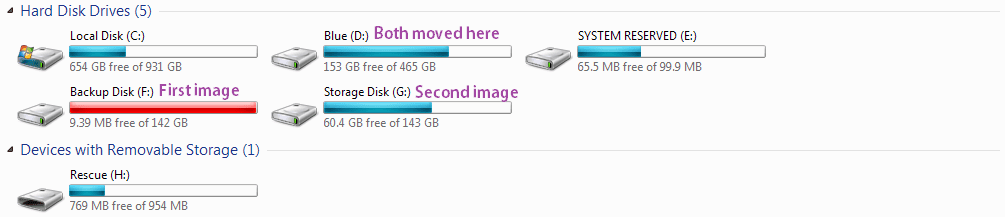
My setup for reference.
Capture.PNG
 

My Computer My Computer

Computer type
PC/Desktop
OS
10 Home x64
CPU
Intel Core i5 4670K
Motherboard
Gigabyte GA-Z87-D3HP
Memory
Corsair XMS3 8GB DDr3 1600MHz
Graphics Card(s)
Sapphire NITRO Radeon R9 Fury
Sound Card
Asus Xonar DX
Monitor(s) Displays
Acer H236HLbmjd
Screen Resolution
1920x1080
Hard Drives
Force GS 128GB - Seagate 320GB - WD Caviar Black 1TB - WD Caviar Blue 500GB
PSU
EVGA SuperNOVA 650 P2
Case
Silverstone Raven 3 RV03B-W
Keyboard
Topre Realforce 104UG-HiPro
Mouse
Mionix Naos 7000
Internet Speed
76/4 On a good day
Antivirus
SmartScreen
Browser
Internet Explorer 11
Copied or moved makes no difference regarding my comment. I would probably try to restore from the locations where Macrium put the images.

You have to boot with the WinPE CD. When you do power-on, keep tapping F12 (ESC for a HP-PC) and change the boot order so that the CD ROM is on top ( with the Up key).
 

My Computer My Computer

Computer Manufacturer/Model Number
HP, Dell, Gateway, Toshiba - 4 laptops and 2 desktops
OS
Vista, Windows7, Mint Mate, Zorin, Windows 8
CPU
from 1.6GHz Duo to i7
Monitor(s) Displays
2x HP w2207
Hard Drives
5x HDD, 7x SSD, 12x Externals
Keyboard
with trackball - no mices
Mouse
Trackball mice
Internet Speed
DSL 6000
OK F12 doesn't seem to work, I've even plugged in a PS2 keyboard because it has issue with my normal USB one. Should I change the boot order in the BIOS?
 

My Computer My Computer

Computer type
PC/Desktop
OS
10 Home x64
CPU
Intel Core i5 4670K
Motherboard
Gigabyte GA-Z87-D3HP
Memory
Corsair XMS3 8GB DDr3 1600MHz
Graphics Card(s)
Sapphire NITRO Radeon R9 Fury
Sound Card
Asus Xonar DX
Monitor(s) Displays
Acer H236HLbmjd
Screen Resolution
1920x1080
Hard Drives
Force GS 128GB - Seagate 320GB - WD Caviar Black 1TB - WD Caviar Blue 500GB
PSU
EVGA SuperNOVA 650 P2
Case
Silverstone Raven 3 RV03B-W
Keyboard
Topre Realforce 104UG-HiPro
Mouse
Mionix Naos 7000
Internet Speed
76/4 On a good day
Antivirus
SmartScreen
Browser
Internet Explorer 11
The boot order must be CD ROM first. Some people have that per default in the permanent BIOS settings. In that case the BIOS will pick up the CD automatically when you have it in the CD tray before power-on. Just watch out, there may be a little nessage appearing on the top left of the screen saying : " .... press any key".
 

My Computer My Computer

Computer Manufacturer/Model Number
HP, Dell, Gateway, Toshiba - 4 laptops and 2 desktops
OS
Vista, Windows7, Mint Mate, Zorin, Windows 8
CPU
from 1.6GHz Duo to i7
Monitor(s) Displays
2x HP w2207
Hard Drives
5x HDD, 7x SSD, 12x Externals
Keyboard
with trackball - no mices
Mouse
Trackball mice
Internet Speed
DSL 6000
Never mind, did the logical thing and mused through my motherboard manual, and it was F8. I've restored to my 21st Dec. image now, it was fairly straight forward. I selected the first 00-00 image, then it asked for the second one, then when I began restoring it asked for the first 00-00 image again. Took over a couple of hours and hopefuly everything's good. Now onto the BSOD subforum to check how my computer had a stroke in the first place! :)
Thank you very much for your help!
 

My Computer My Computer

Computer type
PC/Desktop
OS
10 Home x64
CPU
Intel Core i5 4670K
Motherboard
Gigabyte GA-Z87-D3HP
Memory
Corsair XMS3 8GB DDr3 1600MHz
Graphics Card(s)
Sapphire NITRO Radeon R9 Fury
Sound Card
Asus Xonar DX
Monitor(s) Displays
Acer H236HLbmjd
Screen Resolution
1920x1080
Hard Drives
Force GS 128GB - Seagate 320GB - WD Caviar Black 1TB - WD Caviar Blue 500GB
PSU
EVGA SuperNOVA 650 P2
Case
Silverstone Raven 3 RV03B-W
Keyboard
Topre Realforce 104UG-HiPro
Mouse
Mionix Naos 7000
Internet Speed
76/4 On a good day
Antivirus
SmartScreen
Browser
Internet Explorer 11
You are welcome. Good to hear that you are back on safe territory. I have 2 suggestions:

1. Next time allocate anough space in the folder/partition to where you send the image.

2. Put your user data into a seperate partition. Then the system image goes a lot faster for imaging and restore. The data partition you can also image or you can sync the data with a sync program which is very fast.
 

My Computer My Computer

Computer Manufacturer/Model Number
HP, Dell, Gateway, Toshiba - 4 laptops and 2 desktops
OS
Vista, Windows7, Mint Mate, Zorin, Windows 8
CPU
from 1.6GHz Duo to i7
Monitor(s) Displays
2x HP w2207
Hard Drives
5x HDD, 7x SSD, 12x Externals
Keyboard
with trackball - no mices
Mouse
Trackball mice
Internet Speed
DSL 6000
Next time allocate anough space in the folder/partition to where you send the image.
It worked fine though, why would I need to do that?
Put your user data into a seperate partition. Then the system image goes a lot faster for imaging and restore. The data partition you can also image or you can sync the data with a sync program which is very fast
Unsure how to do that. I thought that's what I was doing in the first place.
 

My Computer My Computer

Computer type
PC/Desktop
OS
10 Home x64
CPU
Intel Core i5 4670K
Motherboard
Gigabyte GA-Z87-D3HP
Memory
Corsair XMS3 8GB DDr3 1600MHz
Graphics Card(s)
Sapphire NITRO Radeon R9 Fury
Sound Card
Asus Xonar DX
Monitor(s) Displays
Acer H236HLbmjd
Screen Resolution
1920x1080
Hard Drives
Force GS 128GB - Seagate 320GB - WD Caviar Black 1TB - WD Caviar Blue 500GB
PSU
EVGA SuperNOVA 650 P2
Case
Silverstone Raven 3 RV03B-W
Keyboard
Topre Realforce 104UG-HiPro
Mouse
Mionix Naos 7000
Internet Speed
76/4 On a good day
Antivirus
SmartScreen
Browser
Internet Explorer 11
It worked fine though, why would I need to do that?
On the partition/disk where you store your images you should have at least space for 3 or 4 images in case you want to go back further than to the last image. They are also handy to retrieve old files that you have long deleted. For that reason I always keep 10 former images.

Unsure how to do that. I thought that's what I was doing in the first place.
I can tell you how to do that. But first tell me how much data (in mega or giga Bytes) you have in Documents, Pictures, Videos, Music.
 

My Computer My Computer

Computer Manufacturer/Model Number
HP, Dell, Gateway, Toshiba - 4 laptops and 2 desktops
OS
Vista, Windows7, Mint Mate, Zorin, Windows 8
CPU
from 1.6GHz Duo to i7
Monitor(s) Displays
2x HP w2207
Hard Drives
5x HDD, 7x SSD, 12x Externals
Keyboard
with trackball - no mices
Mouse
Trackball mice
Internet Speed
DSL 6000
I don't have the ideal space for more than a single image. My media is worth 11.2 GB.
 

My Computer My Computer

Computer type
PC/Desktop
OS
10 Home x64
CPU
Intel Core i5 4670K
Motherboard
Gigabyte GA-Z87-D3HP
Memory
Corsair XMS3 8GB DDr3 1600MHz
Graphics Card(s)
Sapphire NITRO Radeon R9 Fury
Sound Card
Asus Xonar DX
Monitor(s) Displays
Acer H236HLbmjd
Screen Resolution
1920x1080
Hard Drives
Force GS 128GB - Seagate 320GB - WD Caviar Black 1TB - WD Caviar Blue 500GB
PSU
EVGA SuperNOVA 650 P2
Case
Silverstone Raven 3 RV03B-W
Keyboard
Topre Realforce 104UG-HiPro
Mouse
Mionix Naos 7000
Internet Speed
76/4 On a good day
Antivirus
SmartScreen
Browser
Internet Explorer 11
In your first post you talked about a 500GB partition. What is the story of that.

Else, get an external drive (between 500GB and 1TB) to do this properly.
 

My Computer My Computer

Computer Manufacturer/Model Number
HP, Dell, Gateway, Toshiba - 4 laptops and 2 desktops
OS
Vista, Windows7, Mint Mate, Zorin, Windows 8
CPU
from 1.6GHz Duo to i7
Monitor(s) Displays
2x HP w2207
Hard Drives
5x HDD, 7x SSD, 12x Externals
Keyboard
with trackball - no mices
Mouse
Trackball mice
Internet Speed
DSL 6000
The 500GB Caviar Blue is my dedicated game recording drive. My hard drive setup doesn't make sense, next system upgrade I'll ideally have an SSD boot and games drive (~300GB since that's all the space I use), get another Caviar Black and setup a mirror for recording, my Caviar Blue and my Seagate for backups/miscellaneous.
 

My Computer My Computer

Computer type
PC/Desktop
OS
10 Home x64
CPU
Intel Core i5 4670K
Motherboard
Gigabyte GA-Z87-D3HP
Memory
Corsair XMS3 8GB DDr3 1600MHz
Graphics Card(s)
Sapphire NITRO Radeon R9 Fury
Sound Card
Asus Xonar DX
Monitor(s) Displays
Acer H236HLbmjd
Screen Resolution
1920x1080
Hard Drives
Force GS 128GB - Seagate 320GB - WD Caviar Black 1TB - WD Caviar Blue 500GB
PSU
EVGA SuperNOVA 650 P2
Case
Silverstone Raven 3 RV03B-W
Keyboard
Topre Realforce 104UG-HiPro
Mouse
Mionix Naos 7000
Internet Speed
76/4 On a good day
Antivirus
SmartScreen
Browser
Internet Explorer 11
Back
Top