Restore deleted Prefetch?

grits

New member
Power User
VIP
Local time
4:39 PM
Messages
582
Hope it's ok to start a new post 'cuz the others concerning PF are about a year old.

A friend who knows more about computers than I do was here a few days ago & I happened to ask about a little problem that was bugging me. He went through several things trying to find a solution & ended up clearing out my Prefetch, then used CCleaner Registry Clean. All of that is still in Recycle Bin. Can I just go into R/Bin & 'Restore' it since I've been reading that it's NOT a good idea to clear it?

(My little problem still exits but it's just in Event Viewer so will maybe just clear it out later.)

Thanks,
grits
 

My Computer

Computer type
PC/Desktop
Computer Manufacturer/Model Number
emachines
OS
Microsoft Windows 7 Home Premium 64-bit 7601 Multiprocessor Free Service Pack 1
CPU
AMD Athlon(tm) II X2 220 Processor
Motherboard
eMachines EL1358G
Memory
3.00 GB
Graphics Card(s)
NVIDIA GeForce 6150SE nForce 430
Sound Card
Realtek High Definition Audio
Screen Resolution
1280 x 1024 x 32 bits (4294967296 colors) @ 60 Hz
Hard Drives
(1) WDC WD10 EADX-22TDHB0 SCSI Disk Device (2) Generic- Multi-Card USB Device
Keyboard
came with PC
Mouse
came with PC
Antivirus
Avast
Browser
IE 9
Other Info
don't know how to get info for the other 5 areas
If he didn't delete the Layout.ini file there is no reason to restore that old Prefetch data. It will get rebuilt over time.
 

My Computer

OS
7 x64
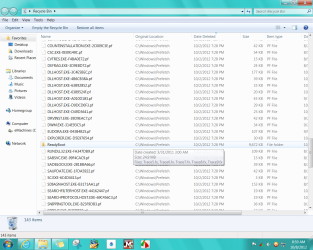
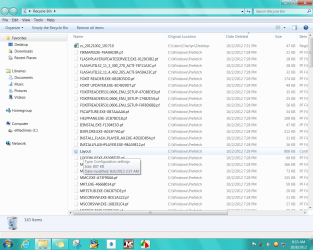
I looked at what's still in Recycle Bin but am still lost. While trying to find my own answer instead of bugging you guys, I also read something about 'don't delete ReadyBoot / ReadyBoost' ??? I do realize that Prefetch will rebuild itself but am worried about the file you referred to in your reply & also the ReadyBoot. :o
Here's a couple shots of my Recycle Bin.
 

Attachments

  • 2012-10-08_083308 _ Prefetch in Recycle Bin.png
    2012-10-08_083308 _ Prefetch in Recycle Bin.png
    107.9 KB · Views: 48
  • 2012-10-08_085915 _ ReadyBoot also in RBin.png
    2012-10-08_085915 _ ReadyBoot also in RBin.png
    110.5 KB · Views: 31

My Computer

Computer type
PC/Desktop
Computer Manufacturer/Model Number
emachines
OS
Microsoft Windows 7 Home Premium 64-bit 7601 Multiprocessor Free Service Pack 1
CPU
AMD Athlon(tm) II X2 220 Processor
Motherboard
eMachines EL1358G
Memory
3.00 GB
Graphics Card(s)
NVIDIA GeForce 6150SE nForce 430
Sound Card
Realtek High Definition Audio
Screen Resolution
1280 x 1024 x 32 bits (4294967296 colors) @ 60 Hz
Hard Drives
(1) WDC WD10 EADX-22TDHB0 SCSI Disk Device (2) Generic- Multi-Card USB Device
Keyboard
came with PC
Mouse
came with PC
Antivirus
Avast
Browser
IE 9
Other Info
don't know how to get info for the other 5 areas
Do some research, f.ex. about the layout.ini and .db files.
If you really want to do things in there, seems the .pf files can go and they'll be recreated.
 

My Computer

Computer type
Laptop
Computer Manufacturer/Model Number
Dell \ Lenovo\ HP \ Toshiba
OS
W7, W8.1
Antivirus
MSE, Malwarebytes
Browser
FF
I remove old prefetched data without any problems.
 

My Computer

Computer type
PC/Desktop
Computer Manufacturer/Model Number
Home made Desktop
OS
Windows 10 Pro. 64/ version 1709 Windows 7 Pro/64
CPU
Intel i7-6800K @ 4.3
Motherboard
ASUS X-99 Deluxe II
Memory
Corsair Platinum 16 gig @2400
Graphics Card(s)
EVGA GTX 1070 OC
Monitor(s) Displays
Asus 27" LED LCD/VE278Q
Screen Resolution
1920-1080 or 1280-720 HDMI
Hard Drives
INTEL SSD 730-240 Gb Sata 3.0/
PSU
EVGA Platium 1200W
Case
Phanteks Luxe Tempered Glass 8 fans/ one radiator
Cooling
XSPC/ Water Cooled CPU
Keyboard
Das 4 Professional
Mouse
Logitech M705/MX Anywhere 2-S
Internet Speed
100 mbits
Antivirus
Microsoft Security Essentials/ Malwarebytes Premium 3.0/ SAS
Browser
I.E. 11 default/Firefox/ ISP Time Warner Cable/Spectrum
Other Info
LG BluRay Burner/
Sound system-KLipsch-THX/
Icy Dock ssd Hot Swap bays.
Back
Top