
Restore point failed

bawldiggle

GrayGhost2 ret.
Pro User
VIP
Local time
7:17 AM
Messages
895
Location
Australia
Prior to installing VirtualBox I created a restore-point.
The VirtualBox installation was completed but VirtualBox would not open, displaying an error message.

I uninstalled VirtualBox with Revouninstaller.

When I attempted to restore the pre-VirtualBox Restore-point, the RP process started.
- I have never done a restore point so did not know what to expect.

When I returned to my laptop, the desktop was open with this alert on top. :confused:
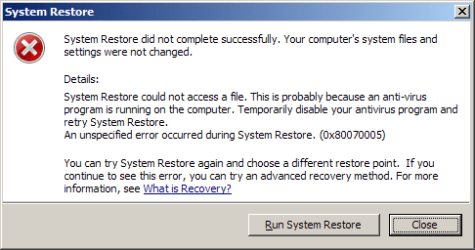
sytem-restore-failed.png

During System-Restore...

  1. AV Bitdefender Internet Security was "active" (I did not disable AV)
  2. The laptop went to sleep

Should sleep mode be suspended during reinstating Restore-Points. ?
I have not retried the system-restore. The Error (0x80070005) has me concerned.

I would appreciate any guidance, thank you :)
 

My Computer

Computer type
PC/Desktop
Computer Manufacturer/Model Number
Toshiba, Lenovo (laptops) + 4 rigs
OS
XP Pro (x86) | 7 HP (x86) & (x64) | 7 Pro (x64)
With Bitdefender you need to perform the system restore with the computer booted in safe mode to have it function properly.
 

My Computer

Computer type
PC/Desktop
Computer Manufacturer/Model Number
Custom Built
OS
Windows 10 Pro x64, Windows 8.1 Pro x64, Windows 7 Ultimate x64 SP1,
CPU
INTEL i9-7920X LGA 2066
Motherboard
Gigabyte X299-WU8 F3
Memory
64 GB (4 X 16 GB) G-Skill V Series DDR4 3200 Quad Channel
Graphics Card(s)
EVGA GTX 1060 SC 3 GB
Sound Card
Realtek Onboard ALC1220
Monitor(s) Displays
2 x Samsung S27E310
Screen Resolution
1920x1080
Hard Drives
Samsung 2 x 970 EVO Plus 500 GB NVMe
1 x 6TB WD 6003FZBX SATA
1 x 6TB WD 60EFRX SATA
12 x 3TB WD 30EFRX SATA
PSU
Seasonic X-1050
Case
Thermaltake Armor+
Cooling
Corsair H80i V2 Liquid AOI Cooler
Keyboard
Logitech G510s
Mouse
Logitech MX Master 2S
Internet Speed
200 Mb/s
Antivirus
ESET NOD32 13.1
Browser
EDGE (Dev, Canary, Beta), Chrome
Other Info
ASUS RT-AC68U router
Malwarebytes 4.0.4
@ pbcopter
Should Bitdefender be disabled ?
 

My Computer

Computer type
PC/Desktop
Computer Manufacturer/Model Number
Toshiba, Lenovo (laptops) + 4 rigs
OS
XP Pro (x86) | 7 HP (x86) & (x64) | 7 Pro (x64)
I don't believe it will help in this case. You should perform the system restore in safe mode, so that it will not interfere.
 

My Computer

Computer type
PC/Desktop
Computer Manufacturer/Model Number
Custom Built
OS
Windows 10 Pro x64, Windows 8.1 Pro x64, Windows 7 Ultimate x64 SP1,
CPU
INTEL i9-7920X LGA 2066
Motherboard
Gigabyte X299-WU8 F3
Memory
64 GB (4 X 16 GB) G-Skill V Series DDR4 3200 Quad Channel
Graphics Card(s)
EVGA GTX 1060 SC 3 GB
Sound Card
Realtek Onboard ALC1220
Monitor(s) Displays
2 x Samsung S27E310
Screen Resolution
1920x1080
Hard Drives
Samsung 2 x 970 EVO Plus 500 GB NVMe
1 x 6TB WD 6003FZBX SATA
1 x 6TB WD 60EFRX SATA
12 x 3TB WD 30EFRX SATA
PSU
Seasonic X-1050
Case
Thermaltake Armor+
Cooling
Corsair H80i V2 Liquid AOI Cooler
Keyboard
Logitech G510s
Mouse
Logitech MX Master 2S
Internet Speed
200 Mb/s
Antivirus
ESET NOD32 13.1
Browser
EDGE (Dev, Canary, Beta), Chrome
Other Info
ASUS RT-AC68U router
Malwarebytes 4.0.4
I had that issue with a client. Technically, it just means that the restore point(s) are pretty much damaged. Safe Mode don't work.

I have tried this in, Administrator mode: regsvr32 quartz.dll (via command prompt) this helped.

Again, most times is restore points gets damaged.

Regards
 

My Computer

Computer type
PC/Desktop
OS
Win 8.1 Pro
Restore points can be wacky. It is safer to make images before you make any bigger changes to the system.

But why did you want to make a system restore in the first place. Is there a problem after uninstalling vBox?
 

My Computer

Computer Manufacturer/Model Number
HP, Dell, Gateway, Toshiba - 4 laptops and 2 desktops
OS
Vista, Windows7, Mint Mate, Zorin, Windows 8
CPU
from 1.6GHz Duo to i7
Monitor(s) Displays
2x HP w2207
Hard Drives
5x HDD, 7x SSD, 12x Externals
Keyboard
with trackball - no mices
Mouse
Trackball mice
Internet Speed
DSL 6000
@whs
... thank you Wolfgang for your input :)

I have never done a system restore ... ever !
So I thought I would start somewhere, even if just for practice.
I have been following posts in your(?) Imaging tutorial and your independent YouTubes.
Gathering knowledge when I have time.

My foray into VirtuaBox was experimental ... gone wrong because VirtualBox have major problems since early July.
I have since downloaded a beta Virtual box from here ... UPDATE: this final post by "perryg" indicates a resolution.
-----
EDIT 1
VirtualBox final release v4.3.16-95972 ... as at 10-Sept-2014
-----
EDIT 2
More problems for x64 bit Windows (by my count). Windows 4.3.16 specifically for errors due to security At a glance some AVs are implicated.
-----

It appears that sevenforum is more inclined to VMware Player, but I had hoped VirtualBox with its included "snapshot" feature would be a quick fix to create a test-bed with imaging, on this laptop. I have a number of programs I want to install but no experience (and nervous apprehension) about virtual drives and imaging.
A raw beginner !

This laptop is developing problems ... browser (Palemoon), AV (Bitdefender) ... maybe needing a clean install of Windows.
- I suspect testing (and uninstalling) numerous programs has affected the system etc
The Toshiba has had a hard life in the past 2½ years, and it is Win-7 that has maintained stability for such a long time.
Unlike Win-XP that had to be clean installed about twice each year)
 
Last edited:

My Computer

Computer type
PC/Desktop
Computer Manufacturer/Model Number
Toshiba, Lenovo (laptops) + 4 rigs
OS
XP Pro (x86) | 7 HP (x86) & (x64) | 7 Pro (x64)
Understand. You are right, sometimes a reinstall is the best solution, as painful as it can be.
 

My Computer

Computer Manufacturer/Model Number
HP, Dell, Gateway, Toshiba - 4 laptops and 2 desktops
OS
Vista, Windows7, Mint Mate, Zorin, Windows 8
CPU
from 1.6GHz Duo to i7
Monitor(s) Displays
2x HP w2207
Hard Drives
5x HDD, 7x SSD, 12x Externals
Keyboard
with trackball - no mices
Mouse
Trackball mice
Internet Speed
DSL 6000
I never done restore points either... I managed 30+ clients backups. Only thing I've done since I manage them all efficiently, I do some files/folders restore, that's it.

Your best bet is to do a complete reinstall, and create an image to USB stick, that way, when things go terribly wrong, you have a backup ready to copy the image over.

Regards
 

My Computer

Computer type
PC/Desktop
OS
Win 8.1 Pro
Thank you all for your support :)
- Imaging and virtual machines are at the top of my to-do's list

My laptop has taken another turn for the better ... temporarily.
When I uninstalled Bitdefender AV using their complete uninstaller, my laptop was then purring like a kitten.
Offline ... !!

Half cooked fanboys on the "Bitdefender" forum had insisted I upgrade from BIS 2013 to BIS-2015 (yes 2015, and 2014 isn't nearly over yet). Their spiel was that BD 2013 is no longer supported ... and that 2015 would "fix all my problems" ... wrong on both counts. :mad:

Now I have installed BIS 2015 and horrors of horrors its Windows-8 nightmare again. Bitdefender 2015 is one size fits all (phones, tablets, laptops, desktops). The entire structure has been changed and trying to reinstate settings is a nightmare (BD did-not/do-not have a save settings/export feature) so I had to snip (PNG) every page, tab and list in BD-2013 ... to manually apply in the upgrade version.

What really concerns me is the inclusion of ... Registry cleaner, PC Cleanup and optimizers in the new structure. :mad:
Trying to find what they all "actually do" just leads to verbal froth.
Basically "trust Bitdefender to look after your PC" :shock:

No thank you ! I will decide what happens on my PC and when.

And to add insult to injury startup time is slower than under BIS-2013. :mad:

I don't have time to play with the new toy, I am trying to run a business.

Today I will be clean installing BIS-2014 (having checked the screenshots are the same as BIS 2013).
When my AV subscription is due for renewal in 239 days ... I will be changing "brands" based on AV Comparatives ... at the moment that looks like Kaspersky (for my 3 online machines)
 
Last edited:

My Computer

Computer type
PC/Desktop
Computer Manufacturer/Model Number
Toshiba, Lenovo (laptops) + 4 rigs
OS
XP Pro (x86) | 7 HP (x86) & (x64) | 7 Pro (x64)
It appears that sevenforum is more inclined to VMware Player, but I had hoped VirtualBox with its included "snapshot" feature would be a quick fix

The snapshot feature is completely unnecessary. It is really easy to restore a virtual machine to go back in time regardless of virtual machine program. Right click the folder the virtual machine is stored in, and use the previous versions feature. You could also go to properties-previous versions. Choose a day back and hit restore. Presto! VM back to the way it was.

In order for previous versions to work, system protection needs to be turned on for the drive, and I recommend dedicating 10% of space to it.

And yes, always use safe mode for system restore. It guarantees no protection software can mess with it.
 

My Computer

Computer type
PC/Desktop
Computer Manufacturer/Model Number
Custom Built
OS
Windows 10 Pro
CPU
AMD Ryzen 5 2400G Processor with Radeon RX Vega 11 Graphics
Motherboard
ASRock X470 Master SLI/AC AM4 AMD Promontory X470 SATA 6Gb/s
Memory
G.SKILL Ripjaws V Series 16GB (2 x 8GB) 288-Pin DDR4 SDRAM D
Graphics Card(s)
2047MB NVIDIA GeForce GTX 1060 6GB (EVGA)
Sound Card
Motherboard Built in
Monitor(s) Displays
Acer R240HY bidx 23.8-Inch IPS HDMI DVI VGA (1920 x 1080) Wi
Screen Resolution
1920 x 1080
Hard Drives
1TB Sandisk SSD PLUS (Main drive)
500 GB Seagate 7200 RPM (Games)
500 GB Western Digital 7200 RPM (Virtual Machines)
PSU
CORSAIR TX Series TX650M 650W 80+ Gold Modular Power Supply
Case
CORSAIR CARBIDE SPEC-02 Mid-Tower Gaming Case, Red LED Fan
Cooling
220mm, two 120mm, and four 60mm fans
Keyboard
Wired Dell keyboard
Mouse
Wireless Logitech mouse
Internet Speed
250mb down, 30mb up
Antivirus
Panda Cloud Antivirus
Browser
Chrome-ish x64
Other Info
Your awesome for reading this.
Back
Top