Hello, my computer has started running horribly over the past two weeks and i can't figure it out. I have limited knowledge on these things.
It keeps "not responding" over and over making it hard to use, matter of fact this is my second time typing this up because it stopped responding, closed and reopened making me lose everything i had typed.
I have a Toshiba Satellite running windows 7 64-bit. I've had issues in the past with it and normally do a system restore to get it back on track. When i went to do that today it stated that i couldn't and to contact admin, its never showed this before.
So i log in as admin and try to run a system restore and all the restore points are missing?? Theres always been plenty to choose from so i can't figure out what has happened??
I've ran AVG, Malewarebytes, and cc cleaner recently but it's not finding anything malicious. The only update that i've knowingly accepted was for AVG an Malwarebytes as they were both out of date.
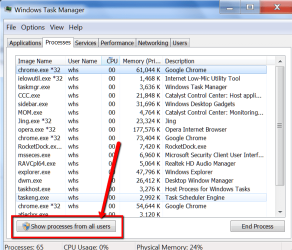
My processes were running 66 yesterday, today its running 94 somehow?? I've noticed that "svchost.exe" is taking up huge amounts of cpu and memory, making my system run terrible and the fan is running hard and hot. I've read up on the svchost and it appears to be in the right folder which means it's not supposed to be a virus.
I'm at a loss as to what to do at this point. Magically now if i try to download or open certain items i get an error messege saying i can't, i keep having to go under tools/internet options/security/custom level/enable downloads, like it resets itself over and over. I've never had to do this before and it's like i'm using someone else's computer all of a sudden?? I'm not sure if the AVG update messed up my computer or what? I just want to restore this to a time when it was working fine but i can't
I'm not sure what info is really needed for this so that someone could help but any direction would be greatly appreciated!!
Below is a screen shot of my task manager...

It keeps "not responding" over and over making it hard to use, matter of fact this is my second time typing this up because it stopped responding, closed and reopened making me lose everything i had typed.
I have a Toshiba Satellite running windows 7 64-bit. I've had issues in the past with it and normally do a system restore to get it back on track. When i went to do that today it stated that i couldn't and to contact admin, its never showed this before.
So i log in as admin and try to run a system restore and all the restore points are missing?? Theres always been plenty to choose from so i can't figure out what has happened??
I've ran AVG, Malewarebytes, and cc cleaner recently but it's not finding anything malicious. The only update that i've knowingly accepted was for AVG an Malwarebytes as they were both out of date.
My processes were running 66 yesterday, today its running 94 somehow?? I've noticed that "svchost.exe" is taking up huge amounts of cpu and memory, making my system run terrible and the fan is running hard and hot. I've read up on the svchost and it appears to be in the right folder which means it's not supposed to be a virus.
I'm at a loss as to what to do at this point. Magically now if i try to download or open certain items i get an error messege saying i can't, i keep having to go under tools/internet options/security/custom level/enable downloads, like it resets itself over and over. I've never had to do this before and it's like i'm using someone else's computer all of a sudden?? I'm not sure if the AVG update messed up my computer or what? I just want to restore this to a time when it was working fine but i can't
I'm not sure what info is really needed for this so that someone could help but any direction would be greatly appreciated!!
Below is a screen shot of my task manager...
My Computer
- Computer type
- PC/Desktop
- Computer Manufacturer/Model Number
- toshiba satellite
- OS
- windows 7 64 bit