Restore points???

JerryB

New member
Local time
10:57 AM
Messages
20
Location
Ormond Beach, Fl.
After installing the SP1 I no longer have automatic restore points????
How do I re-set this to make a restore point whenever there are changes made to the computer?
 

My Computer

Computer Manufacturer/Model Number
HP p6243w
OS
7 home premium 64
CPU
AMD Phenom 8750 Triple Core 2.40 Ghz
Motherboard
Narra 5
Memory
3 gigs
Graphics Card(s)
NVIDIA GeForce 9500 GT
Sound Card
Realtek High Definition Audio
Monitor(s) Displays
20 in. HP 2009m
Hard Drives
300 gig
You should have 1 from just before SP 1 installed, made by Windows Update. At least I did. Maybe you don't get one if you don't use Windows Update for the process?

It should already be set to make new restore points at certain times, but you can always make one manually.

Unless you turned it off.

Look at control panel/system/system protection/configure.
 

My Computer

Computer type
PC/Desktop
Computer Manufacturer/Model Number
Ignatz Special; 4 speed manual gearbox; factory air conditioning; one of one
OS
Windows 7 Home Premium SP1, 64-bit
CPU
Intel Skylake i5-6600K, not overclocked
Motherboard
AsRock Z170M Extreme 4, micro ATX
Memory
8 GB HyperX DDR4-2666 (2 x 4 GB)
Graphics Card(s)
none; graphics are integrated on CPU
Sound Card
onboard: Realtek ALC1150; external: USB Behringer UF0-202
Monitor(s) Displays
Dell S2340M 23 inch IPS
Screen Resolution
1600 x 900
Hard Drives
System: Crucial MX100 series SSD, 128 GB;
Data: Samsung Spinpoint 103SJ, 1 TB;
Backup: WD Caviar Green WD30EZRX-00D8PB0, 3 TB
PSU
Rosewill SilentNight 500 watt fanless, semi-modular
Case
Antec Solo II
Cooling
Noctua NH-U12S; Noctua F12 intake, Noctua S12A exhaust
Keyboard
Microsoft 200 6JH-00001 USB
Mouse
Dell or Microsoft optical wired; USB
Antivirus
Microsoft Security Essentials and Malwarebytes Premium
Browser
Pale Moon
Other Info
All fans PWM; speeds at idle: CPU circa 500 rpm; intake circa 600 rpm; exhaust circa 600 rpm; CPU temps 27 idle and 47 C load in a warm room (27 C/81 F) when running Intel Extreme Tuning Utility stress test.
:confused: This just allows me to make a manual restore point.
Somehow, I must have shut off the automatic restore point feature.
Like you said, before the SP1 install, it would automatically make a restore point everytime Windows Update was run, or if I deleted a program ?????
 

My Computer

Computer Manufacturer/Model Number
HP p6243w
OS
7 home premium 64
CPU
AMD Phenom 8750 Triple Core 2.40 Ghz
Motherboard
Narra 5
Memory
3 gigs
Graphics Card(s)
NVIDIA GeForce 9500 GT
Sound Card
Realtek High Definition Audio
Monitor(s) Displays
20 in. HP 2009m
Hard Drives
300 gig
How do you know it still won't run automatically?

Unless it is set to not run in that window.
 

My Computer

Computer type
PC/Desktop
Computer Manufacturer/Model Number
Ignatz Special; 4 speed manual gearbox; factory air conditioning; one of one
OS
Windows 7 Home Premium SP1, 64-bit
CPU
Intel Skylake i5-6600K, not overclocked
Motherboard
AsRock Z170M Extreme 4, micro ATX
Memory
8 GB HyperX DDR4-2666 (2 x 4 GB)
Graphics Card(s)
none; graphics are integrated on CPU
Sound Card
onboard: Realtek ALC1150; external: USB Behringer UF0-202
Monitor(s) Displays
Dell S2340M 23 inch IPS
Screen Resolution
1600 x 900
Hard Drives
System: Crucial MX100 series SSD, 128 GB;
Data: Samsung Spinpoint 103SJ, 1 TB;
Backup: WD Caviar Green WD30EZRX-00D8PB0, 3 TB
PSU
Rosewill SilentNight 500 watt fanless, semi-modular
Case
Antec Solo II
Cooling
Noctua NH-U12S; Noctua F12 intake, Noctua S12A exhaust
Keyboard
Microsoft 200 6JH-00001 USB
Mouse
Dell or Microsoft optical wired; USB
Antivirus
Microsoft Security Essentials and Malwarebytes Premium
Browser
Pale Moon
Other Info
All fans PWM; speeds at idle: CPU circa 500 rpm; intake circa 600 rpm; exhaust circa 600 rpm; CPU temps 27 idle and 47 C load in a warm room (27 C/81 F) when running Intel Extreme Tuning Utility stress test.
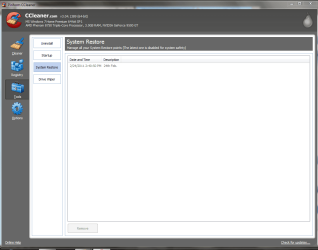
Because, CCleaner always tells me what restore points I have.
I manually created this restore point yesterday.
 

Attachments

  • 2.PNG
    2.PNG
    141.9 KB · Views: 8

My Computer

Computer Manufacturer/Model Number
HP p6243w
OS
7 home premium 64
CPU
AMD Phenom 8750 Triple Core 2.40 Ghz
Motherboard
Narra 5
Memory
3 gigs
Graphics Card(s)
NVIDIA GeForce 9500 GT
Sound Card
Realtek High Definition Audio
Monitor(s) Displays
20 in. HP 2009m
Hard Drives
300 gig
Default is to create a new sys rest pt if there isn't already one in the last 7 days.
 

My Computers

System One System Two

  • Computer type
    PC/Desktop
    OS
    7 X64
    CPU
    i5 8400
    Motherboard
    gigabyte b365m ds3h
    Memory
    2x8gb 3200mhz
    Hard Drives
    various
    PSU
    pure power 11 400w cm
    Case
    Coolermaster
    Cooling
    cryorig m9i
  • Computer type
    PC/Desktop
    OS
    7x64
    CPU
    g5400
    Motherboard
    ga b365m ds3h
    Memory
    8gb ddr4 2400
    PSU
    xfx pro 450w
Because, CCleaner always tells me what restore points I have.
I manually created this restore point yesterday.

All CCleaner can tell you is what restore points you have right now.

It has no idea if one will be made in 30 seconds or tomorrow or next week.
 

My Computer

Computer type
PC/Desktop
Computer Manufacturer/Model Number
Ignatz Special; 4 speed manual gearbox; factory air conditioning; one of one
OS
Windows 7 Home Premium SP1, 64-bit
CPU
Intel Skylake i5-6600K, not overclocked
Motherboard
AsRock Z170M Extreme 4, micro ATX
Memory
8 GB HyperX DDR4-2666 (2 x 4 GB)
Graphics Card(s)
none; graphics are integrated on CPU
Sound Card
onboard: Realtek ALC1150; external: USB Behringer UF0-202
Monitor(s) Displays
Dell S2340M 23 inch IPS
Screen Resolution
1600 x 900
Hard Drives
System: Crucial MX100 series SSD, 128 GB;
Data: Samsung Spinpoint 103SJ, 1 TB;
Backup: WD Caviar Green WD30EZRX-00D8PB0, 3 TB
PSU
Rosewill SilentNight 500 watt fanless, semi-modular
Case
Antec Solo II
Cooling
Noctua NH-U12S; Noctua F12 intake, Noctua S12A exhaust
Keyboard
Microsoft 200 6JH-00001 USB
Mouse
Dell or Microsoft optical wired; USB
Antivirus
Microsoft Security Essentials and Malwarebytes Premium
Browser
Pale Moon
Other Info
All fans PWM; speeds at idle: CPU circa 500 rpm; intake circa 600 rpm; exhaust circa 600 rpm; CPU temps 27 idle and 47 C load in a warm room (27 C/81 F) when running Intel Extreme Tuning Utility stress test.
After installing the SP1 I no longer have automatic restore points????
How do I re-set this to make a restore point whenever there are changes made to the computer?

I can confirm this on my DT (laptop is powered off at the moment).

I just checked (after an uneventful SP1 install 2 days ago) and, indeed, system restore (which had been on) was set back to off, and 0% disk usage.

I just turned it back on and reset it.

Had I not seen this thread, I never would have known it was off!
 

My Computer

Computer type
PC/Desktop
Computer Manufacturer/Model Number
Dell Studio XPS 8500
OS
OEM Windows 7 Ult (x64) SP1
CPU
Intel Core-i7 3770 @ 3.4 GHz
Motherboard
"Dell" branded
Memory
16 GB DDR3 SDRAM @ 1333 MHz
Graphics Card(s)
NVidia GeForce GT620 1 GB
Sound Card
THX TruStudio PC
Monitor(s) Displays
Dell U2410 Full HD
Hard Drives
2.0 TB SATA2 @ 7200 RPM
PSU
350W
Keyboard
MS 4000 Ergon - Wired
Mouse
Logitech Anywhere MX
Internet Speed
Cable HSI w/Turbo (router)
Antivirus
KIS-MBAM Premium-MBAE Premium
Browser
Fx (current version); IE
Other Info
And a Win7/64 Pro laptop; And a Win10/64 Pro desktop.
Dear JerryB,
For automatic system check points(or restore points) to be created the computer has to be in an idle state. This cannot happen when you are running a full virus scan or continuously gaming thus not allowing the system restore function to "intrude" and create a "point" automatically!

The version i used before was Win.XP, where by design, a restore point is created automatically once a day!

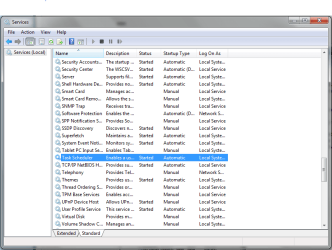
The second cause could be, if per chance,under services, the "automatic" setting is disabled for system event notification service and Task Scheduler!
Hence, make sure if the System Restore and Task Scheduler service are running and set to Automatic. To manage the Services configuration, type "services.msc" in the RUN box OR type the same command as admin. in the cmd box to open services. Under"services look under "standard" for the above two . Double-click each of the tasks and set them to Automatic.
Let us see how things pan out from there!

Regards,
Sreedhav
 

Attachments

  • System Restore not creating automatic System Checkpoints - Avant Browser_2011-02-25_18-16-30.png
    System Restore not creating automatic System Checkpoints - Avant Browser_2011-02-25_18-16-30.png
    116 KB · Views: 12
Last edited:

My Computer

Computer Manufacturer/Model Number
Sony Vaio C series VPCCB35FN laptop
OS
MS Windows 7 Home Premium 64-bit SP1
CPU
IntelCore [email protected]; Sandy Bridge 32nm Tech.
Motherboard
Sony Vaio Version:C609NJYJ
Memory
4096Mb RAM; Single ChannelDDR3@665MHz; DRAM Freq:662MHz
Graphics Card(s)
AMD Radeon HD 6630M; GPU:Whistler;BIOS Core&mem Clock:123.36
Sound Card
REALTEK High Definition Audio Device; INTEL Display Card
Monitor(s) Displays
Generic PnP Intel HD;Resolution:1920*1040 Pixels; BPP:32bits
Screen Resolution
Current Resolution:1920*1080 Pixels; Monitor Frequency:60Hz
Hard Drives
Internal HD:TOSHIBA MK5061GSY; Real Size:488 GB;NTFS; 3 Partitions; SATA; HEADS:16

External HDD: WD Elements 1023 PORTABLE; Estimated Size: 1TB; NTFS; 3 Partitions
Cooling
Lateral Exhaust with a Cooling Pad Placed Beneath.
Keyboard
Logitech Bluetooth+ Generic Integrated K-B
Mouse
Logitech Bluetooth
Internet Speed
2MBPS
Other Info
1)Trend Micro Titanium Maximum Security Suite Version:3
2)SAS-PRO

3)MBAM--PRO


4)WATERFOX+IE9 +WOT+LINKEXTEND+ DRWEBCUREIT LINK CHECKER

5)SPYWAREBLASTER

6) WINPATROL PLUS

7) SANDBOXIE and
8) A BIT OF COMMON SENSE.
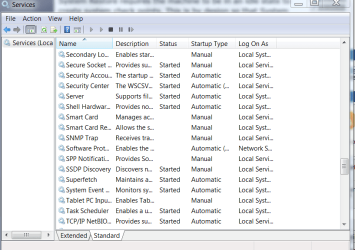
I just did as you suggested. They are set at automatic.
 

Attachments

  • 2.PNG
    2.PNG
    105.6 KB · Views: 8

My Computer

Computer Manufacturer/Model Number
HP p6243w
OS
7 home premium 64
CPU
AMD Phenom 8750 Triple Core 2.40 Ghz
Motherboard
Narra 5
Memory
3 gigs
Graphics Card(s)
NVIDIA GeForce 9500 GT
Sound Card
Realtek High Definition Audio
Monitor(s) Displays
20 in. HP 2009m
Hard Drives
300 gig
Back
Top