Restoring Event Viewer

AntiPCW

New member
Local time
9:59 AM
Messages
9
I seem to have lost my Event Viewer. Every time I try to run it I get a message : 'Event Log service unavailable. Verify that the service is running' but there is no reference to it in the Services. I can see the .exe in Windows/System32 but get the same error message there too. I have also tried this http://social.technet.microsoft.com/Forums/windowsserver/en-US/3f134e80-afde-47fd-a867-4b25c70f50d2/event-log-service-is-unavailable-verify-that-the-service-is-running?forum=winservergen

and got nowhere still. Can anyone help please? Thanks
 

My Computer

Computer type
PC/Desktop
Computer Manufacturer/Model Number
Custom Build
OS
Windows 7 64-bit Professional SP1
CPU
Intel Haswell i5-4670k
Motherboard
Asus Z-87 A
Memory
16Gb DDR3 Corsair Vengeance 1600MHz
Graphics Card(s)
Gigabyte GeForce GTX560Ti
Sound Card
Creative Soundblaster Audigy2 zs
Monitor(s) Displays
Dell U2412M
Screen Resolution
1920x1200
Hard Drives
Samsung 840 PRO 256GB
Samsung SpinRite 500Gb
Western Digital Green 1Tb
PSU
Antec TruePower TP650
Case
Antec 900/2
Cooling
Noctua NH-D14

My Computer

Computer Manufacturer/Model Number
W530-3630QM1
OS
windows 7 home 64bit
CPU
INTEL-CORE I7
Memory
16GB
Hard Drives
750GB
Browser
Chrome
Possible Fix

I repaired my event viewer with this little procedure. The problem you are pointing to could be file corruption.

Step 1: Disable the Event Log Service

a. Right-Click My Computer and chose Manage
b. Expand and locate 'Services and Applications'
c. On the right hand side Double-Click on the 'Event Log'
d. Change the 'Startup Type' to Disabled
e. Reboot computer

Step 2: Rename AppEvent.evt

This file is located in %systemroot%\system32\config

Right-click and rename file to AppEvent.old

Step 3: Re-enable the Event Log Service

a. Right-Click My Computer and chose Manage
b. Expand and locate 'Services and Applications'
c. On the right hand side Double-Click on the 'Event Log'
d. Change the 'Startup Type' to Automatic
e. Reboot computer
 

My Computer

Computer Manufacturer/Model Number
BGC (Bob's Garage Crew)
OS
win 7 X64 Ultimate SP1
CPU
I3770K
Motherboard
Asus P8Z77-V Deluxe
Memory
G Skill F3-14900CL9-4GBXL x 4
Graphics Card(s)
NVIDIA GeForce GTX670 + Intel 4000
Sound Card
Realtek HD 5.1 (MOB)
Monitor(s) Displays
Asus VW224T (1)
Screen Resolution
1920 x 1080
Hard Drives
SATA Corsair Force GT 2.5" 180GB (System) Sata 3
OCZ Vertex3 120GB
OCZ Vertex 2 120GB 2.5" SATA II
ST31000524AS 1000.2GB
WD15EARS (External)
PSU
CoolerMaster 1000 Watt
Case
CoolerMaster HAF X
Cooling
CPU -- CoolerMaster 520N
Keyboard
MS Wireless 3000 V2
Mouse
MS Wireless 3000 V2
Internet Speed
Cable
Antivirus
Norton Internet Security
Browser
IE9
Other Info
AMI Bios 1805
OC'd 3%
Hi HammerHead

Thank you for that response.

Unfortunately, at Step c: I do not see an entry for Event Log nor is it listed in the Services drop-down list.

Am trying a Command sfc /scannow.
 

My Computer

Computer type
PC/Desktop
Computer Manufacturer/Model Number
Custom Build
OS
Windows 7 64-bit Professional SP1
CPU
Intel Haswell i5-4670k
Motherboard
Asus Z-87 A
Memory
16Gb DDR3 Corsair Vengeance 1600MHz
Graphics Card(s)
Gigabyte GeForce GTX560Ti
Sound Card
Creative Soundblaster Audigy2 zs
Monitor(s) Displays
Dell U2412M
Screen Resolution
1920x1200
Hard Drives
Samsung 840 PRO 256GB
Samsung SpinRite 500Gb
Western Digital Green 1Tb
PSU
Antec TruePower TP650
Case
Antec 900/2
Cooling
Noctua NH-D14
Different Way of Finding

Let's try a different path to the services.

Click on start and in the search box type "services" select the icon with the little gear cog. It should present you with a window similar to what I have posted. Then follow the above method. If that doesn't work I have more fixes so hang on. For now lets see if we can find the Event services.

Event Log.PNG
 

My Computer

Computer Manufacturer/Model Number
BGC (Bob's Garage Crew)
OS
win 7 X64 Ultimate SP1
CPU
I3770K
Motherboard
Asus P8Z77-V Deluxe
Memory
G Skill F3-14900CL9-4GBXL x 4
Graphics Card(s)
NVIDIA GeForce GTX670 + Intel 4000
Sound Card
Realtek HD 5.1 (MOB)
Monitor(s) Displays
Asus VW224T (1)
Screen Resolution
1920 x 1080
Hard Drives
SATA Corsair Force GT 2.5" 180GB (System) Sata 3
OCZ Vertex3 120GB
OCZ Vertex 2 120GB 2.5" SATA II
ST31000524AS 1000.2GB
WD15EARS (External)
PSU
CoolerMaster 1000 Watt
Case
CoolerMaster HAF X
Cooling
CPU -- CoolerMaster 520N
Keyboard
MS Wireless 3000 V2
Mouse
MS Wireless 3000 V2
Internet Speed
Cable
Antivirus
Norton Internet Security
Browser
IE9
Other Info
AMI Bios 1805
OC'd 3%
Hi HammerHead

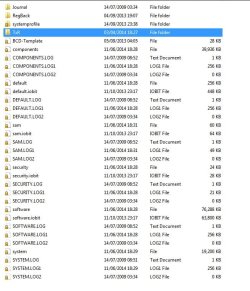
Okay, managed to follow your first response and got as far as Step 2. As you can see from the attached image, no sign of AppEvent.evt for me to rename, or do anything with.

Thanks. Awaiting your next tip.
 

Attachments

  • SystemRoot Config.jpg
    SystemRoot Config.jpg
    69 KB · Views: 0

My Computer

Computer type
PC/Desktop
Computer Manufacturer/Model Number
Custom Build
OS
Windows 7 64-bit Professional SP1
CPU
Intel Haswell i5-4670k
Motherboard
Asus Z-87 A
Memory
16Gb DDR3 Corsair Vengeance 1600MHz
Graphics Card(s)
Gigabyte GeForce GTX560Ti
Sound Card
Creative Soundblaster Audigy2 zs
Monitor(s) Displays
Dell U2412M
Screen Resolution
1920x1200
Hard Drives
Samsung 840 PRO 256GB
Samsung SpinRite 500Gb
Western Digital Green 1Tb
PSU
Antec TruePower TP650
Case
Antec 900/2
Cooling
Noctua NH-D14
Procedure Outdated?

I have had that for a long time. Things could have changed. I couldn't find that exact file either. I have attached a pdf that you can read and try. I acquired it when I was working on my event viewer. You will notice a couple of notes I added where there was a command to type. I had to add the command in the note. Read this and post back. It is zipped up.


View attachment Fix Event Log.zip
 

My Computer

Computer Manufacturer/Model Number
BGC (Bob's Garage Crew)
OS
win 7 X64 Ultimate SP1
CPU
I3770K
Motherboard
Asus P8Z77-V Deluxe
Memory
G Skill F3-14900CL9-4GBXL x 4
Graphics Card(s)
NVIDIA GeForce GTX670 + Intel 4000
Sound Card
Realtek HD 5.1 (MOB)
Monitor(s) Displays
Asus VW224T (1)
Screen Resolution
1920 x 1080
Hard Drives
SATA Corsair Force GT 2.5" 180GB (System) Sata 3
OCZ Vertex3 120GB
OCZ Vertex 2 120GB 2.5" SATA II
ST31000524AS 1000.2GB
WD15EARS (External)
PSU
CoolerMaster 1000 Watt
Case
CoolerMaster HAF X
Cooling
CPU -- CoolerMaster 520N
Keyboard
MS Wireless 3000 V2
Mouse
MS Wireless 3000 V2
Internet Speed
Cable
Antivirus
Norton Internet Security
Browser
IE9
Other Info
AMI Bios 1805
OC'd 3%
Hi HammerHead

Tried that latest fix with that from that zip file. Went through it meticulously to the letter, still Step 15---no result. Same fault. It looks like a complete OS remaster for me. Thanks for all your help.
 

My Computer

Computer type
PC/Desktop
Computer Manufacturer/Model Number
Custom Build
OS
Windows 7 64-bit Professional SP1
CPU
Intel Haswell i5-4670k
Motherboard
Asus Z-87 A
Memory
16Gb DDR3 Corsair Vengeance 1600MHz
Graphics Card(s)
Gigabyte GeForce GTX560Ti
Sound Card
Creative Soundblaster Audigy2 zs
Monitor(s) Displays
Dell U2412M
Screen Resolution
1920x1200
Hard Drives
Samsung 840 PRO 256GB
Samsung SpinRite 500Gb
Western Digital Green 1Tb
PSU
Antec TruePower TP650
Case
Antec 900/2
Cooling
Noctua NH-D14
Short On Options

Well I came up short. Sorry
 

My Computer

Computer Manufacturer/Model Number
BGC (Bob's Garage Crew)
OS
win 7 X64 Ultimate SP1
CPU
I3770K
Motherboard
Asus P8Z77-V Deluxe
Memory
G Skill F3-14900CL9-4GBXL x 4
Graphics Card(s)
NVIDIA GeForce GTX670 + Intel 4000
Sound Card
Realtek HD 5.1 (MOB)
Monitor(s) Displays
Asus VW224T (1)
Screen Resolution
1920 x 1080
Hard Drives
SATA Corsair Force GT 2.5" 180GB (System) Sata 3
OCZ Vertex3 120GB
OCZ Vertex 2 120GB 2.5" SATA II
ST31000524AS 1000.2GB
WD15EARS (External)
PSU
CoolerMaster 1000 Watt
Case
CoolerMaster HAF X
Cooling
CPU -- CoolerMaster 520N
Keyboard
MS Wireless 3000 V2
Mouse
MS Wireless 3000 V2
Internet Speed
Cable
Antivirus
Norton Internet Security
Browser
IE9
Other Info
AMI Bios 1805
OC'd 3%
Have you been to the Black Viper web site?
Have you ever used Advanced System Care for IObits or any of IObits programs?

Something caused this problem.
 

My Computer

Computer type
PC/Desktop
Computer Manufacturer/Model Number
Home made Desktop
OS
Windows 10 Pro. 64/ version 1709 Windows 7 Pro/64
CPU
Intel i7-6800K @ 4.3
Motherboard
ASUS X-99 Deluxe II
Memory
Corsair Platinum 16 gig @2400
Graphics Card(s)
EVGA GTX 1070 OC
Monitor(s) Displays
Asus 27" LED LCD/VE278Q
Screen Resolution
1920-1080 or 1280-720 HDMI
Hard Drives
INTEL SSD 730-240 Gb Sata 3.0/
PSU
EVGA Platium 1200W
Case
Phanteks Luxe Tempered Glass 8 fans/ one radiator
Cooling
XSPC/ Water Cooled CPU
Keyboard
Das 4 Professional
Mouse
Logitech M705/MX Anywhere 2-S
Internet Speed
100 mbits
Antivirus
Microsoft Security Essentials/ Malwarebytes Premium 3.0/ SAS
Browser
I.E. 11 default/Firefox/ ISP Time Warner Cable/Spectrum
Other Info
LG BluRay Burner/
Sound system-KLipsch-THX/
Icy Dock ssd Hot Swap bays.
Yes, I've been using that Black Viper since before Win XP came out, so am very familiar with it. It is what I diligently used to trim a ridiculous 75 Services running to an optimal 35-38. But I made sure Event Viewer was not one of those Services disabled.

And yes, again, I have used Advanced Care System till they kept hiking their renewal prices,and I said no thank you to any more renewals. The only bit of ACS I use is the IOBits Uninstaller.

How does all this sort my issue?
 

My Computer

Computer type
PC/Desktop
Computer Manufacturer/Model Number
Custom Build
OS
Windows 7 64-bit Professional SP1
CPU
Intel Haswell i5-4670k
Motherboard
Asus Z-87 A
Memory
16Gb DDR3 Corsair Vengeance 1600MHz
Graphics Card(s)
Gigabyte GeForce GTX560Ti
Sound Card
Creative Soundblaster Audigy2 zs
Monitor(s) Displays
Dell U2412M
Screen Resolution
1920x1200
Hard Drives
Samsung 840 PRO 256GB
Samsung SpinRite 500Gb
Western Digital Green 1Tb
PSU
Antec TruePower TP650
Case
Antec 900/2
Cooling
Noctua NH-D14

My Computer

Computer type
Laptop
Computer Manufacturer/Model Number
HP Pavilion dv6-6c10us
OS
x64 (6.3.9600) Win8.1 Pro & soon dual boot x64 (6.1.7601) Win7_SP1 HomePrem
CPU
AMD A6-3420M APU with Radeon(tm) HD Graphics
Motherboard
Hewlett-Packard 1805
Memory
6.00 GB
Graphics Card(s)
AMD Radeon(TM) HD 6520G
Sound Card
(1) AMD High Definition Audio Device (2) IDT High Definiti
Monitor(s) Displays
HP W2072a 20" LCD (1600 x 900) @ 60 Hz
Screen Resolution
1366 x 768 x 32 bits (4294967296 colors) @ 60 Hz
Hard Drives
ST640LM0 00 HM641JI SATA Disk Device
Keyboard
Logitech k520 wireless KB
Mouse
Logitech m320 wireless mouse (bundled with KB)
Internet Speed
15/5 | 54 MB Wireless 'n'
Antivirus
Realtime: Defender or Avast | On-demand: Malwarebytes, ESET
Browser
IE 11 on Win8, IE 10 on win 7
Other Info
Media: [Gimp, Audacity, VLC] || Comm: [WEmail 2012, Skype] || Productivity: [OpenOffice,| Textpad] || Utils: [Sysinternals, cCleaner, Speccy, Defraggler]
Yes, tried that in #2 Post, first. No dice.
 

My Computer

Computer type
PC/Desktop
Computer Manufacturer/Model Number
Custom Build
OS
Windows 7 64-bit Professional SP1
CPU
Intel Haswell i5-4670k
Motherboard
Asus Z-87 A
Memory
16Gb DDR3 Corsair Vengeance 1600MHz
Graphics Card(s)
Gigabyte GeForce GTX560Ti
Sound Card
Creative Soundblaster Audigy2 zs
Monitor(s) Displays
Dell U2412M
Screen Resolution
1920x1200
Hard Drives
Samsung 840 PRO 256GB
Samsung SpinRite 500Gb
Western Digital Green 1Tb
PSU
Antec TruePower TP650
Case
Antec 900/2
Cooling
Noctua NH-D14
Copy the following line

SC SDSET eventlog D:(A;;CCLCSWLOCRRC;;;AU)(A;;CCDCLCSWRPWPDTLOCRSDRCWDWO;;;BA)(A;;CCLCSWRPWPDTLOCRRC;;;SY)S:(AU;SA;DCRPWPDTCRSDWDWO;;;WD)(AU;FA;CCDCLCSWRPWPDTLOCRSDRCWDWO;;;WD)

Open an http://www.sevenforums.com/tutorials/783-elevated-command-prompt.html
   Tip
Standard keyboard shortcuts for Copy (Ctrl-C) and Paste (Ctrl-V) shortcuts do not work in Command Prompt.

Enabling the Quick Edit Mode in Command Prompt makes Copy and Paste operations easier.
See step 4 in http://www.sevenforums.com/tutorials/21874-command-prompt-copy-clipboard.html to enable it.

Copy in Command Prompt: highlight the text you want to copy, then press ENTER.
Paste in Command Prompt: right click with your mouse.


Paste the clipboard into the Command Prompt Window
 

My Computer

Computer type
Laptop
Computer Manufacturer/Model Number
HP Pavilion dv6-6c10us
OS
x64 (6.3.9600) Win8.1 Pro & soon dual boot x64 (6.1.7601) Win7_SP1 HomePrem
CPU
AMD A6-3420M APU with Radeon(tm) HD Graphics
Motherboard
Hewlett-Packard 1805
Memory
6.00 GB
Graphics Card(s)
AMD Radeon(TM) HD 6520G
Sound Card
(1) AMD High Definition Audio Device (2) IDT High Definiti
Monitor(s) Displays
HP W2072a 20" LCD (1600 x 900) @ 60 Hz
Screen Resolution
1366 x 768 x 32 bits (4294967296 colors) @ 60 Hz
Hard Drives
ST640LM0 00 HM641JI SATA Disk Device
Keyboard
Logitech k520 wireless KB
Mouse
Logitech m320 wireless mouse (bundled with KB)
Internet Speed
15/5 | 54 MB Wireless 'n'
Antivirus
Realtime: Defender or Avast | On-demand: Malwarebytes, ESET
Browser
IE 11 on Win8, IE 10 on win 7
Other Info
Media: [Gimp, Audacity, VLC] || Comm: [WEmail 2012, Skype] || Productivity: [OpenOffice,| Textpad] || Utils: [Sysinternals, cCleaner, Speccy, Defraggler]
Back
Top