Restoring system problems

Chips

New member
Member
VIP
Local time
7:38 PM
Messages
204
I've been trying to restore my system to an earlier point, but whenever I try it says I've got an anti-virus program that's stopping it. I've got AVG, but that's just the free edition. The only one with a firewall I've got is Norton 360, but I can't seem to find a way to turn it off. Is it Norton? If so, how do I turn it off so I can do a systems restore?
 

My Computer

Computer type
PC/Desktop
OS
Windows 10
Hi Chips,

If you open up Norton there should be an option to turn off 'real-time protection' or you should have the same option if you right-click the notification icon in the bottom right corner.

Hope this helps :)


OS
 

My Computer

Computer Manufacturer/Model Number
Compaq Desktop
OS
Windows 7 Ultimate x64
CPU
AMD Sempron Dual Core
Memory
3GB
Graphics Card(s)
NVIDIA GeForce 6150SE nForce 430
Screen Resolution
1024x768
Hard Drives
150GB Sata
Hi Chips, this can be fixed quite easily :)

Basically, the only way to really turn them off is to uninstall them.

However, you don't need to do that. If you want to System Restore, then simply do it from Safe Mode. Spam F5 as your PC boots, until you get a screen that says "pick an operating system to boot" then press F8 and select "Safe Mode" (NOT any of the "with networking" etc. just Safe Mode) and do the system restore from there.

Neither your AV or your Firewall will start in Safe Mode, so they can't interfere.
 

My Computer

Computer type
PC/Desktop
Computer Manufacturer/Model Number
Medion Erazer (note to self: insert model number) - with custom additions
OS
Windows 10 Pro x64
CPU
Intel Core i5 7400 @ 3.00GHz
Motherboard
OEM supllied with PC
Memory
8GB 2133Mhz DDR4 (OEM supplied)
Graphics Card(s)
Gygabyte Windforce GTX 1050Ti (Factory Overclocked)
Sound Card
Realtek
Monitor(s) Displays
Acer Al1980 + HKC
Screen Resolution
1360*768(HKC) / 1280*1024(Acer)
Hard Drives
1TB Toshiba
1TB WD Caviar Green
120GB Samsung Evo 840
PSU
OEM supplied (no power rating on case)
Case
OEM Supplied
Cooling
Stock
Keyboard
Logitech Wireless
Mouse
Logitect Wireless
Internet Speed
40Mb/s Down 10Mb/s Up
Antivirus
Defender
Browser
Firefox
You're running AVG and Norton?

Norton hates another scanner running along side, and it can cause many issues.
But, this is true for a large majority of other AVs as well.

Get rid of one of them, and use only one.

I would keep Norton and get rid of AVG personally, but it is a personal preference so whichever you prefer. But only use 1.

You'll actually have better protection if they aren't fighting each other.


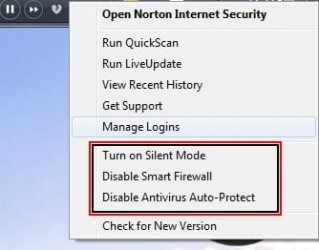
Norton shouldn't interfere with a system restore. But in case it is, if you right click thr Norton icon in your task bar you'll get these options.
 

Attachments

  • Untitled.jpg
    Untitled.jpg
    14.3 KB · Views: 0

My Computer

Computer Manufacturer/Model Number
Custom (Self Build)
OS
Windows 7 Home Premium 64bit
CPU
Intel Core i7 2700k
Motherboard
eVGA P67 SLI
Memory
8GB Mushkin Redline Ridgebacks @1866
Graphics Card(s)
EVGA GTX570 SC
Sound Card
XiFi Titanium HD
Monitor(s) Displays
LG W2453V
Screen Resolution
1920x1080
Hard Drives
Intel 320 80GB -- Intel X25-V 40GB --WD Black 1TB x2 -- WD Blue 640GB
PSU
Seasonic x750
Case
Corsair 600T SE White
Cooling
eVGA Superclocked CPU Cooler
Keyboard
Saitek Cyborg
Antivirus
Kaspersky
Browser
IE
Other Info
LG BD/DVD
Thanks for your help. I left it for a while 'cause I didn't have a recent restore point, but today I had another lock-up so I had a go using Safe Mode. Thankfully I had a more recent restore point this time. This time it failed first try by succeeded the second time. :D
 

My Computer

Computer type
PC/Desktop
OS
Windows 10
Hello Chips.


The method in this tutorial at the link below will make system restore points available from whenever the PC is started or re-started and there's an option to create a shortcut for the desktop so system restore points can be created with 1 click whenever you like.
Be sure to post back with any questions and to keep us informed.


System Restore Point : Create at System Startup
 

My Computer

Computer Manufacturer/Model Number
* BFK Customs *
OS
W 7 64-bit Ultimate
CPU
Intel Q9550 Yorkfield
Motherboard
ASUS P5Q Pro
Memory
8GB Dominator 8500C5D
Graphics Card(s)
ATI : XFX 5870
Sound Card
Realtek HD Audio 7-1
Monitor(s) Displays
1x 47" LCD HDMI & 3x 26" LCD HDMI
Screen Resolution
1920x1080P & 1920x1200
Hard Drives
1x 80GB Intel X25-M G2 SSD : 1x 500GB & 1x 640GB WD Caviar Black(s)
PSU
Corsair 620HX
Case
Cooler Master RC-690
Cooling
Tuniq Tower 120, 2x 140mm and 3x 120mm case fans
Keyboard
Microsoft 500
Mouse
Razer Diamondback 3G
Internet Speed
14 Mb/s
Other Info
1x Koutech 3Gb/s SATA HDD Hot Swap Rack
I would unintall Norton and AVG and run a lightweight free AV like the one most recommended here MS Security Essentials. It works perfectly with the Win7 firewall.

New OS, new tools and applications which keep it lean and mean.
 
Back
Top