"Retrieving libraries..." error

JPaterson

New member
Local time
8:11 PM
Messages
4
Location
Toronto, Ontario
Hey all,

New to the forum, found this place through a Google search.

I'm having an issue with libraries in Windows 7 Home Premium x64.

I'm trying to add a pictures folder to the Pictures library, but whenever I right-click the folder to choose "Include in library", instead of bringing up the libraries on my machine, it says "Retrieving libraries..." and it lasts like this, doesn't ever change.

When I click the "Include in library" option on the toolbar, it doesn't do anything, presumably because it can't find the libraries.

Any ideas?

Thanks!
 

My Computer

OS
Windows 7 Home Premium x64
Hey all,

New to the forum, found this place through a Google search.

I'm having an issue with libraries in Windows 7 Home Premium x64.

I'm trying to add a pictures folder to the Pictures library, but whenever I right-click the folder to choose "Include in library", instead of bringing up the libraries on my machine, it says "Retrieving libraries..." and it lasts like this, doesn't ever change.

When I click the "Include in library" option on the toolbar, it doesn't do anything, presumably because it can't find the libraries.

Any ideas?

Thanks!

You have lost me completely.
I have exactly the same OS version as you do. I do not have " include in library " option no matter where or which I right click. I must have missed something ?

When I want to add a new folder, I'll just simple right click at the Pictures folder under Libraries > New > Folder.
 

My Computer

Computer Manufacturer/Model Number
Acer Aspire 7741Z
OS
Windows 7 Home Premium 64-bit, SP1
CPU
Intel Pentium P6200, Cores 2, 2.13 GHz
Memory
4 GB
Graphics Card(s)
Intel HD
Sound Card
unknown
Monitor(s) Displays
17.3 inches
Screen Resolution
1600 x 900
Hard Drives
640 GB, 5400 PRM
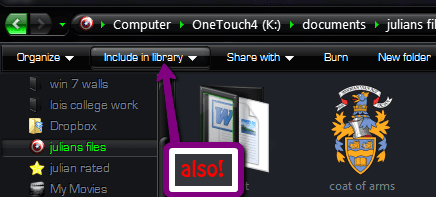
You may be looking in the wrong spot. In Windows Explorer, I have an Include in Library button at the top, with a drop down to chose from existing libraries, or create a new one. You need to click on a folder first, to make the options appear.

Now, for the question, it sounds like some kind of OS corruption. you could try running the system file checker (sfc /SCANNOW) at an elevated command prompt.
 

My Computer

OS
Windows 7 Ultimate x64 SP1
CPU
Intel Core i7-2600
Motherboard
Gigabyte GA-P67A-UD3P-B3
Memory
12 GB Patriot Extreme DDR3-1333
Graphics Card(s)
Nvidia GTX 470
Monitor(s) Displays
Dell UltraSharp 2209WA
Hard Drives
OCZ Agility3 240 GB, WD5001AALS, WD7501AALS
PSU
OCZ ModStream 700W
Case
CoolerMaster HAF 912 Advanced
Cooling
CoolerMaster Hyper 212 Plus
You may be looking in the wrong spot. In Windows Explorer, I have an Include in Library button at the top, with a drop down to chose from existing libraries, or create a new one. You need to click on a folder first, to make the options appear.

Now, for the question, it sounds like some kind of OS corruption. you could try running the system file checker (sfc /SCANNOW) at an elevated command prompt.

Running now. Will re-post once scan is complete.
 

My Computer

OS
Windows 7 Home Premium x64
"Windows Resource Protection did not find any integrity violations."

Any other suggestions? Heh
 

My Computer

OS
Windows 7 Home Premium x64
Not really, unfortunately. I guess you could always try removing the libraries and recreating them.
 

My Computer

OS
Windows 7 Ultimate x64 SP1
CPU
Intel Core i7-2600
Motherboard
Gigabyte GA-P67A-UD3P-B3
Memory
12 GB Patriot Extreme DDR3-1333
Graphics Card(s)
Nvidia GTX 470
Monitor(s) Displays
Dell UltraSharp 2209WA
Hard Drives
OCZ Agility3 240 GB, WD5001AALS, WD7501AALS
PSU
OCZ ModStream 700W
Case
CoolerMaster HAF 912 Advanced
Cooling
CoolerMaster Hyper 212 Plus
Hey all,

New to the forum, found this place through a Google search.

I'm having an issue with libraries in Windows 7 Home Premium x64.

I'm trying to add a pictures folder to the Pictures library, but whenever I right-click the folder to choose "Include in library", instead of bringing up the libraries on my machine, it says "Retrieving libraries..." and it lasts like this, doesn't ever change.

When I click the "Include in library" option on the toolbar, it doesn't do anything, presumably because it can't find the libraries.


Any ideas?

Thanks!

You have lost me completely.
I have exactly the same OS version as you do. I do not have " include in library " option no matter where or which I right click. I must have missed something ?

When I want to add a new folder, I'll just simple right click at the Pictures folder under Libraries > New > Folder.
right clicking a folder gives you the "include in library" in the context menu
2011-06-13_1602.png
 

My Computer

Computer Manufacturer/Model Number
Hewlett packard/p6512uk
OS
Microsoft Windows 7 Home Premium 64-bit 7600
CPU
IIx4 amd athelon 635 processor
Motherboard
FOXCONN 2AA9
Memory
2x2gb
Graphics Card(s)
ati radeon HD 5450
Sound Card
(1) Realtek High Definition Audio (2) AMD High Definition
Monitor(s) Displays
samsung lcd tv 32"
Screen Resolution
1360x 768
Hard Drives
(1) WDC WD10 01FAES-60Z2A0 SATA Disk Device (2) Maxtor OneTouch USB Device (3) ST310003 33AS USB Device (4) WD My Book 1111 USB Device
PSU
?
Cooling
air!
Keyboard
wireless hp
Mouse
wireless Hp,optical
Internet Speed
1.10mb/s
Antivirus
MSE
Browser
Firefox
Back
Top