Reverting back to Windows 7

Richard58

New member
Member
Local time
4:22 PM
Messages
78
Hello, My laptop had Windows 7, I did a free upgrade to Windows 10 about a year ago, and I don't like it. I have the System Recovery discs for my laptop and used them, but SP1 did not download. I've managed to get it, but now Microsoft .NET 4.5 won't download. I don''t know what else I might have to download. I did a backup to a USB stick before using the Recovery discs, but apparently it didn't load the important stuff, or I don't know where to find them. I'm wondering if I'm trying to do something that is a waste of time. Is there a bunch of downloads that are difficult for me to do, I'm not real good with programs and I'm no computer whiz. Should I just try to go back to Windows 10, or ?? Microsoft update is no help. Thank you for any help.
 

My Computer

Computer type
Laptop
Computer Manufacturer/Model Number
HP G-62
OS
Windows 7 Home 64 Bit
What exact model of Acer?

1. Backup activation SEE HERE

2. Install using media that includes SP1

3. Then manually Install KB3138612-x64.msu to get windows update working.
 

My Computers

System One System Two

  • Computer type
    PC/Desktop
    OS
    7 X64
    CPU
    i5 8400
    Motherboard
    gigabyte b365m ds3h
    Memory
    2x8gb 3200mhz
    Hard Drives
    various
    PSU
    pure power 11 400w cm
    Case
    Coolermaster
    Cooling
    cryorig m9i
  • Computer type
    PC/Desktop
    OS
    7x64
    CPU
    g5400
    Motherboard
    ga b365m ds3h
    Memory
    8gb ddr4 2400
    PSU
    xfx pro 450w
Richard58:
The exact SNID number and serial number of that Acer would also be helpful.
 

My Computer

Computer type
PC/Desktop
Computer Manufacturer/Model Number
Dell OptiPlex 9020
OS
Windows 7 Professional SP1 64-bit
CPU
Intel Core i7-4790 3.60 GHz
Memory
32 GB DDR3-1600 MHz
Graphics Card(s)
Integrated Intel HD Graphics 4600
Monitor(s) Displays
Viewsonic 32" LCD
Hard Drives
Kingston SATA 3 240 GB SSD
Internet Speed
Spectrum Internet 1000 Mbps
My laptop is a HP G62, Windows 7 Home Premium,64 bit -- the recovery discs were specifically for that model. Originally, I received the laptop free from someone because it didn't work correctly. I put a new hard drive in it, got the discs for it, and it's worked properly for years now. The Acer is my desktop pc.

Edit: Product G62-149WM
Serial #CNF0122CLX
Product # WQ434UA#ABA

Edit -- SIW2, I used the link you provided in comment 3 and the Updates appear to be working now, it may take awhile.

Edit -- downloading about 192 updates.
 
Last edited:

My Computer

Computer type
Laptop
Computer Manufacturer/Model Number
HP G-62
OS
Windows 7 Home 64 Bit
You should have disabled WU and used Simplix
It has all the updates without the traking.
 

My Computers

System One System Two

  • Computer type
    PC/Desktop
    Computer Manufacturer/Model Number
    custom build
    OS
    Windows 7 HP 64
    CPU
    i5 6600K - 800MHz to 4200MHz
    Motherboard
    GA-Z170-HD3P
    Memory
    4+4G GSkill DDR4 3000
    Graphics Card(s)
    IG - Intel 530
    Monitor(s) Displays
    Samsung 226BW
    Screen Resolution
    1680x1050
    Hard Drives
    (1) -1 SM951 – 128GB M.2 AHCI PCIe SSD drive for Windows 7 and Lubuntu
    (2) -1 WD SATA 3 - 1T for Data
    (3) -1 WD SATA 3 - 1T for backup
    PSU
    Thermaltake 450W TR2 gold
    Keyboard
    Old and good Chicony mechanical keyboard
    Mouse
    Logitech mX performance - 9 buttons (had to disable some)
    Internet Speed
    500Mb/s
    Browser
    Firefox 64
    Other Info
    TinyWall firewall
  • Computer type
    Laptop
    System Manufacturer/Model Number
    Asus Q550LF
    OS
    Windows 7 Pro
    CPU
    i7-4500U 800MHz to 3.0GHz
    Motherboard
    Asus Q550LF
    Memory
    (4+4)G DDR3 1600
    Graphics Card(s)
    IG intel 4400 + NVIDIA GeForce GT 745M
    Sound Card
    Realtek
    Monitor(s) Displays
    LG Display LP156WF4-SPH1
    Screen Resolution
    1920 x 1080
    Hard Drives
    BX500 120G SSD for Windows and programs +
    1T HDD for data
    Internet Speed
    500 Mb/s
    Browser
    Firefox
    Other Info
    TinyWall firewall
If you managed to install SP1:

you then need the update I indicated in my previous post, which can then make Windows update work.

Or you can just run simplix as megahertz suggested, which will do the whole job
 

My Computers

System One System Two

  • Computer type
    PC/Desktop
    OS
    7 X64
    CPU
    i5 8400
    Motherboard
    gigabyte b365m ds3h
    Memory
    2x8gb 3200mhz
    Hard Drives
    various
    PSU
    pure power 11 400w cm
    Case
    Coolermaster
    Cooling
    cryorig m9i
  • Computer type
    PC/Desktop
    OS
    7x64
    CPU
    g5400
    Motherboard
    ga b365m ds3h
    Memory
    8gb ddr4 2400
    PSU
    xfx pro 450w

My Computers

System One System Two

  • Computer type
    PC/Desktop
    Computer Manufacturer/Model Number
    custom build
    OS
    Windows 7 HP 64
    CPU
    i5 6600K - 800MHz to 4200MHz
    Motherboard
    GA-Z170-HD3P
    Memory
    4+4G GSkill DDR4 3000
    Graphics Card(s)
    IG - Intel 530
    Monitor(s) Displays
    Samsung 226BW
    Screen Resolution
    1680x1050
    Hard Drives
    (1) -1 SM951 – 128GB M.2 AHCI PCIe SSD drive for Windows 7 and Lubuntu
    (2) -1 WD SATA 3 - 1T for Data
    (3) -1 WD SATA 3 - 1T for backup
    PSU
    Thermaltake 450W TR2 gold
    Keyboard
    Old and good Chicony mechanical keyboard
    Mouse
    Logitech mX performance - 9 buttons (had to disable some)
    Internet Speed
    500Mb/s
    Browser
    Firefox 64
    Other Info
    TinyWall firewall
  • Computer type
    Laptop
    System Manufacturer/Model Number
    Asus Q550LF
    OS
    Windows 7 Pro
    CPU
    i7-4500U 800MHz to 3.0GHz
    Motherboard
    Asus Q550LF
    Memory
    (4+4)G DDR3 1600
    Graphics Card(s)
    IG intel 4400 + NVIDIA GeForce GT 745M
    Sound Card
    Realtek
    Monitor(s) Displays
    LG Display LP156WF4-SPH1
    Screen Resolution
    1920 x 1080
    Hard Drives
    BX500 120G SSD for Windows and programs +
    1T HDD for data
    Internet Speed
    500 Mb/s
    Browser
    Firefox
    Other Info
    TinyWall firewall
My laptop is a HP G62, Windows 7 Home Premium,64 bit -- the recovery discs were specifically for that model.
G62-149WM
Serial # CNF0122CLX
Product # WQ434UA#ABA
That model laptop is more than 10 years old, so HP no longer has a fully-functional support site for it.
Computer Surgeons indicates that model laptop (same product number) came with a 3-disc recovery kit that contains Windows 7 Home Premium/Professional 64-bit.
It does not confirm if Service Pack 1 is part of it.
 

My Computer

Computer type
PC/Desktop
Computer Manufacturer/Model Number
Dell OptiPlex 9020
OS
Windows 7 Professional SP1 64-bit
CPU
Intel Core i7-4790 3.60 GHz
Memory
32 GB DDR3-1600 MHz
Graphics Card(s)
Integrated Intel HD Graphics 4600
Monitor(s) Displays
Viewsonic 32" LCD
Hard Drives
Kingston SATA 3 240 GB SSD
Internet Speed
Spectrum Internet 1000 Mbps
It took me over 6 hours to download and install the updates -- but, so far, it's looking pretty good. I like it when my desktop and laptop systems are the same. Now I just need to organize Bookmarks, programs, and everything else to get it set up properly. THANK YOU to everyone for the help -- I was getting discouraged.
 

My Computer

Computer type
Laptop
Computer Manufacturer/Model Number
HP G-62
OS
Windows 7 Home 64 Bit
Make a backup image, just in case.

If you have a problem somewhere down the line, e.g. your hd dies - then you can restore the backup image to the new hd in a few minutes. Or if you get some nasty infection - just restore the image.
 

My Computers

System One System Two

  • Computer type
    PC/Desktop
    OS
    7 X64
    CPU
    i5 8400
    Motherboard
    gigabyte b365m ds3h
    Memory
    2x8gb 3200mhz
    Hard Drives
    various
    PSU
    pure power 11 400w cm
    Case
    Coolermaster
    Cooling
    cryorig m9i
  • Computer type
    PC/Desktop
    OS
    7x64
    CPU
    g5400
    Motherboard
    ga b365m ds3h
    Memory
    8gb ddr4 2400
    PSU
    xfx pro 450w
OK, will do, thanks. I've had HD's go bad previously. I assume putting it on a USB stick is good?,
 

My Computer

Computer type
Laptop
Computer Manufacturer/Model Number
HP G-62
OS
Windows 7 Home 64 Bit
I assume putting it on a USB stick is good?

Thats better than nothing, but it is more reliable to use an external hd to store the image file.

If you use windows system image, it doesnt like backing up to usb stick.

Either way, it will take a while if your laptop only has usb2 ports

I would suggest you run cleanmgr first to get rid of any superseded stuff from the sp1 upgrade and subsequent updates.

In addition:

If you havent already, I would suggest replacing your laptops mechanical hd with an ssd. They are quite cheap now, and will make a noticeable difference.

- - - Updated - - -

This will give you some idea:

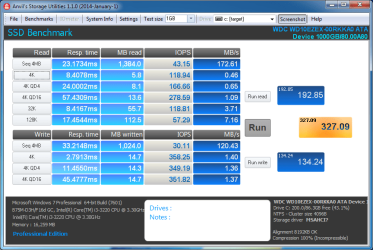
This is quite a good mechanical disk:

WDC WD10EZEX-00RKKA0 ATA Device_1000GB_1GB-20210621-0746.png


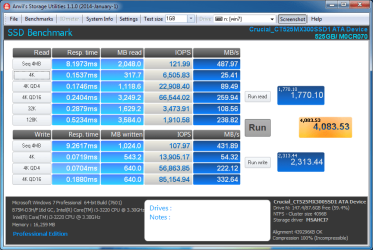
This is an ssd - it is connected to a sataIII port, but even when connected via sataII port is a big improvement on a mechanical spinner

Crucial_CT525MX300SSD1 ATA Device_525GB_1GB-20210621835.png

- - - Updated - - -

The best ssd are the samsung 870 Evo, closely followed by samsung 860 Evo then the crucial mx500 . You probably wouldnt notice the difference. Even cheaper options are the Qvo or bx500 ranges. The larger ones tend to perform better and have more edurance. Also the first 3 have more endurance than the cheaper ones.
 
Last edited:

My Computers

System One System Two

  • Computer type
    PC/Desktop
    OS
    7 X64
    CPU
    i5 8400
    Motherboard
    gigabyte b365m ds3h
    Memory
    2x8gb 3200mhz
    Hard Drives
    various
    PSU
    pure power 11 400w cm
    Case
    Coolermaster
    Cooling
    cryorig m9i
  • Computer type
    PC/Desktop
    OS
    7x64
    CPU
    g5400
    Motherboard
    ga b365m ds3h
    Memory
    8gb ddr4 2400
    PSU
    xfx pro 450w
Great suggestions, thank you. I do have, sitting in a drawer, a Seagate Free Agent GoFlex, USB 3.0, 500 GB I used previously, maybe I could format it and then do the system image to it.
Edit, and yes, my pc seems to have only USB2 ports.
 

My Computer

Computer type
Laptop
Computer Manufacturer/Model Number
HP G-62
OS
Windows 7 Home 64 Bit
Nice link, I'll consider it once my laptop settles down. It keeps downloading updates and then restarting, then more updates, etc. But I'm getting it settled in now. I'm not a gamer, but as I get older, I have less patience while I wait for the computer.
 

My Computer

Computer type
Laptop
Computer Manufacturer/Model Number
HP G-62
OS
Windows 7 Home 64 Bit
Richard58, you should disable WU and run Simplix.
After all installations, run the batch file to uninstall the tracking and other trash.
See instructions on Single file with all updates - Simplix
 

My Computers

System One System Two

  • Computer type
    PC/Desktop
    Computer Manufacturer/Model Number
    custom build
    OS
    Windows 7 HP 64
    CPU
    i5 6600K - 800MHz to 4200MHz
    Motherboard
    GA-Z170-HD3P
    Memory
    4+4G GSkill DDR4 3000
    Graphics Card(s)
    IG - Intel 530
    Monitor(s) Displays
    Samsung 226BW
    Screen Resolution
    1680x1050
    Hard Drives
    (1) -1 SM951 – 128GB M.2 AHCI PCIe SSD drive for Windows 7 and Lubuntu
    (2) -1 WD SATA 3 - 1T for Data
    (3) -1 WD SATA 3 - 1T for backup
    PSU
    Thermaltake 450W TR2 gold
    Keyboard
    Old and good Chicony mechanical keyboard
    Mouse
    Logitech mX performance - 9 buttons (had to disable some)
    Internet Speed
    500Mb/s
    Browser
    Firefox 64
    Other Info
    TinyWall firewall
  • Computer type
    Laptop
    System Manufacturer/Model Number
    Asus Q550LF
    OS
    Windows 7 Pro
    CPU
    i7-4500U 800MHz to 3.0GHz
    Motherboard
    Asus Q550LF
    Memory
    (4+4)G DDR3 1600
    Graphics Card(s)
    IG intel 4400 + NVIDIA GeForce GT 745M
    Sound Card
    Realtek
    Monitor(s) Displays
    LG Display LP156WF4-SPH1
    Screen Resolution
    1920 x 1080
    Hard Drives
    BX500 120G SSD for Windows and programs +
    1T HDD for data
    Internet Speed
    500 Mb/s
    Browser
    Firefox
    Other Info
    TinyWall firewall
I disabled WU, did not run Simplix because it appeared as it might be over my abilities with a computer. I did run cleanmgr. Overall the laptop is running good -- BUT -- I'm having an intermittent issue with startups. The laptop is off all night, I start it up in the morning, the black screen comes on, the Windows logo will appear and it will say Starting Windows, and the Windows musical notes do not play. I have to shut off, then up again. It's about 50/50 on success/failure ratio. "Launch Startup Repair" does no good. A couple of times, I signed in and just when I started using it, it froze up. But once I get to using it for a few minutes, it has not frozen. It does not freeze up as the day goes on -- it's always near the startup.

Any ideas what to do -- if I go the route of the upgrade SSD and memory, will that just carry the same issue, or might that fix the issue? Thanks. Rich
 

My Computer

Computer type
Laptop
Computer Manufacturer/Model Number
HP G-62
OS
Windows 7 Home 64 Bit
Is your Win 7 SP1?
If it's not you should update it to SP1 KB976932

If you already have Win 7 SP1 you should install the updates using Simplix.

Many programs doesn't run if you're no up to date.
 

My Computers

System One System Two

  • Computer type
    PC/Desktop
    Computer Manufacturer/Model Number
    custom build
    OS
    Windows 7 HP 64
    CPU
    i5 6600K - 800MHz to 4200MHz
    Motherboard
    GA-Z170-HD3P
    Memory
    4+4G GSkill DDR4 3000
    Graphics Card(s)
    IG - Intel 530
    Monitor(s) Displays
    Samsung 226BW
    Screen Resolution
    1680x1050
    Hard Drives
    (1) -1 SM951 – 128GB M.2 AHCI PCIe SSD drive for Windows 7 and Lubuntu
    (2) -1 WD SATA 3 - 1T for Data
    (3) -1 WD SATA 3 - 1T for backup
    PSU
    Thermaltake 450W TR2 gold
    Keyboard
    Old and good Chicony mechanical keyboard
    Mouse
    Logitech mX performance - 9 buttons (had to disable some)
    Internet Speed
    500Mb/s
    Browser
    Firefox 64
    Other Info
    TinyWall firewall
  • Computer type
    Laptop
    System Manufacturer/Model Number
    Asus Q550LF
    OS
    Windows 7 Pro
    CPU
    i7-4500U 800MHz to 3.0GHz
    Motherboard
    Asus Q550LF
    Memory
    (4+4)G DDR3 1600
    Graphics Card(s)
    IG intel 4400 + NVIDIA GeForce GT 745M
    Sound Card
    Realtek
    Monitor(s) Displays
    LG Display LP156WF4-SPH1
    Screen Resolution
    1920 x 1080
    Hard Drives
    BX500 120G SSD for Windows and programs +
    1T HDD for data
    Internet Speed
    500 Mb/s
    Browser
    Firefox
    Other Info
    TinyWall firewall
Please begin and maintain a backup-making routine, full images of your OS and data partitions, onto external media, I use two dedicated ext USB HDDs for example. There probably is no such thing as A Perfect Time to make backups. In fact, this week, I will be making my routine backups onto my backup HDDs, taking my own advice! :)
 

My Computer

Computer type
PC/Desktop
Computer Manufacturer/Model Number
Antec desktop; Acer Aspire laptops
OS
Windows 7 Professional 64-bit
CPU
Desktop i5; Acers i5 & i7
Memory
desktop 16GB; 1 Acer 8GB & 1 Acer 16GB
Hard Drives
1TB split into 2 equal partitions [OS and data] usable by RJS
Internet Speed
AT&T DSL
Browser
FF, GChrome, msIE
Other Info
Windows 7 Firewall, Emsisoft AM/AV, MSE [scan-only], SpywareBlaster, Ruiware/BillP combine
RolandJS -- thanks for the suggestion. I backup my important pc on USB sticks twice a month. I don't use a pc for much input these days since retiring. I'm guessing your suggestion on how to do it is a better way.

Megahertz07-- I had SP1, So I did the Simplix. Everything went ok. I had 4 updates afterward, and did all four including Silverlight. I did not do the KB telemetry thing. A 'notepad' opened and I wasn't sure what to do with it. It's a case of 'I'm dumb enough to not know how dumb I am'. :) But I'm trying. I've started it once and it did as expected. Time will tell from here. Thanks. And it takes about 60 seconds to start when it works properly.
 

My Computer

Computer type
Laptop
Computer Manufacturer/Model Number
HP G-62
OS
Windows 7 Home 64 Bit
Back
Top