Hi Everyone,
I have a long story to tell here, so I already thank in advance anyone who has the patience and time to even read it...even more so help me in any way...
Story is as follows:
1 - I had an installation of win 7 64 bit Professional which I didn't turn on for about 1 year.
2 - When I turned it on, first thing I wanted to do was to install windows updates.
3 - It took 3 days for it to even find the updates, so I ran them and got to "Failure to Configure, Reverting Changes", which also took a couple of days.
4 - I browsed the net for solutions and tried absolutelly everything I found, including everything described here (deleting windows update cache, etc): How to Fix ''Failure Configuring Windows Updates'' Issue - and more, can't even remember what.
5 - NOTHING worked. So I decided to completely re-install windows from scratch. Defraged the hard disk, then completely wiped it and re-installed win 7 from scratch from the original CD.
6 - When the installation finished, I tried to search for updates. It again took 3 days and came back with about 241 updates.
7 - Again following advise from around, I started updating them in batches of 5 updates at a time. You can already count the amount of times I sat by the PC rebooting it...
8 - After each successfull update batch, I created a system restore point (successfully).
9 - When I got to the last 5 - low and behold - PC got in a loop of cannot configure windows, reverting changes. And I remind you - it is a brand new installation with nothing in it from a couple of weeks ago.
10 - I tried to do a system restore via f8 - but for some reason it didn't find any of the system restore points I had saved (can anyone explain that?).
11 - I went to f8 again and tried last known good configuration, just so I can log into the PC again. Don't know how, but it worked.
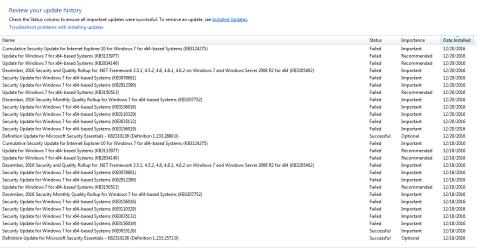
12 - Obviously all the 200 and so updates I had installed were no longer in the history.
13 - Now before I start searching for updates again (it currently shows only 13 updates available, 12 of them optional) and wait another 3 days for it to find - I need to know how not to fall back into this loop again.
14 - I wanted to post this a couple of hours ago, but there is an exlamation mark at the start button in windows and each time I shut down the PC, it tries to install those 12/13 updates and fails.
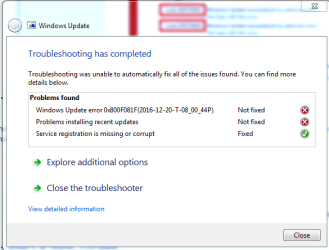
15 - So I am attaching here 2 different results of the windows update fix tool and CBS Log files, from both times I shut down the PC.
16 - Now I obviously will not shut it down again until someone answers me because it will again try to install these 12 updates and will fail again. And if it is failing with 12 updates, imagine what will happen after it finds the 200 other updates that need to be installed.
17 - I can't understand why this is happening on a brand new installation of windows. I am also not sure the troubleshoot results will help you help me because every time it gives a different result. I tried to upload here the folder CBS compressed as requested by your instructions but it 109MB after compression and the max here is 8MB, so I can't upload them here.
18 - Also important to note - windows gets to 99% installing updates and only then it starts the reverting changes thing.
Bless any help you can give me, I am almost giving up
Cheers!
I have a long story to tell here, so I already thank in advance anyone who has the patience and time to even read it...even more so help me in any way...
Story is as follows:
1 - I had an installation of win 7 64 bit Professional which I didn't turn on for about 1 year.
2 - When I turned it on, first thing I wanted to do was to install windows updates.
3 - It took 3 days for it to even find the updates, so I ran them and got to "Failure to Configure, Reverting Changes", which also took a couple of days.
4 - I browsed the net for solutions and tried absolutelly everything I found, including everything described here (deleting windows update cache, etc): How to Fix ''Failure Configuring Windows Updates'' Issue - and more, can't even remember what.
5 - NOTHING worked. So I decided to completely re-install windows from scratch. Defraged the hard disk, then completely wiped it and re-installed win 7 from scratch from the original CD.
6 - When the installation finished, I tried to search for updates. It again took 3 days and came back with about 241 updates.
7 - Again following advise from around, I started updating them in batches of 5 updates at a time. You can already count the amount of times I sat by the PC rebooting it...
8 - After each successfull update batch, I created a system restore point (successfully).
9 - When I got to the last 5 - low and behold - PC got in a loop of cannot configure windows, reverting changes. And I remind you - it is a brand new installation with nothing in it from a couple of weeks ago.
10 - I tried to do a system restore via f8 - but for some reason it didn't find any of the system restore points I had saved (can anyone explain that?).
11 - I went to f8 again and tried last known good configuration, just so I can log into the PC again. Don't know how, but it worked.
12 - Obviously all the 200 and so updates I had installed were no longer in the history.
13 - Now before I start searching for updates again (it currently shows only 13 updates available, 12 of them optional) and wait another 3 days for it to find - I need to know how not to fall back into this loop again.
14 - I wanted to post this a couple of hours ago, but there is an exlamation mark at the start button in windows and each time I shut down the PC, it tries to install those 12/13 updates and fails.
15 - So I am attaching here 2 different results of the windows update fix tool and CBS Log files, from both times I shut down the PC.
16 - Now I obviously will not shut it down again until someone answers me because it will again try to install these 12 updates and will fail again. And if it is failing with 12 updates, imagine what will happen after it finds the 200 other updates that need to be installed.
17 - I can't understand why this is happening on a brand new installation of windows. I am also not sure the troubleshoot results will help you help me because every time it gives a different result. I tried to upload here the folder CBS compressed as requested by your instructions but it 109MB after compression and the max here is 8MB, so I can't upload them here.
18 - Also important to note - windows gets to 99% installing updates and only then it starts the reverting changes thing.
Bless any help you can give me, I am almost giving up
Cheers!
Attachments

My Computer
At a glance
Windows 7 Professional 64bit
- Computer type
- PC/Desktop
- OS
- Windows 7 Professional 64bit