Ridiculously Slow/Flaky Wireless

Amorphous

New member
Local time
4:58 PM
Messages
6
OS: Windows 7
System: Sony VAIO SR
Router: Linksys WRT54G
Wireless adapter: Intel WiFi Link 5100 AGN

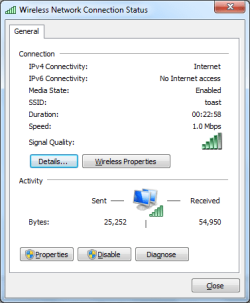
Around the house, my wireless connection is ridiculously slow where on previous occasions it was always fast. I have another laptop I'm running side-by-side with the my VAIO and its wireless performance is flawless, so I'm confident the router isn't the issue. My VAIO reports the signal quality at full bars, but the speed is usually only at 1 or 2 Mbps, whereas my other laptop always holds at 54 Mbps.

The connection itself is flaky. I get knocked off every 5-10 minutes. The only time there's any stability is if I'm 5-10 feet away from the router.

Any suggestions? Thanks.
 

Attachments

  • wireless1.png
    wireless1.png
    12.1 KB · Views: 24
  • wireless2.png
    wireless2.png
    11.2 KB · Views: 30

My Computer

OS
Windows 7
Hi Amorphous, welcome to the forums.

I would personally look to resetting your router, there could be certain addresses that might not be being read correctly by 7. I have had similar issues with connectivity on other peoples machines & a router reboot has solved all of them.
   Note
After resetting your router, it can take up to 2 minutes to be fully internet capable


Hope this helps :)


OS
 

My Computer

Computer Manufacturer/Model Number
Compaq Desktop
OS
Windows 7 Ultimate x64
CPU
AMD Sempron Dual Core
Memory
3GB
Graphics Card(s)
NVIDIA GeForce 6150SE nForce 430
Screen Resolution
1024x768
Hard Drives
150GB Sata
Thanks! Unfortunately, resetting my router did nothing. I thought I solved the problem last night by editing my power plan. It seems that my wireless adapter was running on a power saving mode. After an adjustment, I thought I was in the clear when my connection was reporting speeds of 36 to 54 Mbps. However, it seems I'm back to square one this morning with an abysmal 1 to 2 Mbps. I really haven't a clue what's going on.
 

My Computer

OS
Windows 7
OS: Windows 7
System: Sony VAIO SR
Router: Linksys WRT54G
Wireless adapter: Intel WiFi Link 5100 AGN

Around the house, my wireless connection is ridiculously slow where on previous occasions it was always fast. I have another laptop I'm running side-by-side with the my VAIO and its wireless performance is flawless, so I'm confident the router isn't the issue. My VAIO reports the signal quality at full bars, but the speed is usually only at 1 or 2 Mbps, whereas my other laptop always holds at 54 Mbps.

The connection itself is flaky. I get knocked off every 5-10 minutes. The only time there's any stability is if I'm 5-10 feet away from the router.

Any suggestions? Thanks.

IPv6 support off? what anti virus/firewall? 32 bit or 64?

Ken
 

My Computer

Computer Manufacturer/Model Number
HP Pavillion dv-7 1005 Tx
OS
Win 8 Release candidate 8400
CPU
[email protected]
Memory
4 gigs
Graphics Card(s)
Nvidia 9600M
Sound Card
HD built-in
Monitor(s) Displays
17" Wxga
Screen Resolution
1440x900
Cooling
none
Internet Speed
45Mb down 5Mb up
I'm not using a firewall or anti-virus application. It's 64-bit. The status window reports that IPv6 connectivity has "no Internet access." I don't believe I've turned off IPv6 support.
 

My Computer

OS
Windows 7
A

IPv6 probably isnt the problem but its not being used so you might as well turn it off.

Not even the win 7 firewall?
 

My Computer

Computer Manufacturer/Model Number
HP Pavillion dv-7 1005 Tx
OS
Win 8 Release candidate 8400
CPU
[email protected]
Memory
4 gigs
Graphics Card(s)
Nvidia 9600M
Sound Card
HD built-in
Monitor(s) Displays
17" Wxga
Screen Resolution
1440x900
Cooling
none
Internet Speed
45Mb down 5Mb up
I disabled Windows Firewall earlier while trying to pinpoint the problem. I turned off IPv6 as suggested.
 

My Computer

OS
Windows 7
Has this worked in a different OS? Could you have a hardware problem with the wifi card? Has the computer been opened, or dropped?
 

My Computer

Computer Manufacturer/Model Number
HP Pavillion dv-7 1005 Tx
OS
Win 8 Release candidate 8400
CPU
[email protected]
Memory
4 gigs
Graphics Card(s)
Nvidia 9600M
Sound Card
HD built-in
Monitor(s) Displays
17" Wxga
Screen Resolution
1440x900
Cooling
none
Internet Speed
45Mb down 5Mb up
It has not been opened or dropped. It's brand new. I'm not sure if the problem occurred previously because I upgraded to 7 instantly upon receiving it. I think I'll try reinstalling Vista to see what will happen. Thanks for your help.
 
Last edited:

My Computer

OS
Windows 7
I'm having similar problems.

I have a Dell Latitude 1520 with a Dell 1505 wireless-N mini card.

I'm getting 1mbps or less (more often than not, less) with an 802.11n connection that is no more than 15ft from the access point.

-Have reset the router (many times)
-Windows firewall is off
-Powersaving setting set to max wireless (i.e. no powersaving in regards to the wireless)
-Have tried Windows provided wireless drivers (even the ones updated via Windows update)
-Have tried Dell's Vista drivers
-Card operates at 50+mbps with XP
-Wired connection works fine

This seems to be a recent problem (1 or 2 months). I've been using Win7 since sometime is very early spring and while I never actually checked the speed my wireless card was getting, I also never noticed it being a problem until recently.

Anyone have any idea?

side note: the really sad part here is that the card works a LOT faster in Linux and there isn't even a Linux drivers for the card. :huh:
 

My Computer

Computer Manufacturer/Model Number
Dell 1520 Latitude
OS
Windows 7
I'm having similar problems.

I have a Dell Latitude 1520 with a Dell 1505 wireless-N mini card.

I'm getting 1mbps or less (more often than not, less) with an 802.11n connection that is no more than 15ft from the access point.

-Have reset the router (many times)
-Windows firewall is off
-Powersaving setting set to max wireless (i.e. no powersaving in regards to the wireless)
-Have tried Windows provided wireless drivers (even the ones updated via Windows update)
-Have tried Dell's Vista drivers
-Card operates at 50+mbps with XP
-Wired connection works fine

This seems to be a recent problem (1 or 2 months). I've been using Win7 since sometime is very early spring and while I never actually checked the speed my wireless card was getting, I also never noticed it being a problem until recently.

Anyone have any idea?

side note: the really sad part here is that the card works a LOT faster in Linux and there isn't even a Linux drivers for the card. :huh:

could you tell us what cable modem, router, and ISp

Ken
 

My Computer

Computer Manufacturer/Model Number
HP Pavillion dv-7 1005 Tx
OS
Win 8 Release candidate 8400
CPU
[email protected]
Memory
4 gigs
Graphics Card(s)
Nvidia 9600M
Sound Card
HD built-in
Monitor(s) Displays
17" Wxga
Screen Resolution
1440x900
Cooling
none
Internet Speed
45Mb down 5Mb up

My Computer

Computer Manufacturer/Model Number
Nvidia
OS
Windows 7 ultimate X64
CPU
quad core 2.6
Motherboard
Nvidia Nforce 6i
Memory
8 Gigs
Graphics Card(s)
8800 GTS x2
Sound Card
Onboard
Monitor(s) Displays
Dell 24"
Screen Resolution
1920 x 1600
I also had a problem with slow internet through wireless here is how I resolved it !

Slow Network File Copy issues in Windows 7 caused by Remote Differential Compression | Windows Reference

Hope this helps! -

Although the link is in reference to file copy issues it resolved my slow wireless connection to the interweb

Remote Differential Compression Myth: The Storage Team at Microsoft - File Cabinet Blog : Debunking Myths about Remote Differential Compression and System Performance
 

My Computer

Computer type
PC/Desktop
Computer Manufacturer/Model Number
Alienware Aurora ALX R4
OS
Windows 10 Pro (x64)
CPU
Intel Core i7-3930K (3.2GHz - 4.5GHz)
Motherboard
Alienware Aurora-R4 x79
Memory
4x Samsung 4GB PC3-12800 DDR3 (16GB 1600MHz)
Graphics Card(s)
Nvidia Geforce GTX 690
Sound Card
SteelSeries Siberia Elite
Monitor(s) Displays
Dell UltraSharp U3011
Screen Resolution
2560x1600
Hard Drives
Samsung 850 Pro 256 GB, Seagate 1TB Desktop Hybrid HDD, 2x Western Digital 4TB Green HDD
PSU
875W Some Dell PSU <.<
Case
Alienware Aurora ALX
Cooling
Custom Liquid Cooling (EK CPU & GPU blocks) dual EK 480RAD
Keyboard
Logitech G710+ Mechanical
Mouse
Logitech G700s
Internet Speed
Verizon Fios (50 mbps average)
Other Info
Server: Intel NUC D54250WYK: i5-4250U, 16GB, 256 GB mSATA, Windows Server 2012 R2
I also had a problem with slow internet through wireless here is how I resolved it !

Slow Network File Copy issues in Windows 7 caused by Remote Differential Compression | Windows Reference

Hope this helps! -

Although the link is in reference to file copy issues it resolved my slow wireless connection to the interweb
Even if it is a myth, I see no harm in trying this particular method. Thanks.

could you tell us what cable modem, router, and ISp

Ken
Router is a Linksys WRT330N. While am I getting slow Internet connection, Modem and ISP are irrelevant as the problem occurs with file transfers between my other Win7 desktop. Thanks for the reply.
 

My Computer

Computer Manufacturer/Model Number
Dell 1520 Latitude
OS
Windows 7
I am using a Linsys WRT56G router and a Dlink card, I am still having some issues as it happens, but it appears to be on port 80 only. I think it maybe my virus/network checker. Looks like I am going to try a fresh install to see if that cures the problem.
 

My Computer

Computer Manufacturer/Model Number
Nvidia
OS
Windows 7 ultimate X64
CPU
quad core 2.6
Motherboard
Nvidia Nforce 6i
Memory
8 Gigs
Graphics Card(s)
8800 GTS x2
Sound Card
Onboard
Monitor(s) Displays
Dell 24"
Screen Resolution
1920 x 1600
Hi, I have the same problem as well with Windows 7 on my Asus R2E.
The strange thing is, that after installing windows speed was OK, but on the other day it decreased drastically. I'm not sure what happened, maybe some update has been installed, or something.

P.s. my router is D-link DIR-655
 

My Computer

OS
Windows 7
And after dissabling "Remote Differential Compression" it's back on full speed ;)
 

My Computer

OS
Windows 7
And after dissabling "Remote Differential Compression" it's back on full speed ;)
That would be an incorrect assessment.
 

My Computer

Computer type
PC/Desktop
Computer Manufacturer/Model Number
Alienware Aurora ALX R4
OS
Windows 10 Pro (x64)
CPU
Intel Core i7-3930K (3.2GHz - 4.5GHz)
Motherboard
Alienware Aurora-R4 x79
Memory
4x Samsung 4GB PC3-12800 DDR3 (16GB 1600MHz)
Graphics Card(s)
Nvidia Geforce GTX 690
Sound Card
SteelSeries Siberia Elite
Monitor(s) Displays
Dell UltraSharp U3011
Screen Resolution
2560x1600
Hard Drives
Samsung 850 Pro 256 GB, Seagate 1TB Desktop Hybrid HDD, 2x Western Digital 4TB Green HDD
PSU
875W Some Dell PSU <.<
Case
Alienware Aurora ALX
Cooling
Custom Liquid Cooling (EK CPU & GPU blocks) dual EK 480RAD
Keyboard
Logitech G710+ Mechanical
Mouse
Logitech G700s
Internet Speed
Verizon Fios (50 mbps average)
Other Info
Server: Intel NUC D54250WYK: i5-4250U, 16GB, 256 GB mSATA, Windows Server 2012 R2
And after dissabling "Remote Differential Compression" it's back on full speed ;)
That would be an incorrect assessment.

Today after restart, it's back on very slow speed (like 8 Kb/s), and after reenabling RDC, speed goes to normal, but only until next restart...
So yes, it does not matter if RDC is on, or off.

Same effect does disconnecting and reconnecting back to wireless network.
 

My Computer

OS
Windows 7
I have encountered the exact issue. Running Windows 7, getting full bars and am within ten feet of the router, speeds at 54mbps, but randomly drop down to 1mbps. No rhyme or reason to when it happens or how long it stays this way. I have seen other Windows 7 users describing the same symptoms, but have found no effective fixes.
 

My Computer

OS
Windows 7 Professional 64bit
Back
Top