
Rig Build

When I get done with the rebuild I'll be running a different mobo, CPU, and DVD drive.

It seems like this should be the right order:
*** Get all the latest drivers for them now (saved to a flashdrive or external HD)
*** Do my rebuild and install all the new hardware
*** Install Seven
*** Install Drivers
*** Install Virus/Malware programs
*** DL latest updates
*** Run Prime95 stress test
*** Install my other programs (office, Adobe, etc...)

When I do my fresh install, I will re-format that partition again. this should wipe out all the old Drivers right?

Any other advice or am I headed in the right direction here? :thumbsup:
 
Last edited:

My Computer

Computer Manufacturer/Model Number
"WartHog Wonder"
OS
Windows 7 Ultimate x64 SP1
CPU
AMD Phenom II X4, 945, Quad Core, 3.0 GHz
Motherboard
Gigabyte MA785GM-US2H
Memory
8GB G.Skill PI Black PC2 6400 * 4-4-4-12 @1.9v
Graphics Card(s)
NVIDIA 512MB 9600GT
Sound Card
Realtek ALC889A Chipset (onboard)
Monitor(s) Displays
2 x 22" Hans-G LCD
Screen Resolution
1680x1050
Hard Drives
650GB 7200RPM WD Caviar Black
PSU
OCZ 700w GameXstream
Case
Cooler Master CM 690 Midtower
Cooling
Xigmatek Gaia SD1283 CPU Cooler, Assorted 120mm case fans
Keyboard
Dell SK-8115
Mouse
Microsoft Comfort Optical Mouse 3000
Other Info
Liteon iHAS 424-98B 24x DVD/CD Writer
Yep, when you reinstall, all the old drivers go away.

If you are going to bother to stress test, you may as well test your RAM with memtest86. You make a bootable disc with that application on it and boot from it and let the test run through several passes. Might take a few hours, but it's a good way to confirm if your RAM has any defects.

Memtest86+ - Advanced Memory Diagnostic Tool

Get it at above link.

Like Prime 95, it is optional and most folks don't do it.
 

My Computer

Computer type
PC/Desktop
Computer Manufacturer/Model Number
Ignatz Special; 4 speed manual gearbox; factory air conditioning; one of one
OS
Windows 7 Home Premium SP1, 64-bit
CPU
Intel Skylake i5-6600K, not overclocked
Motherboard
AsRock Z170M Extreme 4, micro ATX
Memory
8 GB HyperX DDR4-2666 (2 x 4 GB)
Graphics Card(s)
none; graphics are integrated on CPU
Sound Card
onboard: Realtek ALC1150; external: USB Behringer UF0-202
Monitor(s) Displays
Dell S2340M 23 inch IPS
Screen Resolution
1600 x 900
Hard Drives
System: Crucial MX100 series SSD, 128 GB;
Data: Samsung Spinpoint 103SJ, 1 TB;
Backup: WD Caviar Green WD30EZRX-00D8PB0, 3 TB
PSU
Rosewill SilentNight 500 watt fanless, semi-modular
Case
Antec Solo II
Cooling
Noctua NH-U12S; Noctua F12 intake, Noctua S12A exhaust
Keyboard
Microsoft 200 6JH-00001 USB
Mouse
Dell or Microsoft optical wired; USB
Antivirus
Microsoft Security Essentials and Malwarebytes Premium
Browser
Pale Moon
Other Info
All fans PWM; speeds at idle: CPU circa 500 rpm; intake circa 600 rpm; exhaust circa 600 rpm; CPU temps 27 idle and 47 C load in a warm room (27 C/81 F) when running Intel Extreme Tuning Utility stress test.
I'll do it. Thanks. :)
 
Last edited:

My Computer

Computer Manufacturer/Model Number
"WartHog Wonder"
OS
Windows 7 Ultimate x64 SP1
CPU
AMD Phenom II X4, 945, Quad Core, 3.0 GHz
Motherboard
Gigabyte MA785GM-US2H
Memory
8GB G.Skill PI Black PC2 6400 * 4-4-4-12 @1.9v
Graphics Card(s)
NVIDIA 512MB 9600GT
Sound Card
Realtek ALC889A Chipset (onboard)
Monitor(s) Displays
2 x 22" Hans-G LCD
Screen Resolution
1680x1050
Hard Drives
650GB 7200RPM WD Caviar Black
PSU
OCZ 700w GameXstream
Case
Cooler Master CM 690 Midtower
Cooling
Xigmatek Gaia SD1283 CPU Cooler, Assorted 120mm case fans
Keyboard
Dell SK-8115
Mouse
Microsoft Comfort Optical Mouse 3000
Other Info
Liteon iHAS 424-98B 24x DVD/CD Writer
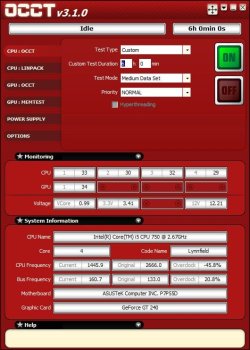
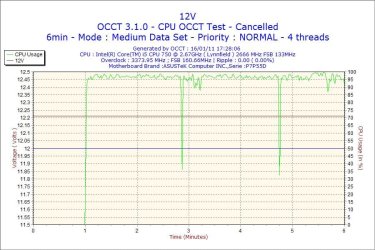
If you are going to do stress testing. I'll suggest OCCT It will not only do CPU tests, but GPU and PSU as well. It monitors temps and voltages, and gives you several graphs as images after, showing these items. I usually run it for 6 hours and have Real Temp open as well. Real Temp will show the lowest and highest temp reached. I think running these type tests should be a part of any new build. It will show any problems, including cooling issues, which should be addressed right away before stressing the PC through use. A Guy

Idle

OCCT.jpg

Testing

Testing.jpg

Results

Results.jpg

12v result (an example of the results, this was just a 5 min run to generate this image)

2011-01-16-17h28-Volt12.jpg

Very nice tool few are aware of. Read the FAQ on the site, and they have a forum for more info or questions. But it is very straight forward. A Guy
 

My Computer

Computer type
PC/Desktop
OS
Windows 10 Home x64
CPU
INTEL Core i5-750 Quad-Core 3.37GHz
Motherboard
ASUS P7P55D
Memory
HyperX Fury Black Series 8GB (2 x 4GB) 1866Mhz
Graphics Card(s)
EVGA GeForce GTX 750 Superclocked 1GB 128-Bit GDDR5
Monitor(s) Displays
LG 32MA68HY 32" IPS
Screen Resolution
1920 x 1080
Hard Drives
Samsung 840 Evo 120GB, SEAGATE 500GB Barracuda® 7200.12, SATA 3 Gb/s, 7200 RPM, 16MB cache
PSU
ANTEC TruePower New TP-550, 80 PLUS, 550W
Case
ANTEC Three Hundred Illusion
Cooling
COOLER MASTER Hyper 212 Plus, 4 x 120mm 1 x 140mm Noctua's
Internet Speed
85 + Mbps
Antivirus
Avast
Browser
Vivaldi
Wow Guy, that looks like a pretty SUHWEEET program. I'm gonna check that out now. :)
 

My Computer

Computer Manufacturer/Model Number
"WartHog Wonder"
OS
Windows 7 Ultimate x64 SP1
CPU
AMD Phenom II X4, 945, Quad Core, 3.0 GHz
Motherboard
Gigabyte MA785GM-US2H
Memory
8GB G.Skill PI Black PC2 6400 * 4-4-4-12 @1.9v
Graphics Card(s)
NVIDIA 512MB 9600GT
Sound Card
Realtek ALC889A Chipset (onboard)
Monitor(s) Displays
2 x 22" Hans-G LCD
Screen Resolution
1680x1050
Hard Drives
650GB 7200RPM WD Caviar Black
PSU
OCZ 700w GameXstream
Case
Cooler Master CM 690 Midtower
Cooling
Xigmatek Gaia SD1283 CPU Cooler, Assorted 120mm case fans
Keyboard
Dell SK-8115
Mouse
Microsoft Comfort Optical Mouse 3000
Other Info
Liteon iHAS 424-98B 24x DVD/CD Writer
Guy, it looks like that OCCT tests the RAM too. So, should I still run Memtest 86+?

Also, looks like that temp program only works for Intel chips. I'm gonna buy an AMD chip.
 

My Computer

Computer Manufacturer/Model Number
"WartHog Wonder"
OS
Windows 7 Ultimate x64 SP1
CPU
AMD Phenom II X4, 945, Quad Core, 3.0 GHz
Motherboard
Gigabyte MA785GM-US2H
Memory
8GB G.Skill PI Black PC2 6400 * 4-4-4-12 @1.9v
Graphics Card(s)
NVIDIA 512MB 9600GT
Sound Card
Realtek ALC889A Chipset (onboard)
Monitor(s) Displays
2 x 22" Hans-G LCD
Screen Resolution
1680x1050
Hard Drives
650GB 7200RPM WD Caviar Black
PSU
OCZ 700w GameXstream
Case
Cooler Master CM 690 Midtower
Cooling
Xigmatek Gaia SD1283 CPU Cooler, Assorted 120mm case fans
Keyboard
Dell SK-8115
Mouse
Microsoft Comfort Optical Mouse 3000
Other Info
Liteon iHAS 424-98B 24x DVD/CD Writer
Guy, it looks like that OCCT tests the RAM too. So, should I still run Memtest 86+?

Also, looks like that temp program only works for Intel chips. I'm gonna buy an AMD chip.

Memtest is the best memory test program, I'd definitely use that. OCCT just tests the GPU memory. For AMD, Core Temp will do you well. A Guy
 

My Computer

Computer type
PC/Desktop
OS
Windows 10 Home x64
CPU
INTEL Core i5-750 Quad-Core 3.37GHz
Motherboard
ASUS P7P55D
Memory
HyperX Fury Black Series 8GB (2 x 4GB) 1866Mhz
Graphics Card(s)
EVGA GeForce GTX 750 Superclocked 1GB 128-Bit GDDR5
Monitor(s) Displays
LG 32MA68HY 32" IPS
Screen Resolution
1920 x 1080
Hard Drives
Samsung 840 Evo 120GB, SEAGATE 500GB Barracuda® 7200.12, SATA 3 Gb/s, 7200 RPM, 16MB cache
PSU
ANTEC TruePower New TP-550, 80 PLUS, 550W
Case
ANTEC Three Hundred Illusion
Cooling
COOLER MASTER Hyper 212 Plus, 4 x 120mm 1 x 140mm Noctua's
Internet Speed
85 + Mbps
Antivirus
Avast
Browser
Vivaldi
Thanks my Friend!
 

My Computer

Computer Manufacturer/Model Number
"WartHog Wonder"
OS
Windows 7 Ultimate x64 SP1
CPU
AMD Phenom II X4, 945, Quad Core, 3.0 GHz
Motherboard
Gigabyte MA785GM-US2H
Memory
8GB G.Skill PI Black PC2 6400 * 4-4-4-12 @1.9v
Graphics Card(s)
NVIDIA 512MB 9600GT
Sound Card
Realtek ALC889A Chipset (onboard)
Monitor(s) Displays
2 x 22" Hans-G LCD
Screen Resolution
1680x1050
Hard Drives
650GB 7200RPM WD Caviar Black
PSU
OCZ 700w GameXstream
Case
Cooler Master CM 690 Midtower
Cooling
Xigmatek Gaia SD1283 CPU Cooler, Assorted 120mm case fans
Keyboard
Dell SK-8115
Mouse
Microsoft Comfort Optical Mouse 3000
Other Info
Liteon iHAS 424-98B 24x DVD/CD Writer
Okay, update:

I bought the Gigabyte mobo. For what I need and the "bang-for-the-buck" it is my best choice: Newegg.com - GIGABYTE GA-MA785GM-US2H AM3/AM2+/AM2 AMD 785G HDMI Micro ATX AMD Motherboard
picture.php


Then I decided to forgo the conventional card reader drive and opted for this: Newegg.com - Rosewill RSD-CR106 Black USB 2.0 External Single slot SD / MMC Card Reader
picture.php


And for the DVD Writer I went with this one: Newegg.com - LITE-ON Black 24X DVD+R 8X DVD+RW 12X DVD+R DL 24X DVD-R 6X DVD-RW 12X DVD-RAM 16X DVD-ROM 48X CD-R 32X CD-RW 48X CD-ROM 2MB Cache SATA 24X DVD Writer LightScribe Support
picture.php
 

My Computer

Computer Manufacturer/Model Number
"WartHog Wonder"
OS
Windows 7 Ultimate x64 SP1
CPU
AMD Phenom II X4, 945, Quad Core, 3.0 GHz
Motherboard
Gigabyte MA785GM-US2H
Memory
8GB G.Skill PI Black PC2 6400 * 4-4-4-12 @1.9v
Graphics Card(s)
NVIDIA 512MB 9600GT
Sound Card
Realtek ALC889A Chipset (onboard)
Monitor(s) Displays
2 x 22" Hans-G LCD
Screen Resolution
1680x1050
Hard Drives
650GB 7200RPM WD Caviar Black
PSU
OCZ 700w GameXstream
Case
Cooler Master CM 690 Midtower
Cooling
Xigmatek Gaia SD1283 CPU Cooler, Assorted 120mm case fans
Keyboard
Dell SK-8115
Mouse
Microsoft Comfort Optical Mouse 3000
Other Info
Liteon iHAS 424-98B 24x DVD/CD Writer
The mobo I got is the latest revision of that board (3.3) so I am happy about that. I went to Gigabyte's site and DL'd the drivers for everything. Do I need to update my BIOS drivers too? Here is the listing from the Gig site: GIGABYTE - Motherboard - Socket AM2+ - GA-MA785GM-US2H (rev. 3.3)

Also, do I need to DL any of the utility drivers? GIGABYTE - Motherboard - Socket AM2+ - GA-MA785GM-US2H (rev. 3.3)

I have 2 Rosewell 120mm case fans coming and I still have to order my CPU (remember I bought the Xigmatek Gaia SD128 cooler already).

I can't decide on which CPU. I am going to go with one of these 3 choices:
Newegg.com - AMD Athlon II X4 640 Propus 3.0GHz 4 x 512KB L2 Cache Socket AM3 95W Quad-Core Desktop Processor ADX640WFGMBOX
Newegg.com - AMD Phenom II X4 945 Deneb 3.0GHz 4 x 512KB L2 Cache 6MB L3 Cache Socket AM3 125W Quad-Core Processor HDX945FBGIBOX
Newegg.com - AMD Phenom II X4 955 Black Edition Deneb 3.2GHz 4 x 512KB L2 Cache 6MB L3 Cache Socket AM3 125W Quad-Core Processor HDZ955FBGMBOX
I checked and the mobo does support all 3 CPUs and the 125 watts. I may never get too deep into OCing, so I'm not sure I need the 955 BE.

Thanks everyone. I'm really excited about this build. Can't wait to get started! :D
 

My Computer

Computer Manufacturer/Model Number
"WartHog Wonder"
OS
Windows 7 Ultimate x64 SP1
CPU
AMD Phenom II X4, 945, Quad Core, 3.0 GHz
Motherboard
Gigabyte MA785GM-US2H
Memory
8GB G.Skill PI Black PC2 6400 * 4-4-4-12 @1.9v
Graphics Card(s)
NVIDIA 512MB 9600GT
Sound Card
Realtek ALC889A Chipset (onboard)
Monitor(s) Displays
2 x 22" Hans-G LCD
Screen Resolution
1680x1050
Hard Drives
650GB 7200RPM WD Caviar Black
PSU
OCZ 700w GameXstream
Case
Cooler Master CM 690 Midtower
Cooling
Xigmatek Gaia SD1283 CPU Cooler, Assorted 120mm case fans
Keyboard
Dell SK-8115
Mouse
Microsoft Comfort Optical Mouse 3000
Other Info
Liteon iHAS 424-98B 24x DVD/CD Writer

My Computer

Computer type
PC/Desktop
Computer Manufacturer/Model Number
Dwarf Dwf/11/2012 r09/2013
OS
Windows 8.1 Pro RTM x64
CPU
Intel Core-i5-3570K 4-core @ 3.4GHz (Ivy Bridge) (OC 4.4GHz)
Motherboard
ASRock Z77 Extreme4-M
Memory
4 x 4GB DDR3-1600 Corsair Vengeance CMZ8GX3M2A1600C9B (16GB)
Graphics Card(s)
MSI GeForce GTX770 Gaming OC 2GB
Sound Card
Realtek High Definition on board solution (ALC 898)
Monitor(s) Displays
ViewSonic VA1912w Widescreen (VGA)
Screen Resolution
1440x900
Hard Drives
OCZ Agility 3 SSD 120GB SATA III x2 (RAID 0)
Samsung HD501LJ 500GB SATA II x2
Hitachi HDS721010CLA332 1TB SATA II
Iomega 1.5TB Ext USB 2.0
WD 2.0TB Ext USB 3.0
PSU
XFX Pro Series 850W Semi-Modular
Case
Gigabyte IF233
Cooling
1 x 120mm Front Inlet 1 x 120mm Rear Exhaust
Keyboard
Microsoft Comfort Curve Keyboard 3000 (USB)
Mouse
Microsoft Comfort Mouse 3000 for Business (USB)
Internet Speed
NetGear DG834Gv3 ADSL Modem/Router (Ethernet) ~4.0 Mb/s (O2)
Antivirus
Avast! 8.0.1497
Browser
IE 11
Other Info
Optical Drive: HL-DT-ST BD-RE BH10LS30 SATA Bluray
Lexmark S305 Printer/Scanner/Copier (USB)
WEI Score: 8.1/8.1/8.5/8.5/8.25
Asus Eee PC 1011PX Netbook (Windows 7 x86 Starter)
Thanks Dwarf. That's the one I'm leaning towards. I may someday wish to OC and that one has the most potential for that. Also, Just out-of-the-box it is alot of chip for the $$!
 

My Computer

Computer Manufacturer/Model Number
"WartHog Wonder"
OS
Windows 7 Ultimate x64 SP1
CPU
AMD Phenom II X4, 945, Quad Core, 3.0 GHz
Motherboard
Gigabyte MA785GM-US2H
Memory
8GB G.Skill PI Black PC2 6400 * 4-4-4-12 @1.9v
Graphics Card(s)
NVIDIA 512MB 9600GT
Sound Card
Realtek ALC889A Chipset (onboard)
Monitor(s) Displays
2 x 22" Hans-G LCD
Screen Resolution
1680x1050
Hard Drives
650GB 7200RPM WD Caviar Black
PSU
OCZ 700w GameXstream
Case
Cooler Master CM 690 Midtower
Cooling
Xigmatek Gaia SD1283 CPU Cooler, Assorted 120mm case fans
Keyboard
Dell SK-8115
Mouse
Microsoft Comfort Optical Mouse 3000
Other Info
Liteon iHAS 424-98B 24x DVD/CD Writer
I would not flash the BIOS unless there's a specific issue an update is issued to sort.
 

My Computer

Computer Manufacturer/Model Number
* BFK Customs *
OS
W 7 64-bit Ultimate
CPU
Intel Q9550 Yorkfield
Motherboard
ASUS P5Q Pro
Memory
8GB Dominator 8500C5D
Graphics Card(s)
ATI : XFX 5870
Sound Card
Realtek HD Audio 7-1
Monitor(s) Displays
1x 47" LCD HDMI & 3x 26" LCD HDMI
Screen Resolution
1920x1080P & 1920x1200
Hard Drives
1x 80GB Intel X25-M G2 SSD : 1x 500GB & 1x 640GB WD Caviar Black(s)
PSU
Corsair 620HX
Case
Cooler Master RC-690
Cooling
Tuniq Tower 120, 2x 140mm and 3x 120mm case fans
Keyboard
Microsoft 500
Mouse
Razer Diamondback 3G
Internet Speed
14 Mb/s
Other Info
1x Koutech 3Gb/s SATA HDD Hot Swap Rack
Why, Thank You BFK. :)
 

My Computer

Computer Manufacturer/Model Number
"WartHog Wonder"
OS
Windows 7 Ultimate x64 SP1
CPU
AMD Phenom II X4, 945, Quad Core, 3.0 GHz
Motherboard
Gigabyte MA785GM-US2H
Memory
8GB G.Skill PI Black PC2 6400 * 4-4-4-12 @1.9v
Graphics Card(s)
NVIDIA 512MB 9600GT
Sound Card
Realtek ALC889A Chipset (onboard)
Monitor(s) Displays
2 x 22" Hans-G LCD
Screen Resolution
1680x1050
Hard Drives
650GB 7200RPM WD Caviar Black
PSU
OCZ 700w GameXstream
Case
Cooler Master CM 690 Midtower
Cooling
Xigmatek Gaia SD1283 CPU Cooler, Assorted 120mm case fans
Keyboard
Dell SK-8115
Mouse
Microsoft Comfort Optical Mouse 3000
Other Info
Liteon iHAS 424-98B 24x DVD/CD Writer
Generally you shouldn't update your BIOS unless a newer version fixes a problem you are having.
It is possible to 'Brick' (can only be used to hold the door open) your motherboard when flashing the BIOS.
For some reason motherboards usually come with an older BIOS version, run your new system for a while and if you are having any issues that will be fixed with the new BIOS version you should weigh the benefits before proceeding.


For the utility drivers, first of all do not use @BIOS it has caused a lot of problems. The best way to update BIOS, if you absolutely have to, is using a USB memory stick.

On/Off Charge, only if you have a i-product, and don't want to charge your i-thing via the electrical plug in :confused:

Easy Tune 6, use for system monitoring, if you like, will get you a basic small OC. Any OC should be done by the testing and adjusting BIOS method, takes more reading and testing but you will get much better performance. These type of apps usually crank up the voltage to compensate for there inability to test small steps and give the best settings for your system. It's a one OC fits all approach and just doesn't work very well.

Xpress Recovery2, can't say, have not ever used it, haven't seen anywhere that anyone has or hasen't used it. There are very good free programs like, Macrium Reflect, free version of Acronis if you have Seagate or Western Digital HDD, that will image your drives and are recommended by many here.
Generally speaking, I tried some of these Gigabyte apps, but don't have any of them on my computer now.


CPUs, If your not planning on OC'ing you won't need the Black Edition, the other two will depend on what you do with your computer and your budget.
Read some reviews and go from there.

Let us know which one you decide on.
 

My Computer

Computer type
PC/Desktop
Computer Manufacturer/Model Number
76~2.0
OS
Windows 7 Ult x64 - SP1/ Windows 8 Pro x64
CPU
Intel Core i5-3570K 4.6GHz
Motherboard
Gigabyte GA-Z77X UD3H, f18
Memory
8GB (2X4GB) DDR3 1600 Corsair Vengeance CL8 1.5v
Graphics Card(s)
Sapphire HD 7770 Vapor-X OC 1GB DDR5
Sound Card
Onboard VIA VT2021
Monitor(s) Displays
22" LCD Dell
Screen Resolution
1680x1050
Hard Drives
Samsung 840Pro 128GB SSD,
Seagate Barracuda 500GB SATA2 7200rpm 32MB cache, Seagate Barracuda 1TB SATA2 7200rpm 32MB cache,
PSU
Corsair HX650W
Case
Cooler Master Storm Scout
Cooling
Corsair H80 2x12cm Noctua NF P12 , 2x14cm case fans
Keyboard
Logitech Wave
Mouse
CM Sentinel
Internet Speed
Dismal
Antivirus
Avast
Browser
Opera Next
Other Info
Haswell laptop: HP Envy 17t-j, i7-4700MQ, GeForce 740M 2GB DDR3, 17.3" Full HD 1920x1080, 16GB RAM, Samsung 840 Pro 128GB, 1TB Hitachi 7200 HDD,
Desktop: eSATA ports,
External eSATA Seagate 500GB SATA2 7200rpm,
External WD USB 500GB
Thanks Dave. Good info. I really appreciate it. Once I begin the build and buy the CPU I'll post up too.
 

My Computer

Computer Manufacturer/Model Number
"WartHog Wonder"
OS
Windows 7 Ultimate x64 SP1
CPU
AMD Phenom II X4, 945, Quad Core, 3.0 GHz
Motherboard
Gigabyte MA785GM-US2H
Memory
8GB G.Skill PI Black PC2 6400 * 4-4-4-12 @1.9v
Graphics Card(s)
NVIDIA 512MB 9600GT
Sound Card
Realtek ALC889A Chipset (onboard)
Monitor(s) Displays
2 x 22" Hans-G LCD
Screen Resolution
1680x1050
Hard Drives
650GB 7200RPM WD Caviar Black
PSU
OCZ 700w GameXstream
Case
Cooler Master CM 690 Midtower
Cooling
Xigmatek Gaia SD1283 CPU Cooler, Assorted 120mm case fans
Keyboard
Dell SK-8115
Mouse
Microsoft Comfort Optical Mouse 3000
Other Info
Liteon iHAS 424-98B 24x DVD/CD Writer
For your new build and fresh install of W7 you will want to download and have on hand (for the motherboard - from the "drivers" page):

  • Audio Driver
  • Chipset Driver
  • LAN Driver
  • SATA AHCI Driver (You want to set the "Storage Configuration" setting in BIOS to AHCI to take full advantage of SATA's capabilities - it is a chore to change this later)

Note the version numbers of the downloads on the website.

You will have a CD/DVD in the box with the motherboard that will have these drivers also. You can check the properties of the files and I bet you will find that the versions are much older. It is always best to install the most current version of the drivers IMHO, and I believe it's best to only do it once (as opposed to installing the old ones and then upgrading later). But note that W7 will install it's own generic AHCI driver during OS install - that you will have to update.

I consider all the "Utilities" to be fluff. I would wait and install these later if you ever wake up one morning and realize you can't live without them! (You wont;))
 

My Computer

Computer type
PC/Desktop
Computer Manufacturer/Model Number
Home Built - Jan 2013
OS
Windows 7 64 Bit Home Premium SP1
CPU
i7-3820
Motherboard
Asus P9X79-PRO - Bios 4608
Memory
GSkill F3-14900CL9Q - 16GB
Graphics Card(s)
EVGA GeForce GTX660 - Driver 352.86
Sound Card
On board Realtek ALC898
Monitor(s) Displays
Acer S271HL
Screen Resolution
1920 x 1080
Hard Drives
#1- Samsung 840 Pro Series
#2- Western Digital WD1002FAEX Sata3 Black
#3- Western Digital WD1002FAEX Sata3 Black
PSU
Corsair CMPSU-850TX-V2 - 850 watt (by Seasonic)
Case
Corsair Obsidian 550D
Cooling
Standard 3 120mm case fans, Cooler Master Hyper 212 EVO
Keyboard
MS KC-0405
Mouse
Intellimouse 5-button
Internet Speed
56 Mbits/Sec (on a good day)
Antivirus
Avast & Malwarebytes
Browser
Firefox
Other Info
Asus DVD - DRW-24B1ST 24X
You can lay your mainboard right on top of the box to install the CPU/heatsink and RAM. There should be an ESD wrapping and a foam pad covering the underside. You can use that on top of the box as a workspace. You can either get you an ESD wrist strap or you need to make sure you ground yourself by keeping your non working hand on the frame of the pc case. That keeps your relative potential at 0. Also when applying thermal paste you only need 1 to 2 pea sized drops and then use an old credit card to spread it evenly across the surface of the CPU. Make sure not to get any on the sides as it is conductive and increases your chances of shorting out pins. Everything else is pretty straightforward as others have stated previously.
 

My Computer

Computer Manufacturer/Model Number
Home built
OS
Windows 7 Home Premium x64
CPU
AMD Phenom II X4 945
Motherboard
ASUS M4N98TD EVO AM3 NVIDIA nForce 980a SLI
Memory
8 GB G-Skill 1.5v DDR 3 1333Mhz
Graphics Card(s)
(2) MSI 512MB GTS 250 SLI
Sound Card
Soundblaster Audigy 2 platinum
Monitor(s) Displays
Samsung 2255BW 22"
Screen Resolution
1650 x 1050
Hard Drives
2 WD 250GB 7500RPM
PSU
Antec TP-750. The ultimate bang for the buck PSU
Case
Raidmax
Cooling
Sycthe Slipstream cooling fans(4)
Keyboard
Zboard Merc
Mouse
Logitech MX-518
Internet Speed
3MB
Other Info
LG Blu-Ray/DVD combo drive/LG DVD-RW w/ lightscribe
Thank you much WD. More GREAT info I know is going to help make this a fun project and keep me with a big :D on my face!
 

My Computer

Computer Manufacturer/Model Number
"WartHog Wonder"
OS
Windows 7 Ultimate x64 SP1
CPU
AMD Phenom II X4, 945, Quad Core, 3.0 GHz
Motherboard
Gigabyte MA785GM-US2H
Memory
8GB G.Skill PI Black PC2 6400 * 4-4-4-12 @1.9v
Graphics Card(s)
NVIDIA 512MB 9600GT
Sound Card
Realtek ALC889A Chipset (onboard)
Monitor(s) Displays
2 x 22" Hans-G LCD
Screen Resolution
1680x1050
Hard Drives
650GB 7200RPM WD Caviar Black
PSU
OCZ 700w GameXstream
Case
Cooler Master CM 690 Midtower
Cooling
Xigmatek Gaia SD1283 CPU Cooler, Assorted 120mm case fans
Keyboard
Dell SK-8115
Mouse
Microsoft Comfort Optical Mouse 3000
Other Info
Liteon iHAS 424-98B 24x DVD/CD Writer
On the CPU cooler, which direction does the fan go?
 
Last edited:

My Computer

Computer Manufacturer/Model Number
"WartHog Wonder"
OS
Windows 7 Ultimate x64 SP1
CPU
AMD Phenom II X4, 945, Quad Core, 3.0 GHz
Motherboard
Gigabyte MA785GM-US2H
Memory
8GB G.Skill PI Black PC2 6400 * 4-4-4-12 @1.9v
Graphics Card(s)
NVIDIA 512MB 9600GT
Sound Card
Realtek ALC889A Chipset (onboard)
Monitor(s) Displays
2 x 22" Hans-G LCD
Screen Resolution
1680x1050
Hard Drives
650GB 7200RPM WD Caviar Black
PSU
OCZ 700w GameXstream
Case
Cooler Master CM 690 Midtower
Cooling
Xigmatek Gaia SD1283 CPU Cooler, Assorted 120mm case fans
Keyboard
Dell SK-8115
Mouse
Microsoft Comfort Optical Mouse 3000
Other Info
Liteon iHAS 424-98B 24x DVD/CD Writer
Back
Top