Right Click Context Menu

monkeytooth

New member
Local time
5:02 PM
Messages
2
Ok, I've got 2 machines both with Windows 7 Home Premium 64bit on them. One machine fresh out the box today. The other a few months, anyway. On both of them I install programs that I know add additional menus to to the right click context menu. Example WinRar would be one program, 7zip another, VLC, a File Shredder Program and a few others. This is the first time I've come across this issue (between both machines), and I gotta say its annoying as hell, on my laptop it was one thing I made by, but my central system, the desktop I am currently installing everything on new to replace my old desktop is a different story. I rely heavy on those menus and not having them well its bothersome. So I am wondering if there is some special setting somewhere on Home Premium alone that I don't know about, that I can't seem to find information on this anywhere else. Or did for some reason Microsoft in all it's finest of Glory just Omit that option from the OS entirely just in Home Premium.. I have 7 Pro on another machine and this problem doesn't exist there.

So all in all losing my mind want to know one way or another. And need an answer. So if anyone knows how to resolve this that would be cool. Thanks
 

My Computer

OS
Windows 7 Home Premium 64 Bit
I think you will find that it is the programs - 7-zip. winrar, etc which will give you the option of adding context menu items.

Not the operating system.
 

My Computers

System One System Two

  • Computer type
    PC/Desktop
    OS
    7 X64
    CPU
    i5 8400
    Motherboard
    gigabyte b365m ds3h
    Memory
    2x8gb 3200mhz
    Hard Drives
    various
    PSU
    pure power 11 400w cm
    Case
    Coolermaster
    Cooling
    cryorig m9i
  • Computer type
    PC/Desktop
    OS
    7x64
    CPU
    g5400
    Motherboard
    ga b365m ds3h
    Memory
    8gb ddr4 2400
    PSU
    xfx pro 450w
I have to say, odd that it didn't automatically add context menus. All my programs add them.

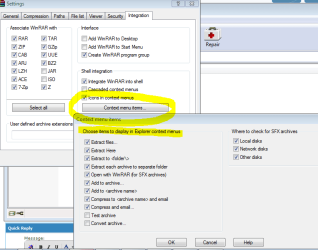
To fix, for example, WinRAR, see attached screenshot.

Not sure otherwise. We'll get you an answer, though, I hope. :)
 

Attachments

  • contextmenu.PNG
    contextmenu.PNG
    18.7 KB · Views: 708

My Computer

Computer Manufacturer/Model Number
Myself
OS
Win7 Ultimate x64, Server 2008 R2
CPU
AMD Phenom II X6 1055T Thuban 2.8GHz
Motherboard
GIGABYTE GA-890FXA-UD5
Memory
8GB G.SKILL Ripjaws Series DDR3 1600 (PC3 12800)
Graphics Card(s)
2x HIS/Sapphire ATI Radeon HD 5830 in CrossfireX
Sound Card
Sound Blaster X-Fi Xtreme
Monitor(s) Displays
Dell 2407WFP 24", Dell 22"
Screen Resolution
1920x1200
Hard Drives
Patriot Torqx 128GB SSD
3TB other HD
PSU
CORSAIR HX Series CMPSU-750HX 750W
Case
Antec Nine Hundred
Cooling
Cooler Master Hyper 212 Plus CPU cooler
Keyboard
SteelSeries MercStealth
Mouse
Razer Lachesis
Internet Speed
HAHA NO MOAR COMCAST. Now, FiOS :D
Other Info
I am a virtualization enthusiast. I like Hyper-V. It's free.
I'm a Windows 7 fangirl. I will teach a class for you or write a custom course for you RIGHT NOW.
I love EVE Online. I'm Sayra Sainer. I play Starcraft II. My gamertag is Tal0nn. I'm trying not to play Minecraft.
I also like coffee. I'll take a basic triple grande extra-hot breve stirred ristretto caramel machiatto.
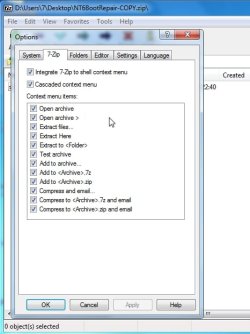
You should be able to add them from the program itself e.g. 7-zip click Tools>Options

7-zip.jpg
 

My Computers

System One System Two

  • Computer type
    PC/Desktop
    OS
    7 X64
    CPU
    i5 8400
    Motherboard
    gigabyte b365m ds3h
    Memory
    2x8gb 3200mhz
    Hard Drives
    various
    PSU
    pure power 11 400w cm
    Case
    Coolermaster
    Cooling
    cryorig m9i
  • Computer type
    PC/Desktop
    OS
    7x64
    CPU
    g5400
    Motherboard
    ga b365m ds3h
    Memory
    8gb ddr4 2400
    PSU
    xfx pro 450w
I know they offer the options and I check them.. and recheck them.. and nothing.. (also I hit apply, ok, close...) If it we're that simple in my case, I'd of never came here in the first place. I have a program Windows 7 Manager (YamiSoft) as well, it shows me things in the context menu's the entries are there but marked as "invalid" for what reason they are invalid I havent the slightest clue.
 

My Computer

OS
Windows 7 Home Premium 64 Bit
All right, let's see. Are you installing the programs using an administrator account? Something isn't right.
 

My Computer

Computer Manufacturer/Model Number
Myself
OS
Win7 Ultimate x64, Server 2008 R2
CPU
AMD Phenom II X6 1055T Thuban 2.8GHz
Motherboard
GIGABYTE GA-890FXA-UD5
Memory
8GB G.SKILL Ripjaws Series DDR3 1600 (PC3 12800)
Graphics Card(s)
2x HIS/Sapphire ATI Radeon HD 5830 in CrossfireX
Sound Card
Sound Blaster X-Fi Xtreme
Monitor(s) Displays
Dell 2407WFP 24", Dell 22"
Screen Resolution
1920x1200
Hard Drives
Patriot Torqx 128GB SSD
3TB other HD
PSU
CORSAIR HX Series CMPSU-750HX 750W
Case
Antec Nine Hundred
Cooling
Cooler Master Hyper 212 Plus CPU cooler
Keyboard
SteelSeries MercStealth
Mouse
Razer Lachesis
Internet Speed
HAHA NO MOAR COMCAST. Now, FiOS :D
Other Info
I am a virtualization enthusiast. I like Hyper-V. It's free.
I'm a Windows 7 fangirl. I will teach a class for you or write a custom course for you RIGHT NOW.
I love EVE Online. I'm Sayra Sainer. I play Starcraft II. My gamertag is Tal0nn. I'm trying not to play Minecraft.
I also like coffee. I'll take a basic triple grande extra-hot breve stirred ristretto caramel machiatto.
You should get all your context menus. Here's an example of mine (attached). Microsoft didn't get rid of them, thankfully.
 

Attachments

  • contextmenu2.png
    contextmenu2.png
    33.1 KB · Views: 193

My Computer

Computer Manufacturer/Model Number
Myself
OS
Win7 Ultimate x64, Server 2008 R2
CPU
AMD Phenom II X6 1055T Thuban 2.8GHz
Motherboard
GIGABYTE GA-890FXA-UD5
Memory
8GB G.SKILL Ripjaws Series DDR3 1600 (PC3 12800)
Graphics Card(s)
2x HIS/Sapphire ATI Radeon HD 5830 in CrossfireX
Sound Card
Sound Blaster X-Fi Xtreme
Monitor(s) Displays
Dell 2407WFP 24", Dell 22"
Screen Resolution
1920x1200
Hard Drives
Patriot Torqx 128GB SSD
3TB other HD
PSU
CORSAIR HX Series CMPSU-750HX 750W
Case
Antec Nine Hundred
Cooling
Cooler Master Hyper 212 Plus CPU cooler
Keyboard
SteelSeries MercStealth
Mouse
Razer Lachesis
Internet Speed
HAHA NO MOAR COMCAST. Now, FiOS :D
Other Info
I am a virtualization enthusiast. I like Hyper-V. It's free.
I'm a Windows 7 fangirl. I will teach a class for you or write a custom course for you RIGHT NOW.
I love EVE Online. I'm Sayra Sainer. I play Starcraft II. My gamertag is Tal0nn. I'm trying not to play Minecraft.
I also like coffee. I'll take a basic triple grande extra-hot breve stirred ristretto caramel machiatto.

My Computers

System One System Two

  • Computer type
    PC/Desktop
    OS
    7 X64
    CPU
    i5 8400
    Motherboard
    gigabyte b365m ds3h
    Memory
    2x8gb 3200mhz
    Hard Drives
    various
    PSU
    pure power 11 400w cm
    Case
    Coolermaster
    Cooling
    cryorig m9i
  • Computer type
    PC/Desktop
    OS
    7x64
    CPU
    g5400
    Motherboard
    ga b365m ds3h
    Memory
    8gb ddr4 2400
    PSU
    xfx pro 450w
Windows 7 Compatible?

Some programs may not be as compatible as they claim
OR
Windows blocks some programs from adding context menu entries.

In Windows 7, most of my programs can add entries but some won't.
They all can in XP and you can easily make your own.
Why did MS remove that feature?

For example, Glary Utilities entries don't appear in my context menu.
Whereas AVG, ASC4, IZArc, Notepad++ and Winamp all successfully add entries.
 

My Computer

Computer type
PC/Desktop
Computer Manufacturer/Model Number
n/a
OS
W7 Ultimate SP1, LM19.2 MATE, W10 Home 1703, W10 Pro 1703 VM, #All 64 bit
CPU
AMD Phenom II x6 1100T, 3.3 GHz
Motherboard
ASUS M4A88T-M/USB3 (AM3)
Memory
12GB DDR3 1333 G-Skill (4GB x 2), G-Skill (2GB x 2)
Graphics Card(s)
NVIDIA GeForce GTX 660
Sound Card
Realtek?
Monitor(s) Displays
Samsung S23B350
Screen Resolution
1920x1080
Hard Drives
WD Green 2TB (SATA), WD Green 3TB (SATA), WD Blue 4TB (SATA), WD Blue 6TB (SATA)
PSU
Cooler Master
Case
Antec GX300 Tower
Cooling
3x Antec TRICOOL 120mm Fans
Mouse
Wired Optical
Internet Speed
DSL
Antivirus
Avast
Browser
Pale Moon (64 bit)
Other Info
2018-12-27 Upgraded HDDs
2015-12-10 Upgraded case, graphics card, storage
2015-08-15 Upgraded motherboard & RAM
2015-07-15 Upgraded LM17.1 to LM17.2
Here's some help that may solve your problem:

Customize the Right Click Menu in Windows 7 - Make Tech Easier
Edit Context Menu Items In Windows 7 & Vista
FileMenu Tools

Also, here's another approach. You might have better control of your Context Menu if you first take ownership of it. Take a look at these tutorials:

Take Ownership of file
How to Allow or Prevent Users and Groups to Take Ownership

And you could even add a Take Ownership shortcut to your Context Menu and use it on the Context Menu itself to take ownership and add/delete items to your Context Menu:

Take Ownership Shortcut
Add ‘Take ownership’ Option to Context Menu
 

My Computer

Computer Manufacturer/Model Number
HP Pavillion dv5t (generation 1)
OS
Vista 64 bit and 32 bit (SP2)
CPU
Intel(R) Core(TM)2 Duo Processor T9400 (2.53 GHz
Memory
4GB DDR2 System Memory (2 Dimm)
Graphics Card(s)
512 MB NVIDIA GeForce 9600M GT
Monitor(s) Displays
15.4" diagonal WSXGA+ High-Definition HP BrightView Widescre
Screen Resolution
1680 x 1050
Hard Drives
320GB 5400RPM SATA Hard Drive with HP ProtectSmart Hard Drive Protection
Keyboard
Built-in HP
Mouse
Built in - Synaptics TouchPad V6.5 on PS/2 Port
Internet Speed
Max
Other Info
~ Intel Next-Gen Wireless-N Mini-card w/Bluetooth ~ Blu-Ray ROM DVD+/-R/RW ~ Integ. HDTV Hybrid Tuner ~ 12 Cell Battery ~ MS Office (Home Premium) 2007 ~
It is because you are using 64 bit windows 7.

A lot of shell extensions ( e.g. Glary Utilities) are 32 bit and will not work on 64 bit o/s.


Some programs may not be as compatible as they claim
OR
Windows blocks some programs from adding context menu entries.

In Windows 7, most of my programs can add entries but some won't.
They all can in XP and you can easily make your own.
Why did MS remove that feature?

For example, Glary Utilities entries don't appear in my context menu.
Whereas AVG, ASC4, IZArc, Notepad++ and Winamp all successfully add entries.
 

My Computers

System One System Two

  • Computer type
    PC/Desktop
    OS
    7 X64
    CPU
    i5 8400
    Motherboard
    gigabyte b365m ds3h
    Memory
    2x8gb 3200mhz
    Hard Drives
    various
    PSU
    pure power 11 400w cm
    Case
    Coolermaster
    Cooling
    cryorig m9i
  • Computer type
    PC/Desktop
    OS
    7x64
    CPU
    g5400
    Motherboard
    ga b365m ds3h
    Memory
    8gb ddr4 2400
    PSU
    xfx pro 450w
There are 32 bit and 64 bit context menus in Windows 7 x64. The file manager FreeCommander - freeware file manager has a simple fix for its .ini file which enables both 32 bit and 64 bit context menus. Just hold the Win key while right clicking to see the 32 bit version. Look for a description in the release notes of the latest version.
 

My Computer

Computer Manufacturer/Model Number
Home Built
OS
Windows 7 Pro x64 - SP1
CPU
Intel i5-3570K
Motherboard
AS Rock Extreme 6
Memory
8GB G-Skill Sniper DDR3-1866
Graphics Card(s)
Intel Graphics 4000 (from CPU)
Sound Card
On Board Realtek
Monitor(s) Displays
ASUS VN247H-P - 23.6" LCD
Screen Resolution
1920x1080
Hard Drives
1 - Intel 520 series 120GB SSD
1 - Seagate 500GB 16MB Cache
PSU
SeaSonic M12II 620watt
Case
Rosewill Challenger
Cooling
Intel Stock
Keyboard
Microsoft 104 key wired
Mouse
Logitech Lx6 Cordless mouse
Internet Speed
55 Mbps download, 12 Mbps upload
Antivirus
Comodo Firewall/AV
Browser
Firefox, IE-9
Thanks Guys

I'm not inconvenienced by this.
I was only adding my speculations. :)

Here's some help that may solve your problem:

Thanks for those links.
I'll check them out after I finish TAFE today.

It is because you are using 64 bit windows 7.

A lot of shell extensions ( e.g. Glary Utilities) are 32 bit and will not work on 64 bit o/s.

I am using Windows 7 (64 bit).
With the exceptions of AVG and VMware Workstation, all of my other programs only offer 1 installer, which also works in XP SP3 (32 bit).

There are 32 bit and 64 bit context menus in Windows 7 x64. The file manager FreeCommander - freeware file manager has a simple fix for its .ini file which enables both 32 bit and 64 bit context menus. Just hold the Win key while right clicking to see the 32 bit version. Look for a description in the release notes of the latest version.

I use FreeCommander (for mass file renaming).
Has a new version come out?

I tried Logo + right clicking on a couple of files, but I didn't notice any differences.
 

My Computer

Computer type
PC/Desktop
Computer Manufacturer/Model Number
n/a
OS
W7 Ultimate SP1, LM19.2 MATE, W10 Home 1703, W10 Pro 1703 VM, #All 64 bit
CPU
AMD Phenom II x6 1100T, 3.3 GHz
Motherboard
ASUS M4A88T-M/USB3 (AM3)
Memory
12GB DDR3 1333 G-Skill (4GB x 2), G-Skill (2GB x 2)
Graphics Card(s)
NVIDIA GeForce GTX 660
Sound Card
Realtek?
Monitor(s) Displays
Samsung S23B350
Screen Resolution
1920x1080
Hard Drives
WD Green 2TB (SATA), WD Green 3TB (SATA), WD Blue 4TB (SATA), WD Blue 6TB (SATA)
PSU
Cooler Master
Case
Antec GX300 Tower
Cooling
3x Antec TRICOOL 120mm Fans
Mouse
Wired Optical
Internet Speed
DSL
Antivirus
Avast
Browser
Pale Moon (64 bit)
Other Info
2018-12-27 Upgraded HDDs
2015-12-10 Upgraded case, graphics card, storage
2015-08-15 Upgraded motherboard & RAM
2015-07-15 Upgraded LM17.1 to LM17.2
Yes that's right.

If you check with Glary's own context menu handler - you will see the entries are there for Glary - but you don't see the context menu entries in windows 64 bit.

Nothing you can do about it.

You might see them if you replace windows explorer with a 32 bit explorer - such as freecommander.
 

My Computers

System One System Two

  • Computer type
    PC/Desktop
    OS
    7 X64
    CPU
    i5 8400
    Motherboard
    gigabyte b365m ds3h
    Memory
    2x8gb 3200mhz
    Hard Drives
    various
    PSU
    pure power 11 400w cm
    Case
    Coolermaster
    Cooling
    cryorig m9i
  • Computer type
    PC/Desktop
    OS
    7x64
    CPU
    g5400
    Motherboard
    ga b365m ds3h
    Memory
    8gb ddr4 2400
    PSU
    xfx pro 450w
I have Win 7 X64. I have winrar, 7zip, with context menus. Please check that you downloaded the X64 versions. Well on 2nd thought if you tried to install a 32bit flavor, it shouldn't work, usually.
I do have many X86 (32 bit) programs installed all with contesxt menus.
flash Get
Weatherbug
FLV Player
DivX
Malwarebytes
Norton
etc.
What does the Windows 7 Manager do that Win 7 doesn't? Maybe causing this problem.

No, Micrsoft has not disabled context menus.
 

My Computer

Computer type
PC/Desktop
Computer Manufacturer/Model Number
Home Built Desktop By DataTech
OS
Windows 7 Ultimate X64 SP1
CPU
Intel i5-2550K, Differing ~4.4-4.8GHz No built in GPU
Motherboard
ASUS P8Z68-V PRO/GEN3
Memory
16GB G.Skill Sniper 1866MHz @ 2133MHz 2x8GB
Graphics Card(s)
ASUS GTX650TIB-DC2OC-2GD5, (650TI Boost)
Sound Card
Onboard Realtek 5-1
Monitor(s) Displays
Samsung P2570HD
Screen Resolution
1920x1080
Hard Drives
Samsung 840 Pro 256GB SSD for OS, 500GB Seagate Constellation (Enterprise drive) for Data
PSU
Corsair HX650W
Case
Inwin Dragon Rider
Cooling
Hyper 212 EVO w/two Noctua fans, push-pull, @1300 RPM
Keyboard
E-Z Eyes, bright yellow keys with large characters
Mouse
steelseries SENSEI Laser Pro Gaming
Internet Speed
48-51Mbs Mbs down, 11 Mbs up Xfinity Cable
Antivirus
Norton Internet Security 2013
Browser
IE 10, Opera, Pale Moon if needed
Other Info
4 case fans, LG BluRay-RE, ASUS DVD-RW, Mr. Fusion power supply, 1.21 gigawatts.
What does the Windows 7 Manager do that Win 7 doesn't? Maybe causing this problem

It makes sense to ask this question. I'm not familiar with W7M, but given its shell customization features (particularly the context menu customization) and registry cleaning features, I'm immediately suspicious. I would:

1) Create an image backup of the drive.
2) Completely uninstall W7M with Revo or similar
3) Reinstall a few of those programs whose context menu items are missing to see if they now appear.

Could be a waste of time, but given the nature of the program and the nature of the problem, I'd have to eliminate it as a possibility early on.

James
 

My Computer

OS
Win7U 64 RTM
CPU
Q9550
Motherboard
GA-EP45-UD3R
Memory
8GB Gskill
Graphics Card(s)
ASUS|EAH4850/HTDI/1GD3/A
Sound Card
xfi Plat
Monitor(s) Displays
Dell 2405fpw
Screen Resolution
1920x1200
Hard Drives
Seagate & WD sata Drives
PSU
Antec
Case
Antec
Keyboard
MS Natural Ergonomic 4000
Mouse
Logitech MX610 USB Cordless
There are two different questions in this thread.

1. Lehnerus says some apps. context menus worked when he had XP - they now don't work in his 64 win7.

He gave Glary as an example.

That is because Glary shell extension is 32 bit and does not work on 64 bit o/s.

There are many apps. like that.

2. The OP had a different question - in his case apps. which do have 64 bit shell extensions are not showing up for him.

They still do not show up after he applies them manually via the program's own interface.

Something seems to be interfering - it may well be another program - possible Yamisoft.
 

My Computers

System One System Two

  • Computer type
    PC/Desktop
    OS
    7 X64
    CPU
    i5 8400
    Motherboard
    gigabyte b365m ds3h
    Memory
    2x8gb 3200mhz
    Hard Drives
    various
    PSU
    pure power 11 400w cm
    Case
    Coolermaster
    Cooling
    cryorig m9i
  • Computer type
    PC/Desktop
    OS
    7x64
    CPU
    g5400
    Motherboard
    ga b365m ds3h
    Memory
    8gb ddr4 2400
    PSU
    xfx pro 450w
The latest Full release of FreeCommander is 2009.02b released in Sept 12, 2010

The release notes contain the following:

  • New: 64 bit context menu will be showed on Windows 64 (XP, Vista, 7)
    • You can now control 64 bit context menu with the following line in the freecommander.ini:
      [Form]
      ShowContextMenu64Bit=1
      AutoCloseTimeContextMenu64Bit=10

      - You can call 64 bit context menu with right click
      - For calling 32 bit context menu use LeftWin+RightClick
      - If you prefer to see for right click always 32 bit context menu: define ShowContextMenu64Bit=0; with LeftWin+RightClick you can call then 64 bit context menu
You have to make this change for the 64-bit context menus to work correctly.
There is also a Beta version of FreeCommander if you are interested.
 
Last edited:

My Computer

Computer Manufacturer/Model Number
Home Built
OS
Windows 7 Pro x64 - SP1
CPU
Intel i5-3570K
Motherboard
AS Rock Extreme 6
Memory
8GB G-Skill Sniper DDR3-1866
Graphics Card(s)
Intel Graphics 4000 (from CPU)
Sound Card
On Board Realtek
Monitor(s) Displays
ASUS VN247H-P - 23.6" LCD
Screen Resolution
1920x1080
Hard Drives
1 - Intel 520 series 120GB SSD
1 - Seagate 500GB 16MB Cache
PSU
SeaSonic M12II 620watt
Case
Rosewill Challenger
Cooling
Intel Stock
Keyboard
Microsoft 104 key wired
Mouse
Logitech Lx6 Cordless mouse
Internet Speed
55 Mbps download, 12 Mbps upload
Antivirus
Comodo Firewall/AV
Browser
Firefox, IE-9
Sorry I seem to have complicated the issue. :o

I wasn't actually asking a question, merely stating my experience (actually I did ask about FreeCommander).
I was merely stating that some programs (which appear to be 32 bit) do add their context menu entries in Windows 7 (64 bit), whereas others don't.

As near as I can tell most of my programs are 32 bit.
During installation they suggest that they be installed in C:\Program Files (x86).
 
Last edited:

My Computer

Computer type
PC/Desktop
Computer Manufacturer/Model Number
n/a
OS
W7 Ultimate SP1, LM19.2 MATE, W10 Home 1703, W10 Pro 1703 VM, #All 64 bit
CPU
AMD Phenom II x6 1100T, 3.3 GHz
Motherboard
ASUS M4A88T-M/USB3 (AM3)
Memory
12GB DDR3 1333 G-Skill (4GB x 2), G-Skill (2GB x 2)
Graphics Card(s)
NVIDIA GeForce GTX 660
Sound Card
Realtek?
Monitor(s) Displays
Samsung S23B350
Screen Resolution
1920x1080
Hard Drives
WD Green 2TB (SATA), WD Green 3TB (SATA), WD Blue 4TB (SATA), WD Blue 6TB (SATA)
PSU
Cooler Master
Case
Antec GX300 Tower
Cooling
3x Antec TRICOOL 120mm Fans
Mouse
Wired Optical
Internet Speed
DSL
Antivirus
Avast
Browser
Pale Moon (64 bit)
Other Info
2018-12-27 Upgraded HDDs
2015-12-10 Upgraded case, graphics card, storage
2015-08-15 Upgraded motherboard & RAM
2015-07-15 Upgraded LM17.1 to LM17.2
Back
Top