corbryant
New member
- Local time
- 5:50 PM
- Messages
- 20
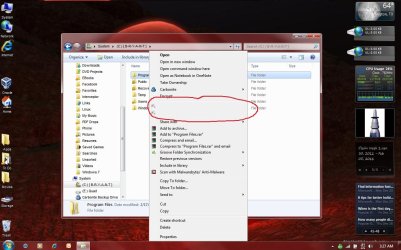
Okay, I just uninstalled Kaspersky Anti-Virus from my D430 with Windows 7 Ultimate and unfortunately the two menu items for Kaspersky that show up when right clicking on a file or folder are still there, although the labels are gone.
I've circled the items in red on the screen capture below..
Does anyone know how to remove these two items from the right click menu? I'm pretty OCD about my system and I hate when little traces of crap hang around to remind me of a program that I grew to hate. =)
Thanks guys!
Cor
I've circled the items in red on the screen capture below..
Does anyone know how to remove these two items from the right click menu? I'm pretty OCD about my system and I hate when little traces of crap hang around to remind me of a program that I grew to hate. =)
Thanks guys!
Cor
Attachments
My Computer
- Computer Manufacturer/Model Number
- Dell D430
- OS
- Dell Desktops: XP Pro 32b/64b - Dell D430 Laptop: Windows 7 Ultimate 32b
- CPU
- Intel Core 2 Duo @ 1.33GHz (U7600)
- Motherboard
- A08
- Memory
- 2.5GB
- Graphics Card(s)
- Mobile Intel 945
- Sound Card
- Sigmatel 9200
- Monitor(s) Displays
- 12.1" WXGA Display (1280x800)
- Hard Drives
- Int: 180GB SSD
Ext: 1TB NAS
- PSU
- N/A
- Case
- N/A
- Cooling
- "Inadequate" =)