MikeWill
New member
I just reinstalled my Win 7, due to the hardware upgrade.
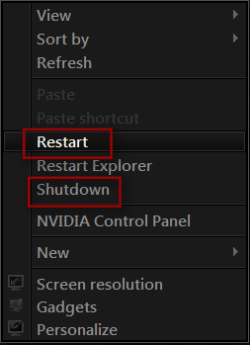
Previously, when I right clicked on my desktop, I have the options to Shutdown and Restart my system. Unfortunately, I don't remember how to set/enable this.
How do I add Shutdown/Restart options in Desktop Context Menu?
Previously, when I right clicked on my desktop, I have the options to Shutdown and Restart my system. Unfortunately, I don't remember how to set/enable this.
How do I add Shutdown/Restart options in Desktop Context Menu?
My Computer
- Computer Manufacturer/Model Number
- -
- OS
- Windows 7 Home Premium 32bit
- CPU
- Intel Core i5-2500K
- Motherboard
- Asus P8Z68-V
- Memory
- 4 (2x2) GB
- Graphics Card(s)
- ASUS eXtreme Nvidia GeForce N6600GT 128MB DDR3
- Sound Card
- -
- Monitor(s) Displays
- Samsung P2370 (23")
- Screen Resolution
- 1920 x 1080
- PSU
- CoolerMaster Real Power 550W
- Internet Speed
- DSL

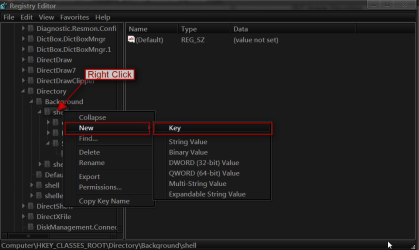
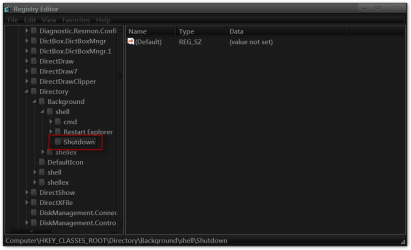
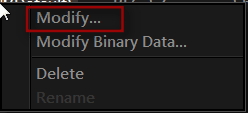
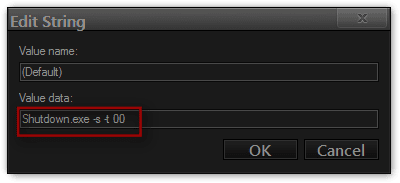
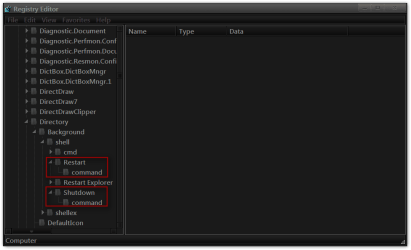
 rb: start button in the search box type regedit and hit enter the registry editor should open then navigate to HKEY_CLASSES_ROOT\Directory\Background\shell in the left navigation pane