ROBOCOPY and not existing folder "c:\Users\"MyUser"\Doc

Omorashi

New member
Local time
8:51 PM
Messages
5
Hello Fellow 7 users,

I have just switched OS to Windows 7, and i am impressed so far.

I want to backup my data on an external harddrive. I would like to use the function ROBOCOPY in the command windows because then i don't have to third party program running all the time. But the copying stops at a folder that it cannot access. The folder is "c:\Users\"MyUser"\Documents\My Music", but the folder doesn't exist in the directory. I have checked the folder with explorer and commando prompt, but its not there.

I have made a screenshot of the failure:

CWindowssystem32cmd.exe%2026-02-2010%20095712.jpg


I am using the following command:

REM Starting Syncronizing with external harddrive
cd %0\..\
robocopy "C:\Users\Halberg\Documents" "Backup\Documents" /MIR /ETA

I hope you can help me with this problem.

/Omorashi
 

My Computer

OS
Windows 7
My Music is not under Documents folder. It's in C:\Users\Halberg\My Music.
The one you see is for retro-compatibility. Exclude it for copying.
 

My Computer

Computer Manufacturer/Model Number
Custom Build
OS
Windows 7 Ultimate x64 SP1 clean install
CPU
AMD Athlon 64 X2 6400+
Motherboard
Asus M2N-E SLI
Memory
4 GB
Graphics Card(s)
2 x NVidia Geforce 8600 GTS
Sound Card
Trust 5.1 Surround USB
Monitor(s) Displays
Benq FP931 19"
Screen Resolution
1280x1024@32bit@75MHz
Hard Drives
1 x Western Digital 500GB SATA (OS installation), 2 x Seagate 320GB SATA, 1 x Seagate 250GB IDE (in external USB box), 1 x TrekStor 750GB USB
PSU
650W
Keyboard
Logitech Cordless Desktop EX 100
Mouse
Logitech Cordless Optical
Internet Speed
8192 kbps / 640 kbps
I know my music folder is located a new place, but thats not the problem (I copy it with an other new command).

The problem is that i want to copy the documents folder but it keeps finding a folder "My Music" that dosen't exist. I cant see the folder either.

i cant see a way to exclude the folder from the copy because i want to copy everything in the root of documents and if i made a new folder there.
 

My Computer

OS
Windows 7

My Computer

Computer type
PC/Desktop
Computer Manufacturer/Model Number
Dwarf Dwf/11/2012 r09/2013
OS
Windows 8.1 Pro RTM x64
CPU
Intel Core-i5-3570K 4-core @ 3.4GHz (Ivy Bridge) (OC 4.4GHz)
Motherboard
ASRock Z77 Extreme4-M
Memory
4 x 4GB DDR3-1600 Corsair Vengeance CMZ8GX3M2A1600C9B (16GB)
Graphics Card(s)
MSI GeForce GTX770 Gaming OC 2GB
Sound Card
Realtek High Definition on board solution (ALC 898)
Monitor(s) Displays
ViewSonic VA1912w Widescreen (VGA)
Screen Resolution
1440x900
Hard Drives
OCZ Agility 3 SSD 120GB SATA III x2 (RAID 0)
Samsung HD501LJ 500GB SATA II x2
Hitachi HDS721010CLA332 1TB SATA II
Iomega 1.5TB Ext USB 2.0
WD 2.0TB Ext USB 3.0
PSU
XFX Pro Series 850W Semi-Modular
Case
Gigabyte IF233
Cooling
1 x 120mm Front Inlet 1 x 120mm Rear Exhaust
Keyboard
Microsoft Comfort Curve Keyboard 3000 (USB)
Mouse
Microsoft Comfort Mouse 3000 for Business (USB)
Internet Speed
NetGear DG834Gv3 ADSL Modem/Router (Ethernet) ~4.0 Mb/s (O2)
Antivirus
Avast! 8.0.1497
Browser
IE 11
Other Info
Optical Drive: HL-DT-ST BD-RE BH10LS30 SATA Bluray
Lexmark S305 Printer/Scanner/Copier (USB)
WEI Score: 8.1/8.1/8.5/8.5/8.25
Asus Eee PC 1011PX Netbook (Windows 7 x86 Starter)
@Dwarf
Thanks!

Now it works perfectly!

You dont happen to know how i enable the Windows to use autorun from usb too btw?
 

My Computer

OS
Windows 7

My Computer

Computer type
PC/Desktop
Computer Manufacturer/Model Number
Dwarf Dwf/11/2012 r09/2013
OS
Windows 8.1 Pro RTM x64
CPU
Intel Core-i5-3570K 4-core @ 3.4GHz (Ivy Bridge) (OC 4.4GHz)
Motherboard
ASRock Z77 Extreme4-M
Memory
4 x 4GB DDR3-1600 Corsair Vengeance CMZ8GX3M2A1600C9B (16GB)
Graphics Card(s)
MSI GeForce GTX770 Gaming OC 2GB
Sound Card
Realtek High Definition on board solution (ALC 898)
Monitor(s) Displays
ViewSonic VA1912w Widescreen (VGA)
Screen Resolution
1440x900
Hard Drives
OCZ Agility 3 SSD 120GB SATA III x2 (RAID 0)
Samsung HD501LJ 500GB SATA II x2
Hitachi HDS721010CLA332 1TB SATA II
Iomega 1.5TB Ext USB 2.0
WD 2.0TB Ext USB 3.0
PSU
XFX Pro Series 850W Semi-Modular
Case
Gigabyte IF233
Cooling
1 x 120mm Front Inlet 1 x 120mm Rear Exhaust
Keyboard
Microsoft Comfort Curve Keyboard 3000 (USB)
Mouse
Microsoft Comfort Mouse 3000 for Business (USB)
Internet Speed
NetGear DG834Gv3 ADSL Modem/Router (Ethernet) ~4.0 Mb/s (O2)
Antivirus
Avast! 8.0.1497
Browser
IE 11
Other Info
Optical Drive: HL-DT-ST BD-RE BH10LS30 SATA Bluray
Lexmark S305 Printer/Scanner/Copier (USB)
WEI Score: 8.1/8.1/8.5/8.5/8.25
Asus Eee PC 1011PX Netbook (Windows 7 x86 Starter)
Well i have allready read that post, and it dosen't give me any way to enable the autorun.ini located on USB drives. But thanks for the quick answer anyway.
 

My Computer

OS
Windows 7
The designers of W7 decided to disable the AutoRun capability on USB devices other than removable optical media for security reasons.

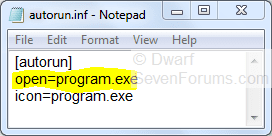
Because of this change in security, some devices which automatically executed programs when plugged into a computer running Vista might not appear to work when plugged into a computer running W7. You will need to click on Open folder to view files from the options that pop up when you insert the drive. There should be an entry called autorun.inf and if you click on it the file will open in Notepad. This will reveal the name of the program (see highlighted example) that would have run automatically had AutoRun not been disabled for that device. You can run that program directly from Windows Explorer.
Capture.PNG
 

My Computer

Computer type
PC/Desktop
Computer Manufacturer/Model Number
Dwarf Dwf/11/2012 r09/2013
OS
Windows 8.1 Pro RTM x64
CPU
Intel Core-i5-3570K 4-core @ 3.4GHz (Ivy Bridge) (OC 4.4GHz)
Motherboard
ASRock Z77 Extreme4-M
Memory
4 x 4GB DDR3-1600 Corsair Vengeance CMZ8GX3M2A1600C9B (16GB)
Graphics Card(s)
MSI GeForce GTX770 Gaming OC 2GB
Sound Card
Realtek High Definition on board solution (ALC 898)
Monitor(s) Displays
ViewSonic VA1912w Widescreen (VGA)
Screen Resolution
1440x900
Hard Drives
OCZ Agility 3 SSD 120GB SATA III x2 (RAID 0)
Samsung HD501LJ 500GB SATA II x2
Hitachi HDS721010CLA332 1TB SATA II
Iomega 1.5TB Ext USB 2.0
WD 2.0TB Ext USB 3.0
PSU
XFX Pro Series 850W Semi-Modular
Case
Gigabyte IF233
Cooling
1 x 120mm Front Inlet 1 x 120mm Rear Exhaust
Keyboard
Microsoft Comfort Curve Keyboard 3000 (USB)
Mouse
Microsoft Comfort Mouse 3000 for Business (USB)
Internet Speed
NetGear DG834Gv3 ADSL Modem/Router (Ethernet) ~4.0 Mb/s (O2)
Antivirus
Avast! 8.0.1497
Browser
IE 11
Other Info
Optical Drive: HL-DT-ST BD-RE BH10LS30 SATA Bluray
Lexmark S305 Printer/Scanner/Copier (USB)
WEI Score: 8.1/8.1/8.5/8.5/8.25
Asus Eee PC 1011PX Netbook (Windows 7 x86 Starter)
Ye but i hopped there were a way to get around that because i wanted to autorun the ROBOCOPY batch file i wrote when i plugged in my external harddrive. But it seems like MS have totaly shut down the possibility to do so in W7. It would have made my life much easier.

But thanks for the help.
 

My Computer

OS
Windows 7
Back
Top