Roboform VS. ????

GRB70

New member
Member
VIP
Local time
5:19 PM
Messages
160
Location
ohio
I'm curious to know how secure Roboform is compared to Keypass? Since Keypass is stored locally and Roboform is online, is there a difference as far as that? I like keypass, although I have had trouble restoring from previous versions. Could someone please enlighten me?

thank you,

GRB70
 

My Computer

Computer type
PC/Desktop
OS
Windows 7 Home Premium 64-bit
CPU
i7-2600k
Motherboard
ASUS P8P67 Deluxe
Memory
Corsair Vengence 8GB
Graphics Card(s)
EVGA GTX 570 HD
Hard Drives
120 SSD
1 TB HDD
500 GB HDD
PSU
Corsair Gaming GS800
Case
HAF X
Cooling
Corsair H70
I myself prefer Lastpass, free and works with almost everything. And keeps all my computers in sync with passwords.
 

My Computer

Computer type
PC/Desktop
Computer Manufacturer/Model Number
Alienware Aurora ALX R4
OS
Windows 10 Pro (x64)
CPU
Intel Core i7-3930K (3.2GHz - 4.5GHz)
Motherboard
Alienware Aurora-R4 x79
Memory
4x Samsung 4GB PC3-12800 DDR3 (16GB 1600MHz)
Graphics Card(s)
Nvidia Geforce GTX 690
Sound Card
SteelSeries Siberia Elite
Monitor(s) Displays
Dell UltraSharp U3011
Screen Resolution
2560x1600
Hard Drives
Samsung 850 Pro 256 GB, Seagate 1TB Desktop Hybrid HDD, 2x Western Digital 4TB Green HDD
PSU
875W Some Dell PSU <.<
Case
Alienware Aurora ALX
Cooling
Custom Liquid Cooling (EK CPU & GPU blocks) dual EK 480RAD
Keyboard
Logitech G710+ Mechanical
Mouse
Logitech G700s
Internet Speed
Verizon Fios (50 mbps average)
Other Info
Server: Intel NUC D54250WYK: i5-4250U, 16GB, 256 GB mSATA, Windows Server 2012 R2
You dont have to use Roboform online, you can uncheck that option during the install. I use roboform and all my passwords are stored locally, never used the online feature.

In my experience Roboform works best with IE. It does work with chrome etc. but not that smoothly and the toolbar often misbehaves.
 

My Computer

Computer Manufacturer/Model Number
Too many to describe...
OS
Windows 7 x64 pro/ Windows 7 x86 Pro/ XP SP3 x86
The best password manager is RoboForm, I've used all of them... the free ones, the ones you have to pay for etc. LastPass had a huge security breech when I had my information stored with them and I will NEVER go back. Robo has been around forever and never had a security breech. I'll pay a small portion of money to have my passwords and to have my security, thanks.
 

My Computer

OS
32bit
Roboform is simply the best. Online storage of your logins if you want. if not just local, but you loose the login anywhere (not at your own pc) and syncing with smartphones.

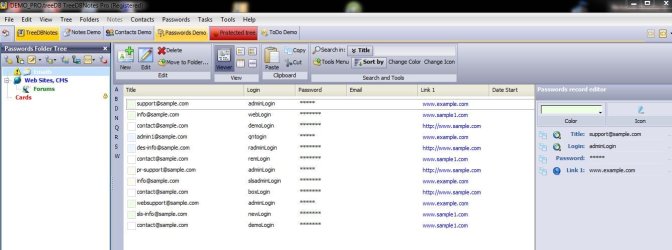
Not strictly a login manager, but it has that functionality is TreedBNotes. It's a database type prog (think MS OneNote) where you can store your websites/logins with hyperlinks.
 

Attachments

  • Capture.JPG
    Capture.JPG
    83.9 KB · Views: 29

My Computer

Computer Manufacturer/Model Number
Toshiba Satellite L500
OS
Windows 7 Home Premium x64 OEM --> RTM clean install
CPU
Intel T4400
Motherboard
? - laptop inbuilt ?
Memory
4Gb
Graphics Card(s)
? - Mobile Intel(R) 4 Series Express Chipset Family ?
Sound Card
Realtek
Monitor(s) Displays
? + extended to a 42" LG55PC plasma tele!
Screen Resolution
1366 * 768
Hard Drives
320Gb 5500rpm
PSU
?
Case
?
Cooling
?
Internet Speed
3Meg, when it works.
Other Info
A LOWLY LAPTOP!
LastPass had a huge security breech when I had my information stored with them and I will NEVER go back.

No, they did not have a huge security breach. Way to exaggerate. Even if Lastpass was compromised your data would be 100% safe. Because only you have the key to decrypt your data store. Lastpass does not store your password in anyway that would be retrievable. All encryption and decryption of your passwords takes place on your local machine before it is ever sent to Lastpass and only you can decrypt it.

However, if you used a weak Master Password for your password database, something that can be brute forced in a manner of seconds, well that is your own problem and failing.

Recap, Lastpass is as safe and secure as anything out there. When AES is no longer secure then you can start worrying.
 

My Computer

Computer type
PC/Desktop
Computer Manufacturer/Model Number
Alienware Aurora ALX R4
OS
Windows 10 Pro (x64)
CPU
Intel Core i7-3930K (3.2GHz - 4.5GHz)
Motherboard
Alienware Aurora-R4 x79
Memory
4x Samsung 4GB PC3-12800 DDR3 (16GB 1600MHz)
Graphics Card(s)
Nvidia Geforce GTX 690
Sound Card
SteelSeries Siberia Elite
Monitor(s) Displays
Dell UltraSharp U3011
Screen Resolution
2560x1600
Hard Drives
Samsung 850 Pro 256 GB, Seagate 1TB Desktop Hybrid HDD, 2x Western Digital 4TB Green HDD
PSU
875W Some Dell PSU <.<
Case
Alienware Aurora ALX
Cooling
Custom Liquid Cooling (EK CPU & GPU blocks) dual EK 480RAD
Keyboard
Logitech G710+ Mechanical
Mouse
Logitech G700s
Internet Speed
Verizon Fios (50 mbps average)
Other Info
Server: Intel NUC D54250WYK: i5-4250U, 16GB, 256 GB mSATA, Windows Server 2012 R2
RoboForm is definitely the way to go. Lastpass forces you to put your passwords in the cloud (thus the security concerns). RoboForm has the option to store your passwords on your computer or use the RoboForm cloud service called RoboForm Everywhere.
 

My Computer

OS
Windows 7 Home Premium 32bit.
Lastpass forces you to put your passwords in the cloud (thus the security concerns).

Which are not actual concerns. Just paranoid users who do not understand encryption. Lastpass and no one else has access to your passwords, because only you have the decryption key. You master key is never sent to Lastpass without heavy use of several hashing procedures. You lose your master key you lose access to your passwords, Lastpass cannot recover it because they do not have your master key.
 

My Computer

Computer type
PC/Desktop
Computer Manufacturer/Model Number
Alienware Aurora ALX R4
OS
Windows 10 Pro (x64)
CPU
Intel Core i7-3930K (3.2GHz - 4.5GHz)
Motherboard
Alienware Aurora-R4 x79
Memory
4x Samsung 4GB PC3-12800 DDR3 (16GB 1600MHz)
Graphics Card(s)
Nvidia Geforce GTX 690
Sound Card
SteelSeries Siberia Elite
Monitor(s) Displays
Dell UltraSharp U3011
Screen Resolution
2560x1600
Hard Drives
Samsung 850 Pro 256 GB, Seagate 1TB Desktop Hybrid HDD, 2x Western Digital 4TB Green HDD
PSU
875W Some Dell PSU <.<
Case
Alienware Aurora ALX
Cooling
Custom Liquid Cooling (EK CPU & GPU blocks) dual EK 480RAD
Keyboard
Logitech G710+ Mechanical
Mouse
Logitech G700s
Internet Speed
Verizon Fios (50 mbps average)
Other Info
Server: Intel NUC D54250WYK: i5-4250U, 16GB, 256 GB mSATA, Windows Server 2012 R2
i use roboform and cant say which is best as i have stuck with roboform from the beginning of my computing . i dont store in the cloud but i back up my passwords folder regularly. also there is a free addon for firefox called roboform lite, and again you can choose to store on the computer and not use the cloud, i think you have to pay for setting up a cloud account, not sure ,never bothered.
 

My Computer

Computer Manufacturer/Model Number
Hewlett packard/p6512uk
OS
Microsoft Windows 7 Home Premium 64-bit 7600
CPU
IIx4 amd athelon 635 processor
Motherboard
FOXCONN 2AA9
Memory
2x2gb
Graphics Card(s)
ati radeon HD 5450
Sound Card
(1) Realtek High Definition Audio (2) AMD High Definition
Monitor(s) Displays
samsung lcd tv 32"
Screen Resolution
1360x 768
Hard Drives
(1) WDC WD10 01FAES-60Z2A0 SATA Disk Device (2) Maxtor OneTouch USB Device (3) ST310003 33AS USB Device (4) WD My Book 1111 USB Device
PSU
?
Cooling
air!
Keyboard
wireless hp
Mouse
wireless Hp,optical
Internet Speed
1.10mb/s
Antivirus
MSE
Browser
Firefox
Thank you all, great to know. Looks like I'm going to have to try RoboForm.

Thanks again :D


grb 70
 

My Computer

Computer type
PC/Desktop
OS
Windows 7 Home Premium 64-bit
CPU
i7-2600k
Motherboard
ASUS P8P67 Deluxe
Memory
Corsair Vengence 8GB
Graphics Card(s)
EVGA GTX 570 HD
Hard Drives
120 SSD
1 TB HDD
500 GB HDD
PSU
Corsair Gaming GS800
Case
HAF X
Cooling
Corsair H70
Out of curiosity, could someone please explain to me what goodsync desktop 8 is and what its for. I read the FAQs, but they didn't explain that part.

thank you :)

grb70
 

My Computer

Computer type
PC/Desktop
OS
Windows 7 Home Premium 64-bit
CPU
i7-2600k
Motherboard
ASUS P8P67 Deluxe
Memory
Corsair Vengence 8GB
Graphics Card(s)
EVGA GTX 570 HD
Hard Drives
120 SSD
1 TB HDD
500 GB HDD
PSU
Corsair Gaming GS800
Case
HAF X
Cooling
Corsair H70
Goodsync - another excellent program from Siber Systems, is a sync program. Think Microsoft SyncToy on steroids.

Rumour has it, if you have Pro Goodsync on your system there's a way to cloud sync your roboform logins with only a Roboform Desktop licence, not the Everywhere licence.
 

My Computer

Computer Manufacturer/Model Number
Toshiba Satellite L500
OS
Windows 7 Home Premium x64 OEM --> RTM clean install
CPU
Intel T4400
Motherboard
? - laptop inbuilt ?
Memory
4Gb
Graphics Card(s)
? - Mobile Intel(R) 4 Series Express Chipset Family ?
Sound Card
Realtek
Monitor(s) Displays
? + extended to a 42" LG55PC plasma tele!
Screen Resolution
1366 * 768
Hard Drives
320Gb 5500rpm
PSU
?
Case
?
Cooling
?
Internet Speed
3Meg, when it works.
Other Info
A LOWLY LAPTOP!
Back
Top