Rocketdock & Object dock

vierasniper

New member
Guru
Local time
4:46 PM
Messages
894
Location
World 1-1
hey guys, if there is anybody that knows if its possible to run rocketdock and object dock at the same time? im trying, but everytime i run object dock, rocketdock stops working.

anyone with the similar problem? any tips?


thanks in advanced.
 

My Computer

Computer Manufacturer/Model Number
The Vampire
OS
Windows 7 Ultimate
CPU
Intel i5 2500k @ 3.30
Motherboard
P8Z68 V-Pro
Memory
G.Skill Ripjaws 1600 2x4 Gb
Graphics Card(s)
BFG GTX 260 MAXCORE 55 OC 896MB GDDR3
Sound Card
Onboard
Monitor(s) Displays
50'' Sony Display Panel
Screen Resolution
1360 x 768
Hard Drives
Seagate 750 GB
WD 160 GB
PSU
OCZ 750 Watts ZT Series Fully Modular PSU 80 Plus Bronze
Case
NZXT Red Phantom
Cooling
120mm x2 Intake, 120mm x 1 and 200mm x2 Exhaust
Keyboard
LX710 Logitech Wireless Keyboard
Mouse
Logitech Wireless Mouse
ummm i know this can be done but im not sure how and cant seem to find a tutorial on doing so quickly enough to include at this moment. you could purchase objectdock pro however and run multiple docks.
 

My Computer

Computer Manufacturer/Model Number
Custom
OS
Windows 7 Ultimate Signature Edition
CPU
Intel Core i7 Extreme 3.33GHz
Motherboard
EVGA X-58 SLI Classified
Memory
12GB DDR3
Graphics Card(s)
2x EVGA 285 2GB in SLI
Sound Card
Creative Labs X-Fi ExtremeGamer
Monitor(s) Displays
30" Viewsonic
Hard Drives
2x1TB Western Digital 7200RPM in RAID 0/1TB WD My Book External HDD
PSU
Thermaltake 1000w supporting quad SLI
Case
Thermaltake Armor Full Tower
Cooling
Thermaltake V1 CPU+DIY Liquid cooling
I assume you have more shortcuts than you can fit into one dock. In addition to Rocket Dock, I solved this problem with a couple of toolbars in the taskbar and the AppLauncher in the sidebar (that I brought over from Vista). But unfortunately the AppLauncher works only in Win7 32bit.

2010-02-18_215105.png
 

My Computer

Computer Manufacturer/Model Number
HP, Dell, Gateway, Toshiba - 4 laptops and 2 desktops
OS
Vista, Windows7, Mint Mate, Zorin, Windows 8
CPU
from 1.6GHz Duo to i7
Monitor(s) Displays
2x HP w2207
Hard Drives
5x HDD, 7x SSD, 12x Externals
Keyboard
with trackball - no mices
Mouse
Trackball mice
Internet Speed
DSL 6000
Why run both rocketdock and Objectdock, when objectdock has the possibility to have multiple docks?

;)
 
Why run both rocketdock and Objectdock, when objectdock has the possibility to have multiple docks?

;)

Hmm, that's interesting. Since I never used Object Dock, I did not know that. I was checking Rocket Dock for that possibility, but it does not seem to support multiple docks.
 

My Computer

Computer Manufacturer/Model Number
HP, Dell, Gateway, Toshiba - 4 laptops and 2 desktops
OS
Vista, Windows7, Mint Mate, Zorin, Windows 8
CPU
from 1.6GHz Duo to i7
Monitor(s) Displays
2x HP w2207
Hard Drives
5x HDD, 7x SSD, 12x Externals
Keyboard
with trackball - no mices
Mouse
Trackball mice
Internet Speed
DSL 6000
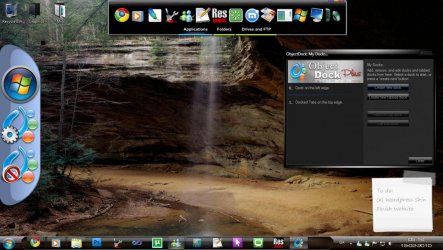
You just gotta right click the icon in the system tray and select "My docks"
 

Attachments

  • 8888.jpg
    8888.jpg
    156.4 KB · Views: 1,275
just run one or the other. on the desktop create yourself a folder called something like desktop, desktop shortcuts, shortcuts, etc............ place the program shortcuts you want quick access to in it and drag it to whichever dock you decide to use.

edit: personally i would avoid objeck dock. stardock programs have a habit of eating too many resources.
 

My Computer

OS
Windows 8 aka windows next
Stacks is available in Rocketdock and it works great. I use this to organize similar programs together.
 

My Computer

Computer type
Laptop
Computer Manufacturer/Model Number
ASUS G60-RBBX05
OS
Win7 Home Premium 64x
CPU
Intel Core 2 Duo P7450 / 2.13 GHz (2.29 with Extreme Turbo)
Memory
4 GB PC-6400 Hyundai (2X2) at 800Mhz
Graphics Card(s)
NVIDIA GeForce GTX 260M 1GB DDR3 VRAM
Monitor(s) Displays
16" LED Backlit
Screen Resolution
1366 x 768 on laptop 1600x1050 max res on 22" external mon
Hard Drives
OCZ Agility 3 60GB SSD / 320 GB - Serial ATA-150 - 7200 rpm
PSU
6-cell Lithium ion { lasts 1.5 hours }
Case
ASUS G60 Laptop
Keyboard
Chicklet type back-lit (white light) keyboard
Mouse
Logitech G9 Laser Mouse 3200dpi and 1000 reports per minute
Internet Speed
Comcast 8.60mb/s up - 3.11mb/s down
Antivirus
MSE
Browser
Firefox
Other Info
General mid-budget gaming Comp. Low batterylife - High FrameRates - currently overheating problems :(

2nd Rig: Case: Rosewill BLACKHAWK Gaming ATX Mid Tower Computer Case

Mobo: GIGABYTE GA-990FXA-UD3
CPU: AMD FX-6200 Zambezi 3.8GHz (4.1GHz Turbo)
Heatsink: COOLER MASTER V8 CPU Cooler
RAM: Patriot Viper 3 8GB (2 x 4GB) 240-Pin DDR3 SDRAM 1866 (PC3 15000)
GPU: SAPPHIRE Radeon HD 6850 1GB 2
Stacks is available in Rocketdock and it works great. I use this to organize similar programs together.

agree. i forgot about stacks, and i have used the stacks feature for my desktop shorts in the past. i have a paid version of winstep xtreme myself.
 

My Computer

OS
Windows 8 aka windows next
Stacks is available in Rocketdock and it works great. I use this to organize similar programs together.

Can also use stacks for Object Dock.
 

My Computer

Computer Manufacturer/Model Number
Custom builds... I build my own.
OS
Windows 7 Ultimate x86 & x64
CPU
Core i7-860, AMD Phenom II X4 955, AMD Athlon II X2 250
Motherboard
ASUS
Memory
Kingston HyperX
Graphics Card(s)
EVGA GeForce 9800 GTX, SAPPHIRE Radeon HD 5870
Sound Card
HT | OMEGA
Monitor(s) Displays
LCD
Hard Drives
Western Digital
PSU
OCZ Technology
Case
COOLER MASTER Storm Sniper, Storm Scout, Antec Skeleton
Internet Speed
DSL
Stacks is available in Rocketdock and it works great. I use this to organize similar programs together.


Anybody know how to set it. I did not find it in the settings (but that does not mean much - LOL).
 

My Computer

Computer Manufacturer/Model Number
HP, Dell, Gateway, Toshiba - 4 laptops and 2 desktops
OS
Vista, Windows7, Mint Mate, Zorin, Windows 8
CPU
from 1.6GHz Duo to i7
Monitor(s) Displays
2x HP w2207
Hard Drives
5x HDD, 7x SSD, 12x Externals
Keyboard
with trackball - no mices
Mouse
Trackball mice
Internet Speed
DSL 6000

My Computer

Computer type
PC/Desktop
Computer Manufacturer/Model Number
Self Assembled
OS
Microsoft Windows 10 Pro Insider Preview 64-bit
CPU
Intel(R) Core(TM) i3-4130 CPU @ 3.40GHz
Motherboard
Gigabyte Technology Co., Ltd. B85M-D3H
Memory
Corsair Vengence 4GB x2 (8.00GB Dual-Channel DDR3 @ 798MHz)
Graphics Card(s)
2047MB GeForce GTS 450 (ZOTAC International)
Sound Card
Onboard (Realtek High Definition Audio)
Monitor(s) Displays
LG Flatron E2040T
Screen Resolution
1600x900
Hard Drives
Western Digital 1 TB
Seagate 500 GB
PSU
Corsair VS550
Case
Cooler Master K380
Cooling
Cooler Master Seidon 120V Plus
Keyboard
Logitech MK260r
Mouse
Logitech MK260r
Internet Speed
PMPL Broadband
Antivirus
Windows Defender + MBAM
Browser
Firefox
Other Info
Dell Studio 15" Laptop
Omegatron, thanks, I had wanted the dock mainly for stacks cause I like grouping icons in lists. I use Rocketdock, but I didn't know Objectdock had this. I will check it out.
 

My Computer

Computer type
Laptop
Computer Manufacturer/Model Number
ASUS G60-RBBX05
OS
Win7 Home Premium 64x
CPU
Intel Core 2 Duo P7450 / 2.13 GHz (2.29 with Extreme Turbo)
Memory
4 GB PC-6400 Hyundai (2X2) at 800Mhz
Graphics Card(s)
NVIDIA GeForce GTX 260M 1GB DDR3 VRAM
Monitor(s) Displays
16" LED Backlit
Screen Resolution
1366 x 768 on laptop 1600x1050 max res on 22" external mon
Hard Drives
OCZ Agility 3 60GB SSD / 320 GB - Serial ATA-150 - 7200 rpm
PSU
6-cell Lithium ion { lasts 1.5 hours }
Case
ASUS G60 Laptop
Keyboard
Chicklet type back-lit (white light) keyboard
Mouse
Logitech G9 Laser Mouse 3200dpi and 1000 reports per minute
Internet Speed
Comcast 8.60mb/s up - 3.11mb/s down
Antivirus
MSE
Browser
Firefox
Other Info
General mid-budget gaming Comp. Low batterylife - High FrameRates - currently overheating problems :(

2nd Rig: Case: Rosewill BLACKHAWK Gaming ATX Mid Tower Computer Case

Mobo: GIGABYTE GA-990FXA-UD3
CPU: AMD FX-6200 Zambezi 3.8GHz (4.1GHz Turbo)
Heatsink: COOLER MASTER V8 CPU Cooler
RAM: Patriot Viper 3 8GB (2 x 4GB) 240-Pin DDR3 SDRAM 1866 (PC3 15000)
GPU: SAPPHIRE Radeon HD 6850 1GB 2
Stacks is available in Rocketdock and it works great. I use this to organize similar programs together.


Anybody know how to set it. I did not find it in the settings (but that does not mean much - LOL).

I am not at my comp, but I have it set up there. If I can later tonight, if noone has posted on how to, i will.
 

My Computer

Computer type
Laptop
Computer Manufacturer/Model Number
ASUS G60-RBBX05
OS
Win7 Home Premium 64x
CPU
Intel Core 2 Duo P7450 / 2.13 GHz (2.29 with Extreme Turbo)
Memory
4 GB PC-6400 Hyundai (2X2) at 800Mhz
Graphics Card(s)
NVIDIA GeForce GTX 260M 1GB DDR3 VRAM
Monitor(s) Displays
16" LED Backlit
Screen Resolution
1366 x 768 on laptop 1600x1050 max res on 22" external mon
Hard Drives
OCZ Agility 3 60GB SSD / 320 GB - Serial ATA-150 - 7200 rpm
PSU
6-cell Lithium ion { lasts 1.5 hours }
Case
ASUS G60 Laptop
Keyboard
Chicklet type back-lit (white light) keyboard
Mouse
Logitech G9 Laser Mouse 3200dpi and 1000 reports per minute
Internet Speed
Comcast 8.60mb/s up - 3.11mb/s down
Antivirus
MSE
Browser
Firefox
Other Info
General mid-budget gaming Comp. Low batterylife - High FrameRates - currently overheating problems :(

2nd Rig: Case: Rosewill BLACKHAWK Gaming ATX Mid Tower Computer Case

Mobo: GIGABYTE GA-990FXA-UD3
CPU: AMD FX-6200 Zambezi 3.8GHz (4.1GHz Turbo)
Heatsink: COOLER MASTER V8 CPU Cooler
RAM: Patriot Viper 3 8GB (2 x 4GB) 240-Pin DDR3 SDRAM 1866 (PC3 15000)
GPU: SAPPHIRE Radeon HD 6850 1GB 2
Got it. Thanks guys.
 

My Computer

Computer Manufacturer/Model Number
HP, Dell, Gateway, Toshiba - 4 laptops and 2 desktops
OS
Vista, Windows7, Mint Mate, Zorin, Windows 8
CPU
from 1.6GHz Duo to i7
Monitor(s) Displays
2x HP w2207
Hard Drives
5x HDD, 7x SSD, 12x Externals
Keyboard
with trackball - no mices
Mouse
Trackball mice
Internet Speed
DSL 6000
Another option.

Add Folders Superbar Windows 7 taskbar 7stack

With 7Stacks, you can add up to 10 lists of folders at superbar of Windows 7 in three display modes just mentioned. And creating a new list is as simple as clicking the right button in any folder on your system and select the “Create New Stack“, after which we will have an icon on the desktop and pin it to taskbar. Moreover, as we are creating space for folders are real (and not just shortcuts) can navigate through subfolders, all without leaving the superbar.
 

My Computer

Computer Manufacturer/Model Number
Custom builds... I build my own.
OS
Windows 7 Ultimate x86 & x64
CPU
Core i7-860, AMD Phenom II X4 955, AMD Athlon II X2 250
Motherboard
ASUS
Memory
Kingston HyperX
Graphics Card(s)
EVGA GeForce 9800 GTX, SAPPHIRE Radeon HD 5870
Sound Card
HT | OMEGA
Monitor(s) Displays
LCD
Hard Drives
Western Digital
PSU
OCZ Technology
Case
COOLER MASTER Storm Sniper, Storm Scout, Antec Skeleton
Internet Speed
DSL
Another option.

Add Folders Superbar Windows 7 taskbar 7stack

With 7Stacks, you can add up to 10 lists of folders at superbar of Windows 7 in three display modes just mentioned. And creating a new list is as simple as clicking the right button in any folder on your system and select the “Create New Stack“, after which we will have an icon on the desktop and pin it to taskbar. Moreover, as we are creating space for folders are real (and not just shortcuts) can navigate through subfolders, all without leaving the superbar.

That looks very similar to taskbars of which I have 4. Example:

2010-02-19_1635.png
 

My Computer

Computer Manufacturer/Model Number
HP, Dell, Gateway, Toshiba - 4 laptops and 2 desktops
OS
Vista, Windows7, Mint Mate, Zorin, Windows 8
CPU
from 1.6GHz Duo to i7
Monitor(s) Displays
2x HP w2207
Hard Drives
5x HDD, 7x SSD, 12x Externals
Keyboard
with trackball - no mices
Mouse
Trackball mice
Internet Speed
DSL 6000
You just gotta right click the icon in the system tray and select "My docks"

i kno i can run multiple docks, i just wanted those 2 docks running. and im under the impression that multiple object docks are gonna slow down my computer.


edit: i forgot about stacks, that could solve my problems. sorry guys :o
 

My Computer

Computer Manufacturer/Model Number
The Vampire
OS
Windows 7 Ultimate
CPU
Intel i5 2500k @ 3.30
Motherboard
P8Z68 V-Pro
Memory
G.Skill Ripjaws 1600 2x4 Gb
Graphics Card(s)
BFG GTX 260 MAXCORE 55 OC 896MB GDDR3
Sound Card
Onboard
Monitor(s) Displays
50'' Sony Display Panel
Screen Resolution
1360 x 768
Hard Drives
Seagate 750 GB
WD 160 GB
PSU
OCZ 750 Watts ZT Series Fully Modular PSU 80 Plus Bronze
Case
NZXT Red Phantom
Cooling
120mm x2 Intake, 120mm x 1 and 200mm x2 Exhaust
Keyboard
LX710 Logitech Wireless Keyboard
Mouse
Logitech Wireless Mouse
Back
Top